


AI Website Agents with WhatsApp & Telegram

Anusha is a digital strategy expert with deep expertise in branding, UI/UX, and performance-focused content. She brings advanced insight into brands to scale intelligently, blending creativity with conversion-focused thinking.

Our authors are proven experts in their fields, writing on topics where they have demonstrated expertise. Every piece of content undergoes peer review and validation by industry professionals.
AI Summary
Key Highlights of AI Website Agents Using WhatsApp Telegram
This post explores how AI website agents integrated with WhatsApp and Telegram revolutionize website updates by simplifying complex workflows. The key insight: messaging an AI agent in natural language enables safe, trackable content changes with draft, preview, approval, and publishing steps—all without logging into a CMS. Designed for marketers, product managers, and developers, these agents streamline content updates, incident responses, and multi-system workflows, enhancing efficiency and control. Through real-world case studies and architecture details, the guide demonstrates practical implementation, emphasizing security via layered authentication and role-based permissions, ultimately saving time and reducing CMS friction.
Most website updates are “small” until they aren’t.
A one line pricing change turns into 14 Slack messages. A blog post sits in Google Docs because nobody wants to fight the CMS. A product manager asks for “a quick hero tweak” and suddenly you are chasing image sizes, approvals, and broken layouts.
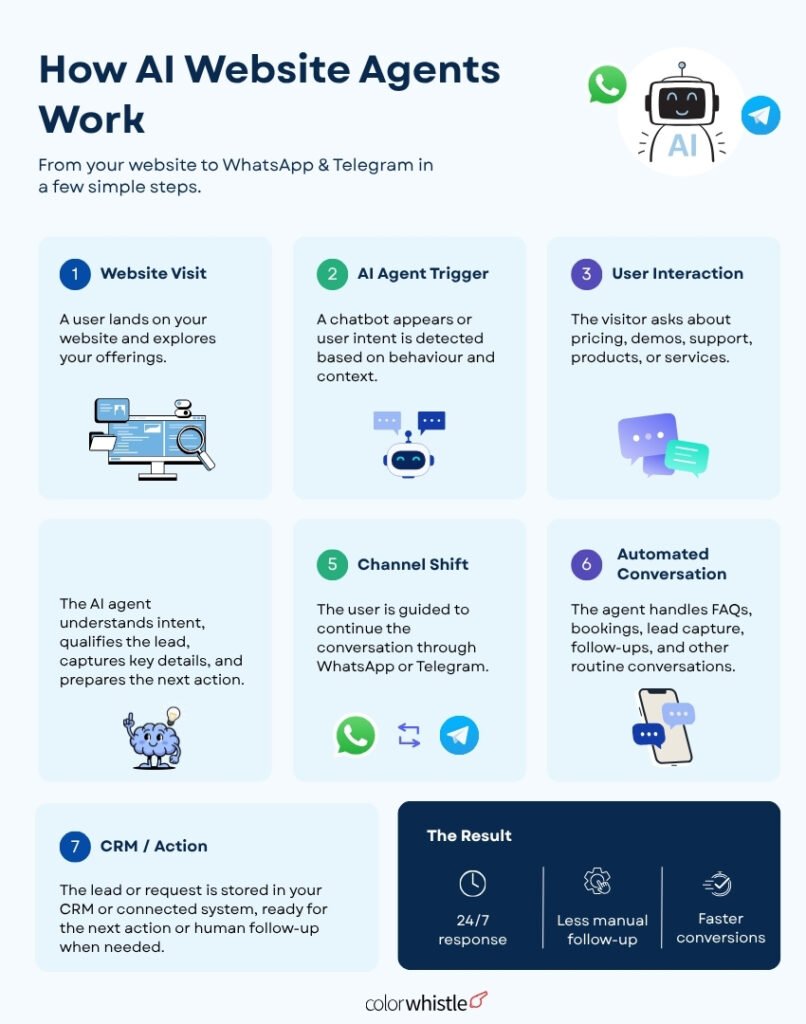
However, AI website agents fix this in a surprisingly practical way: you message the agent in WhatsApp or Telegram, in normal English, and it turns that into safe, trackable website changes. Not just content generation, but real workflows like drafts, previews, approvals, publishing, rollbacks, and syncing with your CMS and APIs.
These agents are designed to seamlessly integrate AI into website design and development, making the process significantly more efficient. This guide shows how to build and run those agents in the real world.
What an “AI website agent” actually is (in plain terms)
An AI website agent is a small system that combines:
- A chat interface (WhatsApp or Telegram)
- An LLM (to interpret instructions, plan steps, and generate content)
- Tools and integrations (CMS APIs, Git, image/CDN, analytics, database, search)
- A workflow engine (drafts, reviews, permissions, logging, retries)
- Safety rails (authentication, approvals, scoped access, audit trail)
Instead of logging into your CMS and clicking around, you send a message like:
Update the homepage headline to: ‘Shipping analytics that actually make sense’. Keep the subheading and CTA the same. Show me a preview.
The agent then:
- Fetches the current homepage content (via CMS API).
- Applies the change.
- Generates a preview URL.
- Asks for approval.
- Publishes only after you confirm.
That’s the core loop: intent → plan → execute → verify → approve → publish.
Additionally, these AI agents can also enhance website performance and assist in AI-assisted website design, making them an invaluable tool for modern web management.
Why WhatsApp and Telegram are the best “admin panels” you already have
You could build a custom dashboard, but WhatsApp and Telegram have advantages that are hard to beat:
- People already use them daily, including non-technical teammates.
- Messages are fast, asynchronous, and mobile-friendly.
- You can support “commands” plus natural language.
- You can attach screenshots, PDFs, and voice notes (Telegram especially).
- You get instant notifications for approvals and publishing.
In practice, this means marketing, support, and product can request and approve changes without entering the CMS, while engineering still keeps control through permissions and approvals. This is where the power of AI agents for apps comes into play.
The most useful workflows (that people actually use)
Content updates without CMS friction
Typical requests:
- “Change pricing from $49 to $59 on the pricing page.”
- “Replace the testimonial from Jane with the new one in this message.”
- “Add this FAQ question and answer under ‘Billing’.”
- “Update the footer copyright to 2026.”
The agent should:
- Locate the right page and component.
- Apply the smallest possible change.
- Preserve formatting and SEO structure. This is crucial as SEO plays a significant role in online visibility.
- Show a diff and preview before publishing.
“Draft, review, approve, publish” from chat
A good agent behaves like a careful editor, not a reckless autopublisher.
A clean approval flow looks like:
- User requests change
- Agent creates draft and returns preview
- Agent asks “Approve to publish?” with buttons or explicit confirmation
- Agent publishes and returns confirmation with timestamp and link
- Agent logs the change and who approved it
Custom E-commerce Website Development Case Study
An example of how these workflows can be beneficial is illustrated in our custom e-commerce website development case study. The integration of these communication tools streamlined content updates significantly.
Digital Agency Website Redesign Case Study
Similarly, in our digital agency website redesign case study, we were able to implement seamless content changes through WhatsApp and Telegram. This not only improved efficiency but also allowed for better control over SEO structure during the redesign process.
Agent workflows across multiple systems
This is where it gets powerful.
Example: “Launch this blog post”
- Generate outline and draft
- Pull product screenshots from a folder
- Create SEO title and meta description
- Add internal links to relevant docs
- Create a CMS entry as draft
- Notify editor for approval
- Publish on approval
- Post a summary to Telegram channel or schedule social snippets
Incident response and quick fixes
When something breaks, the fastest interface is chat.
Examples:
- “Rollback the homepage to the version before today’s change.”
- “Disable the broken banner across the site.”
- “Put a temporary notice on the status page.”
With proper permissions and audit log, this becomes a safe emergency lever.
How the system is structured (architecture that works)
A practical setup usually has these parts:
- WhatsApp Business API or Telegram Bot API receives the message.
- A webhook forwards it to your backend (agent service).
- The backend authenticates the user, loads permissions, and pulls relevant site context including pages, components, brand style, and recent changes.
- The backend calls an LLM API with the user request, the current page content or a reference, allowed tools and permissions, and safety rules and formatting constraints.
- The agent produces a plan, executes tool calls such as CMS API updates, Git commits, and preview generation, and returns a human-readable summary.
- The backend returns a preview link, a diff, and an approval request.
- On approval, the change is published through the CMS, the cache or CDN is invalidated if needed, and the event is logged.
If you are choosing a workflow engine, you can keep it simple at first:
- A database table for drafts and approvals
- A job queue for retries (publishing, cache invalidation)
- A structured audit log
WhatsApp vs Telegram: what to pick
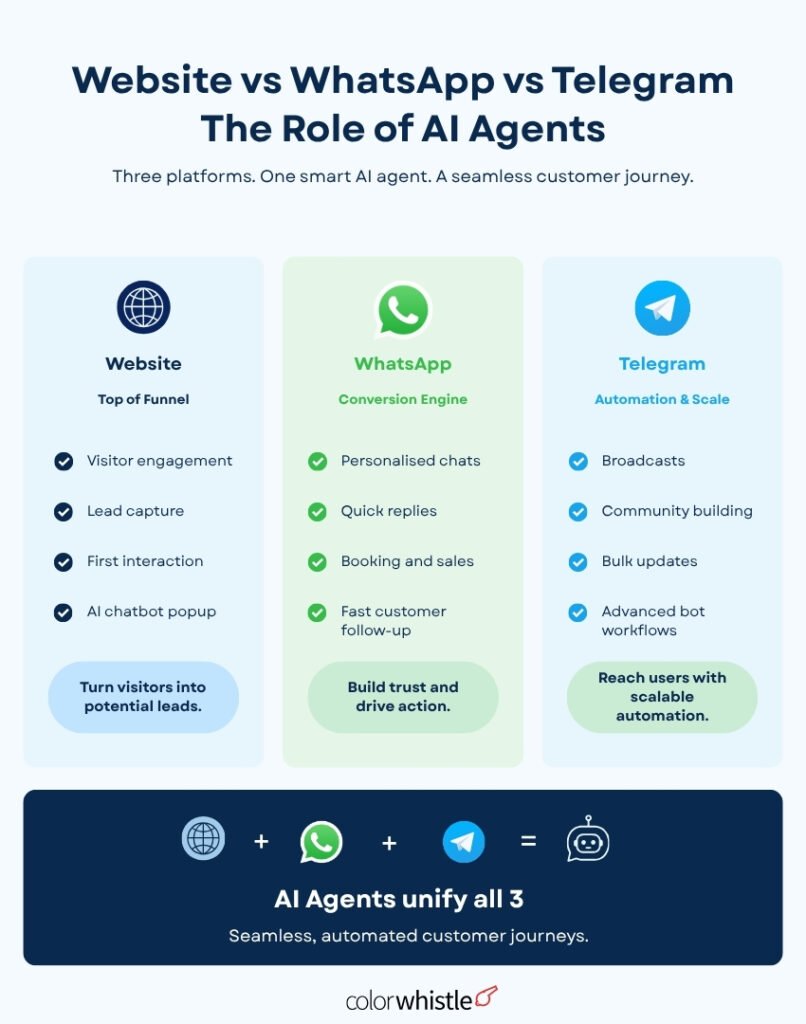
WhatsApp Business API (best for customer-facing ops teams)
Pros:
- Almost everyone has WhatsApp installed.
- Great for operations teams and “approve from phone” workflows.
Notes:
- You typically use the WhatsApp Business Platform via a provider or Meta’s Cloud API.
- WhatsApp has stricter rules around templates and business initiated messages.
- UI is more limited than Telegram (buttons exist but are constrained).
Telegram Bot API (best for internal tools and richer UX)
Pros:
- Fast setup.
- Great inline buttons, menus, threads, file handling.
- Easy to create private admin groups and restrict access.
Notes:
- Great for internal website ops: marketing + product + engineering in one group chat.
- You can implement “Approve” and “Reject” buttons cleanly.
A common real-world pattern:
- Use Telegram for internal website operations
- Use WhatsApp for client approvals if you manage sites for clients
Natural-language updates: what “good” looks like
Natural language is only useful if the agent asks the right follow ups and avoids ambiguity.
Example: Homepage hero update
User:
Change the homepage hero headline to ‘Turn warehouse chaos into clarity’ and keep it under 45 characters. Show me three options.
Agent should:
- Fetch existing hero module
- Generate 3 headline options under constraint
- Show them in chat
- Ask which one to apply
- Apply chosen option to draft
- Provide preview link and diff
- Ask for approval
In the context of managing websites, whether it’s a multi-vendor marketplace, an enterprise-level site, or a startup’s online presence, utilizing these messaging platforms can streamline operations significantly. For instance, with the help of natural language processing, an agent can assist in tasks such as website migration or developing a business website by providing real-time updates and facilitating quick approvals through WhatsApp.
Example: “Update the pricing page”
User:
“We’re increasing Pro from $49 to $59 monthly, yearly stays the same. Make sure the comparison table updates too.”
Agent should:
- Identify all occurrences: pricing cards, comparison table, FAQ mentions
- Propose a change list
- Run a quick search across CMS entries for “$49” and “Pro”
- Show a diff grouped by section
- Ask for approval
The win is not just writing. The win is finding and changing the right places without missing one.
CMS and API integration: the practical options
Your agent needs a reliable source of truth. Here are common setups.
Headless CMS (recommended)
Works well with: Contentful, Strapi, Sanity, Ghost, WordPress (REST), Webflow (API), Shopify (Storefront/Admin), Directus.
What you want from the CMS API:
- Read page/component content
- Create drafts
- Update entries
- Publish entries
- Fetch version history if possible
If your CMS supports environments (staging/production), use them:
- Draft changes go to staging first
- Production publish requires explicit approval
Git-based content (MDX, static site, docs)
If your website is in Git:
- Agent creates a branch
- Commits changes
- Opens a PR
- Posts preview link from Vercel/Netlify
- Approvals can map to PR approvals
- Merge triggers deployment
This is often the safest path for engineering-led websites.
However, when it comes to making substantial changes like a website redesign or updating specific elements such as pricing pages or comparison tables, it’s crucial to follow a systematic approach. For instance, if you’re considering a website redesign, it could be beneficial to subcontract website services for efficiency.
Moreover, if your business model involves e-commerce, you might want to explore options for ecommerce website development. On the other hand, if you’re a startup looking for online presence, startup website design services could be what you need.
In case you’re unsure about how to navigate these changes effectively, looking at successful case studies like our ColorWhistle website redesign case study could provide valuable insights.
Direct API updates (for dynamic content)
If parts of your site pull from a database or service:
- The agent updates content via internal APIs
- It may also update search indexes or caches
- You need strict permissions here
Authentication: don’t skip this
If you let “a WhatsApp number” publish to your site without strong auth, you are building an attacker’s dream.
A practical authentication model
Use a layered approach covering identity, second factors, access roles, and scoped tokens.
Identity binding
- Link each WhatsApp number or Telegram user ID to an internal user record.
- Only allow messages from known, registered IDs.
Second factor for sensitive actions
For publishing, require at least one of the following:
- A one-time code sent to email
- A signed link to your admin domain
- Telegram login widget or OAuth
- A passkey-based approval page
Role-based access control (RBAC)
Assign users one of the following roles: Requester, Editor, Publisher, or Admin. Apply these permissions:
- Requester can create drafts
- Editor can approve content but not publish sitewide layout changes
- Publisher can publish after approval
Scoped tokens for tools
CMS tokens should be restricted as narrowly as possible:
- Limit tokens to certain spaces or projects only
- Limit tokens to certain content types only
- Use separate tokens for read and publish actions where possible
Bonus: approvals as a security boundary
Even if the agent can generate drafts, it’s crucial to require human approval before publishing, especially for:
- Homepage
- Pricing
- Checkout flows
- Legal pages
- Navigation or templates
These areas hold significant importance and any changes made should be carefully reviewed. In fact, website redesign processes often involve similar considerations.
Approvals: make them unavoidable, fast, and clear
Approvals fail when people don’t trust what changed.
Give approvers three things every time:
- What changed (short summary)
- Where it changed (page/component)
- Proof (preview link + diff)
Approval message template (works well)
- Change summary: “Updated Pro plan monthly price $49 → $59”
- Pages/components affected: “Pricing page cards, comparison table”
- Preview: URL
- Diff: bullet list of fields changed
- Buttons: Approve | Request edits | Reject
Telegram supports inline buttons beautifully. In WhatsApp, you can use interactive messages depending on your setup, or require “APPROVE draft_123”.
Publishing: staging first, then production
A safe publishing pipeline:
- Draft update in CMS (status: draft)
- Preview build generated (staging URL)
- Approval captured (who, when, what)
- Publish action executed
- CDN cache invalidation (if needed)
- Post-publish verification
- Log and notify
Post-publish verification includes:
- Fetch the live URL
- Confirm the new text exists
- Optional: screenshot diff
That last step is underrated. If the agent can confirm the live page matches the draft, trust goes up fast.
LLM integration: how to keep outputs reliable
LLMs are great at:
- Understanding intent
- Writing content in brand tone
- Producing structured updates
LLMs are risky at:
- Hallucinating facts
- Making overly broad edits
- “Fixing” things you did not ask to fix
Use constraints, not vibes
Your system prompt and tool layer should enforce:
- “Change only requested fields”
- “Do not alter URLs unless explicitly instructed”
- “Preserve existing HTML structure”
- “Do not publish without explicit approval token”
- “If unsure, ask a follow-up question”
Use structured tool calls
Instead of letting the model output raw CMS payloads, have it produce a structured plan like:
- Identify target page ID
- Identify component key
- Propose updated field values
- Validate constraints (length, forbidden words, formatting)
- Submit update via tool call
This reduces surprises and makes it auditable.
Commands that make the agent predictable (and easier to trust)
Natural language is great, but commands are what make teams rely on it daily.
Here are command patterns that work well:
Content commands
/update page pricing“Change Pro monthly to 59”/edit /home hero.headline“New headline here”/add faq“Question: … Answer: …”/replace“Replace ‘Start free trial’ with ‘Book a demo’ on /enterprise”
Workflow commands
/draft“Create a draft for the changes we discussed”/preview draft_123/approve draft_123/reject draft_123“Reason: pricing table row missing”/publish draft_123
Admin and safety
/whoami/permissions/history /pricing/rollback /home to 2026-09-01 14:22/lock /pricing(freeze page during campaign)
Telegram supports slash commands natively. In WhatsApp, you can still parse them as text patterns.
Real use cases you can deploy this week
Use case 1: Marketing can ship landing pages faster
Workflow:
- “Create a landing page for Webinar: Inventory Forecasting”
- Agent generates: page sections, copy variants, SEO meta
- Agent creates CMS entry as draft and returns preview
- Marketing approves in Telegram
- Agent publishes and posts final URL
This cuts the “CMS ping-pong” cycle dramatically. Such efficiency is crucial especially during large website migrations, where timely updates are essential.
Use case 2: Support can update help docs safely
Workflow:
- Support messages: “Add an FAQ about resetting 2FA”
- Agent drafts doc update, asks for screenshot or steps
- Editor approves
- Agent publishes and pings support with updated link
You keep docs current without asking engineers to do every edit.
Use case 3: Product updates changelog and in-app banners
Workflow:
- “Add a changelog entry for v2.8 with these bullets”
- Agent updates changelog page, and also updates the in-app banner JSON via API
- Approval required for in-app messaging
- Publish + confirm
One request, multiple systems, one audit trail.
What to log (so this doesn’t become chaos)
At minimum, log:
- User identity (WhatsApp number / Telegram ID mapped to internal user)
- Requested instruction (raw)
- Interpreted intent (structured)
- Draft ID and content diff
- Approval record (who approved, when)
- Publish record (who triggered, when, environment)
- Tool actions (CMS entry IDs, API endpoints called)
- Rollback points
If something goes wrong, you want to answer: what changed, who changed it, and how to undo it in under a minute.
A simple implementation blueprint (that scales)
You can build an MVP without over-engineering:
Backend
Build a Node.js or Python service with the following components:
- Webhook endpoints for WhatsApp and Telegram
- User directory mapping
- Draft database (Postgres)
- Job queue (BullMQ or Celery)
- CMS client and preview generator
- LLM client (OpenAI, Anthropic, or similar)
Core tables
users(chat_id, role, org_id)drafts(draft_id, target, diff, preview_url, status)approvals(draft_id, approver_id, decision, timestamp)audit_log(event_type, payload, timestamp)
Environments
stagingfor previewsproductionfor publish
Safety defaults
- No direct publish without approval
- Page-level permissions
- Rate limits per user
- Blocklists for sensitive pages
Once the MVP works, you can add:
- Screenshot-based verification
- SEO checks like those listed in this comprehensive website checklist (title length, missing H1, broken links)
- Brand voice rules
- Multi-approver policies for critical pages
The biggest mistakes to avoid
- Letting the agent “edit freely” without scoped tools
- Give it specific tools, not full access.
- Skipping previews
- If there is no preview, approvals become blind trust.
- No rollbacks
- Every publish should create a rollback point.
- Treating WhatsApp/Telegram identity as secure by default
- Bind identities, add a second factor for publishing, and use RBAC.
- No structured diffs
- If approvers can’t see what changed, they will stop approving.
Wrap up: the practical promise of chat-driven website ops
The concept of “AI Website Agents with WhatsApp & Telegram” is not about replacing your CMS. It’s about giving your team a faster, safer way to operate it.
If you build it with drafts, previews, approvals, authentication, and solid CMS/API integrations, you get a workflow that feels almost unfair:
- Request changes in normal language
- See a preview in minutes
- Approve from your phone
- Publish with an audit trail
- Roll back instantly if needed
This approach is part of the broader trend of AI revolutionizing website development. Start with one narrow workflow, like pricing page updates or blog publishing, then expand to multi-step agent workflows once the trust is there.
That is where these agents stop being a novelty and become part of how your website actually ships. As you scale up operations, it might be beneficial to explore a comprehensive website planning guide or even consider a website redesign checklist for optimizing your site.
It’s also important to remember that if you’re running an enterprise-level site, you’ll need some enterprise website performance optimization tips to ensure smooth operation. If your business model involves multiple vendors, referring to this multi-vendor website guide could provide valuable insights.
FAQs (Frequently Asked Questions)
What is an AI website agent and how does it simplify website updates?
An AI website agent is a small system combining a chat interface (like WhatsApp or Telegram), a large language model (LLM), various tools and integrations (CMS APIs, Git, image/CDN, analytics), a workflow engine (for drafts, approvals, logging), and safety rails (authentication, scoped access). It allows users to send natural language instructions via chat to safely and efficiently update website content, manage workflows like previews and approvals, and publish changes without directly accessing the CMS.
Why are WhatsApp and Telegram considered ideal platforms for AI website agents?
WhatsApp and Telegram serve as excellent “admin panels” because they are widely used daily by both technical and non-technical team members. They support fast, asynchronous messaging that’s mobile-friendly, allow natural language commands, support multimedia attachments like screenshots and voice notes, and provide instant notifications for approvals and publishing. This makes collaboration on website changes seamless across marketing, support, product, and engineering teams.
What common workflows do AI website agents support to improve web management?
AI website agents facilitate key workflows such as content updates without CMS friction (e.g., pricing changes, FAQ additions), draft-review-approve-publish cycles managed entirely through chat with preview links and approval prompts, multi-system coordination for tasks like launching blog posts with SEO optimization and social media scheduling, as well as incident response actions like quick rollbacks or disabling faulty site elements—all enhancing efficiency and control.
How do AI website agents ensure safety and control during website updates?
Safety is maintained through authentication measures, scoped access permissions limiting what each user or role can change, approval workflows requiring explicit confirmation before publishing changes, audit trails logging who made or approved modifications, and retry mechanisms to handle errors. This ensures that updates are deliberate, trackable, reversible if needed, and secure against unauthorized changes.
Can AI website agents help enhance SEO while managing website content?
Yes. AI agents preserve formatting and SEO structure when applying updates to pages or components. They can generate SEO-friendly titles and meta descriptions automatically during content creation workflows such as blog post launches. This careful handling of SEO elements helps maintain or improve online visibility while streamlining content management processes.
Are there real-world examples demonstrating the effectiveness of AI website agents?
Absolutely. Case studies like the custom e-commerce website development show how integrating WhatsApp and Telegram streamlined content updates significantly. Similarly, a digital agency website redesign benefited from seamless content changes managed via chat interfaces while maintaining strong SEO control throughout the process—highlighting practical benefits in diverse web projects.
 AI Website Automation with APIs, MCPs & L...