


AEO & SEO Basic Website Setup Guide

Anusha is a digital strategy expert with deep expertise in branding, UI/UX, and performance-focused content. She brings advanced insight into brands to scale intelligently, blending creativity with conversion-focused thinking.

Our authors are proven experts in their fields, writing on topics where they have demonstrated expertise. Every piece of content undergoes peer review and validation by industry professionals.
AI Summary
Key Highlights of AEO SEO Basic Website Setup Guide
This post explores essential SEO and AEO website setup basics to ensure sites are discoverable and answer-ready in modern search environments. The key insight: proper foundational setup during the first week prevents common indexing errors that block visibility. It covers canonical domains, crawlability, clean URLs, sitemap creation, robots.txt, Google Search Console, Google Analytics, Bing Webmaster Tools, and schema.org markup. Aimed at website builders and startups, the guide promises improved search ranking and AI answer readiness by following a practical, platform-agnostic checklist. Readers learn to avoid blocking Google, enable indexing, and provide structured data for rich results and AI systems.
If you are building a website and you want it to actually show up in search, not just sit there looking pretty, the first week matters a lot.
Not even for fancy tactics. Just basics. The stuff that stops you from accidentally blocking Google, or forgetting a sitemap, or publishing 30 pages with no indexability and then wondering why nothing ranks.
Also, search is changing. It is not only ten blue links anymore. People ask questions in Google, in Bing, in ChatGPT style experiences, in Perplexity, inside browsers, inside voice assistants. So we are going to cover SEO fundamentals and AEO basics together.
AEO is basically about being the best answer. SEO is about being discoverable and trustworthy. You need both now.
This guide is a practical setup checklist that can be applied across various platforms such as WordPress, Webflow, Shopify, or any headless CMS. The concepts are the same.
What “good setup” actually means
Before tools and files, this is the target:
- Your pages can be crawled.
- Your pageBefore tools and files, this is the target:
- s can be indexed.
- Search engines can understand what each page is about.
- You are measuring what is happening.
- You are not sending mixed signals with duplicates, weird canonicals, thin pages, broken internal links.
- You have enough structured context that AI search systems can pull clean answers and cite you.
If you do nothing else, do those.
To achieve this “good setup”, it’s crucial to follow a comprehensive website planning guide, which includes essential aspects such as ensuring your site is ready for a potential future website redesign. During this process, utilizing a detailed website redesign checklist can help streamline the workflow.
Moreover, if you’re a startup looking for professional assistance in creating an effective online presence, exploring our startup website design services could provide valuable insights and support.
Step 1: Pick one canonical domain and stick to it
This sounds boring, but it is a classic early mistake.
Decide your primary domain version:
- https://example.com vs https://www.example.com
- Also decide trailing slash style if your CMS gives options.
- Make sure HTTP redirects to HTTPS.
What you want:
- One version is accessible.
- All other versions 301 redirect to it.
- Internal links always use the canonical version.
- Your sitemap uses the canonical version.
- Search Console properties match what you use.
If you are on WordPress, most of this is controlled in Settings → General, plus your hosting or CDN redirect rules.
Step 2: Confirm your site is crawlable and indexable (yes, right now)
This is the part where people quietly sabotage themselves.
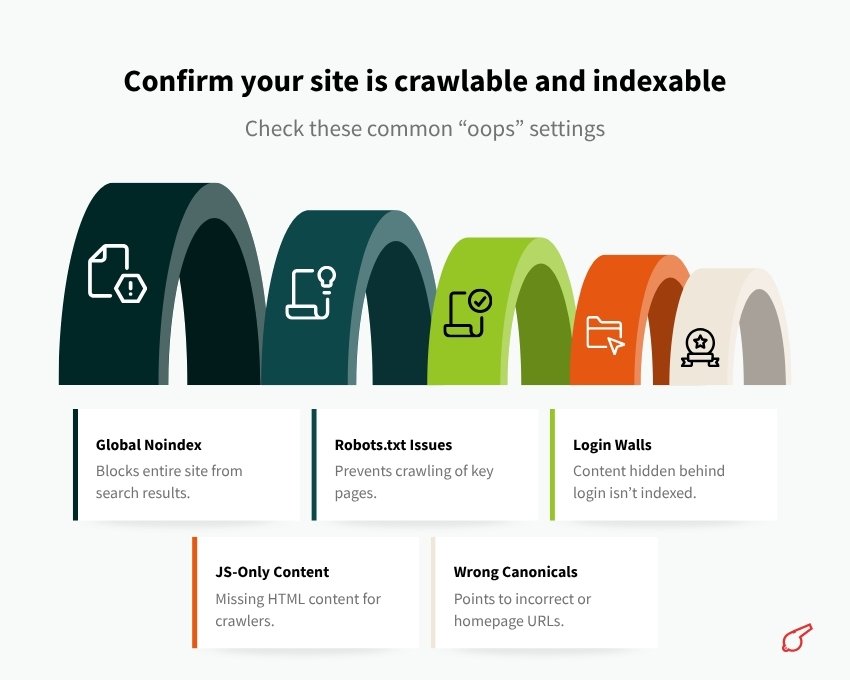
Check these common “oops” settings
- Check these common “oops” settings
- A global noindex tag on the whole site (common on staging sites).
- robots.txt blocking / or blocking important directories.
- Login walls on public pages.
- JS heavy rendering with content that does not exist in HTML for crawlers.
- Canonical tags pointing to the wrong domain or to the homepage.
Quick manual checks
Pick 2 to 3 important pages (homepage, main service page, one blog post) and view source.
You want to see:
- A tag that matches the page
- A meta robots tag that is not noindex
- A canonical link tag that matches the page URL
- Actual text content in the HTML, not only in loaded scripts
If you want a fast indexability signal, use Google Search Console’s URL Inspection tool later in this guide. That is where the truth shows up.
Step 3: Build a clean URL structure that does not fight you later
You do not need a perfect architecture, but you do need a sensible one.
General rules that work almost everywhere:
- Keep URLs readable. Words, not random IDs.
- Avoid changing slugs later. Redirects help, but it is still messy. Consider these factors before a website redesign.
- Use lowercase.
- Use hyphens, not underscores.
- Keep folders consistent.
Examples:
/services/seo-audit/
/blog/aeo-vs-seo/
/locations/austin/
If you are using a CMS, read the CMS documentation for permalink controls. WordPress permalinks matter a lot. Shopify has some locked structures. Webflow is usually clean.
Step 4: Create and submit an XML sitemap
A sitemap is not a ranking hack. It is a discovery and coverage tool. It tells search engines, “Here are the URLs I consider important and canonical.”
What a good sitemap includes
- Only canonical URLs
- Only indexable URLs
- 200 status code pages
- No parameter spam
- Updated
lastmodvalues if your system supports it correctly
Where the sitemap should live
Usually:
https://example.com/sitemap.xml- Or a sitemap index:
https://example.com/sitemap_index.xml
WordPress SEO plugins generate these. Some CMSs generate automatically. Otherwise your dev can generate it during build.
Submit it in the right places
- Google Search Console: Indexing → Sitemaps
- Bing Webmaster Tools: Sitemaps
And yes, submit to Bing. Bing data also flows into some AI experiences and Microsoft surfaces, so it is worth the 2 minutes.
Incorporating SEO into your website strategy can significantly enhance its visibility and lead generation potential. If you’re considering outsourcing this aspect of your business, it’s crucial to understand the benefits of subcontracting website services and to be well-informed when hiring an SEO company. Furthermore, implementing effective B2B SEO strategies can also be beneficial for your online presence.
Step 5: Set up robots.txt (simple and safe)
Robots.txt controls crawling, not indexing in the strict sense. But it is still important.
A safe baseline robots.txt looks like this:
txt User-agent: * Disallow:
Sitemap: https://example.com/sitemap.xml
That means: do not block anything, and here is my sitemap.
Things to avoid unless you know what you are doing
- Blocking
/wp-content/or/assets/when your site needs those for rendering. - Blocking your blog folder
- Blocking your blog folder accidentally.
- Trying to “hide” pages by disallowing them. If the URL is linked externally, it might still get indexed as a URL only listing. If you truly want something out of the index, use
noindex(and allow crawling so bots can see the tag).
Again, check your CMS documentation. Some platforms inject robots rules automatically.
Step 6: Install Google Search Console (GSC) properly
Google Search Console is not optional. It is where you learn:
- Whether Google can crawl your pages
- What is indexed, what is not
- Which queries you show for
- Whether you have mobile, speed, or structured data issues
How to set it up
- Go to Google Search Console.
- Add a property.
You will see two options:
- Domain property (recommended): covers all subdomains and protocols.
- URL prefix property: only that exact prefix.
If you can, use a Domain property. Verification is done via DNS TXT record. Your host will have instructions.
Immediately after verification, do this
- Submit your sitemap.
- Inspect your homepage URL in URL Inspection.
- Click “Test Live URL.”
- If it passes, request indexing. You do not need to do this for every page forever, but for a new site it helps confirm signals.
A note about indexing reality
Indexing is not instant. Even if Google can crawl, it decides what to index. Your job is to remove technical blockers and publish pages worth indexing.
Step 7: Set up Google Analytics (GA4) without making a mess
Analytics is for decisions. If you set it up wrong, you get pretty charts and bad decisions.
Basic GA4 setup
Create a GA4 property, then install the tag using one of the following methods: Google Tag Manager (the cleanest long-term option), a CMS integration, or manually in the header.
Minimum checks
- Verify that real-time traffic is being recorded.
- Confirm internal traffic filtering if you have a team that tests the site constantly.
- sent mode and cookie compliance are handled if required in your region. This can get legal fast, so do not wing it if you operate in regulated markets.
GA4 does not replace Search Console. You need both.
If you’re considering expanding your online presence into areas like education, you might want to create a virtual classroom website online, leveraging the insights from your analytics effectively.
Step 8: Set up Bing Webmaster Tools too
Bing is not dead. Bing Webmaster Tools offers useful diagnostics and feeds into Microsoft ecosystems.
Setup steps
- Go to Bing Webmaster Tools.
- Add your site.
- Import from Google Search Console if you want the fast route.
- Submit your sitemap.
Do it once, forget about it until you need it. But do it.
Step 9: Add schema.org structured data (the “make it obvious” layer)
Schema is where you help machines understand your page and your business. It does not magically rank you. But it helps with:
- Rich results when eligible
- Knowledge style understanding of entities
- AEO readiness because AI systems love clear structured context
- Reducing ambiguity (Is this a product page? A service? An article? Who wrote it?)
The baseline schema most sites should have
- Organization (or LocalBusiness if relevant)
- Website
- WebPage
- Article or BlogPosting for blog content
- BreadcrumbList
- FAQPage only if you truly show FAQs on the page
Practical advice
- Use JSON-LD format.
- Match schema to visible content. Do not add fake FAQs.
- Use consistent naming, logo, URL, social profiles.
Here is a simple Organization example you can adapt:
If you are on WordPress, some SEO plugins output basic schema. That is fine, but review it. Plugins sometimes generate generic schema that does not match your brand details.
Validate with:
- Google Rich Results Test
- Schema Markup Validator
When designing your website, consider incorporating specific elements that cater to your target audience. For instance, if you’re in the finance sector, exploring Australian finance website design ideas could provide valuable insights.
Alternatively, if you’re running a membership site, whether it’s an e-learning membership website or a yoga website, there are numerous membership website ideas and inspirations available to help guide your design process.
Moreover, for those managing small businesses, considering these small business website design ideas could be beneficial in creating a more effective online presence.
Step 10: On page SEO basics that still matter (a lot)
This is the stuff you do on every important page.
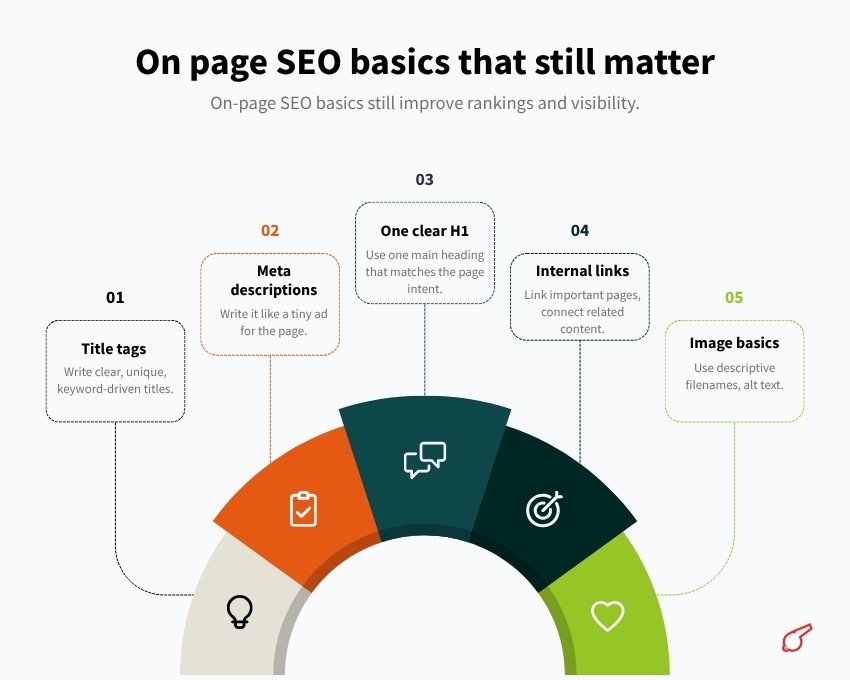
Title tags that are not lazy
- Unique per page
- Describes the page clearly
- Includes the main topic naturally
- Not stuffed, not clickbait
Good example:
- “Technical SEO Audit Services for SaaS Websites”
Not great:
- “Home”
- “Best SEO Services Cheap Fast #1”
Meta descriptions (not a ranking factor, but a click factor)
Write it like a tiny ad for the page. If Google rewrites it, fine. Still worth doing.
One clear H1
Use one main heading that matches the page intent. Then use H2 and H3 for structure.
AEO note: headings often become extraction points for AI answers. Make them clean and descriptive, not poetic.
Internal links that make sense
- Link from your homepage and nav to your key pages.
- Link between related articles.
- Use descriptive anchor text, but do not over optimize.
For instance, incorporating local SEO services into your strategy can significantly enhance your online visibility.
Image basics
- Descriptive file names when possible
- Alt text that actually describes the image
- Compress images
- Avoid huge dimensions
Step 11: Technical setup essentials
This is where rankings quietly die if you ignore it.
HTTPS and security
- HTTPS everywhere.
- No mixed content warnings.
- HSTS is nice if configured correctly.
Additionally, it’s crucial to follow [website migration best practices](https://colorwhistle.com/website-migration-best-practices/) to maintain your site’s SEO health during any transitions.
Mobile friendliness
Google is mobile first. Your site has to work on a phone. Not “technically loads.” Actually usable.
Core Web Vitals (do not obsess, but do not ignore)
Aim for:
- Fast loading hero content
- Minimal layout shift
- Reasonable JS
Use:
- PageSpeed Insights
- Lighthouse
- GSC Core Web Vitals report
Canonicals
Every indexable page should have a self referencing canonical unless you intentionally canonicalize to a different page.
Watch out for:
- Faceted navigation and filters creating duplicates
- URL parameters
- Print views
- Tracking parameters
Redirects
- 301 for permanent redirects
- Fix redirect chains
- Keep redirect maps if you migrate later
404 handling
- Real 404 status code for missing pages
- Helpful 404 page for users
- Monitor in Search Console
Step 12: Indexing control, the right way
There are only a few situations where you should intentionally stop indexing.
Common pages to keep out of the index:
- Admin, login, cart, internal search results
- Thank you pages (sometimes)
- Duplicate tag pages if your CMS creates a million of them
- Thin pages with no standalone value
How to do it:
- Use
noindex, followmeta robots for pages you want crawled but not indexed. - Do not block them with robots.txt if you want Google to see the
noindex.
Also, do not noindex your entire site during development and forget to remove it. This happens constantly. Check before launch.
Step 13: AEO Basics – How to Make Your Content “Answer Shaped”
AEO is not a plugin. It is mostly about content formatting and clarity.
If someone asks:
- “How do I submit a sitemap to Google?”
- “What is robots.txt used for?”
- “What is the difference between AEO and SEO?”
Your page should answer that quickly and cleanly.
Simple AEO Formatting Patterns That Work
- Put the direct answer in the first 2 to 3 sentences.
- Use short sections with clear headings.
- Use bullet lists when steps matter.
- Add a mini FAQ section at the bottom for common follow-ups.
- Define terms in plain English, not jargon.
Also, cite or reference official documentation when relevant. AI systems and human readers both trust that more.
Good sources to link (when you publish this on your site):
- Google Search Console documentation
- Google Analytics documentation
- Bing Webmaster Tools documentation
- Schema.org documentation
- Your CMS documentation (WordPress, Shopify, Webflow, etc.)
If you have original screenshots, even better. Real evidence tends to get reused and cited.
Step 14: AI Search Readiness (What People Forget)
AI search experiences tend to reward pages that are:
- Clearly authored and maintained
- Not anonymous content farms
- Specific, structured, not vague
- Supported by about pages, policies, contact info, real entity signals
So do this basic trust setup:
- Add an About page that says who you are.
- Add Contact details that match your business identity.
- Add author bios for blog posts if you do content marketing.
- Add editorial dates (published and updated) when you revise content.
- Make sure your business name, address, phone are consistent if you are local.
This is not magic E-E-A-T checkbox stuff. It is just common sense. If an AI system is going to cite you as an answer, it helps to look like a real, accountable website.
For those looking to understand more about the differences between AEO and SEO, or seeking guidance on small business online SEO strategies, these resources can provide valuable insights. If you’re in the process of developing a website for your startup or considering DIY AI website agents versus hiring agencies, it’s crucial to keep these AEO principles in mind. Additionally, if you’re exploring options for building an e-commerce website, understanding AEO can significantly enhance your site’s performance.
Step 15: A simple launch checklist (copy this)
Before you call the site “live”:
- One canonical domain set, all variants redirect correctly
- HTTPS enforced
- No global noindex
robots.txt accessible and not blocking important pages - Sitemap generated and accessible
- Sitemap submitted in Google Search Console
- Google Search Console verified (Domain property if possible)
- Bing Webmaster Tools set up and sitemap submitted
- GA4 installed and tested
- Basic schema.org markup present (Organization, Website, WebPage, plus Article on posts)
- Titles and H1s unique on key pages
- Internal links exist between main pages
- Mobile layout checked on actual devices
- PageSpeed Insights run on homepage and one key page
- A few pages written to answer specific questions clearly
Let’s wrap this up
AEO and SEO setup is not exciting. It is more like brushing your teeth. You only notice it when you do not do it.
If you get the technical foundations right, indexing and crawling become boring, which is exactly what you want. Then you can spend your time on content that deserves to rank and deserves to be cited as the answer.
If you want the simplest next move after this guide, do this:
- Verify Google Search Console.
- Submit your sitemap.
- Fix whatever GSC immediately complains about.
- Publish one genuinely helpful page that answers a real question in your niche, clean headings, direct answer first.
- Add schema that matches the page.
That is a real start. Not a perfect start. But a real one.
FAQs (Frequently Asked Questions)
Why is the first week crucial when building a website for search visibility?
The first week is critical because it involves implementing basic SEO fundamentals that prevent common mistakes such as accidentally blocking Google, forgetting to submit a sitemap, or publishing non-indexable pages. Establishing these basics ensures your website can be crawled, indexed, and understood by search engines, setting a strong foundation for ranking.
What does a ‘good setup’ for SEO and AEO mean for my website?
A good setup means your pages are crawlable and indexable, search engines understand what each page is about, you are effectively measuring site performance, avoiding mixed signals like duplicate content or broken links, and providing enough structured context so AI-driven search systems can extract clean answers and cite your site. Achieving this requires careful planning and adherence to SEO fundamentals.
How do I choose and maintain the correct canonical domain for my website?
Pick one primary domain version (e.g., https://example.com or https://www.example.com) and stick to it consistently. Ensure HTTP redirects to HTTPS, all other domain versions 301 redirect to the canonical one, internal links use the canonical domain, your sitemap reflects this version, and Search Console properties align accordingly. This prevents duplicate content issues and consolidates SEO value.
What common settings can unintentionally block my site from being crawled or indexed?
Common pitfalls include having a global noindex tag (often on staging sites), robots.txt files blocking important directories or the entire site, login walls on public pages, heavy reliance on JavaScript without server-side rendering (making content invisible to crawlers), and incorrect canonical tags pointing to wrong URLs. Regular manual checks and using tools like Google Search Console’s URL Inspection help identify these issues.
What are best practices for creating a clean URL structure?
Use readable URLs with meaningful words instead of random IDs; keep slugs consistent and avoid changing them later; use lowercase letters; prefer hyphens over underscores; maintain consistent folder structures (e.g., /services/seo-audit/, /blog/aeo-vs-seo/). Consult your CMS documentation for permalink settings to ensure URLs remain user-friendly and SEO-optimized.
Why is creating and submitting an XML sitemap important, and how should it be managed?
An XML sitemap helps search engines discover and understand which URLs you consider important and canonical. It should include only canonical, indexable URLs returning 200 status codes without parameter spam. The sitemap typically resides at https://example.com/sitemap.xml or sitemap_index.xml. Submit it in Google Search Console under Indexing → Sitemaps and also in Bing Webmaster Tools since Bing data influences some AI search experiences.
 AEO Setup for AI Search Visibility