React in WordPress Gutenberg Development – Explore & Leverage its Capabilities

Powered by an expert content team, this blog blends SEO precision with compelling storytelling. Every insight is supported by data-driven research, ensuring content that ranks, engages, and drives conversions.

Our authors are proven experts in their fields, writing on topics where they have demonstrated expertise. Every piece of content undergoes peer review and validation by industry professionals.
AI Summary
React in WordPress Gutenberg Development - Explore & Leverage its Capabilities
This post explores how React powers WordPress Gutenberg, enabling developers to build dynamic, reusable custom blocks and interactive editing tools. The key insight: React’s component-based architecture and state management enhance performance and developer productivity in block creation. It covers setup, development, styling, and deployment of Gutenberg blocks using React, emphasizing benefits like improved user experience and integration with WordPress APIs. Advanced features such as API integration, animations, and block transformations are detailed, alongside best practices for optimization, accessibility, testing, and documentation. This guide serves developers aiming to create modern, scalable WordPress editing experiences.
As WordPress continues to evolve into a powerful website and application platform, Gutenberg and React have become core technologies shaping the future of content editing and custom block development. With the rise of block-based design, Full Site Editing (FSE), and headless WordPress architectures, developers now have more flexibility than ever to build fast, dynamic, and scalable WordPress experiences.
At the heart of Gutenberg lies React, a popular JavaScript library that powers interactive user interfaces and enables developers to create highly customizable, reusable, and performance-optimized content blocks. By leveraging React in WordPress Gutenberg development, businesses and developers can build advanced custom blocks, interactive editing tools, and seamless content workflows that go beyond traditional themes and page builders.
In this guide, we explore how React enhances Gutenberg development, its practical use cases, technical advantages, and how developers can leverage this combination to build modern, future-ready WordPress websites and editing experiences.
The Power of React in WordPress Gutenberg Development
React, known for its component-based architecture, declarative syntax, and virtual DOM, provides an excellent foundation for developing complex user interfaces. By leveraging React in WordPress Gutenberg development, developers can take advantage of the following key capabilities:
Component Reusability: React encourages the creation of modular and reusable components, allowing developers to write cleaner, more maintainable code. This approach fits seamlessly with Gutenberg’s block-based architecture, enabling developers to build custom blocks by composing smaller, reusable UI components that can be shared across multiple blocks and projects.
State Management: React introduces a flexible state management system that helps developers manage dynamic and interactive data within components. In Gutenberg, this is essential for handling block settings, user inputs, real-time previews, and configuration controls. React’s state handling simplifies updating block content in real time, ensuring a smooth and responsive editing experience.
Virtual DOM: React’s Virtual DOM optimizes performance by minimizing direct updates to the actual browser DOM. This is especially important in Gutenberg, where blocks can be frequently added, edited, rearranged, or removed. By updating only what is necessary, React improves rendering speed, editor responsiveness, and overall performance, resulting in a faster and more fluid content creation workflow.
Did you know?
Gutenberg, the block-based editor, was introduced with the release of WordPress 5.0 in November 2018. It offers a modern and intuitive editing experience for WordPress users.
With its user-friendly block-based approach, Gutenberg has become the default editor for WordPress installations. This means that when users set up a new WordPress website or update their existing installations, they automatically will have access to Gutenberg as their primary content editing tool.
WordPress React Blocks – Creating Custom Blocks with React in Gutenberg
One of WordPress Gutenberg’s greatest strengths is its extensibility through custom blocks, allowing developers to build tailored content elements for specific use cases. By combining React with Gutenberg, developers can create dynamic, reusable, and highly interactive blocks that enhance both the editor and frontend experience.
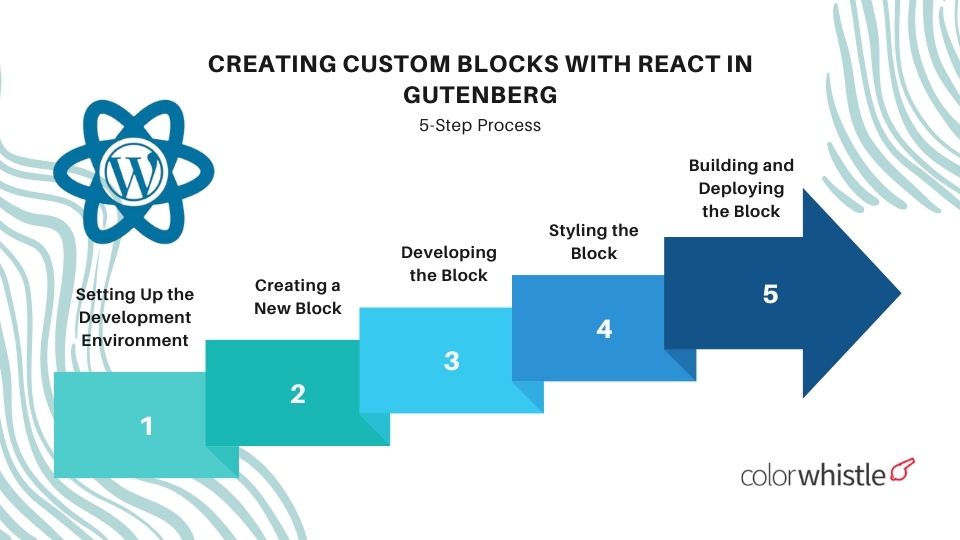
Below is a step-by-step overview of how to create custom Gutenberg blocks using React:
Setting Up the Development Environment: Start by setting up a local WordPress development environment and installing the required dependencies, including the official WordPress Block Editor (Gutenberg) development tools and Node.js packages needed for modern block development.
Creating a New Block: Use the @wordpress/create-block package to scaffold a new block. This CLI tool automatically generates the required folder structure, configuration files, and starter code — helping developers quickly bootstrap a new Gutenberg block project.
Developing the Block with React: Open the generated block directory and begin building the block using React components and JSX. Take advantage of React hooks, state management, and WordPress block APIs to define block behavior, manage user input, handle dynamic content, and ensure smooth interactivity inside the editor.
Styling the Block: Apply styling to block components using modern CSS techniques such as CSS Modules, SCSS, or CSS-in-JS solutions. Gutenberg also provides built-in design tokens, utility classes, and editor styles to ensure blocks maintain visual consistency across both the editor and frontend.
Building and Deploying the Block: Once development is complete, use the provided build and bundling tools to compile optimized JavaScript and CSS assets. This process ensures the block is performance-optimized, production-ready, and easily deployable across WordPress websites.
Benefits of using React js with WordPress
- Component-based architecture
- Enhanced and responsive user experience
- Seamless integration with WordPress REST and Gutenberg APIs
- Improved developer productivity and faster development cycles
- Reusable components and rich React ecosystem
- Single-Page Application (SPA) capabilities
- Better performance optimization and scalability
- Improved SEO with SSR and modern rendering techniques
Also Read
Advanced Interactions and Enhancements with React in Gutenberg
React has the capabilities to extend beyond the basics of block creation. Here are some advanced interactions and enhancements that can be achieved using React in Gutenberg:
Dynamic Attributes: With the help of dynamic attributes create blocks by utilizing React’s state management. For instance, developers can build blocks that have customizable settings, such as color pickers, sliders, or dropdowns. The state can be used to update the block’s appearance and behavior in real-time based on user input.
API Integration: React’s ability to handle asynchronous operations seamlessly makes it a powerful tool for integrating external APIs into Gutenberg blocks. Developers can fetch data from third-party APIs and display the results within the block. This opens up possibilities for creating blocks that display real-time information, such as weather widgets, social media feeds, or dynamic content from external sources.
Interactive User Interfaces: With React, developers can create highly interactive user interfaces within Gutenberg blocks. React’s event-handling system enables the implementation of complex interactions, such as drag-and-drop functionality, sortable lists, interactive charts, and sliders. These features enhance the user experience and provide a more intuitive editing environment.
Block Transformations: Gutenberg allows users to convert one block type to another using block transformations. React’s component structure and JSX syntax make it easy to define different block types and handle the conversion between them. Developers can leverage React’s conditional rendering and component composition to enable smooth transformations between blocks, giving users more flexibility in structuring their content.
Animation and Transitions: React supports CSS transitions and animations which opens up possibilities for creating visually appealing and engaging Gutenberg blocks. By applying CSS transitions and animations to block components, developers can create dynamic effects that enhance the overall user experience. This can be particularly useful for creating attention-grabbing elements, such as animated sliders, image galleries, or interactive banners.
Best Practices and Considerations
While React brings a host of advantages to WordPress Gutenberg development, it’s important to keep in mind certain best practices and considerations:
Code Optimization: Pay attention to optimizing your React code for performance. Avoid unnecessary re-rendering of components, optimize state management, and implement efficient data fetching techniques to ensure smooth editing experiences and fast-loading blocks.
Accessibility: Gutenberg emphasizes accessibility, and it’s crucial to ensure that the blocks developed with React meet accessibility standards. Use semantic HTML, provide proper alt text for images, and make sure interactive elements are keyboard accessible—Leverage Gutenberg’s accessibility tools and guidelines to create inclusive and accessible blocks.
Testing and Compatibility: Test your React-based Gutenberg blocks across different devices, browsers, and screen sizes to ensure compatibility. Make use of testing frameworks and tools to automate testing processes and catch any potential bugs or compatibility issues early in the development cycle.
Documentation and Support: Maintain comprehensive documentation for the custom blocks you create using React. This helps other developers understand the block’s functionality, usage, and any specific considerations. Additionally, actively engage with the WordPress and React communities to seek support, share knowledge, and contribute to the improvement of Gutenberg development practices.
Also Read
React – How Can It Be Utilized in WordPress Development?
React can be used on WordPress in various ways to enhance the functionality and user experience of websites. Here are a few ways React can be integrated into WordPress development:
Gutenberg Blocks
React is the underlying technology behind the Gutenberg editor. Gutenberg blocks are built using React components, allowing developers to create custom blocks with dynamic and interactive features. By leveraging React, developers can build custom Gutenberg blocks that extend the functionality of the editor and provide rich content editing experiences.
Theme Development
React can be utilized in WordPress theme development services to create dynamic and interactive user interfaces. React helps in creating highly responsive and interactive themes that enhance the user experience.
Custom Plugins
When developing custom plugins for WordPress, React can be used to build the front-end interfaces of the plugins. By integrating React components, developers can create powerful and interactive plugin interfaces providing a smoother user experience.
Headless WordPress
React can be employed in combination with the WordPress REST API to build headless WordPress applications. In this approach, WordPress serves as a backend content management system, while the front end is powered by React.
Component Libraries
React component libraries can be created and used on WordPress to provide a consistent design system across multiple themes or plugins. These component libraries enable developers to build UI elements using React components and share them across different projects, ensuring design consistency and code reusability.
Looking for WordPress Development Services?
Seize and experience the transformative impact of WordPress solutions with ColorWhistle.

How is React’s Integration into WordPress Gutenberg?
The integration of React into WordPress Gutenberg has opened up new possibilities for developers by enabling the creation of dynamic, interactive, and highly customizable content blocks. By leveraging React’s component-based architecture, state management, and Virtual DOM, Gutenberg blocks can deliver richer user experiences and smoother editing workflows.
From building custom blocks to adding advanced interactivity and enhanced UI features, React allows developers to create engaging and scalable content editing experiences within WordPress. As the WordPress ecosystem continues to evolve with block-based development and Full Site Editing, mastering React for Gutenberg development has become an essential skill for developers aiming to build powerful, flexible, and future-ready WordPress websites.
For more interesting and professional WordPress website development services, you can contact ColorWhistle by sending us a message or call us at +1 (919) 234-5140, we’ll get back to you at the earliest. We provide services tailored to your requirements that suit your business.
What’s Next?
Now that you’ve had the chance to explore our blog, it’s time to take the next step and see what opportunities await!
Read Similar Content
Wish to Explore Our Services?
Have an Idea? or Project Scope?
In quest of the Perfect WordPress Solutions Buddy?
Be unrestricted to click the other trendy writes under this title that suits your needs the best!
- WordPress Maintenance Mode and it’s Significance
- Why is WordPress Underrated? 5+ WordPress Limitations
- WordPress vs Laravel – How to Decide the Web Application Development Platform?
- Custom WordPress Plugins and Websites – Building a Scalable Business Solution
- WordPress Website Digital Marketing Tips
- How to Create a Medical Website in WordPress?
- WordPress As Enterprise CMS – Compelling Review Of Reviews
 AI in Social Media: Statistics and Trends Dri...