Build Custom Dashboard Web Applications

Powered by an expert content team, this blog blends SEO precision with compelling storytelling. Every insight is supported by data-driven research, ensuring content that ranks, engages, and drives conversions.

Our authors are proven experts in their fields, writing on topics where they have demonstrated expertise. Every piece of content undergoes peer review and validation by industry professionals.
AI Summary
Key Highlights of Building Custom Dashboard Web Applications
This post explores building custom dashboard web applications to enhance real-time decision-making for CTOs, product owners, and engineers. The key insight: custom dashboards outperform off-the-shelf options by offering domain-specific workflows, tighter integrations, and higher security. It covers the rise of real-time analytics and data enrichment, and evolving dashboard intelligence with anomaly detection and natural-language summaries. The guide details dashboard types—strategic, operational, analytical, tactical—and offers practical tips for development, including clean data, user-focused design, and API integration. Readers gain actionable strategies to build scalable, secure dashboards that deliver precise business insights and improve operational outcomes.
A web application without a dashboard is like a car without a speedometer — you’re moving, but you have no idea where you’re going or how fast you’re getting there.
Dashboards have evolved from static chart collections into decision surfaces where signals arrive in real time, and where product/marketing/ops teams expect clear, actionable outcomes. Whether you’re a CTO planning your analytics roadmap, a product owner scoping an MVP, or an engineering team selecting a tech stack, this guide covers what matters in 2026: the features that drive action, the architecture patterns that scale, and a practical roadmap to ship a dashboard that converts.
TL;DR
This brief is for product owners, CTOs, data teams, and agencies planning a custom dashboard in 2026. It explains what stakeholders expect today, the features and architecture that deliver value, and an actionable checklist to ship a secure, fast dashboard that converts.
- Why custom matters: Off-the-shelf solutions are fast to deploy, but custom dashboards win for domain-specific workflows, tighter integrations, higher security, and productized analytics as competitive differentiators
- Market context: Real-time analytics grew to $44.72B in 2025, projected to reach $224.5B by 2032 (25.92% CAGR). Source: Research and Markets
- Modern intelligence: Today’s dashboards incorporate contextual insights, automated anomaly detection, and natural-language summaries to surface meaningful patterns faster
- Build fundamentals: Prioritize data quality, choose visualizations that match your metrics, ensure mobile responsiveness, verify third-party API integrations, and maintain rigorous testing cycles
- API advantages: Enable cross-platform data consolidation, real-time notifications, external system integrations, and simplified time-series processing
- Business impact: Companies using real-time enriched data achieve 25% higher revenue growth and 30% higher profitability versus competitors. Source: SuperAGI
Why build a custom dashboard in 2026?
Short answer: off-the-shelf dashboards are fast to stand up, but custom dashboards win when you need domain-specific workflows, tighter integrations, higher security, or productized analytics as a competitive feature. The market momentum is clear:
- Real-time analytics is exploding: The market reached $44.72 billion in 2025 and is projected to expand to $224.5 billion by 2032, growing at a robust 25.92% CAGR as per Research and Markets. This growth is driven by widespread adoption of AI, machine learning, edge computing, and cloud platforms, which enhance the speed, efficiency, and flexibility of real-time analytics solutions.
- Real-time data enrichment is accelerating: The real-time data enrichment market specifically is expected to grow to $15.6 billion by 2027 with a CAGR of 20%, and 80% of organizations plan to increase their spending on real-time data enrichment in the next two years. Companies leveraging real-time enriched data are achieving 25% higher revenue growth and 30% higher profitability as per SuperAGI.
- Intelligence in dashboards is evolving: Modern dashboards increasingly incorporate contextual insights, automated anomaly detection, and natural-language summaries to surface meaningful patterns faster.
This article explores custom dashboard web applications, popular themes for building them on platforms like WordPress and Laravel, and how they support better decision-making.
What is a Dashboard?
Dashboard is the visual representation of all your data. It is all about monitoring, analyzing, measuring and extracting relevant insights from different data sources and displaying information in a visually appealing manner. It is usually configurable, and you are provided with the ability to choose the data that you want to display, along with the inclusion of charts/graphs to visualize the numbers in a better way.
Any business can make use of a dashboard to have a better understanding of their performance, create reports and to take decisions for the improvement of the business. Dashboard can help businesses with,
- A visual representation of your business insights
- Measuring the efficiency of the efforts made
- The ability to know the trends
- Identification of area that needs improvement
- Taking more informed decision
Did you know?
Always make sure the data given in the dashboard is accurate, simple and clean
Also Read
What is a Dashboard Web Application?
Dashboard is the first thing that every user would look for in a web application. From a user’s point of view, it is the space where the users can get an overview of their relationship with business.
For example: Amazon provides it users with a dashboard with
- Order history
- Order tracking
- Amazon transactions
- Return and refunds
- Account settings
These insights would help users to understand their relationship with your business and similarly, it helps in understanding your customers in a better way.
Also Read
Examples of Modern Dashboards and Decision Processes
The business dashboards are of four types,
- Strategic dashboard
- Operational dashboard
- Analytical dashboard
- Tactical dashboard
Dashboard should be well-defined and created with the purpose of user-focused
Strategic Dashboard
This type of dashboard focuses on high-level metric and long-term strategies.
Example: Management strategic dashboard
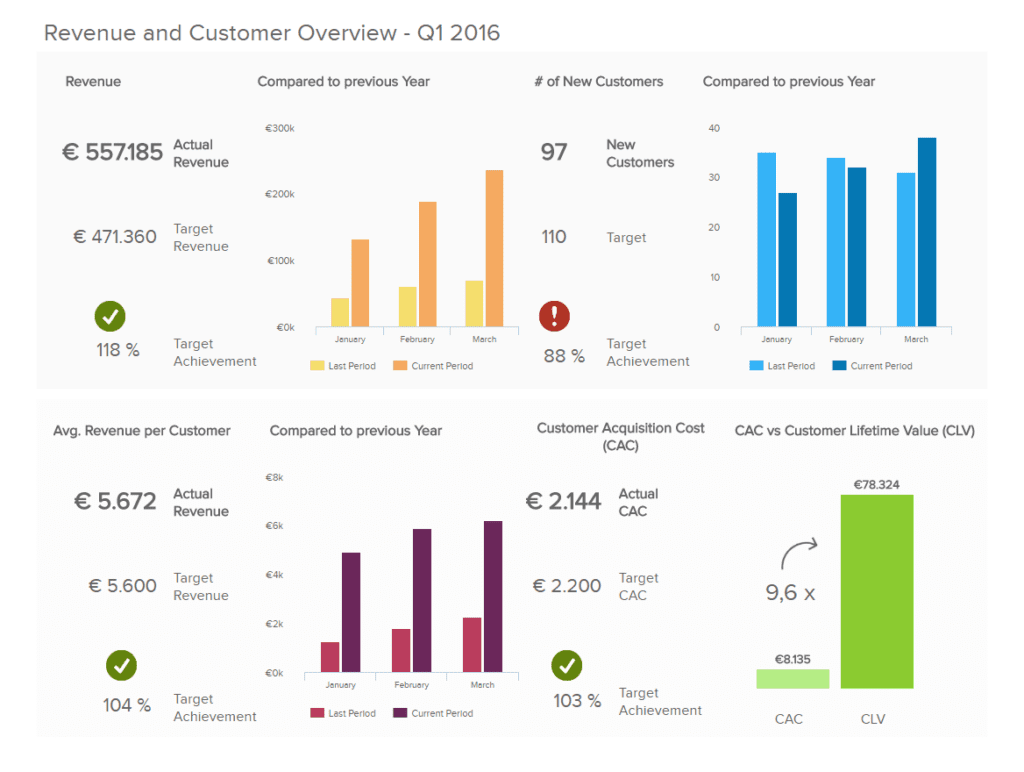
The dashboard represents total revenue, customer base and the cost in acquiring new customers.
Operational Dashboard
This type of dashboard focuses on short-term deadlines and operational procedures.
Example: Marketing operational dashboard
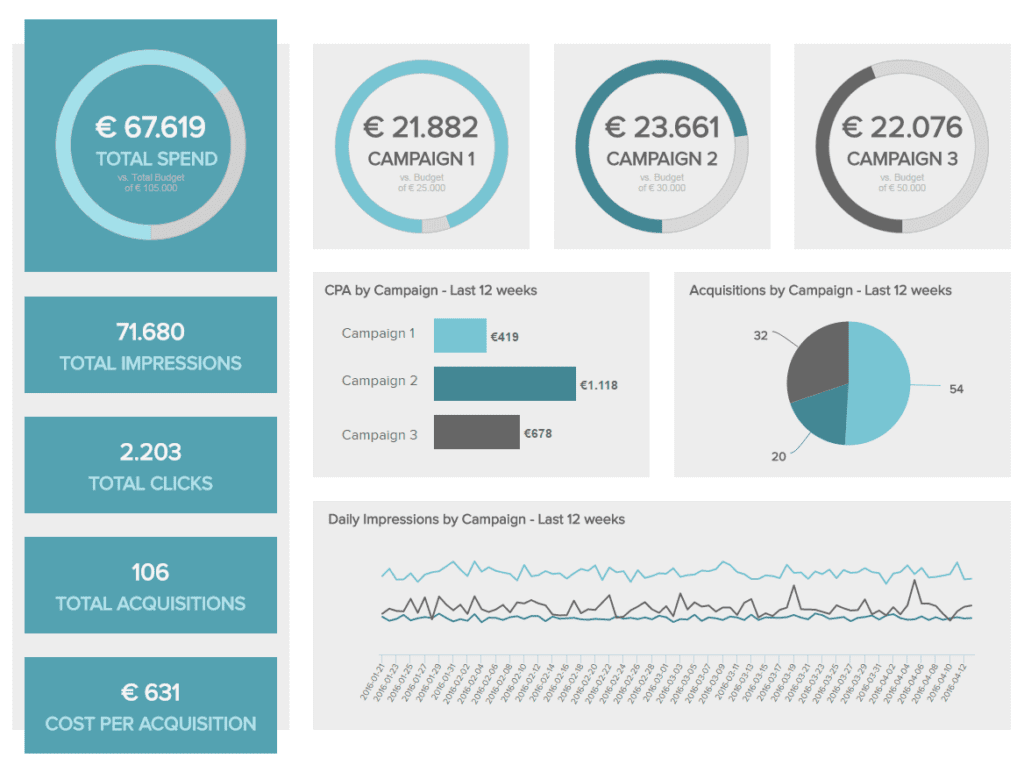
The above dashboard displays the performance of three campaigns over the last 12 weeks. This dashboard is extremely useful when you have plans for optimizing the campaigns. The real-time and accurate data would help the campaign manager to improve the campaigns to produce the best results.
Analytical Dashboard
This type of dashboard contains a large amount of data created by analysts.
Example: Healthcare analytical dashboard
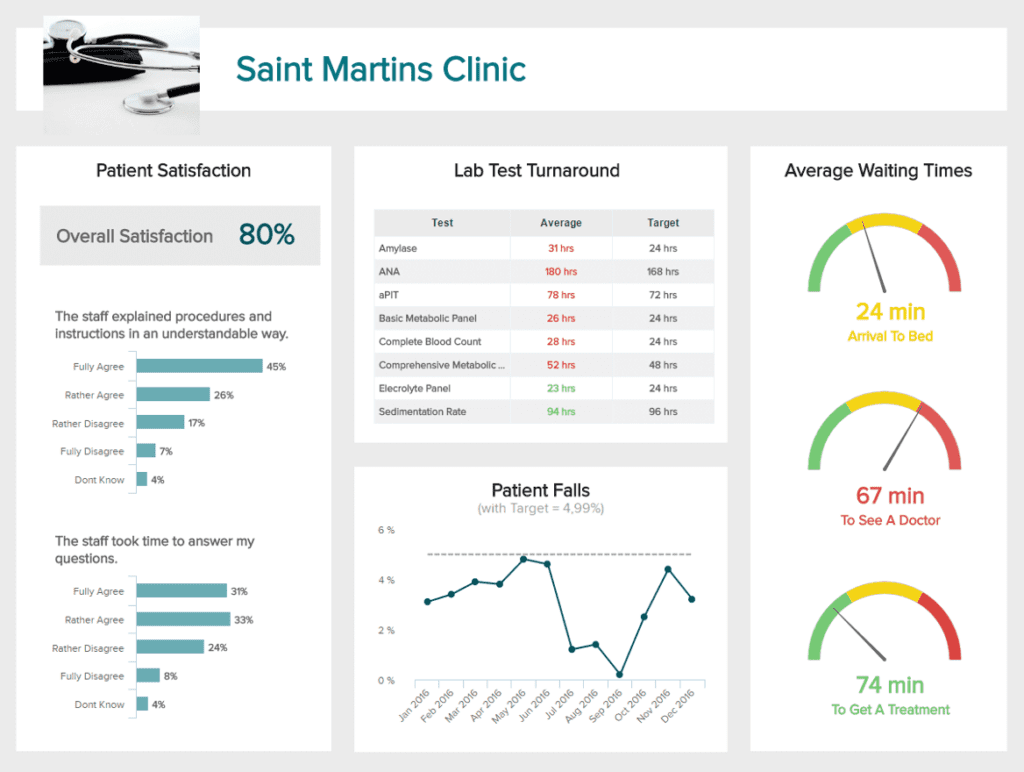
The dashboard displays the patient’s satisfaction score, average waiting time and more. This would help in optimizing the service offered, which would result in better productivity.
Tactical Dashboard
This type of dashboard is used by mid-level management to track performance.
Example: IT project management dashboard
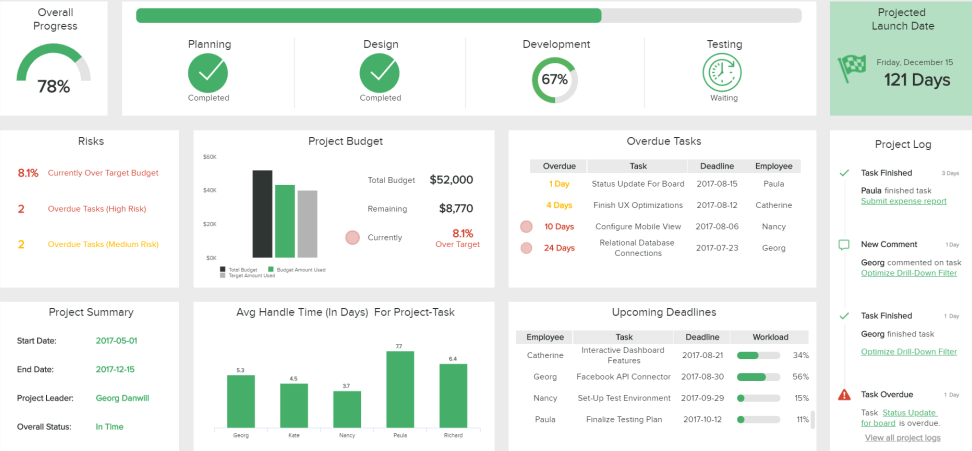
This dashboard represents the overview of the project – its overall performance, time spent on tasks, effectiveness of the parties involved and more. Though there are various ways to represent the performance of a project, this dashboard would help in monitoring the project management efforts and would also alert if the project has any deviation in the process.
Also Read
Tips to Build a Custom Dashboard Application
Dashboard gathers all important information and provides on-demand access to it. It is the platform that offers data transparency by giving a detailed overview of the business in a glance. It is essential that the data you display through the dashboard is unbiased and easily understandable for better decision making.
Checkout this case study of Zack Location, for whom ColorWhistle created a dashboard on the WordPress platform
Here are few tips that you can follow if you are planning to build a custom dashboard for your application
- You need to research on your target audience and their objectives by understanding their needs and pain points
- Ensure that the data you collect is clean and proper. Along with the source of the data, follow a proper data quality management which would help in delivering accurate data in the dashboard
- Build your dashboard’s visualization with the right type of chart that could represent your data in its best way
- The third-party integrations like libraries, SKD’s, API’s whichever you choose to create your dashboard, ensure to review their integration capabilities
- Take advantage of interactivity as it would help in simplifying the analytical process and makes the dashboard more user-friendly
- Make sure the design of the dashboard is compatible with all devices with simple and neat representation
- Once the dashboard is developed, it must run through all the necessary testing process to ensure all the functionalities are working seamlessly
- Deploy your dashboard to the production environment, set up a back and monitor the accessibility
- Ensure that the dashboard always runs on the latest version to make it more secure
Want to know more about building a customized dashboard? Check out this link.
APIs Roles in Modern Dashboard Web Applications
APIs are usually used to minimize the work of developers, as they act as intermediaries between two applications to make them work together.
Let us see what APIs can do in the development of dashboards
- Send notifications associated with respective events
- Helps with integrated analytics, collaboration functionalities and financial key metrics
- At times, it acts as an adapter by enabling external connection
- Helps in organizing data from various sources including datasets, rows, and tables
- It can integrate to your application, allowing you to create test cases and even update the status of the execution run
- Create personalized TV dashboards
- Connects web, spreadsheet, Sass data into one dashboard
- Also helps in consolidating point-in-time events from collaborative work environments
- Simplifies the process of time series data
- Dashboard can also be shared and viewed on any browser, TV and mobile devices using a suitable API
WordPress Themes for Developing Customized Dashboards
Let us have a look at some WordPress themes that can be used for developing a dashboard in your business.
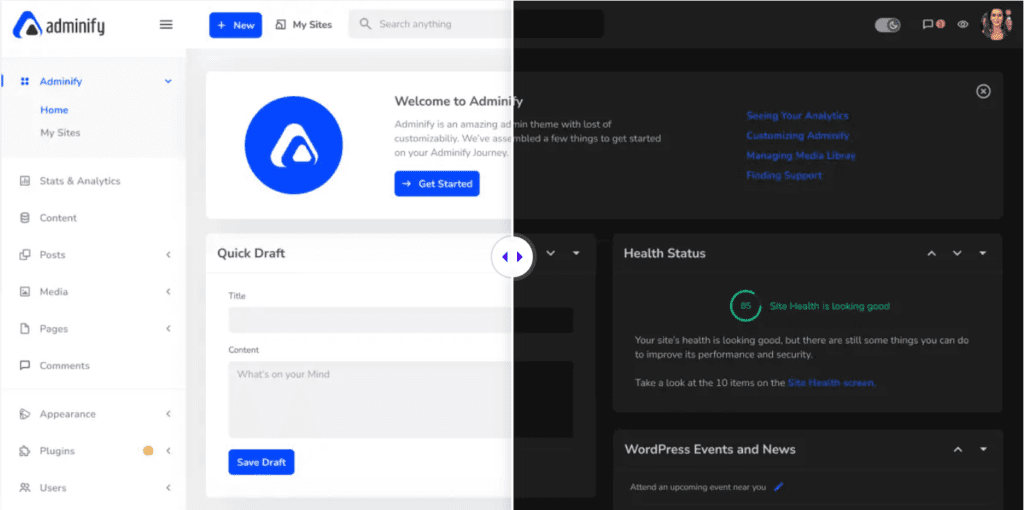
Adminify
The tool is multisite support and is available in both dark and light mode. Multiple menu style with horizontal and vertical dashboard menu.
WPShapere
The plugin has 16 pre-built templates and a customizable color scheme. Can easily customize the dashboard with your brand, and you have the option to enable/disable the automatic background updates.

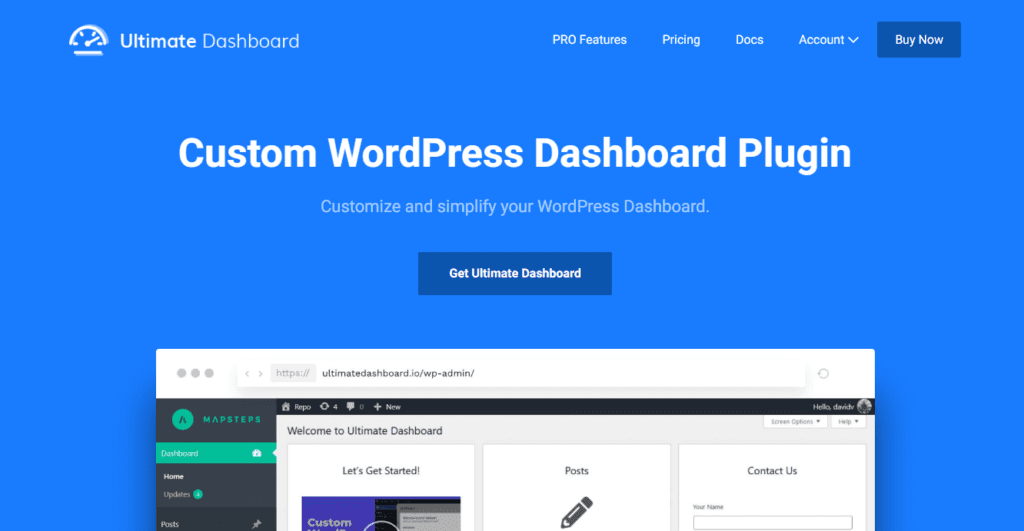
Ultimate Dashboard
It is the lightweight and best WordPress theme for the dashboard. With its custom widgets, you can choose the way you want to display data with a better user experience.
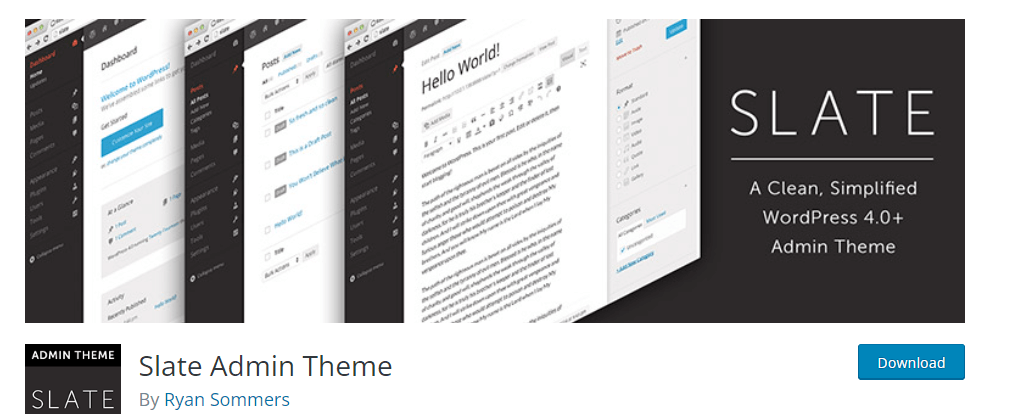
Slate Admin Template
The plugin focuses on content so it’s easy to edit and write on the dashboard. This is considered to be one of the best themes for WordPress dashboard and helps in improving the admin dashboard.
Laravel Themes for Developing Customized Dashboards
Let us have a look at some Laravel themes that can be used for developing a dashboard in your business.
Volt Laravel Dashboard
In this plugin, the dashboard comes with SaaS files and Gulp commands. It is equipped with all basic functionalities that any admin interface would require.

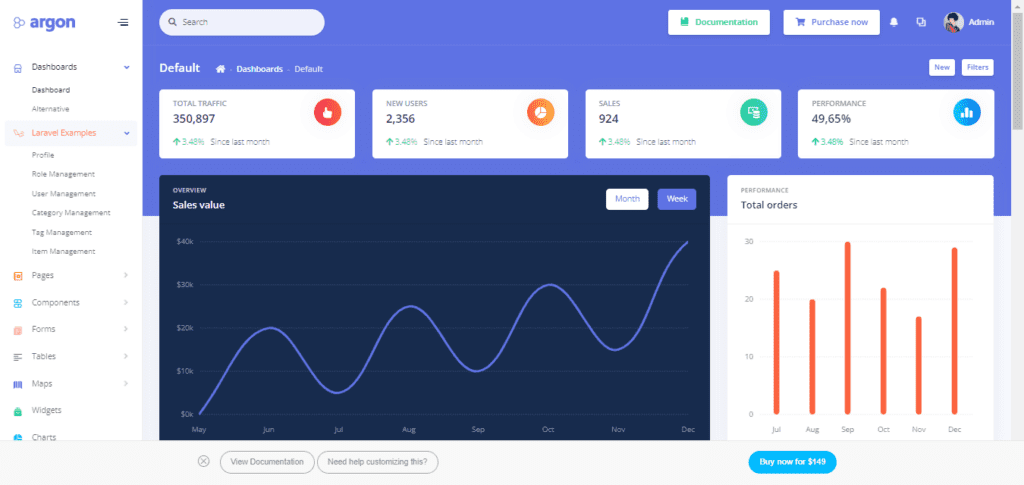
Argon Laravel Dashboard
It is a clean and modern theme and can help you in developing a full functional web application.
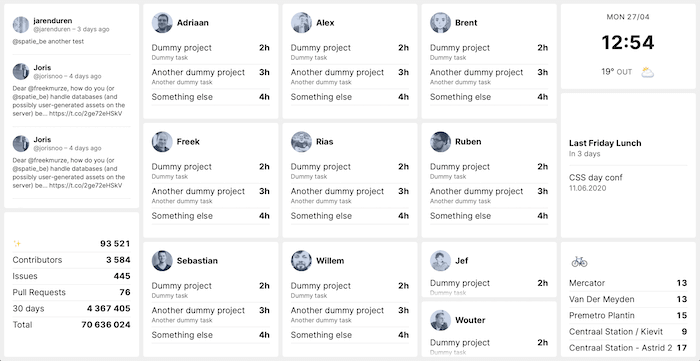
Laravel Spatie
The tool helps in creating simple and eye-catching dashboards in no time. This comes up with a tile view component, using which you can position the things on the dashboard.
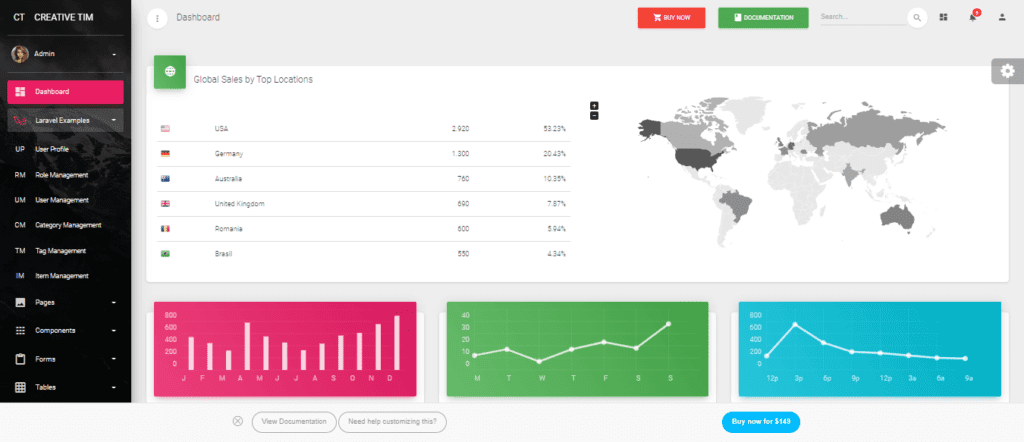
Material Laravel Dashboard
The plugin with it’s ready to use components and CURDS, you can implement certain functionalities and develop a user-friendly dashboard.
Looking for Web Development Services?
Seize and experience the transformative impact of Web Development Services & Solutions with ColorWhistle.

Create Your Dashboard Today
Now you have the basics for creating your dashboard. Represent your data in a simple and engaging way to your decision makers. The dashboard can help you to look into areas of improvements and as well as take steps to improve your campaigns/efforts, if any. Getting to know the results of the efforts you have put in would urge you to do more for the productivity of your business.
Are you confused about deciding the best, suitable platform for your dashboard? A professional web development company can help you with better clarity. This would help to choose right APIs, platform and more for the development of your web application along with a dashboard.
If you are looking for professional assistance, you can contact ColorWhistle by sending us a message or call us at +1 (210) 787-3600, we’ll get back to you at the earliest. We provide services tailored to your requirements that suit your business.
Disclaimer:
All the images and sources we’ve listed in this blog don’t belong to ColorWhistle except for the featured image. We’ve taken these after a complete research on the web (pinterest, google images, dribble, etc.). ColorWhistle doesn’t own any of the above images.
In quest of the Perfect Web Development Services & Solutions Buddy?
Be unrestricted to click the other trendy writes under this title that suits your needs the best!
- 10 Voice Search Statistics To Make You More Visible
- Online Business Model – Templates, Checklists, and Resources
- API Directory vs API Discovery — What’s the difference?
- Interesting English Websites of Japan
- Best Italian Flooring Company Website Ideas
- Myths about Website Development, Design, and Web Application
- AngularJS Web Application Development Case Studies: A Curated List
What’s Next?
Now that you’ve had the chance to explore our blog, it’s time to take the next step and see what opportunities await!
 Popular Rebranding Case Studies for Inspirati...