




Best Practices for Securing Your WordPress REST API

Manav Gupta, Copywriter at ColorWhistle, crafts engaging content for digital marketing, branding, and web development. With expertise in sales collateral, web content, and ad copy, he brings a strategic approach to content creation. Holding an honors degree in engineering, he combines technical insight with creative storytelling.

Our authors are proven experts in their fields, writing on topics where they have demonstrated expertise. Every piece of content undergoes peer review and validation by industry professionals.
AI Summary
Key Highlights of Securing WordPress REST API Best Practices
This post explores essential best practices for securing the WordPress REST API, a crucial tool connecting WordPress content with diverse applications. The key insight: securing your REST API is vital to prevent unauthorized access and attacks. It covers strong authentication methods (JWT, OAuth 2.0, API keys), role-based permissions, rate limiting, IP whitelisting, input validation, and security plugins. These layered defenses protect data and maintain site integrity. Readers will learn actionable steps to safeguard their WordPress APIs, reducing risk and enabling safe, scalable integrations. Next steps include monitoring usage, updating software, and consulting experts for custom security solutions.
The WordPress REST API holds significant importance in modern web development as it bridges the gap between content management systems (CMS) like WordPress and the evolving landscape of web applications, services, and digital experiences.
The role of WP REST API in enabling custom integrations, mobile app development, decoupled architectures, and other modern web practices cements its importance in contemporary web development strategies.
In other words, the REST API exposes your WordPress website’s content, such as posts, pages, users, and more, in a format that’s easily consumable by other software applications. It could include
Mobile Apps
- A news app fetching and displaying the latest blog posts from your WordPress website
- An e-commerce app showing product listings and details from your WooCommerce-powered content management system.
- An event app displaying upcoming events from your WordPress-based event management site
Web Applications
- A marketing dashboard aggregating content statistics from multiple WordPress websites
- A custom portfolio website pulling project data from a WordPress backend
- A job board platform integrating job listings from different WordPress sites
Single-Page Applications (SPAs)
Third-Party Platforms
- A content aggregation platform displaying articles from various WordPress blogs
- A learning management system (LMS) incorporating educational content from WordPress websites
- A social media dashboard pulling posts and updates from multiple WordPress-based social profiles
- Membership websites managing user enrollment, progress tracking, and content access seamlessly
IoT (Internet of Things)
- A weather station device sending data to a WordPress website via its REST API for real-time weather updates
- A smart home application accessing sensor data from a WordPress backend to control home automation
Cross-Platform Applications
- A hybrid mobile app (built with tools like Ionic or React Native) displaying content from a WordPress site alongside native app features
- A progressive web app (PWA) using WordPress data to provide offline-accessible content and app-like experiences
Chatbots and Voice Assistants
- A chatbot pulling FAQ content from a WordPress knowledge base
- A voice-activated assistant retrieving information from a WordPress site’s REST API in response to user queries
Data Analytics and Reporting
- A business intelligence dashboard integrating sales and marketing data from a WordPress-based e-commerce site
- An analytics tool visualizing user engagement metrics gathered from WordPress content
These examples demonstrate the versatility of the WordPress REST API in connecting WordPress data with a diverse range of applications, services, and platforms to create innovative and interconnected digital experiences.
At the same time, it exposes how vulnerable your WordPress website can be with REST API constantly exchanging data every other second.
Fortunately, we are here to discuss 5+ best practices for securing your WordPress REST API.
Why Securing your WordPress REST API is Crucial?
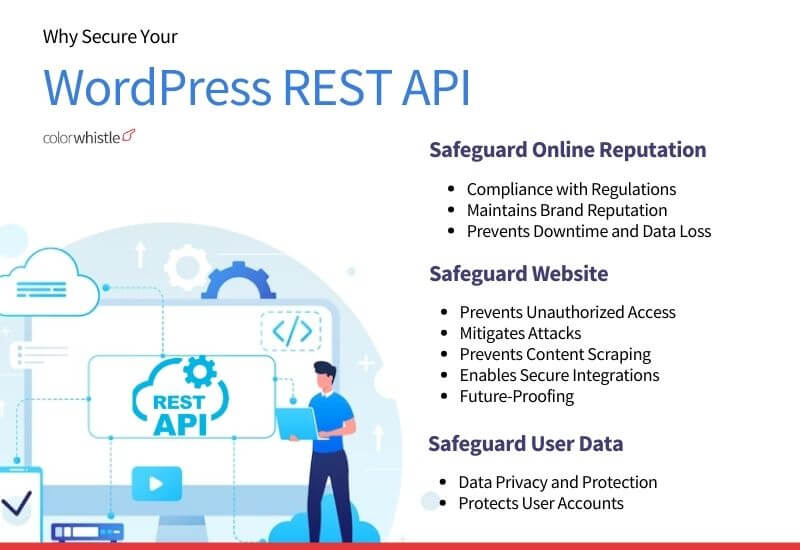
A secure REST API ensures that only the right people and systems can access your data. Proper security:
- Prevents unauthorized access
- Blocks automated attacks and malicious bots
- Protects user accounts and private data
- Reduces content scraping
- Ensures safe integration with mobile apps and external tools
- Helps you stay compliant with privacy and security standards
- Protects your brand reputation by preventing leaks or downtimeA secure REST API ensures that only the right people and systems can access your data. Proper security:
A poorly protected REST API can easily become an entry point for attackers, so securing it should always be part of your development workflow.
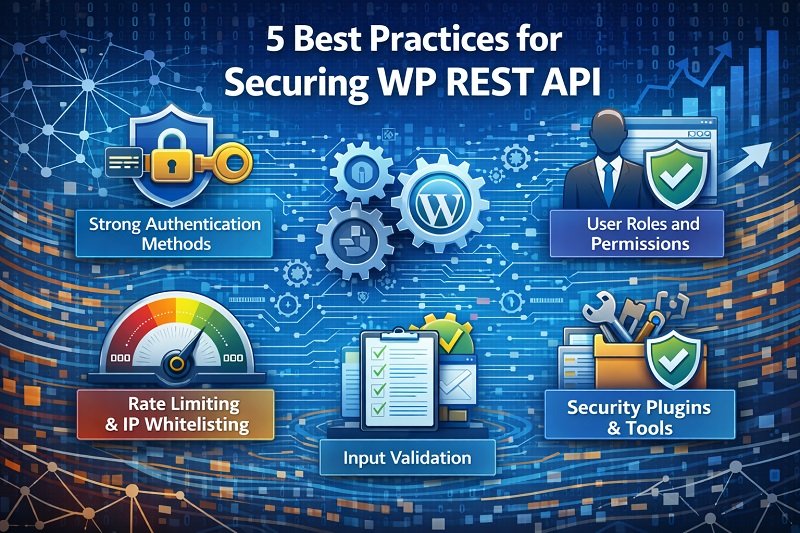
5 Best Practices for Securing WP REST API
- Choose strong authentication methods
- Implement user role and permissions
- Rate limiting and IP whitelisting
- Input validation
- Security plugins and tools
A poorly protected REST API can easily become an entry point for attackers, so securing it should always be part of your development workflow.
TIP#1: Choose Strong Authentication Methods
- Authentication is your first line of defense. Instead of letting anyone query your API, use proper authentication methods so only valid apps or users can access it.
Token-based authentication
Benefits
Drawbacks
- Secure and temporary tokens
- Good for scalability
- Easy to control access levels
- Requires careful handling
- Tokens stored in local storage can be stolen through XSS
When to Use:
Use it when you need a flexible, modern integration between apps and WordPress. For example:
Did You Know?
Token-based authentication is suitable for secure, user-friendly experiences.
OAuth 2.0
OAuth 2.0 is great when you need secure third-party access or single sign-on (SSO). It allows apps to access specific data without sharing user passwords.
Benefits
Drawbacks
- Best for third-party integrations
- Revokable tokens
- Ideal for SSO
- Gives users control over what data they share
- More complex to implement
- Different providers behave slightly differently
When to Use:
Use it when you need secure external integrations or SSO across multiple services.
Did You Know?
OAuth 2.0 is ideal for third-party access and SSO.
API Key Authentication
API keys are simple and lightweight. They’re good for internal systems or low-risk integrations.
Benefits
Drawbacks
- Easy to set up
- Quick authentication
- Works well for server-to-server requests
- Keys can be exposed if shared incorrectly
- Not as secure as tokens or OAuth
- No fine-grained permission control
When to Use:
Use this for simple internal tools or low-risk APIs where simplicity is more important than advanced security.
Did You Know?
API key authentication offers simplicity and basic access control.
TIP#2: Implement User Roles and Permissions
WordPress roles are powerful, and you can use them to control who can access which API endpoints. Always follow the principle of least privilege.
For example:
- Admins can manage everything
- Editors can edit content but don’t need access to user data
- Authors should only manage their own posts
- Subscribers should have read-only access
You can even modify capabilities programmatically.
In WordPress, capabilities are the specific permissions that define what actions users of different roles can perform.
By assigning or modifying capabilities, you can control the level of access a user role has to different parts of your website, including the REST API.
Here are examples of how to assign specific capabilities to roles to limit API actions:
EXAMPLE I: Limiting Editor Access to API
In this example, we’ll limit the “Editor” role to only have read (GET) access to the REST API endpoints related to posts.
function restrict_editor_api_access() {
    $editor_role = get_role('editor');
    $editor_role->remove_cap('edit_others_posts');
    $editor_role->remove_cap('delete_posts');
    $editor_role->remove_cap('edit_published_posts');
}
add_action('init', 'restrict_editor_api_access');
EXAMPLE II: Allowing Author Access to API for Their Own Posts
In this example, we’ll allow the “Author” role to have read and write (GET, POST, PUT, DELETE) access to their own posts via the REST API.
function allow_author_api_access() {
    // Get the "Author" role object
    $author_role = get_role('author');

    // Add the capability to read and write their own posts via API
    $author_role->add_cap('read');
    $author_role->add_cap('edit_posts');
    $author_role->add_cap('delete_posts');
}
add_action('init', 'allow_author_api_access');
EXAMPLE III: Custom Role with Restricted API Access
In this example, we’ll create a custom role named “Content Manager” with limited API access, allowing them to read and create posts, but not update or delete them.
function create_custom_role() {
    add_role('content_manager', 'Content Manager', array(
        'read' => true,
        'edit_posts' => false,
        'delete_posts' => false,
        'publish_posts' => false,
        'upload_files' => true, // Allow uploading media
  ));
}
add_action('init', 'create_custom_role');
Also Read
TIP#3: Rate Limiting and IP Whitelisting
These two security measures protect your site from bots, abuse, and denial-of-service attacks.
- Rate limiting controls how many requests a client can send within a specific time
- IP whitelisting limits API access to approved IP addresses
When to Use:
- Use rate limiting when you want to prevent brute-force attacks or overload from repeated API hits.
- Use IP whitelisting for private or internal APIs where only known systems should have access.
Combining both gives you strong layered security.
TIP#4: Input Validation
Never trust user input. Strong input validation ensures no malicious code enters your system.
Prevent SQL Injection
Always use prepared statements or parameterized queries.
$stmt = $pdo->prepare("SELECT * FROM users WHERE id = :id");
$stmt->bindParam(':id', $userId, PDO::PARAM_INT);
$stmt->execute();
Prevent XSS Attacks
Escape all output before rendering it on screen.
echo htmlspecialchars($username, ENT_QUOTES, 'UTF-8');Input validation, output escaping, and prepared statements work together to keep your API safe.
TIP#5: Integrate Security Plugins and Tools
Well-built security plugins can add firewall protection, brute-force protection, malware scanning, and monitoring.





These tools won’t replace your coding best practices, but they provide another strong layer of protection.
Also Read
Other Common Practices for Securing Your WP REST API
- Always use HTTPS so data is encrypted
- Keep WordPress, themes, and plugins updated
- Remove unused plugins and themes
- Monitor API usage and logs to detect unusual activity
- Use a WAF (Web Application Firewall) if possible
- Disable unused REST endpoints to shrink your attack surface
These small steps significantly reduce the chance of your API being misused.
Key Takeaways
The WordPress REST API can power websites, apps, dashboards, automation tools, and even IoT devices. Because of that, securing it is non-negotiable. Focus on proper authentication, strict permissions, input validation, traffic control, and continuous monitoring. These practices will help you build safe integrations and protect your users and data.
If you need help planning or securing a custom API integration, our WordPress development team at ColorWhistle can guide you through best practices and build secure, scalable solutions tailored to your project. We have leveraged our technical expertise to support global businesses with innovative and reliable web-based applications.
Click here to write to us or call us at +1 (210) 787 3600 any time to discuss your business requirements. Our expert advisers respond to your messages swiftly.
What’s Next?
Now that you’ve had the chance to explore our blog, it’s time to take the next step and see what opportunities await!
 Non-Disclosure Agreements (NDA): A Detailed G...









This is the article I was looking for. Thank you very much for your cooperation. Can you tell me what software you use to run an incredibly fast website? Also, I’d like to create a simple website for my business, but I don’t have a domain and I need help with hosting. According to reports, Asphostportal has an excellent reputation. Are there any other options? If so, what would you suggest?