Core Web Vitals Guide : Boost Website Performance

Powered by an expert content team, this blog blends SEO precision with compelling storytelling. Every insight is supported by data-driven research, ensuring content that ranks, engages, and drives conversions.

Our authors are proven experts in their fields, writing on topics where they have demonstrated expertise. Every piece of content undergoes peer review and validation by industry professionals.
AI Summary
Key Highlights of Core Web Vitals Boosting Performance
This post explores how optimizing Core Web Vitals enhances website speed and user experience, crucial for retaining visitors and improving SEO. The key insight: focusing on metrics like Largest Contentful Paint (LCP), Interaction to Next Paint (INP), and Cumulative Layout Shift (CLS) directly boosts site performance. It guides website owners, especially WordPress users, on using tools like Google PageSpeed Insights and Lighthouse to measure and improve these scores. The post shares real-world examples and steps to achieve high performance, promising faster loading times, increased engagement, and better search rankings. Evaluating and optimizing these metrics is vital for competitive, user-friendly websites.
Welcome to the world of websites! A place where speed is king, and every millisecond counts. But let’s be honest, have you ever visited a website that took forever to load?
A slow-loading website is like a closed store – no matter how great your products or services are, if customers can’t access them quickly, they’ll simply move on to the next option. As a reputable website development company, we’ve seen firsthand how a poorly performing website can hinder a business’s online success.
This is where Core Web Vitals come to the rescue. By focusing on the essential metrics that impact user experience, Core Web Vitals help you optimize your website’s performance, ensuring that it loads swiftly and efficiently. In this guide, we’ll delve into the world of Core Web Vitals, using real-life examples, including our own website’s score, to illustrate how to boost your website’s performance and keep your customers engaged and satisfied.
What are Core Web Vitals?
Core Web Vitals are a set of key performance metrics introduced by Google to measure real-world user experience on websites. They focus on three critical aspects of user experience: loading speed, interactivity, and visual stability. Websites that perform well on Core Web Vitals tend to load faster, respond quickly to user interactions, and avoid unexpected layout shifts, leading to improved SEO performance and higher user satisfaction.
The current Core Web Vitals metrics are:
- Largest Contentful Paint (LCP), which measures loading performance
- Interaction to Next Paint (INP), which measures overall interactivity
- Cumulative Layout Shift (CLS), which measures visual stability
Google uses these metrics as part of its page experience signals, making Core Web Vitals optimization essential for both search visibility and user engagement.
Largest Contentful Paint (LCP): It measures loading performance and is based on the time it takes for the largest image or text block visible within the viewport to load.
Interaction to Next Paint (INP): INP measures how responsive a website feels during user interactions such as clicks, taps, or keyboard input.
Cumulative Layout Shift (CLS): Measures visual stability and is based on the total amount of unexpected layout shifts of visible page content.
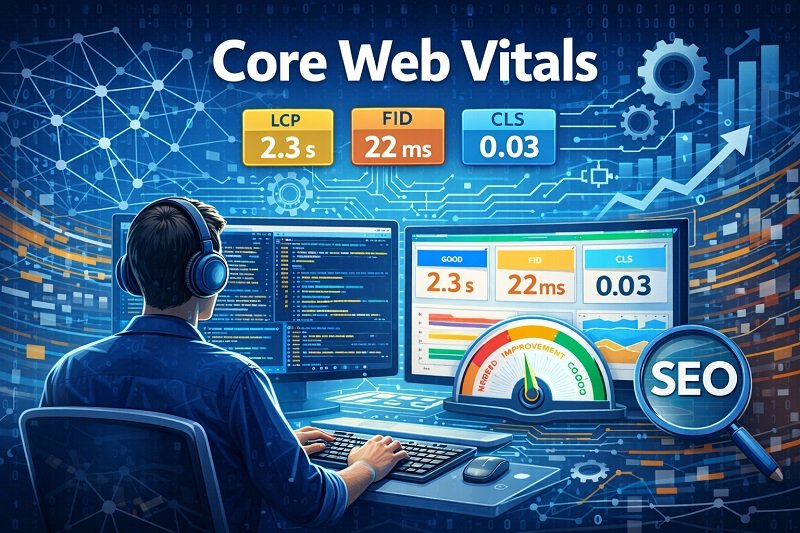
Google uses these Core Web Vitals as signals of a website’s user experience, and they will be incorporated as part of the overall ranking algorithm in the future. Therefore, optimizing for Core Web Vitals can have a positive impact on a website’s search engine optimization (SEO) and its ability to provide a good user experience.
Did You Know
Only around 40% of websites globally pass all Core Web Vitals metrics
Source: Google Chrome UX Report
Understanding the Scores in Detail
Core Web Vitals and performance scores are commonly measured using tools such as Google PageSpeed Insights, Lighthouse, and Chrome DevTools. These tools evaluate both lab data and real-user data to provide a comprehensive view of how a website performs under real-world conditions.
To help you understand the core web vital metrics we are going to illustrate it with an example. We are showcasing the score of our ColorWhistle website and how we optimized and maintained it to get 100.
The screenshot illustrates ColorWhistle’s individual score on performance, accessibility, best practices, and SEO.

These scores are calculated from the below-mentioned metrics.
The below screenshot illustrates the metrics that have been evaluated for the website.
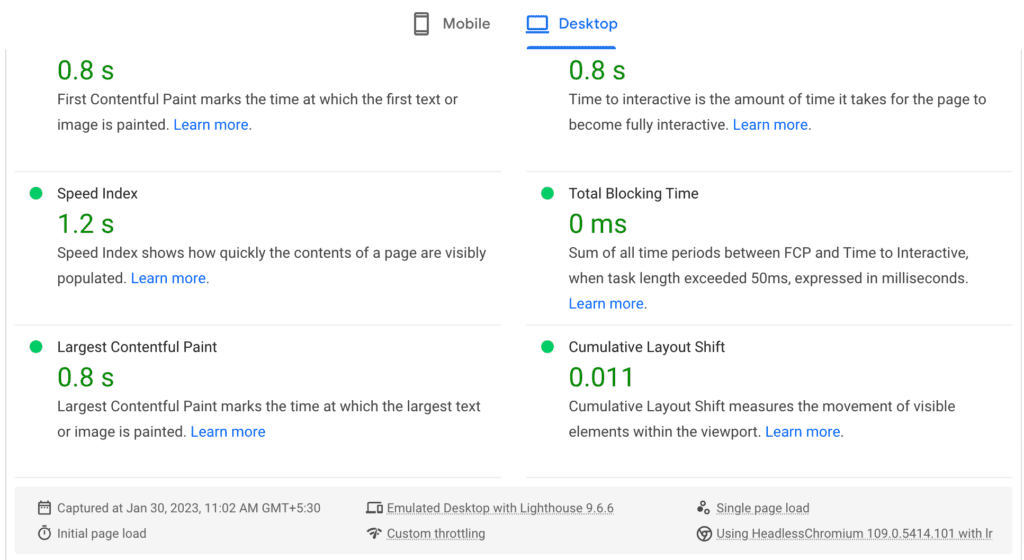
In addition to Core Web Vitals, Google evaluates several supporting performance metrics that help diagnose performance issues and guide optimization efforts.
First Contentful Paint (FCP) – It measures the time it takes for the first meaningful piece of content to appear on a website.
This is the first impression a user has of a website, and a fast FCP can greatly improve the user experience and lead to higher engagement and conversions.
In other words, FCP is a critical metric for website performance, and improving it can lead to a better overall experience for your website’s visitors.
Time To Interact (TTI) – It is a metric that measures the amount of time it takes for a web page to become fully interactive for the user. TTI is considered an important aspect of user experience, as it indicates the responsiveness of a website and how quickly users can start interacting with the page.
TTI is calculated from the moment the page starts loading to the moment when all the critical resources have loaded and the main thread is free to handle user input.
A lower TTI value indicates a faster and more responsive website, while a higher TTI value suggests slower performance and a less satisfying user experience.
Speed Index – It measures the average time it takes for visual elements on a webpage to display as the page loads. It’s a single-valued score to be determined, which reflects the user’s perception of how quickly the page loaded.
The lower the Speed Index, the faster the page is considered to load.
Largest Contentful Paint – It measures loading speed and user experience on a website. It is the time taken to load the largest visible element on a web page, such as an image or a text block.
A fast LCP score indicates the main content of a website will be quickly visible to the user, leading to a better overall user experience.
Google Page Speed Insights also offers opportunities to improve and optimize your website
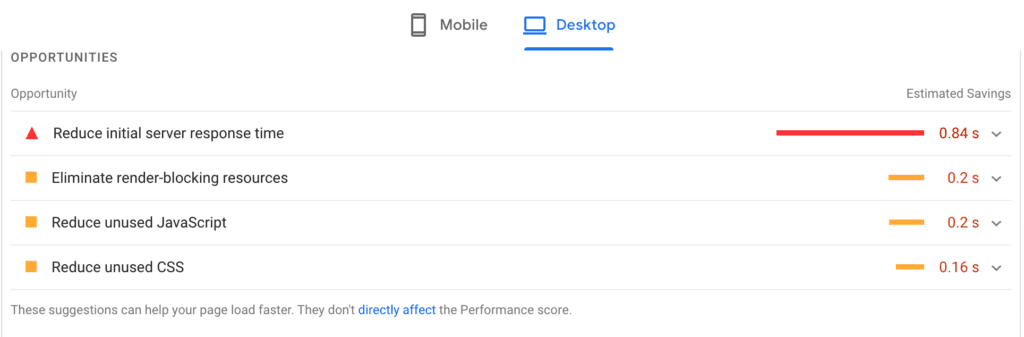
By expanding each opportunity you will get to know the suggestions that help to improve the loading time of your website.
By crawling down the Google page speed page, you will be able to view the PASSED audits (audits that are evaluated and passed) and the suggestions that may help in improving the quality of your website.
Did You Know
Websites that meet Core Web Vitals benchmarks experience lower bounce rates and higher engagement, particularly on mobile devices.
Source: Google Search Central
We at ColorWhistle evaluate our website’s core web vital scores and make use of the opportunities and suggestions to improve the overall performance of our website. As we consider this to be the most vital activity, it has helped us to reach website performance with a score of 100, and we are also able to maintain it to date.
To explore more on our process and how we achieved a good score on all the above metrics, do have a read about our case study, where we consistently maintain excellent Core Web Vitals scores across performance, accessibility, and SEO metrics on our website colorwhistle.com — case study link.
Also Read
Evaluate Your Website Today
Evaluating your website’s Core Web Vitals is the first step toward improving performance, SEO, and user experience. By analyzing metrics such as LCP, INP, and CLS using tools like PageSpeed Insights and Lighthouse, you can identify bottlenecks and apply targeted optimizations to deliver a faster, more stable browsing experience.
For WordPress websites, performance optimization requires a combination of clean code, optimized themes and plugins, caching strategies, and server-level enhancements.
WordPress users, take your websites to the next level! Our WordPress Performance Booster Package offers powerful tips on how you can enhance performance and skyrocket success. Ask us how?
Take the performance test and assess the website’s Core Web Vitals. With various tools and optimization techniques, easily improve the scores and provide a better experience to the website visitors. Don’t miss the opportunity to enhance the website’s performance and stand out from the competition. Act now and take the performance test today.
Wrapping Up
By focusing on Core Web Vitals such as Largest Contentful Paint, Interaction to Next Paint, and Cumulative Layout Shift, businesses can significantly improve website performance and deliver a smoother, more engaging user experience. Optimizing these metrics not only enhances usability but also contributes to better search visibility and higher conversion rates. With the right performance strategy and expert support, websites can consistently meet modern performance standards and stay competitive in an increasingly experience-driven digital landscape.
If you are looking for professional assistance, to evaluate your website and to take the necessary steps to optimize it, you can contact ColorWhistle by sending us a message or call us at +1 (919) 234-5140, we’ll get back to you at the earliest. We provide services tailored to your requirements that suit your business.
Looking for Web Development Services?
Seize and experience the transformative impact of Web Development Services & Solutions with ColorWhistle.

What’s Next?
Now that you’ve had the chance to explore our blog, it’s time to take the next step and see what opportunities await!
Read Similar Content
Wish to Explore Our Services?
Have an Idea? or Project Scope?
In quest of the Perfect Web Development Services & Solutions Buddy?
Be unrestricted to click the other trendy writes under this title that suits your needs the best!
- Elementor Cloud – How to Grow Your Business?
- Popular Website Development Case Studies
- Marketplace Website Design & Development Essentials
- Website Vendors, Website Builders, Website Maintenance And Marketing With Agency Vendors
- Top Heavy Equipment Website Design Ideas & Inspirations
- Build Custom Dashboard Web Applications
- 10 Voice Search Statistics To Make You More Visible
 Popular Dashboard Development Tools