Modern WordPress Website Development Types – WooCommerce Website to Hybrid Web Application

Rajeev is a developer and tech lead with more than 11 years of experience building high-performance websites across travel, education, real estate, and e-commerce. He focuses on speed, stability, and scalability, and enjoys creating API-driven solutions that help businesses extend their digital capabilities in smart and meaningful ways. He has a strong interest in integrating third-party systems and building custom functionality that supports long-term growth and real business outcomes. Outside of work, he is yet another Federer fan who dreams of someday watching Federer play at center court and he loves endurance cycling & playing badminton during his off time!

Our authors are proven experts in their fields, writing on topics where they have demonstrated expertise. Every piece of content undergoes peer review and validation by industry professionals.
AI Summary
Key Highlights of Modern WordPress Website Development Types
This post explores various WordPress development types to unlock its full potential beyond blogging. The key insight: WordPress supports diverse solutions from CMS websites, WooCommerce eCommerce stores, PWAs, to native/hybrid mobile apps. It serves developers and business owners seeking scalable, high-performance web and app platforms. The article details ready-made vs custom theme approaches, WooCommerce's flexibility including headless setups, and PWA benefits like offline access. Native/hybrid app integration via REST API ensures unified content management. Readers learn how to leverage WordPress effectively, saving time and costs while boosting site speed, scalability, and user experience.
WordPress is a free, open-source Content Management System (CMS) written in PHP. WordPress is the most powerful and popular CMS in existence. Even though WordPress is projected as a Blogging platform, WordPress is more than just a blogging software.
Partnering with a respected WordPress development agency is essential to utilizing WordPress to the fullest extent because it can unlock its capabilities beyond its status as a blogging platform.
Did you know?
WordPress has a ~62–63% market share in the CMS market and WordPress powers 43% of the world’s top websites
We can build almost anything and everything using WordPress. From a simple CMS website to an e-commerce platform or even a hybrid mobile application, everything is now possible with WordPress. There are endless possibilities now with WordPress.
In this article, we will dig deep into various WordPress development types.
I. CMS WordPress Website Development
There are two types of approaches in CMS WordPress website development. They are,
- Readymade theme based
- Custom WordPress theme development from scratch
Ready-made theme based
The ready-made theme-based approach is based on a pre-built theme with multiple readymade layouts, that can be used to create a new website with less/no development effort.
The main advantage of a ready-made theme approach is cost and time. As everything is pre-built, development time is very less, so does the cost.
The WordPress Plugin Directory features 55,000+ plugins
Based on the other requirements, we can find the plugins and add them to the website.
If we are choosing a readymade theme, we have to make sure that the selected theme provides what we are looking for. Otherwise, It will be huge work in case we need to customize the theme.
Another downside of a ready-made theme is, we only get to choose from what they offer. If we have a custom design or idea in mind then ready-made themes don’t help much. In such cases, we have to customize the readymade theme which nullifies the very reason why we went with the ready-made theme in the first place.
Another disadvantage is Performance & Speed. As ready-made themes are built with keeping a large set of audience in mind, it’s never a go-to solution for one single purpose. The theme has so many features and add-ons which we might not need for our website. Due to this, these themes are always overloaded with so many features and pages which have a negative impact on speed and performance.
Also, most of the ready-made themes are built using page builders like Elementor, DIVI, WP Page Bakery etc. Page builders can affect performance if not optimized properly.
Another downside is the ease of understanding & usability. With so many options and features, it always gets hard to understand and manage them.
Custom Theme Development From Scratch
This is an approach to developing the entire theme from scratch.
In this method, we build the website exactly how we want. As it’s built from scratch, we have complete control over the entire website, its functionalities, and its performance.
In this approach, the main objective is speed and performance. Every module is built with this in mind, ensuring clean code, minimal overhead, and faster load times.
In modern WordPress development, this approach often uses block-based theme development (Full Site Editing) instead of traditional page builders. Custom Gutenberg blocks are created specifically for the project, allowing editors to manage content easily without compromising performance.
Rather than relying on heavy third-party page builders, developers can build custom blocks using native WordPress block APIs or tools like ACF Blocks, which results in better performance, cleaner markup, and long-term maintainability.
Another key focus in this approach is reducing plugin usage. Plugins are used only when absolutely necessary and when building the same functionality from scratch would not be time-efficient. This significantly improves stability, security, and performance.
Another advantage of custom theme development is scalability. With full control over the codebase, the website can be planned and structured for future enhancements, integrations, and feature expansions from the very beginning.
The main downside of custom theme development is time and cost. Since everything is built from scratch, it requires more effort compared to a ready-made theme approach. However, for businesses that prioritize performance, scalability, and long-term value, this approach is often a clear win-win.
Also Read
II. Ecommerce WordPress Website Development
As mentioned above, in CMS WordPress website development, here also we have two types of approaches.
1. Ready-made theme based
2. Custom theme development from scratch
All the Pros & Cons are the same as the previous method. The major difference is the effort involved in an Ecommerce website is more when compared to a CMS website.
Custom WooCommerce Development
As it’s an ecommerce website, it comes with a lot of extra features. So, this will increase the timeline and cost.
Be it ready-made theme based approach or Custom Theme development based approach, for most of the functionalities like Wishlist, Compare Products, Payment Gateways, Abandoned Cart, Single Page Checkout etc., we have to go with third-party plugins as developing these features by ourselves will take a good amount of time and it’s not advisable too.
Ecommerce in WordPress is based on a plugin called WooCommerce. It is a great product with so many features and there are so many plugins which are developed as addons for this. WordPress + Woocommerce is a great choice for the Companies who are looking to enable online shopping presence for their businesses.
Consider referring to WooCommerce vs Shopify statistics for a more in-depth comparison of these two popular eCommerce platforms.
WooCommerce powers over 6.6 million live websites worldwide.
This solution is not only for selling your products. WooCommerce also extends its presence to Rental, Booking, Appointments, Subscriptions, Memberships, Marketplace and much more as well.
Woocommerce is a great platform for those who are looking for a Small and Medium sized online store.
WooCommerce has 100+ million downloads from WordPress.org
Headless WooCommerce Development
Headless WooCommerce is a modern ecommerce architecture where WooCommerce is used purely as the backend, while the frontend is built using modern JavaScript frameworks such as React, Next.js, or Vue.
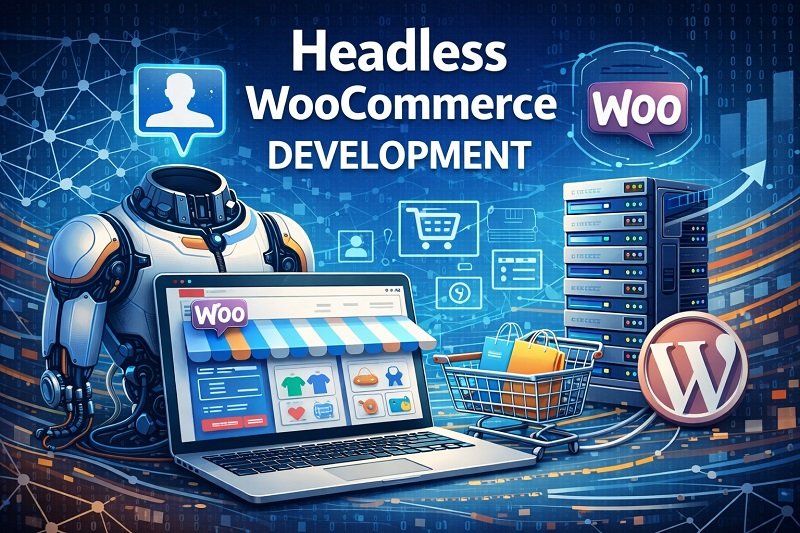
In this approach:
- WooCommerce manages products, orders, customers, and payments.
- The frontend consumes data using REST API or GraphQL (WPGraphQL for WooCommerce).
- The user-facing storefront is completely decoupled from WordPress.
Headless WooCommerce is particularly suitable for:
- High-traffic ecommerce websites
- Stores requiring advanced UI or custom checkout flows
- Businesses planning mobile apps or multi-channel commerce experiences
While this approach requires higher initial development effort and expertise, it provides long-term flexibility, scalability, and performance benefits that align well with modern ecommerce requirements.
III. Progressive Web Applications (PWA) with WordPress
Progressive Web Applications (PWAs) combine the reach of a website with the experience of a mobile application. A PWA works inside a browser but offers app-like features such as offline access, push notifications, faster load times, and the ability to be installed on a user’s device without going through an app store.
When built with WordPress, a PWA uses WordPress as the backend CMS while modern frontend technologies and service workers handle caching, performance, and offline functionality.
Why PWAs are gaining popularity
- Improved performance and faster page loads
- Offline or low-network access
- App-like user experience without app store dependency
- Lower development and maintenance cost compared to native apps
- Single codebase for web and mobile users
PWAs are ideal for content-driven websites, ecommerce stores, and businesses that want to enhance mobile user experience without investing immediately in full native or hybrid mobile applications.
Also Read
IV. Native/Hybrid Application
As we all know, we are in the Mobile First Era. Nowadays, a website being mobile friendly isn’t just enough to compete in the market and to scale the business to the next level. So, Mobile applications are the next level upgrade for businesses who have websites.
Major question here is, how to have a website and mobile application function together. Most of the companies have websites and mobile applications for their businesses but they both function independent of each other which is not the correct way.
So developing a Native/Hybrid application using WordPress is an exciting solution.
There are few ways to develop mobile applications using the same database/content which is served to the website.
- Native App development using WordPress Rest API for Simple Apps and GraphQL (via WPGraphQL) for advanced setups.
- Develop Hybrid Apps using Flutter, Phonegap, Ionic
- Convert Website into Mobile Apps using ready-made tools
Also Read
Native App development using WordPress Rest API
This is one of the proper and advisable methods to create mobile apps from a WordPress website. WordPress provides REST API which will provide content for the mobile application.
For instance, if we have an Ecommerce website built using WordPress+Woocommerce which sells products and If we want to develop a mobile application for this shop, we can use WordPress REST API to develop native mobile apps in Android or IOS or both.
Major advantage of this method is, we don’t have to maintain products/inventory separately for the website and mobile app. Both the website and mobile app uses the WordPress database which serves as a central point. So, Inventory management becomes very easy as there is no confusion in handing it for either the website or the mobile app.
With the data being provided by REST API, which then can be used to develop mobile applications in Android, IOS separately.
Major advantage of this approach is that we get to build the proper mobile application.

Disadvantage of this approach is the time and cost. As it’s built entirely using API, it will take time, which will result in high cost too.
Develop Hybrid Apps using Flutter
Even though there are multiple hybrid mobile app development frameworks available in the market, like Phonegap, Cordova, Ionic etc, We are going to explore the possibilities of WordPress + Flutter.
Flutter is an open-source framework developed by Google which is used to create native Android & IOS apps using a single codebase. Using Flutter for App and WordPress for the backend.
There is a library available called Flutter WordPress which can be used to connect a Flutter App with WordPress backend to develop apps in Android & IOS using a single codebase.
We need hands-on experience in WordPress, Php & Flutter to develop hybrid apps using Flutter and WordPress as a backend.
Also Read
Convert Website into Mobile Apps using ready-made tools:
This is the easiest method to convert your WordPress website into a mobile app without any developer efforts.
There are multiple ready tools available in the market that convert your website into a mobile application in a single click.
Few of the famous providers are AppPresser, MobiLoud, WPMobile.App etc
These third parties provide various features in different pricing plans in monthly and annual pricing.
Looking for WordPress Development Services?
Seize and experience the transformative impact of WordPress solutions with ColorWhistle.

Conclusion
WordPress has grown into a versatile platform capable of powering modern websites, ecommerce stores, PWAs, and mobile applications. Consulting with a WordPress development company can boost your website performance and results in a better way. From standard CMS builds to custom development, headless WooCommerce, and app-driven experiences, WordPress supports a wide range of scalable digital solutions.
We at ColorWhistle cater to do all these specialized WordPress websites. If you are looking to build your own website in WordPress or a hybrid mobile application, do reach out to us and we will be able to take the conversation further and help you build your next web project.
In quest of the Perfect WordPress Solutions Buddy?
Be unrestricted to click the other trendy writes under this title that suits your needs the best!
- Top WordPress eLearning Plugins for EduTech Websites
- WordPress 6.1- New Doors Opened!
- Smart Branding and Lead Generation with WordPress Websites
- Building WordPress Kitchen Visualizer for Lead Generation
- WordPress + WP Engine + SSO – How to Build and Make Use of Possibilities
- WordPress Maintenance Mode and it’s Significance
- Modern WordPress Website Development Types – WooCommerce Website to Hybrid Web Application
What’s Next?
Now that you’ve had the chance to explore our blog, it’s time to take the next step and see what opportunities await!
 Healthcare Website Development Complete Guide...