




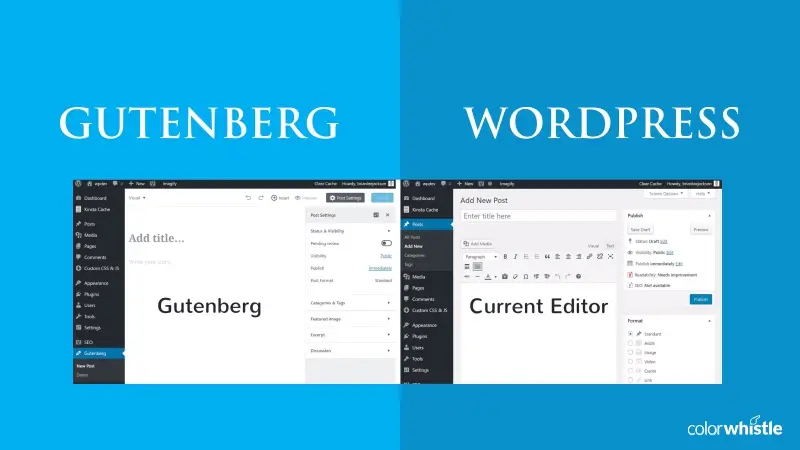
Gutenberg WordPress Editor – Complete Guide

Powered by an expert content team, this blog blends SEO precision with compelling storytelling. Every insight is supported by data-driven research, ensuring content that ranks, engages, and drives conversions.

Our authors are proven experts in their fields, writing on topics where they have demonstrated expertise. Every piece of content undergoes peer review and validation by industry professionals.
AI Summary
Gutenberg WordPress Editor - Complete Guide
This serves as a practical guide to the Gutenberg WordPress editor, a modern block-based content builder integrated into WordPress core. The key insight: Gutenberg revolutionizes content creation by simplifying layout design and reducing shortcode reliance. Targeted at content creators and developers, it enables easier website customization, improved mobile compatibility, and smoother theme switching without third-party plugins. Despite being in development with some technical issues, Gutenberg promises faster load times and a unified editing experience. The post encourages hands-on preparation for this shift, highlighting the need for modern web development skills and ongoing updates on Gutenberg's impact.
WordPress has evolved from a simple blogging platform into a powerful website-building ecosystem, and the Gutenberg WordPress Editor plays a major role in this transformation. As digital experiences become more visual, modular, and performance-driven, Gutenberg introduces a modern block-based editing system that simplifies content creation while offering greater design flexibility.
Built to replace the traditional WordPress editor, Gutenberg enables users to create dynamic layouts using customizable content blocks — reducing reliance on shortcodes, heavy page builders, and complex custom code. With its foundation in React and focus on speed, usability, and full-site editing, Gutenberg is shaping the future of how websites are designed, managed, and scaled on WordPress.
In this guide, we explore what the Gutenberg WordPress Editor is, how it works, how it differs from traditional editors, and what it means for content creators, developers, and businesses adapting to modern WordPress development.
What is Gutenberg WordPress Editor?
The Gutenberg WordPress Editor is a modern block-based page and content editor that is fully integrated into the WordPress core. Its primary goal is to simplify content creation, modernize the editing experience, and reduce reliance on shortcodes and custom HTML by introducing a more visual and flexible workflow. This update goes beyond visual improvements — it delivers a complete transformation of how content is created, managed, and structured in WordPress through a block-based approach.
Gutenberg replaces the older TinyMCE (Classic Editor) and offers significantly more functionality, from building complex page layouts to managing reusable content blocks and custom fields. It is a client-side editor built with React, enabling a faster, more interactive, and modular content-building experience using individual content blocks such as text, images, galleries, buttons, and more.
With Gutenberg, building pages becomes more intuitive and organized through a clean user interface and structured content flow. Users can now create entire websites using Gutenberg, including landing pages, blog layouts, and full-site designs through Full Site Editing (FSE), allowing customization of headers, footers, templates, and global styles without relying on heavy page builders.
Gutenberg represents a major advancement for content publishers by reducing the gap between how content appears in the WordPress admin panel and how it is displayed on the frontend, providing a more accurate real-time editing experience.
As an open-source project developed by the WordPress community, Gutenberg continues to evolve with regular updates, performance improvements, and new features. Since its official integration into WordPress 5.0, it has become the foundation for modern WordPress website development and content management.
Also Read
How is Gutenberg different from other WordPress editors?
As long as the content is presented in a linear format, the current WordPress editor is good for creating content posts and adding images and videos.
But, there have been many changes ever since and currently, ‘content block’ system is trending. To keep up with this new trend, many editors were created for WordPress like Elementor, Divi, and Beaver Builder. These options still exist as WordPress hasn’t incorporated the ‘content block’ style, editor. With the Gutenberg editor, this will soon change.
Gutenberg is mainly being constructed to build content blocks easily. This will allow web developers to create themes for content block websites without difficulty. Also, instead of depending on visual editors like Elementor or Beaver Builder, Gutenberg will support such layouts natively. This will greatly cut down website load time and avoid dependency on bulky content block plugins.
Furthermore, Gutenberg will be quite useful for users who want to switch themes. Themes like Divi has content block builders embedded. But if you want to switch themes, it can cause a major problem. Thankfully, with the Gutenberg, themes that don’t support content block will be able to support it without any changes. So you can install any theme you like without having to install third-party add-ons on top of themes.
Another major benefit for Gutenberg is its capacity on mobile devices. Most of the content block plugins don’t work properly on mobile devices. From start, Gutenberg has been designed to work well on mobile devices and to offer the same functionality irrespective of the device used.
In the current stage, Gutenberg has technical issues. It is currently available as a plugin and so far, it has received mixed reviews. The plugin is not advisable for use on live websites as it is in the development stage. If you’re keen to know how it works, play around with it on a
development website.
In general, here are some of the pros and cons of Gutenberg WordPress editor,
Pros of Gutenberg Editor
- Simplifies the content creation and editing process
- Makes it easier to visualize and manage content blocks
- Requires less technical knowledge to build complex layouts
- Produces cleaner, more lightweight page structures
- Supports easy embedding from multiple third-party platforms
- Improves website performance compared to heavy page builders
Cons of Gutenberg Editor
- May have a learning curve for users familiar with Classic Editor
- Some advanced layouts still require custom development or plugins
- Occasional compatibility issues with older themes
How to find out if plugins are compatible with Gutenberg?
GitHub defines Gutenberg compatibility based on whether a WordPress plugin can perform the same functional tasks when Gutenberg is enabled. For example, if a plugin includes an “Add Media” feature, it is considered Gutenberg-compatible when it provides a corresponding block in the Gutenberg block inserter. In short, compatibility means maintaining feature parity between the Classic Editor and Gutenberg.
A plugin is also considered compatible if it runs without errors or conflicts while Gutenberg is active. This ensures a smooth editing experience and prevents functionality from breaking in the WordPress dashboard.
Once a plugin is manually tested in a controlled environment, it is classified in the database as either is_compatible = yes or is_compatible = no. In some cases, plugins are pre-labeled as likely_yes or likely_no based on logical expectations — for instance, caching plugins typically do not interact with the editor interface and are therefore assumed to be compatible.
To help users make informed decisions, GitHub also maintains a public database that tracks Gutenberg compatibility for existing WordPress plugins. This resource allows developers and website owners to verify whether their installed plugins work smoothly with Gutenberg.
Also Read
Start preparing for Gutenberg WordPress update now
Gutenberg represents a modern approach to writing, editing, and building content in WordPress. Deciding whether to adopt it depends largely on the type of content you create and how you manage your website workflow.
Today, Gutenberg has matured into a stable and powerful editor, and it continues to evolve with features like Full Site Editing, reusable blocks, and performance optimizations. Whether you are excited or cautious about the block editor, it has already become a core part of WordPress. For this reason, gaining hands-on experience with Gutenberg is a smart step to stay ahead of ongoing changes in WordPress development.
There is no need to worry about this transition — instead, being informed and prepared will help you take full advantage of its capabilities. Learning how Gutenberg works now ensures smoother adaptation as WordPress continues to move toward block-based design and content management.
To work effectively with Gutenberg, developers benefit from modern WordPress development skills such as JavaScript, React, PHP, and HTML/CSS. ColorWhistle’s WordPress development services provide comprehensive solutions to help businesses build, optimize, and scale WordPress websites. Our WordPress experts actively work with Gutenberg and Full Site Editing, ensuring we can help you maximize performance, flexibility, and long-term growth.
We have covered the fundamentals of what Gutenberg is and how it impacts WordPress websites. As WordPress and Gutenberg continue to evolve, we will keep updating this guide with the latest insights, best practices, and feature improvements.
Till then, stay tuned.
Looking for WordPress Development Services?
Seize and experience the transformative impact of WordPress solutions with ColorWhistle.


In quest of the Perfect WordPress Solutions Buddy?
Be unrestricted to click the other trendy writes under this title that suits your needs the best!
 School Website Design Ideas And Inspirations









awesome work, your post are always helping the world. Keep up the good job. I will be coming back more ofter