




Website Redesign Complete Checklist Guide (PDF Download Included)

Powered by an expert content team, this blog blends SEO precision with compelling storytelling. Every insight is supported by data-driven research, ensuring content that ranks, engages, and drives conversions.

Our authors are proven experts in their fields, writing on topics where they have demonstrated expertise. Every piece of content undergoes peer review and validation by industry professionals.
AI Summary
A Quick Summary of Website Redesign Complete Checklist
This serves as a practical guide for business owners overwhelmed by website redesign. The key insight: detailed planning and a comprehensive checklist streamline the entire process. The blog covers how to define measurable goals, understand user behavior, analyze competitors, and manage design and development effectively. It emphasizes protecting SEO through structured audits and redirects, and refreshing content strategy with proven tactics. Readers will learn step-by-step methods to avoid common redesign pitfalls, preserve search rankings, and launch a user-friendly, high-performing website. The guide supports saving time, reducing errors, and boosting online presence with proven, actionable strategies.
“I hate my website! What do I do?”
Most business owners feel this way at some point. It’s normal for your website to feel outdated, slow, or misaligned with your brand after a few years. A redesign can be overwhelming, but with the right checklist, the entire process becomes manageable.
‘Website redesign’, these two words are more than enough to make website owners break out in a cold sweat.
The sheer amount of work needed to pull off a complete website redesign makes many reconsider the whole idea.
This guide walks you through everything you need to do before, during, and after a website redesign so you can avoid mistakes, protect your SEO, and launch a website that performs better than your old one.
11+ Website Redesign / Revamp Checklist
A successful website redesign starts long before the first mockup. Whether you’re handling the project in-house or hiring an agency, proper planning saves time, reduces rework, and ensures that your new website delivers real results.
Use this checklist to guide your entire redesign process.
1. How to plan for your website redesign?
Jumping into a redesign without clarity often leads to wasted time, poor direction, and disappointing results. Start with a clear plan.
Define Your Goals
If you want a successful redesign, you need measurable goals. Studies show that clear goal setting can increase success rates upto 178%.

- What exactly do we want to achieve with this redesign?
- How will we measure success, and which KPIs matter most to us?
- What budget can we realistically allocate for design, development, SEO, and ongoing maintenance?
- How much time can we commit to planning, building, testing, and launching?
- What actions do we want users to take on the new website?
- Do we need multilingual pages or region-specific content?
- Do we want the redesigned site to support personalization or future AI-driven components?
Understand Your Users
When you’re redesigning your website you must always keep your user in mind.
Your redesign must serve your audience. Study their behavior before you change anything.
So start finding out answers to these following questions.
- Who is our real audience, and what problems are they trying to solve?
- Which pages do they spend the most time on today?
- Where are they dropping off or getting confused?
- Does our content flow make sense to them?
- Which keywords are bringing the strongest organic traffic?
- What devices and screen sizes do our users prefer?
- What common complaints or friction points have we seen in the past?
- Are there accessibility issues holding users back?
- Do mobile visitors have a slower or less pleasant experience?
Competitor analysis
I’m sure you must know that comparing your business with competitors will help you identify where you stand and what you can do better. The same applies when redesigning your website.
Other than your competitors, think about the website you visit, why do you go there often? What do you hope to accomplish when you’re browsing their website?
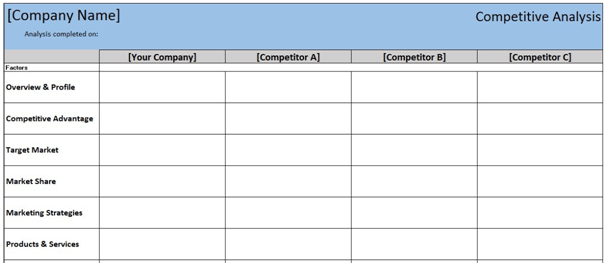
I suggest you start with five of your direct competitors and analyze their website. Create a spreadsheet, like the one below to track your progress.
When looking at your competitor’s website, start finding out answers to these following questions.
- What type of content do our competitors publish, and what seems to work for them?
- What features or functions are they offering that users find useful?
- Which keywords do they rank well for that we don’t?
- How fast and smooth is their overall website experience?
- How well-structured is their navigation?
- Do they offer better UX on mobile?
- How do they guide visitors toward a conversion?
- Are they using personalization or dynamic content?
- How accessible is their design?
- How strong is their internal linking strategy?
Also Read
2. How to handle design and development during your website redesign?
If you want your website to flourish, a well-designed and developed website will help you get a front seat in the online market. However, both are a daunting task.
People are looking for something welcoming rather than a maze of letters and numbers.
Only through proper design and development, you can create a user-friendly environment where people can learn about your business or find out new stuff.
To make your design and development experience flawless and customer focused, you can also hire a web development company who can help you create a perfect website.
Here are some points to keep in mind for a successful design and development.
Design
According to Stanford University’s web credibility research, 75% of users admitted that they judged a business based on their web design alone. And another research conducted by Missouri University of Science and Technology discovered that first impressions of a website are 94% design related.

Think about it from a human level, if a person seemed untrustworthy, will you do business with them?
Obviously no!
Remember your website is an extension of your brand. One of the main purposes of your website is to communicate with the user so that it entices them to engage with you and finally become your customer.
Here are some questions which will help you frame the right design.
- What’s working well on our current site, and what isn’t?
- Does the homepage clearly communicate value within a few seconds?
- Is the hero section clean, simple, and backed by a clear CTA?
- Are fonts and spacing comfortable to read?
- Are we designing components that can be reused throughout the site?
- Are we thinking mobile-first throughout the design process?
- Do our visuals, icons, and graphics feel consistent and modern?
- Is our color palette accessible and easy on the eyes?
- Are we designing with A/B testing in mind?
- Does the layout follow common UX patterns that users expect?
Development
According to SAG ipl, 68% of the companies that developed a mobile-first website saw a rise in sales.
Web development is complex as it involves working across multiple things. Your website is what presents your business to the people in the real world. Everything from website design, color, ease of navigation, and loading time matters.
Unless you try and test, you will never know what will work for your website. However, developing your website based on universal conventions is recommended.
Here are some of the basic questions to evaluate your website.
- Are we optimizing for Core Web Vitals like LCP, CLS, and INP?
- Is our hosting modern and fast (PHP 8+, Redis, HTTP/3, CDN)?
- Are images converted to modern formats like WebP or AVIF?
- Are images and iframes set to lazy load?
- Is caching configured properly on both server and browser side?
- Are we minimizing heavy scripts and trimming unnecessary plugins?
- Are we implementing structured data on key templates?
- Are analytics and tracking scripts loading efficiently?
- Are essential security headers in place?
- Are all forms protected from spam?
- Are we testing on all major browsers and device types?
Also Read
3. How to redesign your website without losing SEO?
A website redesign is utterly useless if a user can’t find you. To improve your website metrics, you have to get found.
As such redesigning your website can be stressful but what will happen to the SEO of your current website? You don’t want to lose the hard work you’ve put to get a strong ranking.
Before you Start
Here are a few tips to redesign your website according to SEO.

- Export all titles, descriptions, and header tags
- Export and map all old URLs
- Identify pages that bring traffic or conversions
- Audit thin and duplicate content
- Check which keywords competitors focus on
- Review internal linking
- Export your backlink profile
- Scan your site structure
- Check indexing issues in Search Console
- Review robots.txt and canonical tags
- Backup everything, even if you think you won’t need it
During the Redesign
Here are some implementation tips.
- Keep important URLs unchanged if possible
- Set up 301 redirects correctly
- Upload a clean XML sitemap
- Test crawling and indexing
- Validate schema markup
- Make sure metadata and alt text carry over
- Re-run Core Web Vitals tests after the redesign
- Request indexing for new or changed pages
After the Launch
- Watch your keyword rankings daily for a few weeks
- Track errors, 404s, and redirect issues
- Fix any redirect chains
- Re-check canonical tags
- Monitor organic traffic trends closely
This simple SEO website redesign checklist can help you with smooth SEO migration to your new website. If you struggle to implement any one of these tips, you can outsource SEO services to make sure you don’t lose search engine ranking during the transition.
4. How to develop a content strategy for your website redesign?
A survey states, companies who blog receive 55% more visitors, 97% more inbound links, and 434% more indexed pages.
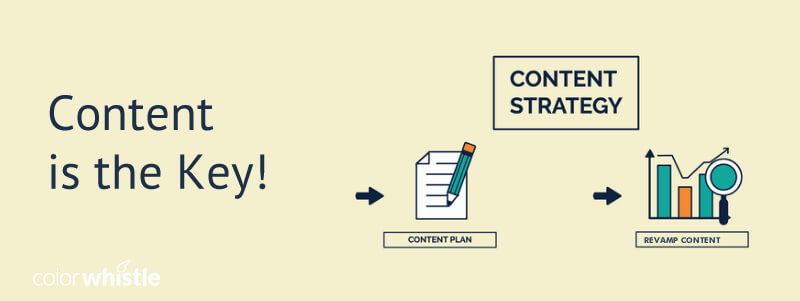
Undoubtedly, in the website redesign checklist, content strategy can help you find the type of content that is working and see where you can improve. Website redesign will also serve as an amazing opportunity to institute new content practices too.
Here are a few tips to refresh your content strategy during your website redesign.
- Decide which content stays, gets updated, or needs to go
- Look at what content is actually performing well
- Build new topical clusters or strengthen existing ones
- Improve content using E-E-A-T principles
- Add visuals, videos, tools, and richer content where it helps
- Strengthen CTAs and internal linking throughout the site
- Merge thin or outdated pages into stronger, more useful ones
- Add FAQs with proper schema markup
- Make sure tone and messaging feel unified across the site
- Rewrite content so it’s easier to skim and understand
- Map content to the user journey (awareness, consideration, conversion)
5. How to launch your redesigned website?
Until now you were planning and finding new information to revamp your website for real-world usage. The final slice in the website redesign checklist is to process the launch and to make sure the changes don’t break anything.
Some important things to check the post here are:
- Does everything look and work properly across all devices?
- Are forms, CTAs, and popups behaving as expected?
- Are all old URLs redirected to their new homes?
- Are GA4, Search Console, Tag Manager, and Pixel tracking correctly?
- Is the site out of staging mode and indexable?
- Are images optimized and loading fast?
- Does the site meet accessibility basics?
- Did we run Lighthouse + Web Vitals checks one more time?
- Are there any console or JavaScript errors?
- Is our schema valid?
- Is the CDN working globally?
- Do we have a clean backup ready?
- Are we monitoring 404 errors and fixing them quickly?
6. Why do most of the website redesigns fail?

Failure in most redesigns boils down to these points.
- Decisions are based on opinions instead of data
- No clear strategy before jumping into design
- User feedback is skipped entirely
- SEO gets ignored and rankings drop
- Too many fancy animations or scripts slow the site down
- Core Web Vitals aren’t considered early in the project
- Accessibility is forgotten
- Tracking isn’t set up, so success can’t be measured
- Too many third-party tools create performance issues
- Content becomes messy without a plan
- No one monitors performance during the first month after launch
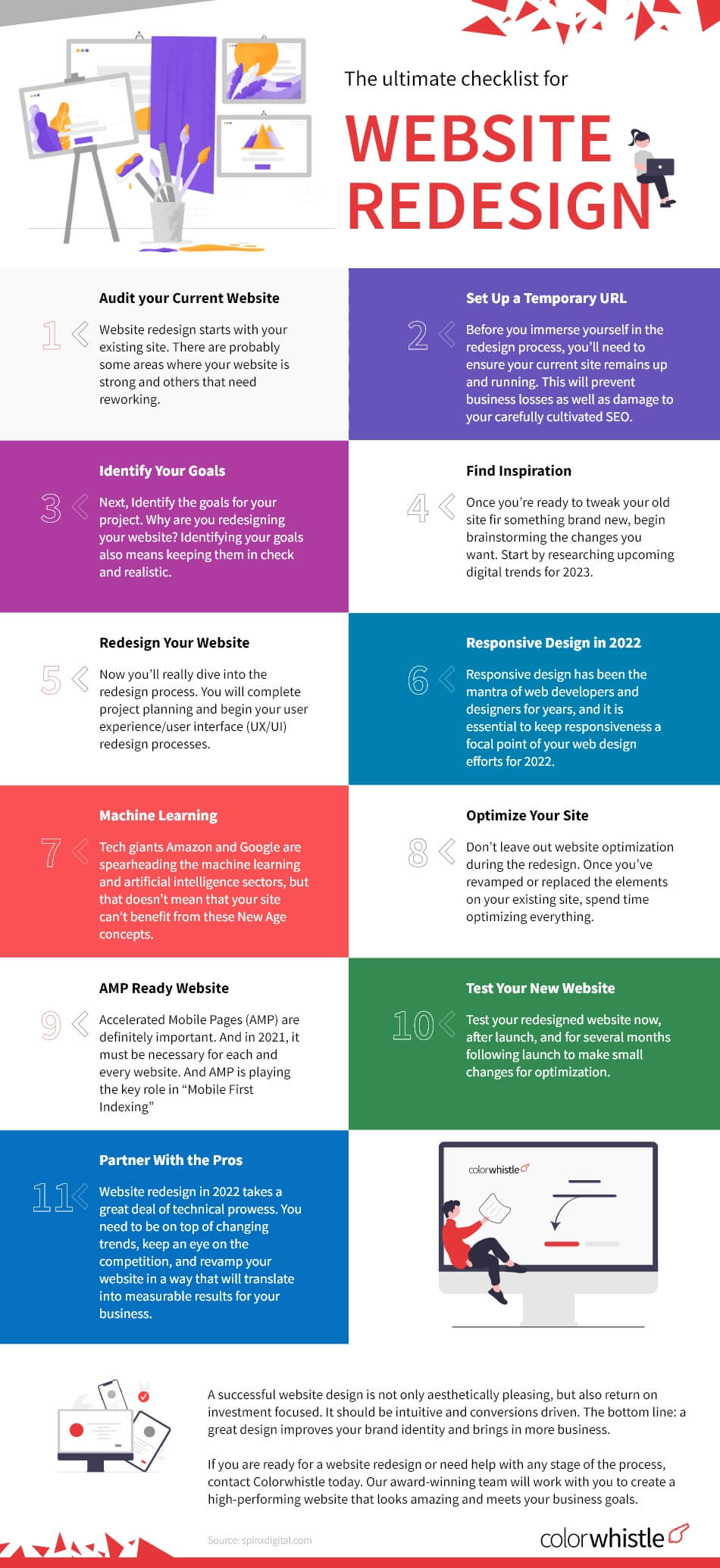

Drawing the final curtain to our website redesign checklist
With the lines between the online and offline world becoming more and more blurred, it has never been more important for businesses to make a web presence.
No matter the business, your potential customers would have searched you online before reaching out to you.
Once your redesigned website goes live, you have one more step left- to see how the goals you set are working out.
Through analytics and tracking data, you can find out if goals are met or if more work is required.
If goals are not met, keep on iterating until you accomplish them. Under such circumstances, a split testing will be useful.
You can drink your victory champagne and deem your website redesign a success once your goals are met!
If you follow our website redesign checklist before your pre-launch, your post-launch will be a breeze.
Are you ready to explore website redesign opportunities? ColorWhistle can help. We offer Website Redesign Packages to fit your specific needs and goals. For any questions relating to web development, web design, SEO or digital marketing, leave your comments below!”
In quest of the Perfect Website Redesign Solutions Buddy?
Be unrestricted to click the other trendy writes under this title that suits your needs the best!
- Winning the Web: Strategies for Business Website Redesign and Growth
- Website Redesigning: Embracing Personalization and Dynamic Content for Tailored User Journeys
- Revamping Your Corporate Brand: Strategies for Successful Website Redesign and Branding
- Large Website Migration Case Studies and Checklists
- Website Redesign Essential & Benefits Guide
- Top 11+ Website Redesign Agencies in the UK
- CMS for Website Redesign : Important Benefits
 Best SEO Case Studies List that Actually Work...









This design is incredible! You definitely know how to keep a reader amused. Between your wit and your videos, I was almost moved to start my own blog (well, almost…HaHa!) Excellent job. I really enjoyed what you had to say, and more than that, how you presented it. Too cool!
Thanks for giving your ideas.
Hey Anjana,
First of all thanks for such a great post you have shared here.
Points which you have covered in this article is really excellent one.
All the five points and it sub-points are really appreciable one.
I hope you will keep updating like this in future.
Let this post share with my website design team.