


AI Website Automation with APIs, MCPs & LLMs

Anusha is a digital strategy expert with deep expertise in branding, UI/UX, and performance-focused content. She brings advanced insight into brands to scale intelligently, blending creativity with conversion-focused thinking.

Our authors are proven experts in their fields, writing on topics where they have demonstrated expertise. Every piece of content undergoes peer review and validation by industry professionals.
AI Summary
Key Highlights of AI Website Automation Using APIs and MCPs
This post explores how to implement AI website automation effectively using APIs, MCPs, and LLMs. The key insight: treat LLMs as planners and routers, not sole knowledge sources, leveraging APIs as execution surfaces for reliability. It serves developers aiming to build production-grade automations that orchestrate complex workflows across CMS, CRM, support, and analytics systems. The guide details architecture patterns, tool calling, context management, and security best practices to reduce complexity and ensure auditability. By adopting MCP standards and strict tool design, readers will learn to streamline multi-step workflows, improve scalability, and secure AI-driven website operations for real-world deployment.
If you have ever built “automation” for a website, you already know the uncomfortable truth.
Most automations are not hard because the logic is complex. They are hard because everything touches everything.
Your CMS, your database, your auth model, your analytics, your email provider, your CRM, your support inbox, your cache, your queue, your deployments, your rate limits, your permissions, and your auditors.
Now add LLMs to the mix.
Used correctly, LLMs become a powerful orchestration layer that can interpret intent, choose tools, and execute multi-step website workflows that used to require glue code, dashboards, and manual ops.
Used incorrectly, they become a probabilistic root shell with unclear permissions.
This guide is a technical, developer-friendly blueprint for doing it the right way using:
- APIs as your source of truth and execution surface
- MCPs (Model Context Protocol servers) as a standardized tool layer
- LLMs for planning, tool selection, and natural-language interfaces
- Workflow, monitoring, and security practices that make this production-grade
What “AI website automation” actually means
AI website automation is not just about generating content and publishing it. It represents a broader concept of end-to-end orchestration across your web stack.
Typical examples:
- Publish a post, generate a social thread, schedule it, and attach tracking links.
- Triage a support ticket, fetch order details, and draft a reply with citations.
- Review a PR, run tests, summarize changes, and post release notes to the CMS.
- Detect a traffic anomaly using AI on website performance, correlate with deployments, and open an incident.
- Qualify leads from a form submission with AI-assisted website design, enrich the data, and push to CRM.
- Moderate user-generated content using AI which is revolutionizing website development, quarantine suspicious posts and alert admins.
All of these require tools (APIs) and a system that can reliably call them.
That is where tool calling and MCP become the center of the architecture.
Core architecture: LLM + Tools + Guardrails
A production setup usually looks like this:
- User intent enters (chat UI, admin panel, webhook, scheduled job).
- Agent runtime runs an LLM with instructions (system prompt), context (state, memory, relevant documents), and tool definitions (functions, MCP tools).
- The LLM plans and calls tools (API calls) with structured arguments.
- Tools execute with permissions, rate limits, and validation.
- Results flow back to the LLM to continue or finalize.
- Everything is logged, monitored, and auditable.
A key strategic shift: the LLM should not be “the brain that knows everything.” Instead, the LLM acts as a router and planner that leans on tools for facts and actions. If you want reliability, you want a tool-first design.
Agent architecture patterns that work in production
Single-agent tool caller (good default)
A single LLM instance calls tools iteratively until it completes a goal. Use this when workflows are short (1 to 10 tool calls), you can define tight tools and validations, and you want minimal moving parts.
Planner-executor (more reliable for multi-step workflows)
Split the work across dedicated roles to reduce tool-call chaos and make it easier to enforce workflow structure:
Planner: creates a plan and constraints.
Executor: runs steps with tools such as LLM’s text generator, and returns results.
Verifier (optional): checks the output against policy and required fields.
In this context, it’s also worth exploring alternative Google Keyword Planner AI options for better keyword strategy in your content planning phase. Furthermore, if you’re in need of a specialized digital platform for your Australian finance website design, remember that these agent architecture patterns can be adapted to suit your specific needs.
Multi-agent (only when you have a real reason)
Multiple specialized agents: SEO agent, CMS agent, Support agent, SRE agent.
This is useful when:
- The tool surface is huge.
- You have different permission boundaries.
- You need parallel work.
However, it is also where complexity explodes. Start simple.
MCPs: why they matter for website automation
MCPs: why they matter for website automation
MCP (Model Context Protocol) is a standard for exposing tools, resources, and prompts to LLM applications through MCP servers.
Why developers should care:
You can package integrations (CMS, DB, Stripe, analytics) as tool servers.
Your agent runtime can connect to MCP servers rather than hardcoding tool schemas.
Tools become discoverable, typed, and reusable across apps.
In practice, MCP helps you move from:
- “every project has custom tool wiring” to
- “tools are standardized services”
If you are building an internal automation platform for multiple sites or brands, MCP saves you from rewriting the same integration layer.
Reference: MCP documentation (use the spec and server examples to implement tool exposure and permission boundaries).
Tool calling: the bridge between intent and execution
LLM tool calling (sometimes called function calling) means:
- You give the model a tool schema (name, description, JSON args).
- The model returns a structured tool invocation.
- Your runtime executes it and returns results.
This approach aligns perfectly with websites because websites already have APIs.
For instance, an SEO agent can be integrated into your website automation process to enhance search engine visibility. Moreover, if you’re looking to develop an AI app or need expert advice on AI implementation through our AI consulting services, we have the necessary expertise.
Furthermore, if your business model involves travel services or multi-vendor marketplace setups, we offer specialized solutions such as travel website development and multi-vendor marketplace website development.
Tool design rules (hard-learned)
- Make tools small and composable. Use
get_post(id), notdo_everything_for_post(...). - Use strict schemas. Validate with JSON Schema, Zod, or Pydantic.
- Make tools idempotent where possible. Publish actions should be safe to retry.
- Return machine-usable outputs. Include IDs, URLs, timestamps, and status codes.
- Separate read vs write tools. They require different scopes and different approvals.
Tokens, context windows, and context management (the real bottleneck)
In production, your biggest constraint is usually not “model intelligence.” It is context limits and cost.
What to include in context
- The immediate user request
- The current workflow state (step, variables, already-called tools)
- The minimum policy and security rules
- Retrieved documents relevant to the current step
- Tool results, summarized if large
What to leave out of context
- Entire CMS pages
- Whole database rows when you only need a few fields
- Large logs, HTML blobs, and long email threads without summarization
Practical context management strategies
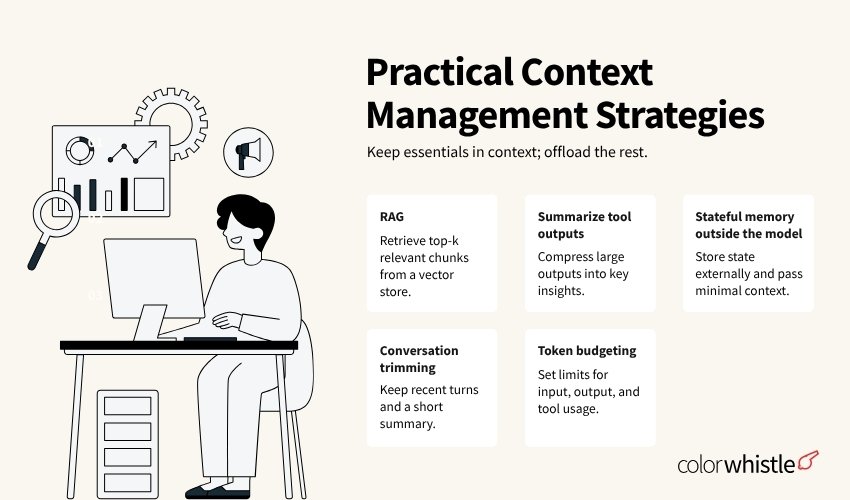
RAG (retrieval augmented generation)
- Store your docs (SOPs, schema docs, CMS conventions) in a vector store.
- Retrieve only the top-k chunks per step.
Summarize tool outputs
If get_comments() returns 500 items, summarize the results and keep a pointer to the full object store.
Stateful memory outside the model
- Use Redis or Postgres to store workflow state.
- Pass only a compact state object back into the LLM.
Conversation trimming
Keep the latest turns plus a running summary.
Token budgeting
Define budgets per step: input tokens, output tokens, and maximum tool calls.
If you do not budget, you will ship something that works in staging and silently fails at scale.
Permissions, approvals, and security (non-negotiable)
LLM automation touches the most sensitive part of your business: the ability to change things.
Treat this as an identity and authorization problem first.
Permission model: scopes + role binding
Define scopes like:
- cms.posts.read
- cms.posts.write
- cms.media.write
- users.read
- users.ban
- payments.refund
Then bind scopes to:
- human roles (admin, editor, support)
- automation roles (publishing-bot, moderation-bot)
- environment (staging vs production)
Human-in-the-loop (HITL) approvals
For high-impact actions, require approvals:
- Publishing content
- Sending messages to customers
- Issuing refunds
- Deleting users or data
Pattern:
- LLM prepares a “proposed action” object
- System renders it in an admin UI
- Human clicks approve
- Only then does the tool execute
Tool execution sandbox
Never let the model execute arbitrary HTTP requests.
Instead:
- Only allow calls to tools you define.
- Tools should call allowlisted domains and routes.
- Tools should enforce input validation and output filtering.
Defend against prompt injection
Prompt injection is not theoretical. It is common when you ingest content from the web, emails, or user-generated text.
Mitigations:
- Treat external content as untrusted data, not instructions.
- Use structured tool outputs, not raw HTML.
- Apply content filtering and allowlists.
- Keep system policies outside the retrieved context where possible.
- Use a “policy check” step before any write action.
Secrets and key management
- Do not put API keys in prompts.
- Use a secrets manager such as AWS Secrets Manager, GCP Secret Manager, or Vault.
- Rotate keys and use short-lived tokens when possible.
- For OpenAI API usage, keep keys server-side only.
Integrations you will actually need
You mentioned several key surfaces. Here is how they fit into a real automation stack.
OpenAI API (LLM + tool calling)
You will typically use a chat/completions endpoint with tool calling, embeddings for retrieval (RAG), and optionally structured outputs for strict JSON responses.
What matters architecturally:
- Model selection per task — use a cheaper model for triage and a stronger model for planning.
- Rate limits and retries
- Token budgeting
- Tracing per request
CMS APIs (WordPress, headless CMS, custom)
For WordPress specifically, common routes include REST API endpoints for posts, media, and users, as well as custom endpoints for workflows.
Best practice: use a service layer in front of the WP REST API
- Normalize schemas before passing data downstream.
- Enforce scopes to restrict what callers can access.
- Log audits for all read and write operations.
- Apply rate limits on write operations.
WhatsApp / Telegram APIs (messaging automation)
Messaging integrations are high-risk because mistakes become user-visible instantly.
Patterns that work
- Draft-first: generate the message and require approval before any outbound send.
- Use approved message templates with variables to reduce free-form risk.
- Apply rate limiting per recipient.
- Enforce opt-out compliance and maintain full send logs.
Common use cases
- Order updates
- Support triage
- Lead qualification
- Admin alerts from monitoring
In addition to these integrations, it’s important to consider whether to use custom AI solutions or off-the-shelf alternatives. Custom solutions can provide more tailored functionality but may require more resources to develop and maintain.
Workflow design: from “agent” to “automation system”
A reliable system treats LLM calls as steps inside a workflow engine, similar to the AI workflow automation examples that are becoming increasingly popular.
Recommended workflow components
- Trigger: webhook, cron, message queue, UI request
- State store: Postgres/Redis with workflow IDs
- Queue: SQS/RabbitMQ/Kafka for background execution
- Tool layer: internal APIs or MCP servers – MCP for AI workflow automation
- LLM runtime: orchestrator with retries and budgets
- Approval UI: for HITL steps
- Audit log: immutable events
Example workflow: publish a post + notify Telegram
Step 1 — Trigger
Initiate with: “Publish draft #123”
Step 2 — Tools called in sequence
cms.get_post(123)seo.check_readability(text)– leveraging the power of AI tools in workflow automationcms.update_post(123, patched_content)cms.publish_post(123)telegram.send_message(channel_id, text)
Step 3 — HITL
Require approval before the publish step and before the message send.
Step 4 — Monitoring
Log tool latencies, publish success, and message delivery.
This workflow is deterministic. The LLM’s role is to propose edits, produce summaries, and choose next steps when there is ambiguity.
Monitoring and observability for LLM automations
If you cannot answer “why did this message get sent” in 30 seconds, you will regret shipping.
Minimum observability checklist:
Structured logs
Log the following events:
workflow.startedllm.called(model, tokens in/out, latency, request ID)tool.called(tool name, args hash, result size, latency)approval.requested/approval.grantedworkflow.completed/workflow.failed
Do not log sensitive payloads by default. Store them separately with access controls.
Incorporating insights from the latest AI workflow automation trends can further enhance your system’s efficiency and effectiveness. Moreover, focusing on LLM observability can provide deeper insights into your automations, helping you to understand and optimize their performance better.
Tracing
Use OpenTelemetry or a similar tracer to tie together inbound triggers, LLM calls, tool calls, and external API calls.
Quality metrics
Track the following:
- Tool-call error rate
- Retry rate
- Average tool calls per workflow
- Token usage per workflow type
- Human override rate (how often approvals reject)
- User satisfaction signals (support outcomes, click rates)
Alerts
Alert on the following:
- Write-tool spikes
- Unusual outbound messaging volume
- Repeated failures on the same step
- Cost anomalies (token spend spikes)
- Permission denials (may indicate an attack or misconfiguration)
Scalability: making it fast, cheap, and safe
Scalability is a mix of architecture and discipline.
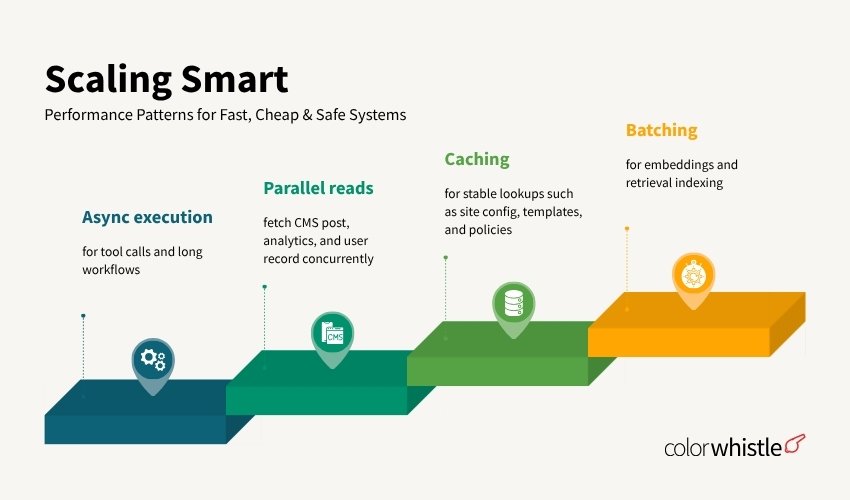
Performance patterns
- Async execution for tool calls and long workflows
- Parallel reads — fetch CMS post, analytics, and user record concurrently
- Caching for stable lookups such as site config, templates, and policies
- Batching for embeddings and retrieval indexing
Cost control patterns
Use smaller models for:
- Classification
- Routing
- Summarization
Use larger models only for:
- Planning complex steps
- High-stakes copy
General cost rules:
- Clamp output tokens hard
- Prefer retrieval over stuffing everything into context
Reliability patterns
- Retries with exponential backoff for external APIs
- Dead-letter queues for failed workflows
- Idempotency keys for write tools
- Circuit breakers when a dependency degrades
- Fallback modes — for example, “draft only” when publish fails
A practical reference stack (one you can actually build)
Here is a clean implementation approach that works for most teams:
- API gateway: routes tool calls, enforces auth/scopes
- Workflow engine: use Temporal, Prefect, Dagster, or a simple queue with a state machine
- MCP servers (optional but strategic): expose standardized tools across projects
Tool service layer
- CMS tool service (WordPress wrapper)
- Messaging tool service (WhatsApp/Telegram wrapper)
- Analytics tool service
LLM orchestration service
- OpenAI API client
- Tool calling runtime
- Context builder (RAG + memory)
Observability
- OpenTelemetry traces
- Centralized logs
- Cost dashboard
This separates concerns cleanly: the LLM decides what to do next, while tools decide whether an action is allowed and how it is carried out.
Common failure modes (and how to avoid them)
Failure mode 1: “The model posted the wrong thing”
Root causes: no approval step was in place, or the tool was too powerful and handled everything in one call.
Fixes:
- Add human-in-the-loop (HITL) approvals for any publish action
- Split tools into distinct read, draft, and publish operations
Failure mode 2: “It works in dev but not in prod”
Root causes: context, permissions, and rate limits differ between environments.
Fixes:
- Use a staging environment with production-like data
- Run synthetic tests that execute full workflows daily
- Implement rate limit handling and exponential backoffs
Failure mode 3: “Costs exploded overnight”
Root cause: unbounded token usage and large tool outputs stuffed into context.
Fix: enforce token budgets per workflow, use summarization, and store large outputs in external storage with pointers instead of loading them into context directly. It’s also beneficial to follow some OpenAI Codex best practices to optimize the usage.
Failure mode 4: “Prompt injection caused unsafe actions”
Root cause: untrusted content was treated as instructions.
Fix: isolate external content from instruction context, run policy checks before any write tools execute, and enforce allowlists and strict schemas on all inputs.
Putting it together: a minimal but solid blueprint
If you want to start implementing AI website automation this week, do it in this order:
- Inventory workflows — pick 2 to automate: one read-only, one write-with-approval.
- Define tool surface — design 10 to 20 small tools around CMS, messaging, and analytics.
- Build a permissioned tool gateway — include scopes, validation, audit logs, and rate limits.
- Add LLM tool calling via the OpenAI API — use a planner-executor pattern if workflows exceed a few steps.
- Implement context management — use RAG for docs and summaries for large tool outputs.
- Add approvals — especially for publishing and outbound messaging.
- Ship observability — traces, logs, token spend, and alerts.
- Scale via workflows and queues — async execution, retries, and dead-letter queues.
By following these eight steps, you will have something that is not just impressive in a demo but dependable in production.
In the realm of AI transformation, such strategies can significantly enhance efficiency across various sectors including CRM automation, where tailored AI workflows can revolutionize customer relationship management. Furthermore, these principles are also applicable when building enterprise websites or creating scalable AI-powered MVPs, ensuring that the end product is not only functional but also scalable. Additionally, for businesses in the travel sector looking to enhance their online presence with specific website features, these guidelines provide a solid foundation for leveraging AI effectively.
Wrap up
AI website automation works best when you treat LLMs as an orchestration layer, not a magical backend. This approach aligns with the principles outlined in our comprehensive AI-powered automation guide.
- APIs are the execution surface.
- Tool calling is the control plane.
- MCPs make tools portable and standardized across projects.
- Context management decides whether your system is stable or chaotic.
- Permissions and security decide whether you can deploy it at all.
- Monitoring and workflows decide whether it survives real usage.
Building it like you would any other critical system is key: minimal privileges, tight interfaces, observable behavior, and deterministic tools. This approach not only helps in achieving real automation instead of a clever toy but also facilitates the implementation of an AI SaaS credits system if your project requires such functionality.
In addition to website automation, AI can also be leveraged to create virtual classroom websites online or streamline processes in various sectors, including education through AI automation.
FAQs (Frequently Asked Questions)
What is AI website automation and how does it differ from simple content generation?
AI website automation refers to end-to-end orchestration across your entire web stack, not just generating and publishing content. It involves automating complex workflows such as publishing posts, triaging support tickets, reviewing pull requests, detecting traffic anomalies, qualifying leads, and moderating user-generated content by integrating various tools and APIs reliably.
How do Large Language Models (LLMs) enhance website automation?
LLMs serve as powerful orchestration layers that interpret user intent, select appropriate tools, and execute multi-step workflows on websites. When used correctly, they replace glue code and manual operations by planning and calling APIs with structured arguments while relying on tools for facts and actions to ensure reliability.
What is the core architecture for production-grade AI website automation?
A robust setup includes user intent input (via chat UI or webhook), an agent runtime running an LLM with system prompts and tool definitions, the LLM planning and calling APIs with permissions and validations, results flowing back to the LLM for continuation or completion, and comprehensive logging, monitoring, and auditing. This tool-first design ensures scalability and security.
What are the common agent architecture patterns for implementing AI-driven website automation?
Three main patterns exist: 1) Single-agent tool caller – a single LLM instance calls tools iteratively for short workflows; 2) Planner-executor – separates planning from execution to improve reliability in multi-step workflows; 3) Multi-agent – multiple specialized agents handle distinct domains like SEO or support but introduces complexity. Choosing depends on workflow complexity and permission boundaries.
Why are MCPs (Model Context Protocol servers) important in AI website automation?
MCPs standardize exposing tools and resources as discoverable, typed services to LLM applications. They allow packaging integrations like CMS or analytics as tool servers connected via MCP rather than hardcoding schemas. This standardization reduces redundant integration efforts across projects and enforces permission boundaries effectively.
What is ‘tool calling’ in the context of LLM-powered website automation?
Tool calling involves providing the LLM with tool schemas that define available functions with descriptions and JSON arguments. The LLM then returns structured invocations of these tools to execute specific API calls. This mechanism bridges user intent interpreted by the model with reliable execution of actions across web services.
 AEO & SEO Basic Website Setup Guide