



Brilliant Directories: The Complete Guide to Building, Monetizing and Scaling a Directory, Membership, Community or Marketplace

Rajeev is a developer and tech lead with more than 11 years of experience building high-performance websites across travel, education, real estate, and e-commerce. He focuses on speed, stability, and scalability, and enjoys creating API-driven solutions that help businesses extend their digital capabilities in smart and meaningful ways. He has a strong interest in integrating third-party systems and building custom functionality that supports long-term growth and real business outcomes. Outside of work, he is yet another Federer fan who dreams of someday watching Federer play at center court and he loves endurance cycling & playing badminton during his off time!

Our authors are proven experts in their fields, writing on topics where they have demonstrated expertise. Every piece of content undergoes peer review and validation by industry professionals.
AI Summary
Key Highlights of Brilliant Directories for Monetizing Directories
This post explores building and scaling online directories using Brilliant Directories, emphasizing strategic business models over features. The key insight: success depends on aligning platform capabilities with your specific directory type—whether a simple directory, membership site, community, lead generation network, or marketplace. It guides founders and marketers through planning structure, memberships, monetization, and integrations for growth. By focusing on core requirements first, users can effectively build, monetize, and expand their platforms. The post serves those aiming to create versatile, scalable directories that drive discovery, engagement, and transactions with practical, adaptable strategies.
Building a successful online directory is no longer just about creating a list of businesses and adding a search box.
Today, a directory website can include much more than searchable listings. It can combine member profiles, paid memberships, recurring subscriptions, lead generation, premium content, community features, advertising, digital products, and even marketplace transactions.
This creates a lot more opportunities for the business, but it also makes the planning and development process more complicated.
What should the business model look like? Should listings be free or paid? Should members pay monthly or annually? How should categories and search filters be structured? Can the directory generate leads? Can vendors sell products or services through the platform? What happens when the website needs to connect with WordPress, a CRM, a payment gateway, or another external system? Where can automation and AI fit into the overall platform?
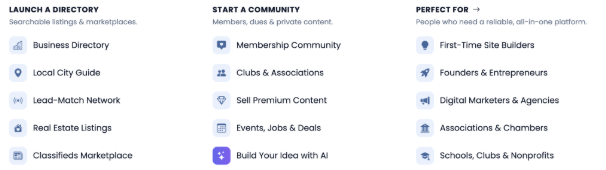
Brilliant Directories is designed to support many of these use cases. The platform currently positions itself for business directories, membership websites, online communities, local city guides, lead matching networks, premium content, and classified listings. It also includes features for membership management, recurring payments, lead monetization, premium content, and other revenue models.
But from our experience, the most important question isn’t simply whether Brilliant Directories have a particular feature.
The better question is:
Can Brilliant Directories support the business you are trying to build, and which parts should be handled through native functionality, configuration, integration, or custom development?
That distinction becomes especially important once a directory starts becoming more complex.
This guide looks at the different business models you can build, how to plan the directory structure, how memberships and monetization can work, and where integrations or custom development may become necessary.
The goal is to give you a practical understanding of what needs to be considered before starting a Brilliant Directories project.
Table Of Contents
- What Is ‘Brilliant Directories’?
- A directory is primarily about discovery
- A membership website is primarily about access
- A community is primarily about interaction
- A marketplace is primarily about transactions
- What Types of Businesses Can You Build?
- Local service directories
- Professional directories
- Industry and B2B directories
- Education directories
- Association and membership organizations
- Lead-generation networks
- Communities and paid networks
- Marketplace-oriented businesses
- Choosing the Right Directory Business Model
- Model 1: Free directory
- Model 2: Paid listings
- Model 3: Membership subscriptions
- Model 4: Pay-per-lead
- Model 5: Advertising
- Model 6: Marketplace commission
- Model 7: Hybrid
- Choosing a Profitable Directory Niche
- Start with a specific problem
- Evaluate the niche using a scoring framework
- Look for the monetization path
- Don’t build for everyone
- Directory vs Membership vs Community vs Marketplace
- A directory helps people discover
- A membership website provides access
- A community encourages interaction
- A marketplace facilitates transactions
- Why the distinction matters
- Designing Your Directory’s Information Architecture
- Start with the listing type
- Then define the taxonomy
- Taxonomy versus custom fields
- Plan parent-child relationships
- Design for future growth
- Building Powerful Search and Filters
- Search result design
- Sorting and ranking
- Pagination matters
- Membership Models That Actually Make Money
- Start with the value proposition
- A simple four-tier model
- Don’t create too many plans
- Membership can control more than price
- Free members can still be valuable
- Building Recurring Revenue
- What should a recurring membership include?
- Monthly versus annual billing
- Free trials
- Failed payments
- When standard recurring billing isn’t enough
- A Practical Framework for the First Stage of Your Project
- 1. Who are your users?
- 2. What are they looking for?
- How will they search?
- 4. Why will businesses join?
- 5. Why will they pay?
- 6. How will you make money?
- 7. What happens as the business grows?
- 8. Which functionality is actually custom?
- Payment Gateways and Custom Payment Integrations
- Start by identifying what you are charging for
- One-time payments
- Recurring payments
- Gateway selection matters
- When the standard integration isn’t enough
- Payment integrations should be designed around events
- What a custom payment integration may involve
- Turning a Brilliant Directories Website into a Lead-Generation Business
- Why paid leads can be attractive
- Common lead monetization models
- Pay per lead
- Lead credits
- Lead packages
- Subscription + leads
- Premium lead access
- Lead routing
- Geographic routing
- Lead quality matters more than lead volume
- Turning a Directory into a Marketplace
- Directory model
- Marketplace model
- What does a marketplace need?
- Example marketplace flow
- Marketplace Payment Architecture
- Model A: Marketplace collects everything
- Model B: Vendor receives the payment
- Model C: Payment platform handles split payments
- Why merchant-of-record questions matter
- Marketplace integrations
- Community Features: Turning Visitors Into Returning Users
- Useful community features
- Community features should serve the niche
- Member-Only Content and Access Control
- Access control is more than hiding a button
- Member permissions can become sophisticated
- Using Brilliant Directories with WordPress
- WordPress can handle the content side
- Brilliant Directories can handle the directory side
- Integration approaches
- Separate sites
- Subfolder
- Shared authentication
- API synchronization
- Brilliant Directories and WordPress SSOSingle Sign-On, or SSO, becomes relevant when users should not need separate credentials for two connected systems.
- What does a real SSO project involve?
- Role-to-membership mapping
- Bidirectional synchronization
- When should you consider SSO?
- Brilliant Directories API, Webhooks and External Integrations
- Common integration targets
- API integration
- Webhooks
- Scheduled synchronization
- Real-time versus scheduled
- Integration architecture matters
- When Do You Need a Custom Brilliant Directories Plugin?
- Level 1: Native functionality
- Level 2: Configuration
- Level 3: Design or theme customization
- Level 4: Integration
- Level 5: Custom plugin
- Level 6: External application
- Examples of requirements that may justify custom development
- Why plugins can be preferable to core modifications
- Don’t customize for the sake of customization
- How to Decide Between Native BD, Integration and Custom Development
- What a Professional BD Discovery Process Should Look Like
- Why Requirements Analysis Matters More Than Feature Lists
- The Right Architecture Depends on the Business Stage
- Stage 1: Validate
- Stage 2: Monetize
- Stage 3: Automate
- Stage 4: Expand
- Stage 5: Intelligence
- What Makes a BD Project Simple or Complex?
- Number of user roles
- Number of systems
- Number of transactions
- Number of business rules
- Data volume
- Payment requirements
- Synchronization
- Security
- A Practical Checklist Before Hiring a Brilliant Directories Developer
- The Core Principle: Build the Business, Not Just the Directory
- How AI Can Transform a Brilliant Directories Website
- AI-powered directory search
- AI member matching
- AI lead qualification
- AI-generated member profiles
- AI categorization
- AI data enrichment
- AI review summarization
- AI recommendations
- AI-powered administration
- How AI can connect to BD
- How Much Does a Brilliant Directories Website Cost?
- Cost category 1: Basic configuration
- Cost category 2: Custom directory functionality
- Cost category 3: Membership customization
- Cost category 4: API integrations
- Cost category 5: Payment integrations
- Cost category 6: Custom plugins
- Cost category 7: Marketplace development
- The right way to estimate
- Real-World Development Cost Examples
- What Services Might You Need for a Brilliant Directories Project?
- Brilliant Directories consulting
- BD setup and configuration
- Custom design and UX
- Custom BD development
- BD plugin development
- Payment integration
- WordPress integration
- Marketplace development
- Data migration
- Performance optimization
- Migrating an Existing Directory to Brilliant Directories
- A typical migration process
- Step 1: Inventory
- Step 2: Map
- Step 3: Transform
- Step 4: Validate
- Step 5: Import
- Step 6: Test
- Step 7: Launch
- Migration is also an opportunity
- Performance, Security and Maintainability
- Search performance
- Pagination
- Images
- API performance
- Maintainability
- A Practical Brilliant Directories Project Roadmap
- Phase 1: Business model
- Phase 2: Requirements
- Phase 3: Information architecture
- Phase 4: Native BD configuration
- Phase 5: UX/UI
- Phase 6: Custom development
- Phase 7: Integrations
- Phase 8: Data migration
- Phase 9: Testing
- Phase 10: Launch
- Phase 11: Optimization
- Common Brilliant Directories Project Mistakes
- Mistake 1: Starting with features instead of the business model
- Mistake 2: Designing taxonomy too late
- Mistake 3: Treating every field as a custom field
- Mistake 4: Choosing payments too late
- Mistake 5: Assuming every payment workflow is standard
- Mistake 6: Building a marketplace without understanding the money flow
- Mistake 7: Over-customizing
- Mistake 8: Ignoring existing WordPress architecture
- Mistake 9: Building AI before fixing the data
- Mistake 10: Launching an empty directory
- Mistake 11: Building everything at once
- Brilliant Directories Native Features vs Custom Development
- When Should You Hire a Brilliant Directories Developer?
- The best time to involve a developer may be before development starts
- Questions to Ask Before Hiring a BD Development Partner
- Business understanding
- Native capability
- Architecture
- Integrations
- Payments
- Testing
- Future development
- Cost
- The Future of Directory Businesses
- Frequently Asked Questions About Brilliant Directories
- Who are Brilliant Directories?
- Can I build a paid membership website with Brilliant Directories?
- Does Brilliant Directories support recurring payments?
- Can Brilliant Directories be used for a marketplace?
- Can I connect Brilliant Directories with WordPress?
- Can WordPress and Brilliant Directories share users?
- Does Brilliant Directories have an API?
- Can I integrate a custom payment gateway?
- How much does Brilliant Directories development cost?
- Can I migrate an existing directory?
- Can I create multiple membership levels?
- Can I monetize leads?
- Can I use AI with Brilliant Directories?
- Do I need a Brilliant Directories developer?
- Should I customize Brilliant Directories immediately?
- What is the biggest mistake when building a BD website?
- Final Checklist for Launching a Brilliant Directories Business
- Conclusion: Build the Business, Not Just the Directory
What Is ‘Brilliant Directories’?
Brilliant Directories is a platform for building websites where structured listings, members, search, content, and monetization need to work together.
At the most basic level, you can use it to create a directory of businesses or professionals.
But that’s only one possible use case.
A directory can become a membership business. A membership business can grow into a community. A directory can become a lead generation platform. It can also evolve into a marketplace where businesses offer products, services, bookings, or other transactions.
Because of this, the business model is often more important than the initial website design.
Before getting into the technical side, it helps to understand what type of platform you are actually trying to build.
A directory is primarily about discovery
A visitor comes to the website because they are looking for something.
For example:
- A plumber
- An accountant
- A lawyer
- A healthcare provider
- A school
- A consultant
- A supplier
- A local business
- A service provider
- An event
- A property
- A product
The purpose of the directory is to organize these businesses, professionals, products, or resources in a way that makes them easier for visitors to discover.
The basic journey is usually:
Search → Filter → Compare → Contact
The more useful and relevant the search results are, the more value the directory provides to the visitor.
But discovery is only one part of what a directory platform can do.
A membership website is primarily about access
A membership website introduces different levels of access for its users.
For example:
- Free membership
- Basic membership
- Professional membership
- Premium membership
- Enterprise membership
Each membership level can offer different benefits, visibility, permissions, or commercial opportunities.
For example, a free member may only have access to a basic profile, while a premium member may get better visibility, additional profile fields, lead access, or other features.
This changes the role of the website.
Instead of simply helping visitors discover businesses, the platform also needs to provide enough value to members to justify their ongoing membership.
A community is primarily about interaction
Once people have profiles and a reason to participate, a directory can become more than a database.
It can become a community.
Depending on the business model, members may be able to:
- Find one another
- Communicate
- Publish content
- Participate in discussions
- Attend events
- Exchange recommendations
- Build professional relationships
- Access members-only resources
At this point, the directory becomes one part of a larger member experience.
The search functionality is still important, but interaction and engagement become equally important.
A marketplace is primarily about transactions
The next stage is commerce.
Instead of simply helping a visitor find a provider, the platform can facilitate an actual transaction.
For example:
- Product sales
- Service purchases
- Bookings
- Reservations
- Leads
- Payments
- Vendor commissions
- Customer reviews
This creates another level of complexity.
The platform now needs to be involved in some or all the commercial transaction between the customer and the provider.
That can introduce requirements around payments, orders, bookings, refunds, commissions, vendor accounts, payouts, and transaction records.
This progression is useful to keep in mind:
Directory → Membership → Community → Leads → Commerce → Marketplace
Not every business needs to reach the final stage.
In fact, one of the common mistakes we see in directory projects is trying to build everything from day one.
A better approach is to first understand the business model and then select the technology and functionality needed to support that model.
Start with the core requirements.
Build that properly.
Then expand the platform as the business grows.
What Types of Businesses Can You Build?
One of the advantages of using a flexible directory platform is that the same basic concepts can support very different types of businesses.
The difference usually comes down to the data structure, membership model, search experience, monetization strategy, and workflows.
Let’s look at some common examples.
Local service directories
- Service
- Category
- Location
- City
- County
- ZIP code
- Specialty
- Availability
- Business attributes
For example, a home services directory could allow someone to select a category such as plumbing or HVAC and then narrow the results based on their geographic location.
This type of directory can work particularly well when a lead has enough commercial value that businesses are willing to pay for visibility or customer enquiries.
The business doesn’t necessarily need to charge providers simply for having a listing.
It can also generate revenue from the enquiries generated through those listings.
Professional directories
Professional services are another natural fit for a directory platform.
Examples include:
- Lawyers
- Accountants
- Consultants
- Architects
- Financial professionals
- Coaches
- Agencies
- Technology specialists
- Healthcare professionals
In this type of directory, a listing can be much more than a name and phone number.
A professional profile could include:
- Areas of specialization
- Credentials
- Service areas
- Reviews
- Articles
- Videos
- Contact options
- Membership-specific features
This gives the member a reason to maintain and improve their profile while also giving visitors more information to make a decision.
Industry and B2B directories
A B2B directory connects businesses rather than individual consumers.
For example:
Manufacturers → Distributors → Suppliers → Service providers → Buyers
The directory can become a central place where businesses discover potential partners, suppliers, or service providers.
Depending on the industry, monetization could come from:
- Paid memberships
- Enhanced listings
- Lead generation
- Advertising
- Featured placements
- Direct transactions
B2B directories can also become more valuable over time as the number and quality of participating businesses increases.
Education directories
Education is another area where search architecture becomes particularly important.
A directory may need to allow visitors to search by:
- Institution
- Course
- Subject
- Location
- Delivery method
- Qualification
- Specialty
- Enrollment type
For example, a student may want to find a particular type of course in a specific city that is available online or offline.
The more attributes’ users need to combine during a search, the more important the underlying data structure becomes.
This is something that needs to be planned before development rather than added later as a collection of filters.
Association and membership organizations
Professional associations, clubs, nonprofits, and other organizations can use a directory as part of a larger membership experience.
The platform can combine:
- Member profiles
- Membership plans
- Dues
- Events
- News
- Resources
- Member communications
- Member-only content
Brilliant Directories currently position the platform for organizations such as schools, clubs, and nonprofits, including use cases around member directories, dues, donations, events, and news.
In these projects, the directory is often only one part of the overall website.
The membership system, content, events, and communication features can be equally important.
Lead-generation networks
A directory doesn’t necessarily have to make money by selling the listing itself.
Instead, the business can monetize the enquiries generated through the directory.
For example:
Visitor → Service request → Qualified lead → Relevant member → Lead fee
Consider a plumber, lawyer, insurance agent, or consultant.
A qualified customer enquiry may be significantly more valuable to them than simply having their business name displayed in a directory.
Because of this, they may be willing to pay for a qualified lead.
This creates a very different business model from traditional directory advertising.
The focus shifts from:
“How many people viewed this listing?”
to:
“How many useful enquiries did this listing generate?”
Communities and paid networks
A niche community can combine directory and membership functionality with ongoing member interaction.
For example:
- Member profiles
- Discussions
- Content
- Events
- Messaging
- Premium resources
- Member-only areas
- Recurring subscriptions
In this model, the directory becomes part of the community rather than being the entire product.
The reason someone joins may not simply be to create a profile.
They may join because they want access to a network, industry information, events, resources, or other members.
Marketplace-oriented businesses
The most complex model is usually a marketplace.
For example:
Customer → Provider discovery → Booking → Payment → Provider fulfillment → Review
At this point, the platform is no longer simply helping visitors discover businesses.
It has become part of the commercial transaction.
That introduces additional considerations around:
- Payment processing
- Commissions
- Refunds
- Vendor accounts
- Vendor payouts
- Booking systems
- Availability
- Transaction records
- Customer protection
- External integrations
This is where the distinction between a directory and a marketplace becomes particularly important.
A business may start with a directory and eventually move toward transactions, but the technical architecture should be planned with that possible progression in mind.
Choosing the Right Directory Business Model
Before choosing features, choose the business model.
This sounds obvious, but it is one of the most important decisions in a directory project.
A directory with 10,000 free listings and no clear monetization strategy isn’t necessarily a successful business.
On the other hand, a directory with only 500 highly valuable professional members can potentially generate substantial recurring revenue if those members receive enough value from the platform.
The number of listings alone isn’t the measure of success.
The important question is whether the platform creates enough value for the people participating in it.
Let’s look at some of the common models.
Model 1: Free directory
The directory is free for both businesses and visitors.
The business may generate revenue through:
- Advertising
- Sponsorships
- Affiliate commissions
- Featured placements
- Premium services
This model can be useful when the initial priority is audience and directory growth.
The objective is to remove the barrier to entry and build enough traffic and participation before introducing additional monetization opportunities.
However, the business still needs to think about how it will eventually generate revenue.
Getting thousands of free listings is useful only if those listings help create a sustainable business.
Model 2: Paid listings
In this model, businesses pay to appear in the directory.
This is one of the most straightforward monetization models.
However, the directory needs to provide enough value to justify the fee.
That value could come from:
- Search visibility
- Website traffic
- Leads
- Reviews
- Analytics
- Featured placement
- Customer enquiries
For example, a business may be willing to pay for a listing if it consistently generates relevant customer enquiries.
But if the listing receives no traffic or leads, retaining that paying member becomes difficult.
So the value proposition needs to be clear from the beginning.
Model 3: Membership subscriptions
Businesses or individuals pay recurring fees to access specific features.
For example:
| Plan | Possible Benefits |
|---|---|
| Free | Basic profile |
| Basic | Enhanced profile |
| Professional | Featured placement + leads |
| Premium | Priority visibility + advanced tools |
| Enterprise | Multiple users + custom features |
This model creates predictable recurring revenue and is one of the strongest reasons to combine a directory with membership functionality.
The membership isn’t simply a payment plan.
It can become the mechanism that controls what a member can access and how much value they receive from the platform.
Model 4: Pay-per-lead
In this model, the listing itself may be free, but members pay when they receive a lead.
This can work particularly well in high-value service categories.
For example, if a qualified customer enquiry is worth $500 to a service provider, the provider may be comfortable paying $20, $50, or more for that qualified lead.
The actual economics will depend heavily on the quality of the leads.
If members receive irrelevant or low-quality enquiries, they won’t continue paying for them.
So lead quality becomes one of the most important parts of this business model.
Model 5: Advertising
The directory can also generate revenue through advertising.
Possible options include:
- Banner advertisements
- Sponsored listings
- Category sponsorship
- Newsletter sponsorship
- Dashboard advertisements
- Featured placements
This model generally becomes more attractive once the website has significant traffic.
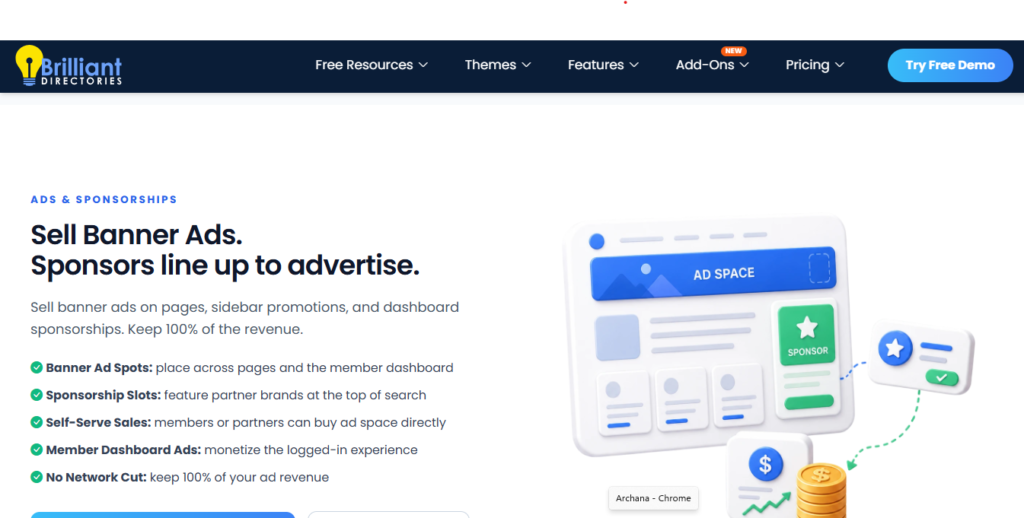
A directory with limited traffic may find it difficult to generate meaningful advertising revenue, while a directory with a large and targeted audience can offer advertisers a valuable channel.
Model 6: Marketplace commission
In a marketplace model, the platform takes a percentage of each transaction.
For example:
$100 customer purchase → $15 platform commission → $85 vendor
The actual economics will depend on the industry, payment structure, transaction value, and operating costs.
Marketplace models are more complex because the platform needs to account for:
- Transactions
- Refunds
- Vendor payouts
- Payment processing
- Customer disputes
- Order management
So this shouldn’t be treated simply as another monetization checkbox.
The entire transaction workflow needs to be considered.
Model 7: Hybrid
The strongest directory businesses often combine multiple revenue models.
For example:
Free members + paid members + paid leads + advertising + digital products
Or:
Free listings + premium memberships + marketplace commissions
Brilliant Directories currently promotes several monetization mechanisms, including subscriptions, paid leads, advertising, digital products, and gated content.
But just because the platform provides multiple monetization options doesn’t mean you should activate all of them.
This is something we recommend being careful about.
Choose the revenue models that support the actual value proposition of the directory.
If the main value of the platform is lead generation, focus on leads and membership.
If the main value is community access, focus on membership and premium content.
If the platform is intended to become a marketplace, plan the transaction flow from the beginning.
The technology should support the business model, not the other way around.
Choosing a Profitable Directory Niche
The niche is often more important than technology.
You can build a technically excellent directory, but that alone doesn’t guarantee that it will become a successful business. A directory can struggle if the market is too broad; businesses don’t see enough value in participating, or visitors don’t have a strong reason to come back.
So before deciding how to build the platform, it is worth spending time understanding the market.
Start with a specific problem
Instead of asking:
“What kind of directory should I build?”
A better question is:
“What group of people has a recurring problem finding, comparing, hiring, or interacting with a particular type of provider?”
This usually leads to much better opportunities.
For example:
- Finding qualified healthcare providers
- Finding local contractors
- Finding specialist consultants
- Finding suppliers within a specific industry
- Finding professional service providers
- Finding educational programs
- Finding specialized tourism experiences
The common factor is that the directory is solving a real discovery problem.
If people already have difficulty finding the right provider, comparing their options, or deciding who to contact, there is a stronger reason for the directory to exist.
Evaluate the niche using a scoring framework
Once you have a few potential niches, it helps to evaluate them systematically rather than choosing one simply because it looks interesting.
A simple approach is to score each potential niche from 1 to 5 across several factors.
| Factor | Question |
|---|---|
| Demand | Are people actively searching for these providers? |
| Supply | Are there enough businesses to populate the directory? |
| Competition | Is the market already dominated by established platforms? |
| Value | Is a customer worth enough to the provider? |
| Willingness to pay | Would businesses pay for access, visibility, or leads? |
| Repeat usage | Will visitors have a reason to return? |
| Community potential | Can members interact with each other? |
| Transaction potential | Can the directory eventually facilitate purchases or bookings? |
| Geographic opportunity | Is there a strong local or regional opportunity? |
| Expansion potential | Can the business expand into related categories later? |
You don’t necessarily need to find a niche that scores 5 out of 5 on everything.
The purpose of this exercise is to understand where the opportunity actually comes from.
A niche that scores well across several of these areas is generally more interesting than one selected simply because there are a large number of businesses in the category.
For example, a category may have thousands of potential listings, but if businesses don’t see enough commercial value in joining the platform, the size of the potential directory doesn’t help much.
On the other hand, a smaller industry with strong demand, high-value leads, and businesses that are willing to pay may provide a much better foundation.
Look for the monetization path
Another useful way to evaluate a niche is to think about how a member relationship could develop over time.
A typical progression could look like:
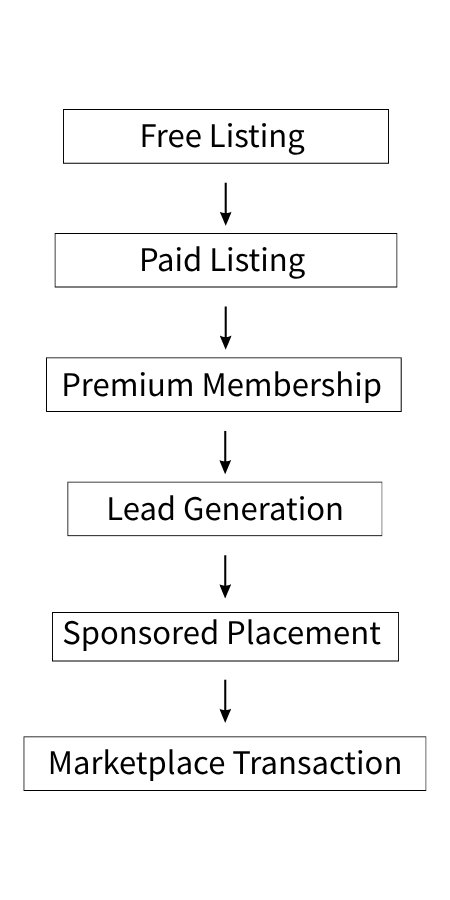
The point isn’t that every directory should implement all of these stages.
Instead, the idea is to make sure there is a reasonable path to monetization as the platform grows.
For example, a business may initially join the directory for free.
Once the business starts receiving traffic or enquiries, it may be willing to upgrade to a paid listing.
After that, it may be interested in additional visibility, premium leads, analytics, promotional opportunities, or other membership benefits.
Eventually, the same member relationship could support transactions or other commercial services.
This gives the business multiple opportunities to create revenue from the same member over time.
Don’t build for everyone
A common mistake is trying to make the first version of the directory too broad.
“All businesses in the United States” is usually not a useful niche.
“Independent HVAC contractors serving three specific metropolitan areas” is much closer to a practical starting market.
A focused directory gives you several advantages.
You can establish:
- Better search relevance
- Stronger content
- Better member acquisition
- More targeted marketing
- More useful leads
- Better community engagement
It is also easier to understand what your users actually need.
For example, if the directory is focused specifically on HVAC contractors in three cities, you can build the search experience, content, membership plans, lead-generation workflow, and marketing strategy around that particular audience.
Once the model works, the geographic or category scope can expand.
This is usually easier than starting with an extremely broad directory and trying to figure out the actual target audience after the platform has already been built.
Directory vs Membership vs Community vs Marketplace
The terms directory, membership website, community, and marketplace are often used interchangeably.
They shouldn’t be.
Although these platforms can share many of the same features, they represent different business models and user journeys.
Understanding the difference is important because it directly affects what the website needs to do.
A directory helps people discover
The primary interaction is:
Search → Compare → Contact
The most important features are therefore:
- Structured listings
- Categories
- Search
- Filters
- Locations
- Profiles
- Reviews
- Contact mechanisms
The goal is to help a visitor find the right business, professional, service, product, or resource.
For example, a local contractor directory may allow a visitor to search for plumbers in a particular city, compare several profiles, read reviews, and then contact the provider.
The directory is primarily focused on discovery.
A membership website provides access
The primary interaction becomes:
Join → Pay → Access
Now the important features change.
The platform may need:
- Membership plans
- Billing
- Permissions
- Renewals
- Content access
- Member dashboards
- Account management
The member is no longer simply creating a listing.
They are paying for access to a set of benefits.
Those benefits could include enhanced profiles, premium content, leads, better visibility, member resources, tools, or other services.
The membership system therefore becomes an important part of the business logic.
A community encourages interaction
The primary interaction is:
Join → Participate → Return
At this point, the platform needs to give members reasons to keep coming back.
Important features may include:
- Profiles
- Discussions
- Messaging
- Events
- Content
- Notifications
- Reviews
- Member-generated content
The directory may still be an important part of the platform, but it is no longer the entire product.
The value comes from the interaction between members and the resources available to them.
A marketplace facilitates transactions
The primary interaction becomes:
Discover → Purchase → Fulfill → Review
This introduces another level of complexity.
The platform may now need to manage:
- Vendors
- Products or services
- Orders
- Bookings
- Payments
- Commissions
- Refunds
- Payouts
- Availability
- Transaction records
At this stage, the platform is involved in commercial transactions rather than simply helping users find one another.
That distinction matters when planning the project.
Why the distinction matters
Imagine someone says:
“I want to build a directory for local contractors.”
That statement could describe at least four completely different projects.
Version A
A simple searchable directory.
Visitors search for contractors, view profiles, and contact them.
Version B
Contractors pay $50 per month for enhanced profiles.
Now the project needs membership plans, recurring billing, account management, and different profile capabilities.
Version C
Visitors submit a project request and contractors pay for qualified leads.
Now the platform needs a lead-generation workflow, lead distribution, member eligibility, and lead billing.
Version D
Visitors choose a contractor and book and pay through the platform.
Now the project has entered marketplace territory, with requirements around bookings, payments, commissions, refunds, payouts, and potentially vendor management.
All four projects might start with the same word:
“Directory.”
But their technical and commercial requirements are very different.
This is why requirements analysis needs to happen before development.
The word “directory” isn’t enough to define the project.
We need to understand what the users are expected to do, how businesses make money, how members are charged, how leads or transactions move through the system, and what the platform needs to manage behind the scenes.
Once those requirements are clear, it becomes much easier to determine which Brilliant Directories features can be used as-is, which ones need configuration, and where integrations or custom development may be required.
Designing Your Directory’s Information Architecture
One of the easiest ways to create problems later is to start adding listings before deciding how the data should be organized.
A directory’s information architecture affects almost everything that happens later.
It determines how visitors discover information, how search works, how filters are implemented, how listings are related to one another, and how easily the platform can scale when the number of listings grows.
This is why we recommend planning the data structure before starting the listing form.
Start with the listing type
The first question is simple:
What exactly does the directory contain?
For example:
- Businesses
- Professionals
- Products
- Services
- Courses
- Events
- Properties
- Organizations
Each listing type may require a different set of fields.
A professional profile may need credentials, specialties, experience, and service areas.
A product listing may need price, inventory, specifications, and product categories.
An event may need dates, venues, registration details, and event types.
A property may need location, property type, price, bedrooms, amenities, and availability.
The listing type should therefore be established before designing the fields.
Then define the taxonomy
After identifying the listing type, the next step is deciding how those listings will be organized.
A typical hierarchy might look something like:
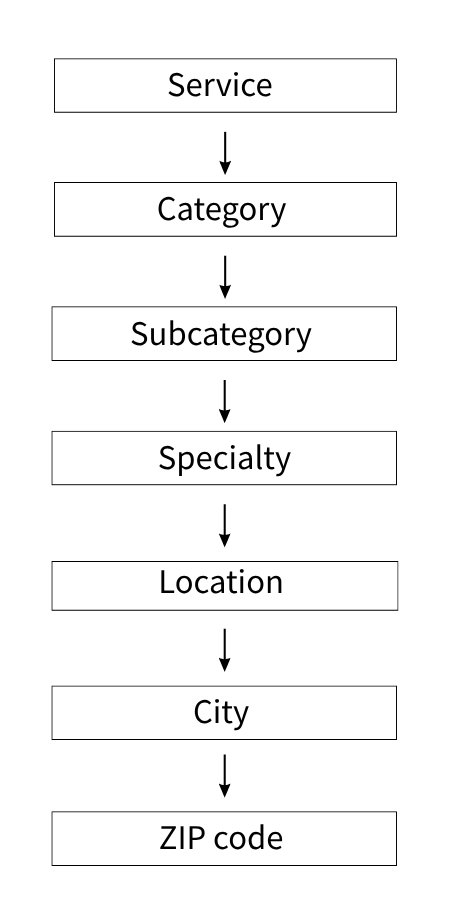
However, not every attribute should become a category.
This is an important distinction.
For example:
Plumber could be a category.
Emergency plumbing could be a specialty.
Dallas could be a location.
Available 24/7 could be an attribute.
These are all pieces of information about the listing, but they serve different purposes.
A visitor may want to browse all plumbing businesses.
They may then want to narrow the results to emergency plumbing services.
They may also want to restrict those results to Dallas.
Finally, they may want to see only providers that are available 24/7.
If all of these values are treated in exactly the same way, the search experience becomes harder to manage.
The structure needs to reflect how users are expected to search.
Taxonomy versus custom fields
This is one of the more important architectural decisions in a directory project.
Imagine that the directory eventually contains 20,000 listings and visitors frequently need to search by:
- Service category
- Location
- Specialty
Those dimensions need to be structured in a way that supports efficient filtering.
Simply creating dozens of unrelated custom fields may appear easier during the initial development stage, but it can make the system harder to maintain as the directory grows.
It can also create unnecessary performance problems when the website needs to query large amounts of data.
This is where planning becomes important.
In one of the real directory implementations we worked on, the requirements involved multiple search dimensions, taxonomy restructuring, institutional relationships, sub-accounts, and performance considerations.
Rather than relying on inefficient custom-field queries for everything, the implementation considered taxonomy-based filtering and pagination as part of the overall directory architecture.
The broader lesson is simple:
Design the search model before designing the listing form.
If you know how users will search, filter, and navigate the directory, you can make better decisions about how the underlying information should be stored.
This also becomes important when SEO is part of the project.
For example, in another directory implementation, a single filtered directory URL was not sufficient because the business needed individual, indexable pages for combinations such as specialist type and city. The solution involved creating separate member directory pages with backend filtering so each combination could have its own page and supporting content.
This is a good example of why search architecture, content structure, and SEO requirements need to be considered together.
Plan parent-child relationships
Some directories need more than a flat list of independent listings.
They may need organizational relationships.
For example:
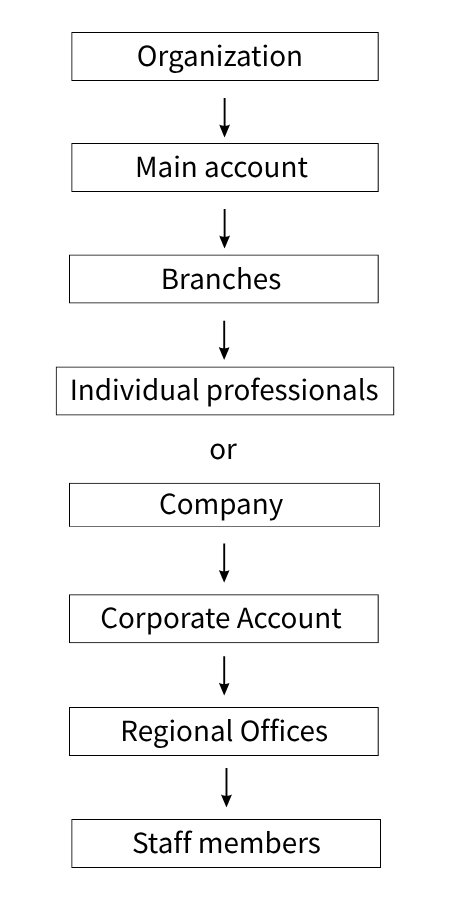
These relationships can affect several areas of the system:
- Login
- Permissions
- Billing
- Search
- Profile ownership
- Data management
- Reporting
For example, if a company has multiple branches, you may need to decide whether each branch should have its own listing, whether all branches should be controlled from a single account, whether the parent company pays the membership fee, and whether individual staff members can manage their own profiles.
These decisions may not seem important when the directory has 50 listings.
They become much more important when the platform has thousands of listings and multiple organizations managing multiple users.
If the parent-child relationship is discovered after the platform has already accumulated a large amount of data, restructuring becomes considerably harder.
This is why these relationships should be identified during the planning stage.
Design for future growth
A good directory architecture shouldn’t only support today’s requirements.
It should also leave enough room for the next stage of the business.
Before finalizing the structure, ask questions such as:
- Will more categories be added?
- Will new locations be added?
- Will additional listing types be introduced?
- Will businesses have multiple locations?
- Will members have multiple users?
- Will listings eventually become products?
- Will the directory eventually generate leads?
- Will members need different levels of access?
These questions don’t mean that every future feature needs to be developed immediately.
They simply help prevent architectural decisions that make future development unnecessarily difficult.
For example, if the business may eventually introduce multiple locations for a single company, the data model should not assume that every account can have only one physical location.
If the directory may eventually introduce paid memberships, the relationship between listings, users, and membership levels needs to be considered.
If the directory may later become a marketplace, the listing structure may eventually need to connect with products, services, bookings, or transactions.
The objective isn’t to build all of those features from day one.
The objective is to avoid designing the first version in a way that makes the next version unnecessarily difficult.
A good information architecture gives the business room to grow without forcing a complete rebuild every time a new requirement is introduced.
Building Powerful Search and Filters
Search is one of the most important parts of any directory.
If visitors can’t quickly find the right listing, the rest of the platform becomes much less valuable.
A directory search can be very simple, such as a keyword search, or it can become a sophisticated discovery system with multiple filters, locations, categories, specialties, and other attributes.
The right approach depends on the type and size of the directory.
Start with basic search
A small directory may only need a simple keyword search.
For example:
Search “plumber”
The website returns relevant plumbing businesses.
That can work when the directory is small and the number of listings is limited.
As the directory grows, however, visitors usually need more control over the results
Category filtering
Categories allow users to start broad and gradually narrow their search.
For example:
Home Services
→ Plumbing
→ HVAC
→ Electrical
→ Roofing
A visitor might first select Home Services and then narrow the results to Plumbing.
The category structure should match the way people actually think about the services or businesses they are looking for.
This is also why the taxonomy planning we discussed earlier is so important.
If categories and subcategories aren’t structured properly, the search experience becomes difficult to manage as the directory grows.
Location filtering
Location becomes especially important for local directories.
Depending on the business model, the website may need to support several levels of location:
- Country
- State
- Region
- County
- City
- Neighborhood
- ZIP code
- Radius
For example, a local services directory might allow visitors to search for:
HVAC → Montgomery County → Maryland Or Plumber → Arlington → Virginia
The exact location structure depends on the directory.
A local contractor directory may need city and ZIP code searches, while a national professional directory may need state, region, or country-level filtering.
Multiple filters
The more useful directories usually allow visitors to combine multiple search criteria.
For example:
Category + Location + Specialty + Availability + Membership Level
A visitor could search for:
Plumbers + Dallas + Emergency Services + Available 24/7
This is where information architecture becomes particularly important.
Every filter needs to work with the underlying data structure, and the system needs to return the right results without making the search unnecessarily slow.
A directory with thousands of listings can quickly become difficult to manage if every filter is implemented independently without considering how the queries will work together.
Search result design
Search results should provide enough information for visitors to make a decision.
Depending on the directory, this could include:
- Business or member name
- Location
- Specialty
- Rating
- Membership level
- Featured status
- Price
- Availability
- Distance
- Contact options
The objective isn’t to display every piece of information.
The objective is to show the information that helps the visitor decide which listing to explore.
For example, a professional directory may prioritize the person’s specialty, location, rating, and profile image.
A service marketplace may need to show pricing and availability.
A B2B supplier directory may need to highlight product categories, service areas, certifications, and company information.
The result design should therefore be based on the user’s decision-making process.
Sorting and ranking
Once the filters are in place, the platform may also need to decide how the results should be ordered.
Possible ranking factors include:
- Relevance
- Distance
- Rating
- Recency
- Featured status
- Membership level
- Lead availability
- Profile completeness
This creates an important connection between the search experience and the membership business model.
For example, a free member might appear in standard search results, while a premium member could receive enhanced placement.
That can create additional value for paid memberships.
At the same time, ranking rules should be transparent enough that users can trust the results.
If visitors feel that the search results are simply determined by who paid the most, the credibility of the directory can suffer.
The ranking strategy therefore needs to balance commercial goals with the quality and relevance of the results.
Pagination matters
A directory with thousands of listings shouldn’t attempt to load every result on one page.
Pagination, efficient queries, and appropriate filtering become increasingly important as the dataset grows.
In one real-world directory implementation, performance was considered as part of the directory requirements from the beginning. Pagination and the way search filters were handled were both important parts of the implementation.
This is an important lesson for directory development:
Search functionality and performance architecture should be planned together.
A search feature may work perfectly with a few hundred listings and become a performance problem once the directory reaches tens of thousands.
It is better to consider that growth during the initial architecture rather than trying to optimize the system after the database has already become large.
Membership Models That Actually Make Money
Membership is one of the biggest opportunities for turning a directory from a static website into a recurring-revenue business.
Instead of simply listing businesses, the platform can give those businesses an ongoing reason to maintain their membership.
But charging a membership fee isn’t enough.
The member needs to understand what they are getting in return and why they should continue paying.
Start with the value proposition
A business might pay for a membership because the platform provides:
- Visibility
- Leads
- Customers
- Networking opportunities
- Premium content
- Industry information
- Tools
- Exposure
- Credibility
- Access to a community
- Data or resources
The membership plan should package these benefits clearly.
A member shouldn’t have to study a complicated pricing table to understand why one plan is better than another.
The upgrade path should be easy to understand.
A simple four-tier model
A practical starting point could be four membership levels.
Free
Designed primarily for acquisition.
Possible benefits:
Basic profile
- Basic search visibility
- Limited information
- Basic contact options
The free plan gives businesses a reason to join the directory without making an immediate financial commitment.
Professional
Designed for monetization.
Possible benefits:
- Enhanced profile
- More images
- Better visibility
- Reviews
- Lead access
The Professional plan should provide enough additional value that an active business has a reason to upgrade.
Premium
Designed for higher-value members.
Possible benefits:
- Featured placement
- Premium leads
- Advanced analytics
- Promotional opportunities
- Priority exposure
This level can be useful for businesses that want more visibility or need more commercial opportunities from the platform.
Enterprise
Designed for larger organizations.
Possible benefits:
- Multiple users
- Multiple locations
- Advanced permissions
- Custom workflows
- Dedicated support
The exact structure should depend on the business model.
Not every directory needs four plans, and some businesses may need a completely different structure.
The important thing is to create a clear progression in value.
Don’t create too many plans
It is easy to create five or six membership plans because the platform supports different combinations of features.
That doesn’t mean you should.
Too many plans can make the pricing confusing.
The customer should be able to answer one simple question:
“Why should I upgrade?”
They shouldn’t need to compare dozens of small differences between plans.
A good pricing structure normally has a clear progression.
The higher the membership level, the more meaningful the benefits should become.
Membership can control more than price
A membership plan doesn’t have to control only how much someone pays.
It can become part of the platform’s overall business logic.
Depending on the requirements, membership can influence:
- Profile features
- Search visibility
- Content access
- Lead access
- Messaging
- Events
- Downloads
- Advertising
- Analytics
- Other member tools
Brilliant Directories’ membership architecture supports subscription tiers that can control pricing, profile capabilities, content limits, display options, and the member experience.
This is important because it means membership can determine what a user is actually allowed to do on the platform.
The membership system is therefore more than a payment mechanism.
It can become part of the website’s access control and business rules.
For example, a free member might be allowed to create a basic profile, while a premium member may have access to enhanced profile fields, better visibility, leads, analytics, or promotional features.
Free members can still be valuable
A free membership tier shouldn’t automatically be considered a lost revenue opportunity.
Free members can provide value to the platform by:
- Increasing directory coverage
- Improving search value
- Creating more content
- Generating reviews
- Attracting visitors
- Eventually upgrading
- Purchasing leads
- Buying promoted placements
A useful funnel could therefore look like:
Visitor -> Free Member -> Active Member -> Paid Member -> Premium Member
The important metric isn’t simply how many people sign up.
What matters is how many members move through the funnel and how much value the platform creates at each stage.
A large number of free members can be useful if those members improve the quality and coverage of the directory, and a percentage eventually convert into paid customers.
Building Recurring Revenue
Recurring subscriptions can make the economics of a directory much more predictable.
Instead of repeatedly selling individual listings, the platform can build a recurring member base.
For example:
500 members × $25/month = $12,500/month
At:
1,000 members × $50/month = $50,000/month
These are simple examples, not forecasts.
The actual economics depend on factors such as customer acquisition cost, retention, payment costs, support, and the value delivered to members.
The important point is that recurring revenue changes the business model.
Once members are paying regularly, retention and ongoing value become just as important as acquiring new members.
What should a recurring membership include?
Before implementing subscriptions, the business should define at least:
- Membership price
- Billing cycle
- Benefits
- Trial period
- Renewal process
- Cancellation process
- Upgrade rules
- Downgrade rules
- Failed-payment handling
- Member access after payment failure
These rules should be decided before development.
For example, if a payment fails, does the member immediately lose access?
Is there a grace period?
Does the system retry the payment?
Does the administrator receive a notification?
What happens after several failed attempts?
These are business rules, not just technical details.
Brilliant Directories currently supports recurring membership billing and documents monthly, quarterly, semi-annual, and yearly billing, along with optional one-time setup fees.
Monthly versus annual billing
Monthly plans generally reduce the initial commitment for the customer.
Annual plans can improve cash flow and potentially improve retention because the customer has committed for a longer period.
A common approach is to offer both.
For example:
$49/month
or
$490/year
The annual option effectively provides a discount while encouraging a longer commitment.
The right pricing structure depends on the business and the value of membership.
For some directories, a low monthly price may make sense because the membership is easy to justify.
For a high-value B2B directory where a single lead can be worth hundreds or thousands of dollars, a much higher annual membership may be reasonable.
Free trials
Free trials can be useful when members need time to understand the value of the platform.
But a trial should have a clear conversion strategy.
Before implementing one, ask:
- What can the member experience during the trial?
- What value should they see?
- When should upgrade prompts appear?
- What happens when the trial ends?
- Is payment information collected during signup?
The goal is not simply to increase trial registrations.
The goal is to give potential members enough experience with the platform to understand why continuing the membership is worthwhile.
Failed payments
Failed payments are easy to underestimate when planning a subscription system.
A recurring billing workflow needs to account for what happens after a payment fails.
A basic flow could look like:
Payment succeeds -> Member remains active
Or:
Payment fails -> Retry / Recovery workflow -> Notification -> Possible grace period -> Possible suspension -> Possible cancellation
Each step needs to be defined.
A subscription isn’t complete simply because the first payment succeeds.
The platform needs to handle what happens throughout the membership lifecycle.
Brilliant Directories currently promotes automated recovery features, retries, reminders, upgrades, downgrades, and prorated billing as part of its monetization capabilities.
When standard recurring billing isn’t enough
This is where requirements analysis becomes particularly important.
A business may have a straightforward monthly subscription that fits comfortably within the platform’s existing functionality.
Another business may need something more specific, such as:
- A regional payment gateway
- Custom recurring billing logic
- External subscription management
- Custom invoice synchronization
- Special renewal rules
- External accounting integration
- Custom payment notifications
- Complex upgrade and downgrade rules
These requirements can change the implementation significantly.
For example, Brilliant Directories documentation notes that some payment gateways handle recurring subscriptions differently. It specifically identifies different behavior for gateways such as PayPal Standard and PayFast compared with on-site gateways that can automatically charge customer accounts.
That distinction is important when planning the project.
The question shouldn’t simply be:
“Does Brilliant Directories support recurring payments?”
It does.
The better question is:
“Does the exact recurring payment workflow our business requires fit the standard implementation?”
If it does, use the native capability.
If it doesn’t, then look at integration or custom development.
This approach is usually more maintainable and cost-effective than immediately deciding to build a completely custom billing system.
A Practical Framework for the First Stage of Your Project
Before starting development, we recommend documenting eight things.
This doesn’t need to be a large technical document.
The objective is to make sure the business model, user journeys, monetization, and technical requirements are understood before development begins.
1. Who are your users?
Start by identifying everyone who interacts with the platform.
For example:
- Visitors
- Free members
- Paid members
- Vendors
- Administrators
- Staff
- Partners
Each user type may have different permissions and responsibilities.
A visitor may only search and view listings.
A free member may manage a basic profile.
A paid member may access leads or premium features.
An administrator may manage the entire platform.
Understanding these roles early makes later permission and membership decisions much easier.
2. What are they looking for?
Define what visitors and members actually need to find.
This could include:
- Businesses
- Professionals
- Products
- Services
- Resources
- Community members
The answer influences the listing structure, search architecture, profile design, and content strategy.
How will they search?
Define the actual discovery process.
Possible options include:
- Keyword
- Category
- Location
- Attributes
- Multiple filters
- Map
- AI or natural-language search
Not every directory needs every option.
A small local directory may only need category and location.
A large professional directory may need multiple filters.
A more advanced platform may eventually introduce map-based or natural-language discovery.
The important thing is to define the expected search experience before finalizing the data structure.
4. Why will businesses join?
This is one of the most important questions in the entire project.
Businesses need a reason to participate.
Possible reasons include:
- Visibility
- Leads
- Customers
- Networking
- Content
- Tools
If the answer is unclear, it becomes difficult to build a compelling membership proposition.
The directory should provide something businesses cannot easily get by simply creating their own website.
5. Why will they pay?
Once the reason for joining is clear, define the reason for upgrading.
Possible benefits include:
- Better visibility
- More leads
- Premium access
- Advanced features
- Reduced competition
- Commercial opportunities
This should directly connect with the membership structure.
If a premium plan costs more, the member should clearly understand what additional value they receive.
6. How will you make money?
Document the revenue model before development.
Possible options include:
- Memberships
- Paid listings
- Leads
- Advertising
- Sponsorship
- Digital products
- Transactions
- Commissions
A platform can use one model or combine several.
For example:
Free listings + premium memberships + paid leads
Or:
Free members + paid members + advertising + digital products
The business model should determine the functionality, rather than adding monetization features simply because the platform supports them.
7. What happens as the business grows?
Think beyond the first version.
Ask what happens when you have:
- More members
- More listings
- More locations
- More categories
- More transactions
- More integrations
This brings us back to architecture.
The platform should be designed so that reasonable growth doesn’t immediately require rebuilding the core system.
Search, taxonomy, membership, account structure, and data relationships should all be considered with future growth in mind.
8. Which functionality is actually custom?
This is one of the most useful questions to ask for every requirement.
Start with:
Can Brilliant Directories already do this?
If yes:
Configure it.
If not:
Can an existing integration solve it?
If yes:
Integrate it.
If not:
Can the API or webhook architecture solve it?
If yes:
Build the integration.
Only after going through these options should you ask:
Do we actually need custom development or a plugin?
This sequence can prevent significant unnecessary development costs.
It also makes the project easier to maintain because we’re using the platform’s existing capabilities wherever they genuinely fit instead of replacing them with custom code.
The goal isn’t to customize Brilliant Directories as much as possible.
The goal is to build the required business functionality in the most practical way.
Payment Gateways and Custom Payment Integrations
Payments are one of the areas where a directory can quickly move from being a relatively simple website to a much more complex application.
If the website only needs to charge a member for a monthly subscription, the requirements may be fairly straightforward.
But things change when the platform needs to collect payments from customers, calculate commissions, pay vendors, process refunds, keep subscriptions synchronized, and communicate with another financial system.
At that point, payment processing becomes part of the overall application architecture.
This is why payment requirements should be defined early in a Brilliant Directories project.
Start by identifying what you are charging for
A directory business may have several different types of transactions:
- Membership subscriptions
- One-time listing fees
- Featured listings
- Lead purchases
- Digital products
- Event registrations
- Advertising
- Sponsorships
- Marketplace purchases
- Bookings
These transactions don’t necessarily need to follow the same payment workflow.
For example, charging $100 for an annual membership is fundamentally different from operating a marketplace where 20 vendors receive payments from hundreds of customers.
Understanding the type of transaction is therefore the first step.
One-time payments
One-time payments are generally the simplest model.
A member might pay:
$199 for an annual listing
or:
$49 for a featured placement
The transaction can be completed, the relevant service can be activated, and the payment can be recorded.
There is still a need to handle errors and payment confirmation, but the lifecycle is relatively simple because there isn’t an ongoing subscription relationship to maintain.
Recurring payments
Recurring payments introduce another lifecycle:
Signup → Initial payment → Subscription active → Renewal → Renewal payment → Continue
The system also needs to account for situations such as:
- Failed payments
- Expired cards
- Cancellation
- Upgrade
- Downgrade
- Refunds
- Grace periods
- Subscription status
Brilliant Directories supports recurring membership billing and multiple billing cycles, which makes standard subscription models possible without building a complete payment system from scratch.
The important question is whether the standard billing workflow matches the exact requirements of the business.
Gateway selection matters
A payment gateway should be selected based on the business model, not simply because it is popular.
Before choosing one, consider:
- Country
- Currency
- Customer location
- Business location
- One-time payment support
- Recurring payment support
- Refund support
- Webhook capabilities
- Marketplace requirements
- Payout requirements
- Transaction fees
- Compliance requirements
A gateway that works perfectly for a SaaS subscription may not be suitable for a multi-vendor marketplace.
For example, a business may need a gateway that supports a particular country or currency but handles recurring payments differently from the standard Brilliant Directories workflow.
That difference needs to be understood before development begins.
When the standard integration isn’t enough
Sometimes the business needs a payment gateway or payment workflow that isn’t covered by the standard implementation.
For example:
“We need customers to subscribe monthly using a regional payment provider, but the provider handles recurring billing externally.”
Or:
“We need the payment status in BD to stay synchronized with an external billing platform.”
Or:
“We need a successful payment to activate a specific membership and then send the transaction information to another system.”
These are no longer simple configuration tasks.
They may require:
- API integration
- Webhooks
- Custom business logic
- Background processing
- Payment status synchronization
- Custom administration
- Error handling
The exact approach depends on how the payment provider works and what Brilliant Directories needs to know about the transaction.
Payment integrations should be designed around events
A useful architecture can look like this:
Customer payment -> Payment provider -> Payment confirmation / webhook -> Integration layer -> Brilliant Directories -> Membership / listing / order update
This is generally more reliable than assuming that a browser returning to a “success” page means the payment definitely succeeded.
The payment provider should be treated as the authoritative source for the payment event where appropriate.
For example, a customer might complete the payment successfully, but their browser could close before returning to the website.
If the system depends entirely on the success-page redirect, it may never receive the information it needs.
A webhook or server-side confirmation provides a much more reliable way of handling the actual payment event.
What a custom payment integration may involve
A professional implementation may include:
- Gateway API integration
- Authentication
- Payment creation
- Payment confirmation
- Webhook handling
- Signature verification
- Transaction logging
- Membership activation
- Failed payment handling
- Refund handling
- Cancellation handling
- Admin reporting
- Error recovery
- Sandbox transaction testing
- Production deployment
The development effort depends heavily on the gateway’s API quality and the exact business rules.
A well-documented API with reliable webhooks can make an integration considerably easier.
A gateway with limited API capabilities or unusual recurring-payment behavior can require considerably more custom work.
A useful rule : Don’t build a custom payment system if the native Brilliant Directories payment capabilities already satisfy the requirement.
Custom development should solve a genuine business requirement.
It shouldn’t replace functionality that already works.
The best approach is usually to start with the native capability, identify the exact gap, and then build only what is actually required to close that gap.
Turning a Brilliant Directories Website into a Lead-Generation Business
A directory can generate revenue without charging businesses simply to appear in it.
One of the strongest models is to monetize the leads generated by the directory.
Imagine a visitor searching for a service provider.
Instead of simply displaying a list of businesses, the website asks:
“What service do you need?”
The visitor provides information such as:
- Service required
- Location
- Project details
- Budget
- Timeline
- Contact information
The platform can then identify relevant members.
The business model becomes:
Visitor → Request → Lead → Matching members → Paid lead
This changes the value proposition significantly.
Why paid leads can be attractive
A listing tells a business:
“Your profile is visible.”
A lead tells the business:
“A potential customer is looking for your service.”
That difference can have a major impact on willingness to pay.
For high-value professional services, a qualified lead may be worth much more than a monthly listing fee.
A business may not be interested in paying $50 simply for visibility.
But if the platform regularly delivers qualified customers, paying for those opportunities can become much easier to justify.
Common lead monetization models
Pay per lead
The member pays for each lead received.
This model is straightforward when each lead has a relatively predictable value.
Lead credits
Members purchase credits and use those credits when accessing leads.
For example, a member could purchase a certain number of credits in advance and use them as new opportunities become available.
Lead packages
The platform can sell lead bundles.
For example:
10 leads = $100
50 leads = $400
This can encourage members to commit to larger packages.
Subscription + leads
A membership can include a certain number of leads, with additional leads available for purchase.
This combines recurring revenue with lead-based revenue.
Premium lead access
Higher membership plans can receive earlier or exclusive access to certain opportunities.
This creates another reason for businesses to upgrade their membership.
Lead routing
Generating the lead is only half the problem.
The platform also needs to determine who should receive it.
Lead routing can be based on:
- Category
- Location
- Service area
- Membership plan
- Availability
- Profile status
- Specialty
- Lead capacity
For example:
HVAC request -> Maryland -> Residential -> Eligible HVAC members
The system can then determine which members are eligible based on the business rules.
A premium member may receive access to certain opportunities.
A member outside the requested service area may not qualify.
A member who has reached their lead capacity may also need to be excluded.
These rules need to be defined before the lead-generation workflow is developed.
Geographic routing
Location can be particularly important for local service directories.
A lead may need to be routed based on:
Country → State → County → City → ZIP → Radius
For example, a customer searching for a plumber may expect to receive providers who actually service their location.
This is another reason directory taxonomy and location architecture need to be planned carefully.
The lead-generation system depends on the quality of the underlying directory data.
If locations and service areas aren’t structured properly, routing becomes much harder.
Lead quality matters more than lead volume
A directory owner might proudly report:
“We generated 10,000 leads.”
That sounds impressive.
But if those leads are irrelevant, duplicated, poorly qualified, or delivered to the wrong businesses, members will eventually stop paying.
The goal shouldn’t simply be to generate as many leads as possible.
The goal should be to generate leads that members actually value.
Important metrics include:
- Leads generated
- Leads delivered
- Lead acceptance rate
- Lead response rate
- Member conversion
- Customer conversion
- Revenue per lead
- Refund or dispute rate
- Member retention
These metrics help connect lead quality with member value.
The long-term success of a lead-generation directory depends on creating a reliable relationship between the quality of the leads and the revenue members generate from them.
If members consistently see a commercial return, lead monetization can become one of the strongest revenue models available to the platform.
Turning a Directory into a Marketplace
A marketplace is one of the most powerful ways to extend a directory.
It is also one of the biggest increases in complexity.
A traditional directory answers:
“Who provides this service?”
A marketplace answers:
“Who provides this service, and can I transact with them here?”
That difference changes the architecture.
Directory model
Visitor → Search → Profile → Contact
The directory helps the customer discover a provider and then usually hands the interaction over to the business.
Marketplace model
Visitor → Search → Product/service → Purchase/booking → Payment → Fulfillment → Review
The marketplace becomes part of the transaction itself.
That means the platform needs to manage more than profiles and search.
What does a marketplace need?
The exact requirements depend on the business, but a marketplace may need the following.
Vendor accounts
Businesses need a way to manage their commercial presence on the platform.
Vendor profiles
The profile explains who the business is and what it provides.
Products or services
The vendor needs something that can actually be purchased or booked.
Pricing
The platform needs to communicate pricing clearly.
Availability
For bookings, appointments, or experiences, availability may need to be managed.
Orders
Customers need transaction records and order information.
Payments
Customers need a way to pay.
Commissions
The marketplace needs to calculate how much it retains from each transaction.
Payouts
Vendors need to receive their share.
Refunds
The platform needs to handle cancellations and refunds.
Reviews
Customers can provide feedback after completing a transaction.
Each of these introduces additional business rules.
Example marketplace flow
Consider a marketplace for local experiences.
A visitor finds an activity priced at $200.
The customer pays the marketplace.
The marketplace retains a 15% commission.
The operator receives the remaining amount.
The simplified flow is:
Customer -> Marketplace -> $200 payment -> $30 commission -> $170 operator amount
This looks simple on paper.
In production, however, additional questions immediately appear.
What happens if the customer cancels?
What happens if the operator cancels?
What happens if the payment fails?
Who issues the refund?
When is the vendor paid?
What happens if the booking is modified?
Who is responsible for the transaction?
How are disputes handled?
How are taxes calculated?
What happens when the commission changes?
These questions demonstrate why a marketplace shouldn’t be treated as “just adding ecommerce to a directory.”
The transaction lifecycle needs to be designed before development begins.
Marketplace Payment Architecture
The payment model should be designed before marketplace development begins.
There are several possible approaches, and each has different technical and operational implications.
Model A: Marketplace collects everything
The platform receives the customer payment and later pays the vendors.
This can provide greater control over the overall transaction flow.
However, it also introduces additional financial and operational responsibilities.
The business needs to understand how payments, refunds, disputes, vendor payouts, and related responsibilities will be handled.
Model B: Vendor receives the payment
The customer pays the vendor directly, while the marketplace may receive a commission or platform fee.
This can simplify some parts of the money flow.
However, it may introduce other integration requirements, particularly around tracking transactions and calculating or collecting the marketplace’s share.
Model C: Payment platform handles split payments
A specialized marketplace payment provider can potentially handle payment distribution between the platform and vendors.
This can simplify some operational requirements.
However, whether this approach is appropriate depends on factors such as:
- Payment provider
- Country
- Business structure
- Vendor structure
- Compliance requirements
There is no single payment architecture that works for every marketplace.
Why merchant-of-record questions matter
If your business collects customer payments and then pays suppliers, you need to understand the commercial and legal implications before development begins.
Questions may include:
- Who is selling to the customer?
- Who issues the invoice?
- Who processes refunds?
- Who handles disputes?
- Who receives the original payment?
- Who pays the vendor?
- Who is responsible for taxes?
These aren’t questions that should be left until after the technical implementation has started.
The answers can directly influence the payment architecture and the systems that need to be integrated.
Marketplace integrations
A complex marketplace may involve several systems:
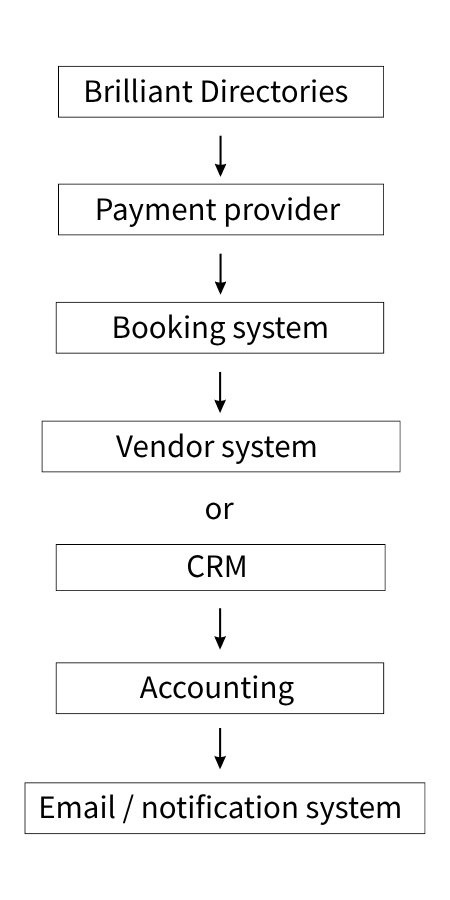
The directory platform can act as the central member and discovery layer while specialized external systems handle other responsibilities.
This is often preferable to forcing every function into a single platform.
The goal is not to make Brilliant Directories responsible for everything.
The goal is to build an architecture where each system handles the responsibility it is best suited for.
Community Features: Turning Visitors Into Returning Users
A directory is useful when people need to find something.
A community becomes valuable when people have a reason to return even when they aren’t actively searching.
That distinction can significantly change the business model.
A directory creates discovery:
“I need an accountant.”
A community creates ongoing engagement:
“I want to learn, connect, and participate with other professionals.”
Combining the two can create a much stronger platform.
Useful community features
Depending on the niche, a community may include:
- Member profiles
- Messaging
- Reviews
- Discussions
- Groups
- Events
- News
- Articles
- Member posts
- Comments
- Notifications
- Private content
- Member directories
- Reputation systems
- Badges
- Recommendations
The right combination depends on how members are expected to interact.
There is no reason to implement every community feature simply because it is available.
Community features should serve the niche
Don’t add a forum simply because every community website has one.
Instead, ask:
What would members actually discuss?
For a professional association, the topics might include:
- Industry news
- Regulatory changes
- Job opportunities
- Events
- Professional advice
For a local business community:
- Local opportunities
- Referrals
- Networking
- Events
- Business resources
For a specialist hobby:
- Guides
- Discussions
- Reviews
- Events
- Member showcases
The technology should follow the community behavior.
If members have no reason to participate in a discussion forum, adding one won’t automatically create engagement.
The community features need to solve a real need for the audience.
Member-Only Content and Access Control
Membership becomes much more valuable when it controls access to useful resources.
Examples include:
- Research
- Reports
- Documents
- Videos
- Courses
- Guides
- Templates
- Pricing information
- Industry resources
- Member directories
- Premium articles
A simple access model might look like:
Free visitor → Limited content
↓
Paid member → Full content
More sophisticated businesses may have several membership levels.
For example:
| Content | Free | Basic | Premium |
|---|---|---|---|
| Public articles | ✓ | ✓ | ✓ |
| Basic resources | ✓ | ✓ | ✓ |
| Premium reports | ✓ | ✓ | |
| Private resources | ✓ | ||
| Premium events | ✓ |
The exact access rules depend on the membership structure.
Access control is more than hiding a button
One common mistake is thinking:
“If the download button isn’t visible, the file is protected.”
It isn’t necessarily.
If a protected document has a publicly accessible URL, a user may still be able to access it directly.
For sensitive member resources, authorization should be enforced when the resource is requested.
This principle applies to:
- PDFs
- Images
- Videos
- Documents
- API responses
- Downloads
- Premium pages
The system needs to verify that the user has the appropriate permission before returning the protected resource.
Member permissions can become sophisticated
Access decisions may depend on several factors:
Membership plan -> Member type -> Special permission -> Content category -> Access decision
This is another reason membership architecture should be designed before content is populated.
If the content structure is created first and access rules are added later, restructuring permissions can become considerably more difficult.
Using Brilliant Directories with WordPress
Many businesses considering Brilliant Directories already have a WordPress website.
That creates an important architectural question:
Do you replace WordPress, or do you make WordPress and Brilliant Directories work together?
In many situations, the second option deserves serious consideration.
The two platforms can handle different parts of the overall website.
WordPress can handle the content side
For example:
- Marketing pages
- Blog
- SEO content
- Landing pages
- Editorial content
- Company information
Brilliant Directories can handle the directory side
For example:
- Members
- Listings
- Membership plans
- Directory search
- Member profiles
- Leads
- Directory-specific workflows
This can create a complementary architecture.
WordPress
↓
Content and marketing
Integration layer
↓
Synchronization
Integration layer
↓
Synchronization
The exact architecture depends on the project.
Integration approaches
There isn’t one architecture that fits every WordPress and Brilliant Directories project.
Separate sites
For example: www.example.com and directory.example.com
This can be easier to maintain because each system has a clear responsibility.
Subfolder
For example:
www.example.com/directory
This can create a more unified experience.
However, it may require more sophisticated routing and infrastructure depending on how the two systems are hosted and connected.
Shared authentication
Users may be able to authenticate across both platforms.
This can reduce friction when users need to interact with both systems.
API synchronization
The systems can exchange data through APIs.
For example, a new member created in one system could be synchronized with the other.
- Users
- Memberships
- Roles
- Listings
- Content
- Events
- Other data
The right choice depends on the existing website, the expected user experience, the amount of shared data, and how closely the two platforms need to work together.
Brilliant Directories and WordPress SSOSingle Sign-On, or SSO, becomes relevant when users should not need separate credentials for two connected systems.
Imagine that a business already has a WordPress membership website and then introduces Brilliant Directories.
Without integration, users may need:
WordPress account
and
BD account
That creates friction.
With SSO, the desired experience may be:
Login once → Access both systems
The user doesn’t need to think about which platform they are currently using.
What does a real SSO project involve?
SSO is more than copying a username and password.
A proper implementation may need to handle:
- Authentication
- User identification
- User creation
- Existing-user matching
- Role mapping
- Membership mapping
- Session handling
- Logout behavior
- Error handling
- Security
- API communication
Each of these needs to be considered when designing the integration.
Role-to-membership mapping
One particularly useful pattern is:
WordPress role
↓
BD membership plan
For example:
WordPress Premium Member
↓
BD Premium Membership
Or:
WordPress Business Member
↓
BD Business Membership
This allows each platform to maintain its own internal structures while still providing a connected user experience.
The WordPress role doesn’t necessarily need to be identical to the Brilliant Directories membership.
Instead, the integration maps the two systems based on the business rules.
Bidirectional synchronization
A more advanced implementation may need synchronization in both directions.
WordPress → BD
and:
BD → WordPress
For example, a new user created in WordPress may need to exist in BD.
A membership change in BD may need to update the user’s WordPress role.
This is no longer simply an authentication problem.
It becomes a synchronization and business-logic problem.
The integration needs to define which system is authoritative for each type of information and how changes are communicated between the two systems.
When should you consider SSO?
SSO becomes especially useful when:
- The website already has a large user base
- Users interact with both systems
- Both platforms need the same identity
- Duplicate accounts would create confusion
- Membership status needs to be synchronized
- The business wants one unified user experience
For a new project with very limited overlap between the two systems, SSO may not be necessary.
The architecture should be based on the actual user journey rather than adding SSO simply because the two platforms are connected.
Brilliant Directories API, Webhooks and External Integrations
A directory platform becomes significantly more powerful when it can communicate with the rest of the business.
For example:
New member -> BD -> CRM -> Welcome email -> Sales notification
This can happen automatically instead of requiring someone to manually copy information between systems.
Common integration targets
A Brilliant Directories website may need to connect with:
- CRM
- Email marketing
- Accounting
- ERP
- Booking platforms
- Payment providers
- Marketing automation
- Analytics
- Mobile applications
- External databases
- AI services
- Customer support platforms
The exact integrations depend on the business.
The important thing is to identify these systems during the discovery stage.
API integration
An API allows one system to request or send structured information to another system.
A simplified example:
External CRM
asks:
“Give me this member’s information.”
↓
BD API
↓
Member information
Another example:
External application
sends:
“Create this new member.”
↓
BD API
↓
New BD account
The exact operations available depend on Brilliant Directories’ current API capabilities and the requirements of the external system.
This should be verified before promising a particular integration.
Webhooks
APIs generally involve one system asking another system for information.
Webhooks can work differently.
The system can effectively say:
“When this event happens, tell me.”
For example:
New member created
↓
Webhook
↓
External CRM
This can be useful for event-driven automation because the external system doesn’t need to repeatedly ask whether something has changed.
Brilliant Directories currently documents webhooks for events involving members, leads, reviews, forms, and other platform activity.
Scheduled synchronization
Not every integration needs real-time synchronization.
Sometimes the requirement is simply:
“Synchronize the data every night.”
This may be appropriate for:
- Large data imports
- External catalog synchronization
- Reporting
- Historical data
- Less time-sensitive information
A scheduled process can sometimes be simpler and more efficient than building a real-time integration.
Real-time versus scheduled
Real-time versus scheduled
- Timing matters
- Payment status changes
- Access permissions change
- Leads need immediate delivery
Use scheduled synchronization when:
- Data changes slowly
- Large datasets are involved
- Immediate updates aren’t necessary
- The external system doesn’t provide webhooks
The decision should be based on the business requirement rather than automatically assuming that every integration needs real-time synchronization.
Integration architecture matters
A production integration should consider:
- Authentication
- API limits
- Retries
- Error handling
- Duplicate prevention
- Logging
- Data mapping
- Data validation
- Security
- Monitoring
A simple API call may take minutes to implement.
A reliable production integration can require considerably more work.
For example, what happens if the API is temporarily unavailable?
Should the system retry?
What happens if the same webhook is delivered twice?
How do we prevent duplicate members?
Where are integration errors recorded?
Who gets notified when synchronization fails?
These questions are what separate a basic integration from a production-ready integration.
When Do You Need a Custom Brilliant Directories Plugin?
One of the most important questions for a BD project is:
“Can this be done without custom development?”
The answer should always be investigated before development starts.
A useful decision hierarchy is to move from the simplest solution to the most complex one.
Level 1: Native functionality
If Brilliant Directories already provides the required capability, use it.
There is no reason to rebuild something that the platform already handles.
Level 2: Configuration
If the feature can be achieved through settings, membership plans, forms, or existing workflows, configure it.
Configuration is usually easier to maintain than custom development.
Level 3: Design or theme customization
If the functionality exists but the presentation needs to change, customize the frontend.
This allows the business to achieve the required user experience without rebuilding the underlying functionality.
Level 4: Integration
If another platform already provides the required functionality, connect it through an API, webhook, or supported integration.
There is often no reason to recreate a mature external system inside the directory.
Level 5: Custom plugin
If the requirement genuinely extends Brilliant Directories functionality, build a plugin.
A plugin can provide a controlled place for additional business logic.
Level 6: External application
If the workflow is sufficiently complex or belongs outside the directory platform, build or use an external service.
This can be the better option when the functionality has become a substantial application of its own.
This hierarchy helps prevent unnecessary custom development.
Examples of requirements that may justify custom development
Depending on the project, custom development may be justified for:
- Custom payment gateway
- Specialized recurring billing
- Advanced search
- Custom lead routing
- External system synchronization
- SSO
- Custom dashboards
- Complex member workflows
- Marketplace logic
- AI matching
- Automated data enrichment
The key word is requirement.
The fact that something looks different from the default Brilliant Directories experience doesn’t automatically mean it needs custom development.
Why plugins can be preferable to core modifications
A custom plugin can isolate additional functionality from the platform’s core.
This can make it easier to:
- Maintain
- Test
- Update
- Reuse
- Disable
- Extend
The exact implementation depends on the Brilliant Directories architecture and the requirement.
The broader principle is:
Customize the platform in the most upgrade-safe way possible.
Avoid making changes that create unnecessary dependencies on the core platform.
Don’t customize for the sake of customization
A common mistake is to treat every difference from the default platform as a development requirement.
Instead, ask:
Does this difference create measurable business value?
If the answer is no, keep the native implementation.
If the answer is yes, determine the simplest maintainable way to achieve it.
That is where experienced Brilliant Directories consulting can save more money than development alone.
Good planning can prevent unnecessary custom work before it starts.
How to Decide Between Native BD, Integration and Custom Development
A simple decision framework can help determine the right implementation approach.
| Requirement | First approach to consider |
|---|---|
| Standard member profile | Native BD |
| Membership subscription | Native BD |
| Standard recurring billing | Native BD |
| Custom visual layout | Theme/design customization |
| External CRM synchronization | API/integration |
| Payment provider not covered by standard workflow | Custom integration |
| WordPress shared authentication | SSO/integration |
| External booking engine | API integration |
| Specialized search behavior | Configuration/custom development |
| Complex marketplace | Integration + custom development |
| AI recommendations | External AI + BD integration |
| Unique business workflow | Custom plugin |
The principle is simple:
Use the least complex architecture that solves the business problem properly.
This normally produces a better balance between:
- Development cost
- Maintainability
- Future flexibility
The goal isn’t to minimize development at any cost.
The goal is to avoid complexity that doesn’t provide corresponding business value.
What a Professional BD Discovery Process Should Look Like
Before development begins, the project should be analyzed from the business side first.
A good discovery process connects the business model with the technical requirements.
Business model
Start by asking:
- Who are the customers?
- Who are the members?
- Who pays?
- What are they paying for?
- How will the platform make money?
These questions establish the foundation for everything else.
Member model
Next, define the member structure:
- How many member types exist?
- Are there free and paid members?
- Are there multiple plans?
- Can members have sub-users?
- Can one organization manage multiple listings?
These decisions affect accounts, permissions, membership, billing, and listing ownership.
Search
Define how visitors will find what they need.
Ask:
- What do visitors search for?
- Which filters matter?
- Are locations important?
- Are there multiple listing types?
- How should results be ranked?
The answers directly influence the information architecture.
Payments
Payment requirements should be documented early.
Ask:
- One-time or recurring?
- Which payment provider?
- Which currencies?
- Which countries?
- Are refunds required?
- Are upgrades and downgrades required?
This can reveal whether native payment functionality is enough or whether integration work is needed.
Leads
If leads are part of the business model, define:
- Are leads generated?
- Who receives them?
- Are leads paid?
- How are they routed?
- What happens if nobody accepts them?
Lead generation can become a major part of the platform, so these rules shouldn’t be left vague.
Marketplace
If transactions are involved, define:
- Are transactions required?
- Who collects payment?
- Who receives the money?
- How is commission calculated?
- When are vendors paid?
These questions determine much of the marketplace architecture.
Integrations
List the external systems that need to communicate with BD.
For example:
- WordPress
- CRM
- Booking platform
- Accounting system
- External database
- AI
- Email automation
It is much easier to plan integrations when they are identified during discovery rather than after the core system has already been developed.
Administration
Finally, define what administrators need to manage.
Ask:
- What does the administrator need to manage?
- What reports are required?
- What should be automated?
- What requires manual approval?
Administrative workflows are often overlooked during the initial planning stage.
They become important once the directory starts growing.
This discovery process is often more valuable than immediately starting development.
It helps establish what actually needs to be built and reduces the chance of discovering major requirements halfway through the project.
Why Requirements Analysis Matters More Than Feature Lists
A client may say:
“I need a directory with membership and payments.”
That sounds relatively simple.
But the actual requirements could be:
- Three member types
- Four membership plans
- Monthly and annual subscriptions
- Free trials
- Regional payment gateway
- Automatic renewal
- Failed payment recovery
- Member-only documents
- Advanced location search
- Lead routing
- CRM synchronization
- WordPress SSO
- Vendor commissions
That is a very different project.
The difference between these two requirements isn’t simply the number of features.
It is the number of relationships between those features.
For example:
Membership -> Payment -> Access -> Leads -> Search visibility -> Marketplace eligibility
A change in one part of the system can affect several other areas.
For example, if a member’s subscription expires, the system may need to:
- Change their membership status
- Remove access to premium content
- Change their profile visibility
- Stop them from receiving leads
- Potentially remove marketplace privileges
This is why complex Brilliant Directories projects should be treated as systems rather than collections of isolated features.
The more relationships there are between requirements, the more important discovery and architecture becomes.
The Right Architecture Depends on the Business Stage
A new directory and a mature marketplace don’t necessarily need the same architecture.
Trying to build the final version before the business model has been validated can introduce unnecessary complexity.
A staged approach is often more practical.
Stage 1: Validate
Start with:
- Core directory
- Basic search
- Member profiles
- Simple monetization
Goal: Prove demand.
At this stage, the priority is understanding whether people actually want the service.
There is little value in building an extremely sophisticated marketplace if nobody is using the directory.
Stage 2: Monetize
Once the core concept has been validated, add:
- Paid memberships
- Premium listings
- Leads
- Recurring subscriptions
Goal: Prove willingness to pay.
The question now changes from:
“Will people use this?”
to:
“Will businesses pay for this value?”
Stage 3: Automate
Once there is a working business model, add:
- APIs
- Webhooks
- CRM
- Email automation
- Data synchronization
Goal: Reduce manual operations.
Automation becomes much more valuable once there is enough activity to justify it.
Stage 4: Expand
The platform can then introduce:
- Marketplace
- Vendor tools
- Advanced payments
- Bookings
- More sophisticated member workflows
Goal: Increase transaction value.
At this point, the business may already have enough users and activity to justify the additional complexity.
Stage 5: Intelligence
The final stage may introduce:
- AI search
- AI matching
- AI recommendations
- Automated categorization
- AI lead qualification
Goal: Make the platform smarter and more useful.
The important point is that AI becomes more useful when the underlying directory data is structured properly.
A directory with well-organized listings, categories, locations, member profiles, and historical interactions provides a much stronger foundation for intelligent matching and recommendations.
This staged approach is generally safer than attempting to build the final architecture before the business model has been validated.
What Makes a BD Project Simple or Complex?
The number of website pages isn’t a good indicator of development complexity.
A 20-page directory can be technically complex.
A 100-page directory can be relatively straightforward.
The complexity usually comes from what happens behind those pages.
Number of user roles
More roles usually mean more permissions and workflows.
For example, a platform with visitors and administrators is relatively simple.
A platform with visitors, free members, premium members, vendors, sub-users, moderators, staff, and administrators requires significantly more role management.
Number of systems
A Brilliant Directories website by itself is one thing.
BD + WordPress + CRM + payment provider + booking platform is significantly more complex.
Every additional system introduces another integration point.
Number of transactions
A directory with profiles is simpler than a marketplace processing payments.
Once money moves through the platform, additional requirements appear around payments, refunds, commissions, payouts, and transaction records.
Number of business rules
Consider the difference between:
“Members can submit a profile.”
and:
“Premium members can receive exclusive leads based on location and specialty, but only while their subscription is active.”
The second requirement connects membership, payments, search, lead routing, location, specialty, and access rules.
That is where complexity increases.
Data volume
Thousands or millions of listings require different performance considerations from a directory with a few hundred records.
Search, filtering, pagination, indexing, imports, and synchronization may all need additional planning.
Payment requirements
Recurring billing, refunds, commissions, and payouts increase complexity.
A simple one-time payment is very different from a system that has to manage an ongoing subscription lifecycle and marketplace transactions.
Synchronization
One-way data import is generally simpler than bidirectional synchronization.
For example:
BD → CRM
is different from:
BD ↔ CRM
Bidirectional synchronization requires additional logic around conflicts, updates, duplicate prevention, and system ownership.
Security
Sensitive data, payment events, and protected content require additional controls.
This is especially important when multiple external systems are involved.
This is why a professional estimate should be based on requirements and workflows, not simply on the number of website pages.
A Practical Checklist Before Hiring a Brilliant Directories Developer
Before requesting a development quote, it helps to prepare the following information.
Business
- Business model defined
- Target audience defined
- Revenue model defined
- Initial niche defined
Directory
- Listing types defined
- Categories defined
- Locations defined
- Search filters defined
- Member types defined
Membership
- Membership plans defined
- Pricing defined
- Benefits defined
- Access rules defined
- Upgrade and downgrade rules defined
Payments
- Gateway selected
- Currency defined
- Recurring billing requirements defined
- Refund policy defined
- Failed payment workflow defined
Leads
- Lead generation process defined
- Lead routing defined
- Lead pricing defined
- Member eligibility defined
Marketplace
- Vendors defined
- Products or services defined
- Commission model defined
- Payout model defined
- Booking or order requirements defined
Integrations
- WordPress requirements defined
- CRM requirements defined
- API requirements defined
- Webhook requirements defined
- External systems identified
- SSO requirements defined
Future
- AI opportunities identified
- Scalability considered
- Migration requirements considered
- Reporting requirements defined
The more of these questions you can answer before development begins, the more reliable your estimate is likely to be.
It also makes it easier for the development team to identify what can be handled natively, what requires configuration, what should be integrated, and what genuinely requires custom development.
The Core Principle: Build the Business, Not Just the Directory
The most successful Brilliant Directories projects shouldn’t begin with:
“Which features should we turn on?”
They should begin with:
“What business are we trying to create?”
That question changes how the entire project is approached.
If the objective is local lead generation, optimize for:
Search → Leads → Member Conversion
If the objective is recurring membership revenue, optimize for:
Visitor → Member → Subscription → Retention
If the objective is a professional community, optimize for:
Member → Content → Interaction → Return
If the objective is a marketplace, optimize for:
Discovery → Transaction → Fulfillment → Repeat Purchase
And if the long-term goal is an AI-powered platform, the architecture should preserve the structured data required to make intelligent search, matching, and recommendations possible later.
This is why the early decisions matter so much.
The directory structure affects search.
Search affects lead generation.
Membership affects access and monetization.
Payments affect membership status.
Membership status can affect leads and visibility.
Marketplace transactions introduce payments, commissions, vendors, refunds, and payouts.
External integrations connect all of these systems to the rest of the business.
A platform can therefore become much more complex than its frontend suggests.
Brilliant Directories can provide a substantial foundation for these different business models.
The real value of professional implementation is understanding which foundation to use, which capabilities to configure, which systems to integrate, and where custom development is actually justified.
The objective isn’t to customize Brilliant Directories as much as possible.
It is to build the right business functionality using the simplest architecture that can support the business today while leaving enough room for it to grow tomorrow.
That is the core principle we would use when approaching a Brilliant Directories project:
Build the business first. Then build the directory that supports it.
How AI Can Transform a Brilliant Directories Website
Artificial intelligence is creating new opportunities for directory businesses.
For years, directories have primarily relied on structured filters:
Category → Location → Specialty → Results
That model is still useful, especially when users know exactly what they are looking for.
But AI can make the discovery process much more natural.
Instead of forcing visitors to understand the directory’s taxonomy, they can describe what they need in their own words.
For example:
“I need a family lawyer in Northern Virginia who handles custody cases and offers evening consultations.”
An AI-powered search experience could interpret that request and translate it into the appropriate search criteria.
This changes the role of the directory.
It is no longer simply a database of listings.
It can become a discovery and matching engine.
AI-powered directory search
Traditional directory search may require users to select:
- Category
- Subcategory
- Location
- Specialty
- Service
- Price
- Availability
AI can potentially understand many of these requirements from a single natural-language query.
For example:
“Find three accountants near me who specialize in small businesses and offer virtual consultations.”
The AI layer could identify:
- Professional type
- Location requirement
- Specialty
- Service delivery method
- Number of results
It could then use the structured data already stored in Brilliant Directories to retrieve relevant members.
This leads to an important architectural point:
AI should not replace structured directory data.
It should make that data easier to use.
The structured data remains important because the AI needs reliable information to work with.
It could then use the structured data already stored in Brilliant Directories to retrieve relevant members.
This leads to an important architectural point:
AI should not replace structured directory data.
It should make that data easier to use.
The structured data remains important because the AI needs reliable information to work with.
AI member matching
A directory can potentially use AI to match visitors with providers.
Imagine a visitor completes a short form:
“What do you need help with?”
The response may contain several requirements that don’t map neatly to a single category.
AI can analyze the request and produce a structured representation such as:
Service: Business litigation
Location: Maryland
Company size: Small business
Urgency: High
Preferred communication: Video call
The platform can then compare those requirements against member profiles.
The workflow could look like:
Visitor → AI qualification → Matching → Recommended members → Lead
That can potentially be much more useful than simply displaying hundreds of search results.
Instead of asking the visitor to understand the directory’s structure, the platform can help translate the visitor’s actual need into relevant options.
AI lead qualification
AI can also operate after a lead has been submitted.
For example:
“I need someone to repair my commercial HVAC system. The building is in Arlington, the system has stopped working completely, and we need someone today.”
The AI system could identify:
- Category
- Commercial requirement
- Location
- Urgency
- Service type
It could then help route the lead to suitable members.
This can be particularly useful for lead-generation directories where lead quality directly affects member retention.
If members are paying for leads, better qualification and routing can have a direct impact on the value they receive from the platform.
AI-generated member profiles
Many directories struggle with incomplete profiles.
A business may provide only:
“We are a plumbing company serving Dallas.”
AI could potentially help turn available structured information into a more complete profile, subject to member review.
Possible generated content could include:
- Business descriptions
- Service summaries
- FAQs
- Profile introductions
- SEO metadata
- Category descriptions
- Social posts
Human review should remain part of the process, particularly when generated content includes claims about qualifications, pricing, certifications, or regulated services.
AI can assist with content creation, but it shouldn’t automatically be treated as the final authority for business claims.
AI categorization
A large directory may receive thousands of new listings.
Manually categorizing every submission can become expensive and time-consuming.
AI can potentially suggest:
- Category
- Subcategory
- Specialty
- Service type
- Geographic classification
- Relevant attributes
The administrator can then review, approve, or correct the suggestions.
The workflow becomes:
Submission → AI classification → Admin review → Published listing
This can reduce administrative work without giving AI uncontrolled publishing authority.
That distinction is important.
Automation should reduce repetitive work while still allowing people to review decisions that affect the accuracy of the directory.
AI data enrichment
A directory may also contain incomplete information.
AI-assisted enrichment could potentially identify and structure information from approved sources, such as:
- Services
- Specialties
- Business descriptions
- Locations
- Industry classifications
- Frequently asked questions
This needs to be designed carefully around data quality, source attribution, and permission requirements.
The objective shouldn’t be to generate as much information as possible.
The objective should be to improve the quality and usefulness of the information stored in the directory.
AI review summarization
If a directory contains hundreds or thousands of reviews, users may not want to read every review individually.
AI could summarize recurring themes.
For example:
“Customers frequently mention fast response times, professional service, and clear communication.”
The original reviews should remain accessible.
AI summaries should complement the underlying reviews, not replace them.
This gives visitors a quick overview while still allowing them to inspect the original feedback.
AI recommendations
A directory can potentially recommend:
- Similar businesses
- Related professionals
- Relevant services
- Complementary providers
- Popular listings
- Members based on previous activity
For example, someone looking for a business lawyer may also need an accountant, insurance specialist, or HR consultant.
These recommendations can increase discovery and create additional opportunities for members.
They can also help the platform move beyond a simple search experience toward a more connected discovery system.
AI-powered administration
AI doesn’t have to be visible to customers.
It can also assist administrators.
For example:
“Which membership plans had the most cancellations this month?”
Or:
“Summarize the major issues reported by members this week.”
Or:
“Which categories have the highest number of incomplete profiles?”
Or:
“Show me members whose subscriptions are expiring soon.”
The AI layer can turn existing platform data into more accessible business intelligence.
Instead of requiring administrators to manually review multiple reports, the platform can potentially provide a more natural way to ask questions about the information already available.
How AI can connect to BD
AI functionality doesn’t necessarily need to be built directly into the directory platform.
A common architecture can be:
Brilliant Directories -> API / Webhooks -> Integration Layer -> AI Service -> AI Result -> BD / User Interface
This approach can be useful because AI models and services evolve quickly.
The directory should remain the system responsible for authoritative member, listing, and membership information, while AI provides an intelligence layer around that data.
This separation can also make it easier to change or improve the AI component without redesigning the core directory.
How Much Does a Brilliant Directories Website Cost?
One of the most common questions before starting a directory project is:
“How much will it cost?”
Unfortunately, there isn’t one number that accurately represents a Brilliant Directories project.
The platform itself is only one part of the total investment.
The final cost depends on several factors, including:
- Business model
- Design requirements
- Number of listing types
- Search complexity
- Membership structure
- Payment requirements
- Integrations
- Custom workflows
- Data migration
- Marketplace functionality
- AI requirements
- Testing
- Ongoing maintenance
A basic directory and a multi-vendor marketplace may both be described as “BD websites,” but their development requirements can be dramatically different.
Cost category 1: Basic configuration
A relatively straightforward project may involve:
- Platform setup
- Branding
- Basic pages
- Membership plans
- Forms
- Standard search
- Payment configuration
- Initial content
This is primarily a configuration and implementation exercise.
If the platform already supports most of the required functionality, there may be relatively little custom development involved.
Cost category 2: Custom directory functionality
More complex directory requirements may include:
- Multiple listing types
- Advanced taxonomies
- Location hierarchy
- Custom filters
- Specialized search
- Custom listing fields
- Member relationships
- Search result customization
The cost increases according to the complexity of the data model and user experience.
A directory with several thousand listings and multiple search dimensions requires considerably more planning than a basic directory with a few hundred listings.
Cost category 3: Membership customization
A membership-heavy platform may require:
- Multiple membership levels
- Custom benefits
- Conditional access
- Recurring billing
- Upgrades
- Downgrades
- Member workflows
- Special permissions
Some of these capabilities may already be available natively.
The development estimate should therefore separate configuration from customization.
This distinction is important when estimating a project because implementing an existing native capability is very different from creating new business logic.
Cost category 4: API integrations
An API integration might connect Brilliant Directories with:
- CRM
- Accounting
- Booking
- ERP
- External databases
- Mobile applications
- Marketing automation
The complexity depends on both sides of the integration.
A simple one-way data transfer is very different from bidirectional synchronization.
The latter requires additional work around data mapping, updates, conflicts, duplicate prevention, error handling, and synchronization rules.
Cost category 5: Payment integrations
Payment work can range from:
Simple gateway configuration
to:
Custom payment integration
to:
Complex recurring billing or marketplace payment architecture
The latter may require:
- API development
- Webhooks
- Transaction synchronization
- Error handling
- Refund handling
- Subscription management
- Testing
Payment requirements should therefore be understood before a development estimate is prepared.
Cost category 6: Custom plugins
A custom Brilliant Directories plugin may be appropriate when the requirement introduces a reusable platform capability.
Examples include:
- Custom payment gateway
- Specialized member workflow
- External data synchronization
- Advanced search
- Custom dashboard
- AI integration
- Automation
The key question is whether the custom functionality solves a genuine business requirement.
Cost category 7: Marketplace development
Marketplace projects generally require additional architecture.
Potential components include:
- Vendor onboarding
- Vendor dashboards
- Products or services
- Orders
- Bookings
- Customer payments
- Commission calculations
- Vendor payouts
- Refunds
- Reviews
This is substantially different from a standard directory.
The right way to estimate
A practical cost framework looks like this:
| Project Type | Complexity | Main Cost Drivers |
|---|---|---|
| Basic BD setup | Low | Configuration and content |
| Design customization | Low to Medium | UX, templates, frontend |
| Advanced search | Medium | Taxonomy, filters, performance |
| Membership customization | Medium | Plans, access, workflows |
| API integration | Medium | Data mapping, authentication, synchronization |
| Payment integration | Medium to High | Gateway API, webhooks, billing |
| WordPress SSO | Medium to High | Authentication, user mapping, security |
| Custom plugin | High | Business logic, admin tools, testing |
| Marketplace | High | Vendors, transactions, commissions, payouts |
| Multi-system platform | Very High | Multiple integrations and workflows |
The right way to estimate a project is therefore:
Requirements → Architecture → Development tasks → Testing → Deployment
rather than:
Number of pages → Price
Real-World Development Cost Examples
Generic cost tables can be useful, but they can also become misleading if they suggest that every project of a particular type costs the same amount.
A better approach is to use real, anonymized project benchmarks together with an explanation of the actual scope.
For example, one directory enhancement we worked on included:
- Advanced search
- Multiple filter dimensions
- Taxonomy restructuring
- Institution/member relationships
- Sub-account functionality
- Performance considerations
- Pagination
- Frontend design work
The scoped implementation was estimated at approximately $1,250, with roughly 1.5 weeks of development and design work.
That number should not be interpreted as a standard price for an advanced Brilliant Directories project.
It demonstrates something more useful.
A clearly defined and contained enhancement can be relatively affordable even when it involves several interconnected requirements.
The scope is what matters.
A different project involving payment integration, WordPress SSO, marketplace functionality, or complex external synchronization can require considerably more development.
This is why we recommend estimating each project based on its actual requirements rather than applying a generic “directory website” price.
What Services Might You Need for a Brilliant Directories Project?
Not every project needs every service.
The appropriate services depend on the business stage and the complexity of the platform.
Brilliant Directories consulting
This can be useful before development begins.
Typical activities include:
- Requirements analysis
- Platform assessment
- Architecture
- Feature mapping
- Business model review
- Technical planning
The objective is to answer:
“What should we build, and what is the simplest way to build it?”
This early analysis can prevent unnecessary development later.
BD setup and configuration
This is appropriate for projects where the platform already provides most of the required functionality.
This can include:
- Membership plans
- Forms
- Listings
- Search
- Membership plans
- Forms
- Listings
- Search
The goal is to configure the existing platform around the business requirements.
Custom design and UX
This is useful when the default experience doesn’t match the business.
Areas can include:
- Homepage
- Directory search
- Listing pages
- Member dashboard
- Registration
- Checkout
- Mobile experience
The underlying functionality may already exist, but the presentation and user experience may need to be customized.
Custom BD development
This is for business-specific requirements that aren’t available through configuration.
Examples include:
- Custom workflows
- Search
- Dashboards
- Member logic
- Administrative functionality
BD plugin development
Plugins can be useful for reusable or isolated functionality.
Examples include:
- Payment gateways
- Data synchronization
- Automation
- Custom business logic
- AI integration
API integration
BD may need to connect with:
- CRM
- ERP
- Booking systems
- Accounting
- External databases
- Mobile applications
The integration can allow the directory to work as part of a larger business system.
Payment integration
This can be required for:
- Regional gateways
- Custom recurring billing
- Payment synchronization
- Subscription workflows
- Marketplace payments
WordPress integration
For businesses that already use WordPress as their primary website, possible services include:
- SSO
- User synchronization
- API integration
- Subfolder integration
- Shared workflows
The objective is to make both systems work together where that makes sense.
Marketplace development
This is for businesses moving from:
Directory
to:
Directory + Transaction Platform
This can include vendor workflows, payments, commissions, payouts, bookings, and external commerce integrations.
Data migration
Existing directories may require migration of:
- Members
- Listings
- Taxonomies
- Images
- Documents
- Historical data
- Cleaned or transformed data
Migration should be planned rather than treated as a simple import at the end of the project.
Performance optimization
This becomes increasingly useful as the dataset and traffic grow.
Potential areas include:
- Search
- Database queries
- Pagination
- Caching
- API calls
- Images
- Frontend performance
The right service mix depends on what the business actually needs.
Migrating an Existing Directory to Brilliant Directories
Many directory projects don’t start from zero.
A business may already have:
- Thousands of listings
- Hundreds of members
- Years of content
- Existing categories
- Customer reviews
- Images
- Documents
- Historical data
Migration therefore needs to be treated as a project in its own right.
A typical migration process
Step 1: Inventory
Identify what currently exists.
This includes the data, content, users, categories, media, relationships, and other important information in the existing system.
Step 2: Map
Determine how the existing fields map to Brilliant Directories.
For example:
Old category → New category
Old member type → New membership
Old location → New location structure
Step 3: Transform
Clean and restructure the data before importing it.
This may include changing field formats, consolidating categories, removing outdated information, and preparing data for the new structure.
Step 4: Validate
Check for:
- Missing values
- Duplicates
- Invalid categories
- Incorrect locations
- Broken references
Step 5: Import
Move the data in controlled batches.
This makes it easier to identify problems and repeat the process when necessary.
Step 6: Test
Verify:
- Profiles
- Search
- Images
- Membership
- Links
- Permissions
The objective is to make sure the migrated data behaves correctly inside the new platform.
Step 7: Launch
Switch traffic after the migrated data and website have been validated.
The launch should be based on a tested migration rather than assuming the import was successful simply because the records exist.
Migration is also an opportunity
Don’t simply reproduce the old site’s problems in a new platform.
Migration can be an opportunity to:
- Remove duplicates
- Improve taxonomy
- Clean outdated listings
- Improve search
- Introduce new membership plans
- Improve profile quality
- Fix URLs
- Improve performance
A successful migration should therefore be treated as a business modernization project, not just a data transfer.
Performance, Security and Maintainability
A directory can start small and eventually grow into a significant database.
A system that performs well with 500 listings may behave very differently with 50,000.
Performance therefore needs to be considered during architecture, not only after users start complaining.
Search performance
Efficient search requires appropriate data structures and queries.
Avoid making every filter depend on expensive database operations.
Where appropriate, structured taxonomy and indexed data can provide more efficient filtering.
The search architecture should be considered alongside the information architecture from the beginning.
Pagination
Don’t attempt to load thousands of listings on a single page.
Pagination or other controlled result-loading strategies can reduce unnecessary processing and improve the visitor experience.
This becomes particularly important as the number of listings grows.
Images
Large images can affect:
- Page speed
- Storage
- Bandwidth
- Mobile performance
Image optimization should therefore be part of the platform strategy rather than an afterthought.
API performance
External integrations can introduce their own bottlenecks.
Consider:
- Rate limits
- Caching
- Retry mechanisms
- Background processing
- Failure handling
An integration may work perfectly during initial testing and behave differently when the volume of API requests increases.
Security
Security becomes especially important when the website handles:
- Member information
- Payment events
- Private content
- API credentials
- Webhooks
- External integrations
API credentials should never be exposed unnecessarily.
Webhook endpoints should validate incoming requests appropriately.
Protected resources should enforce authorization rather than relying only on whether a frontend button is visible.
Maintainability
A successful website isn’t finished at launch.
Brilliant Directories and external systems will continue to evolve.
Custom functionality should therefore be designed to minimize unnecessary changes to core platform functionality and make future maintenance easier.
This is one reason plugin-based or integration-based approaches can be preferable to directly modifying core functionality.
A maintainable implementation makes future updates, troubleshooting, testing, and additional development easier.
A Practical Brilliant Directories Project Roadmap
A well-planned project can be divided into stages.
Phase 1: Business model
Define:
- Audience
- Niche
- Value proposition
- Revenue model
- Member types
The goal is to understand what business the platform is actually supporting.
Phase 2: Requirements
Document:
- Listings
- Search
- Memberships
- Payments
- Leads
- Community
- Marketplace
- Integrations
This establishes the functional scope.
Phase 3: Information architecture
Define:
- Categories
- Taxonomies
- Locations
- Listing types
- Member relationships
- Permissions
This creates the foundation for the directory data.
Phase 4: Native BD configuration
Implement everything that can be handled without custom development.
This should happen before unnecessary customization.
If the platform already supports a requirement, use that capability rather than rebuilding it.
Phase 5: UX/UI
Design:
- Homepage
- Search
- Results
- Profiles
- Registration
- Membership
- Checkout
- Dashboard
The design should reflect the actual user journeys established during requirements analysis.
Phase 6: Custom development
Build only the requirements that genuinely need custom functionality.
This keeps custom code focused on business-specific requirements.
Phase 7: Integrations
Connect:
- Payment gateways
- CRM
- WordPress
- Booking systems
- Other external platforms
Integration work should follow the architecture defined earlier.
Phase 8: Data migration
If required, import and validate existing data.
Migration should be tested before the final launch.
Phase 9: Testing
Test:
- Search
- Registration
- Payments
- Membership
- Permissions
- Integrations
- Mobile
- Performance
Testing should cover both individual features and the relationships between them.
Phase 10: Launch
Monitor:
- Errors
- Search behavior
- Conversion
- Membership signups
- Payment success
- Member engagement
Launching the website is not the end of the project.
It is the point where real users begin providing real-world data.
Phase 11: Optimization
Once real users start interacting with the platform, use actual data to determine what should be improved.
This could reveal changes needed in search, membership plans, conversion paths, performance, or other areas.
The platform can then evolve based on actual user behavior rather than assumptions made during the initial build.
Common Brilliant Directories Project Mistakes
Mistake 1: Starting with features instead of the business model
The platform should support the business.
The platform shouldn’t define the business.
Before deciding which features to implement, understand who the customers are, what they need, and how the business intends to generate revenue.
Mistake 2: Designing taxonomy too late
Changing categories after importing thousands of listings can become expensive.
Taxonomy should be planned before large-scale data migration.
Mistake 3: Treating every field as a custom field
Some data should be structured as categories, taxonomies, or relationships.
Using custom fields for everything can make filtering, search, and maintenance more complicated.
Mistake 4: Choosing payments too late
Payment architecture can affect membership, marketplace, and accounting workflows.
Payment requirements should therefore be understood early.
Mistake 5: Assuming every payment workflow is standard
A gateway may support payments but behave differently when it comes to:
- Recurring billing
- Refunds
- Webhooks
- Payment confirmation
The gateway’s actual capabilities need to be evaluated.
Mistake 6: Building a marketplace without understanding the money flow
Before development, answer:
Who receives the customer’s money?
Who pays the vendor?
Who handles refunds?
How is commission calculated?
These decisions directly affect the marketplace architecture.
Mistake 7: Over-customizing
If Brilliant Directories already solves the problem, use the native functionality.
Custom development should have a clear purpose.
Mistake 8: Ignoring existing WordPress architecture
An existing WordPress website doesn’t automatically need to be replaced.
Integration may be a better option.
The two platforms can potentially handle different responsibilities.
Mistake 9: Building AI before fixing the data
AI recommendations are only as useful as the underlying directory data.
Poor categories, incomplete profiles, and inconsistent locations will produce poor results regardless of how sophisticated the AI layer is.
The foundation needs to be structured first.
Mistake 10: Launching an empty directory
A directory with no useful listings has little value to visitors.
Member acquisition and initial content should therefore be part of the launch strategy.
The technology can be ready, but the business still needs enough useful content and listings to create value.
Mistake 11: Building everything at once
A phased approach allows the business to validate demand before investing heavily in advanced functionality.
It also makes it easier to identify which features are actually valuable to users.
Brilliant Directories Native Features vs Custom Development
One of the most useful questions for any project is:
“Do I actually need custom development?”
The answer should be evaluated requirement by requirement.
| Requirement | Native BD | Configuration | Integration | Custom Development |
|---|---|---|---|---|
| Member profiles | ✓ | |||
| Membership plans | ✓ | ✓ | ||
| Standard subscriptions | ✓ | ✓ | ||
| Standard payment workflows | ✓ | ✓ | ||
| Directory search | ✓ | ✓ | ||
| Advanced search requirements | ✓ | ✓ | ||
| External CRM | ✓ | |||
| Custom payment provider | ✓ | ✓ | ||
| WordPress SSO | ✓ | ✓ | ||
| External booking system | ✓ | |||
| Marketplace workflows | ✓ | ✓ | ||
| AI matching | ✓ | ✓ | ||
| Specialized business workflow | ✓ |
This table should always be reviewed against the current Brilliant Directories documentation before publication because platform capabilities can evolve.
The key principle is:
Don’t custom-build something simply because you can.
Start with the simplest solution that satisfies the business requirement.
If native functionality works, use it.
If configuration works, configure it.
If another system already solves the problem, integrate it.
Only introduce custom development when there is a genuine requirement that cannot be handled effectively through the simpler options.
When Should You Hire a Brilliant Directories Developer?
You may not need a developer for every Brilliant Directories project.
If your requirements fit the standard platform, configuration and basic design may be enough.
A developer becomes increasingly valuable when you need:
- Custom workflows
- Advanced search
- API integrations
- Webhooks
- Custom payment gateways
- Recurring billing customization
- WordPress integration
- SSO
- Data synchronization
- Marketplace functionality
- AI integration
- Custom dashboards
- Data migration
- Performance optimization
The best time to involve a developer may be before development starts
This may sound counterintuitive.
But early technical consultation can identify:
- What BD already supports
- What needs configuration
- What requires integration
- What needs custom development
- What should be postponed
- What may create scalability problems
That can prevent spending money on the wrong implementation.
For example, a business may initially assume it needs a custom plugin for a particular feature.
During discovery, it may turn out that the requirement can be handled through native functionality or an existing integration.
In that case, the consultation itself has already saved development time and cost.
Questions to Ask Before Hiring a BD Development Partner
Don’t only ask:
“How many years have you worked with Brilliant Directories?”
Also ask questions that reveal whether the development partner understands the platform as part of a larger business system.
Business understanding
Do you understand our business model?
The developer should understand what the platform is supposed to achieve, not just what pages need to be built.
Native capability
Can this requirement be achieved using BD’s existing functionality?
This helps identify whether custom development is actually necessary.
Architecture
How would you structure the data and search?
The answer can reveal how the developer approaches scalability and directory architecture.
Integrations
What systems need to communicate with BD?
This helps uncover integration requirements before development begins.
Payments
How will recurring payments, failures, and refunds work?
Payment workflows should be understood rather than treated as a simple checkout feature.
Maintainability
Will the implementation be upgrade-safe?
This is particularly important when custom functionality is involved.
Testing
What will be tested before launch?
A good implementation should include testing of the relationships between features, not just individual pages.
Future development
Can the architecture support our next phase?
The answer should consider the business roadmap rather than only the current version.
Cost
Which parts of the estimate are configuration, design, integration, and custom development?
This makes the estimate easier to understand and helps identify where custom work is contributing to the overall cost.
These questions can reveal whether you’re hiring someone who understands Brilliant Directories as a business system or simply someone who can modify templates.
The Future of Directory Businesses
Directories are evolving.
The old model was:
Search a list.
The newer model is:
Describe what you need and receive the most relevant options.
The old monetization model was:
Pay to be listed.
The newer model can include:
Membership + Leads + Subscriptions + Transactions + Premium Services
The old directory was:
A database of businesses.
The newer directory can become:
A discovery, community, lead-generation, and transaction platform.
AI will accelerate this transition.
Structured directory data is particularly interesting because businesses already have information about:
- What they offer
- Where they operate
- Which categories they belong to
- Which customers they serve
- What reviews they receive
- Which membership level they hold
That information creates opportunities for intelligent search, recommendations, and matching.
The directory of the future may therefore look less like a digital phone book and more like an intelligent marketplace for a specific niche.
The important point is that the underlying directory structure still matters.
AI may change how users interact with the information, but the quality of the information itself remains critical.
Frequently Asked Questions About Brilliant Directories
Who are Brilliant Directories?
Brilliant Directories is a platform designed for creating directory, membership, community, lead-generation, and related websites. Its current positioning covers multiple directory and membership business models.
Can I build a paid membership website with Brilliant Directories?
Yes.
Membership plans can be configured with different pricing and benefits, including recurring subscription models.
Does Brilliant Directories support recurring payments?
Yes.
Brilliant Directories supports recurring membership billing and multiple billing cycles.
The exact payment behavior depends on the selected payment gateway and the business requirements.
Can Brilliant Directories be used for a marketplace?
It can form part of a marketplace architecture, but the exact marketplace requirements need to be evaluated.
Vendor management, transactions, commissions, payouts, bookings, and refunds may require additional integrations or custom development.
Can I connect Brilliant Directories with WordPress?
Yes.
Depending on the requirements, the two platforms can potentially operate as separate systems connected through APIs, synchronization, SSO, or other integration approaches.
Can WordPress and Brilliant Directories share users?
A custom integration can synchronize users and map WordPress roles to BD membership plans where required.
Does Brilliant Directories have an API?
Yes.
BD provides API capabilities for interacting with platform data and supports webhook-based integrations for certain events.
Can I integrate a custom payment gateway?
Depending on the gateway and its API, custom payment integration may be possible.
The gateway’s recurring payment, webhook, refund, and transaction capabilities need to be evaluated before development begins.
How much does Brilliant Directories development cost?
There is no universal price.
Basic configuration may require relatively little development, while custom integrations, payment systems, marketplaces, migrations, and complex workflows can require significantly more work.
The best approach is to estimate from the actual requirements.
Can I migrate an existing directory?
Yes.
Directory migration can be planned around existing listings, members, categories, locations, images, and other data.
The complexity depends on the source system and the quality and structure of the existing data.
Can I create multiple membership levels?
Yes.
Multiple membership plans can be used to create different levels of access, visibility, and monetization.
Can I monetize leads?
Yes.
Lead-generation and paid-lead models can be incorporated into directory businesses.
The exact workflow depends on the required lead routing and monetization model.
Can I use AI with Brilliant Directories?
AI can be incorporated around a BD-powered directory through APIs, integrations, and custom development.
Potential applications include:
- Natural-language search
- Matching
- Lead qualification
- Categorization
- Recommendations
- Administrative automation
Do I need a Brilliant Directories developer?
Not necessarily.
If the project can be implemented using native functionality and configuration, professional development may not be required.
A developer becomes more useful when the project includes custom workflows, APIs, payments, WordPress integration, marketplace functionality, AI, or complex data requirements.
Should I customize Brilliant Directories immediately?
Usually not.
First, determine whether the requirement can be handled through native functionality or configuration.
Then evaluate integrations before building custom functionality.
What is the biggest mistake when building a BD website?
Starting development before clearly defining the business model and requirements.
The technology should support the business model, not the other way around.
Final Checklist for Launching a Brilliant Directories Business
Before starting development, confirm the following.
Business
- Target audience defined
- Niche validated
- Revenue model selected
- Member value proposition defined
Directory
- Listing types defined
- Categories defined
- Taxonomies defined
- Locations defined
- Search filters defined
- Ranking requirements defined
Membership
- Member types defined
- Membership plans defined
- Pricing defined
- Access rules defined
- Upgrade and downgrade rules defined
- Cancellation rules defined
Payments
- Gateway selected
- Currency confirmed
- Recurring billing requirements defined
- Refund process defined
- Failed-payment process defined
Leads
- Lead generation defined
- Lead routing defined
- Lead pricing defined
- Member eligibility defined
Marketplace
- Vendors defined
- Products or services defined
- Commission model defined
- Payout model defined
- Refund process defined
- Booking or order requirements defined
Integrations
- WordPress requirements defined
- SSO requirements defined
- CRM identified
- API requirements documented
- Webhooks identified
- External systems identified
AI
- AI use cases identified
- Data requirements understood
- Human review requirements defined
- AI integration architecture considered
Technical
- Performance requirements defined
- Security requirements defined
- Migration requirements defined
- Backup strategy defined
- Testing plan defined
The more of these areas you can define before development begins, the fewer surprises you’re likely to encounter later.
It also gives the development team a much clearer basis for estimating scope, timeline, architecture, and cost.
Conclusion: Build the Business, Not Just the Directory
A Brilliant Directories website can start as something relatively simple: A searchable collection of businesses. But that doesn’t have to be where it ends.
With the right strategy, a directory can evolve into:
A membership business
A lead-generation platform
A professional community
A content and resource hub
A marketplace
An intelligent search and matching platform
The technology is only one part of that equation.
The more important decisions happen before development begins.
You need to understand:
- Who your users are
- What they need
- Why businesses will participate
- Why they will pay
- How visitors will search
- How members will interact
- How payments will work
- How leads will be distributed
- Whether transactions are required
- Which external systems need to connect
- Where automation can help
- Where AI can create additional value
- Which functionality is native
- Which functionality needs integration
- Which functionality genuinely requires custom development
The best Brilliant Directories projects don’t attempt to customize everything.
They start with the business model, use the platform’s native capabilities wherever possible, integrate proven external services when appropriate, and introduce custom development only where it creates meaningful business value.
That approach can reduce unnecessary development, improve maintainability, and make it easier to evolve the platform as the business grows.
If you’re planning a Brilliant Directories project, the first question shouldn’t necessarily be:
“How much does it cost to build?”
A better first question is:
“What are we actually trying to build, and what is the most effective way to build it?”
Once that is clear, the technology, development scope, integrations, and budget become much easier to define.
And that is ultimately the difference between simply building a directory website and building a directory business that can grow.
At ColorWhistle, we work closely with BD and its clients to deliver solutions tailored to their specific requirements. Our capabilities extend beyond traditional directory platforms, helping businesses build modern, scalable directory and community-based digital systems. Looking to build or enhance your directory platform? Contact ColorWhistle to explore the right technology solutions for your business.
 AI Readiness Statistics for SMBs: Adoption, C...