The Impact of AI on Website Performance and Speed

Powered by an expert content team, this blog blends SEO precision with compelling storytelling. Every insight is supported by data-driven research, ensuring content that ranks, engages, and drives conversions.

Our authors are proven experts in their fields, writing on topics where they have demonstrated expertise. Every piece of content undergoes peer review and validation by industry professionals.
AI Summary
Key Highlights of AI Impact on Website Performance Speed
This post explores how AI revolutionizes website performance and speed optimization by automating repetitive, time-consuming tasks. The key insight: AI enhances user experience, engagement, and conversions by continuously monitoring, detecting, and fixing performance issues faster than manual methods. It covers distinctions between website speed and performance, major factors affecting both, and AI-driven solutions like automated code fixes, media optimization, predictive analytics, A/B testing, personalization, and security improvements. By leveraging AI, businesses can reduce bounce rates, improve SEO rankings, and handle high traffic efficiently. The post encourages consulting experts for tailored AI strategies to achieve sustained website success.
Are you tired of spending countless hours fixing performance issues on your website? AI can change the way you approach optimization by handling the time-consuming tasks for you. Manual performance work is often repetitive, easy to overlook, and depends heavily on developer attention. With expert AI consulting at your side, you can effortlessly enhance user experience, boost engagement, drive conversions, and overcome the challenges that hamper website performance.
In this post, we’ll walk through why performance matters, the biggest factors affecting it, and how AI can enhance website speed and performance.
Let’s delve into it.
1. What is Website Performance and Speed?
Many people confuse website performance with website speed. They’re connected, but not the same.
Website performance
This refers to how efficiently your entire website behaves for users.
Some indicators of good performance include:
- Fast load time
- Smooth navigation
- Quick interaction responses
- Optimized resource usage
- Stable rendering across devices
Website speed
This refers to how fast your server delivers content and how quickly the page loads in a browser.
It is usually measured through:
- Time to First Byte (TTFB)
- Page load time
- Render time
Although they’re different, they strongly influence each other. Good performance and speed together improve:
- User satisfaction
- Retention
- Conversions
- Mobile experience
- SEO rankings
- Core Web Vitals
Few Case Studies of Brands Using AI for Optimizing Performance
Uses AI to personalize recommendations, optimize visual search, and speed up content delivery. To read more on this, check out the link
eBay
Integrated AI to personalize listings and improved the average click-through rate by 31 percent. To know more elaborately, visit the page.
Airbnb
Shifted toward deep AI integration to enhance search results, improve UX, and offer more personalized experiences. Read through the impacts, AI is going to create on the Airbnb platform in the coming years.
These examples show how AI helps large platforms optimize performance and user experience at scale.
Also Read
2. Why does Website Performance Matter?
Think of a poorly performing website like walking into a messy café. Slow service, cluttered tables, and uncomfortable seating drive customers away, no matter how good the actual product is.
A website works the same way. If it loads slowly or feels laggy, users leave.
A well-performing website offers:
- Reduced bounce rate
- Better user retention
- Higher SEO rankings
- Smoother navigation
- Better engagement
- Improved accessibility
- Stronger mobile experience
- Increased conversions
- Ability to handle heavy traffic
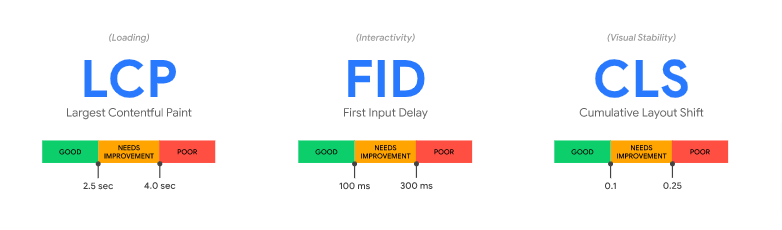
Google’s Core Web Vitals heavily emphasize performance. A score of 90 or more generally means your website is considered user-friendly and search-friendly. We have covered Google Core Web Vitals extensively in our recent post, check it out for more details.
3. Factors Affecting Website Performance and Speed
A website doesn’t slow down because of one issue. Performance depends on many technical and design choices across your hosting, codebase, plugins, media files, traffic and more.
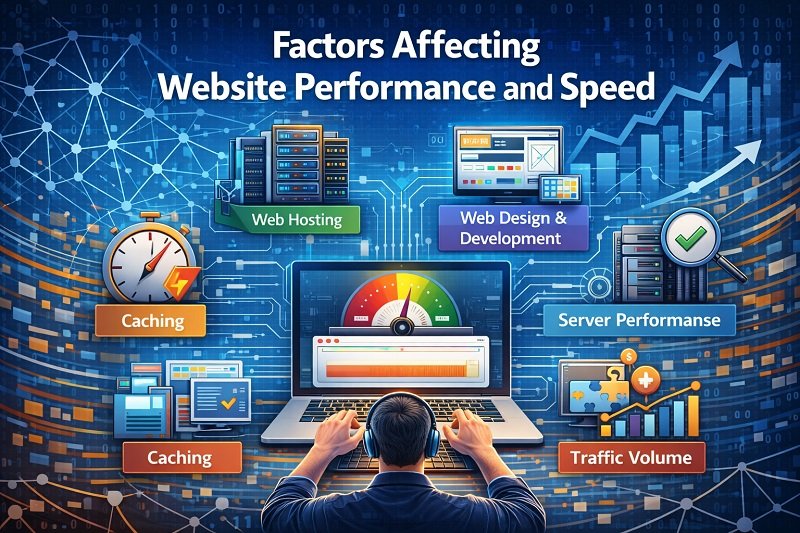
Below are the major areas that impact performance.
Web Hosting
- High downtime
- Slow server response
- Low memory or processing resources
- Weak bandwidth allocation
- No CDN integration
- Outdated server configuration (PHP, MySQL, Nginx/Apache)
Web Design & Development
- Overuse of JavaScript, HTML, and CSS
- Heavy images and large videos
- Using wrong file formats
- Lack of lazy loading
- Duplicate or outdated code
- Unoptimized queries
- Too many plugins
- Too many server requests
- Non-responsive layouts
Caching
- Disabled browser caching
- No server caching
- Inefficient CDN caching
- Improper cache configuration
Server Performance
- Poor load balancing
- Bad server tuning
- Weak caching and database optimization
Third-party extensions
- Too many external scripts
- Slow API responses
- Low-quality plugins
- Compatibility issues
Responsiveness
- No responsive design
- Oversized images on mobile
- Large CSS and JS files
- Poor device rendering
- No CDN usage
Traffic Volume
- High concurrency with limited resources
- Lack of autoscaling
- No load balancing
- No real-time monitoring
- Poor resource allocation during peak traffic
Manually monitoring all these areas is difficult and tiring. This is exactly where AI can make a meaningful difference.
Also Read
4. How AI Helps Improve Website Performance and Speed
AI transforms performance optimization by automating tasks that usually require hours of manual work. AI tools continuously monitor your site, detect issues early, and even fix them in many cases.
Here is how AI can help.
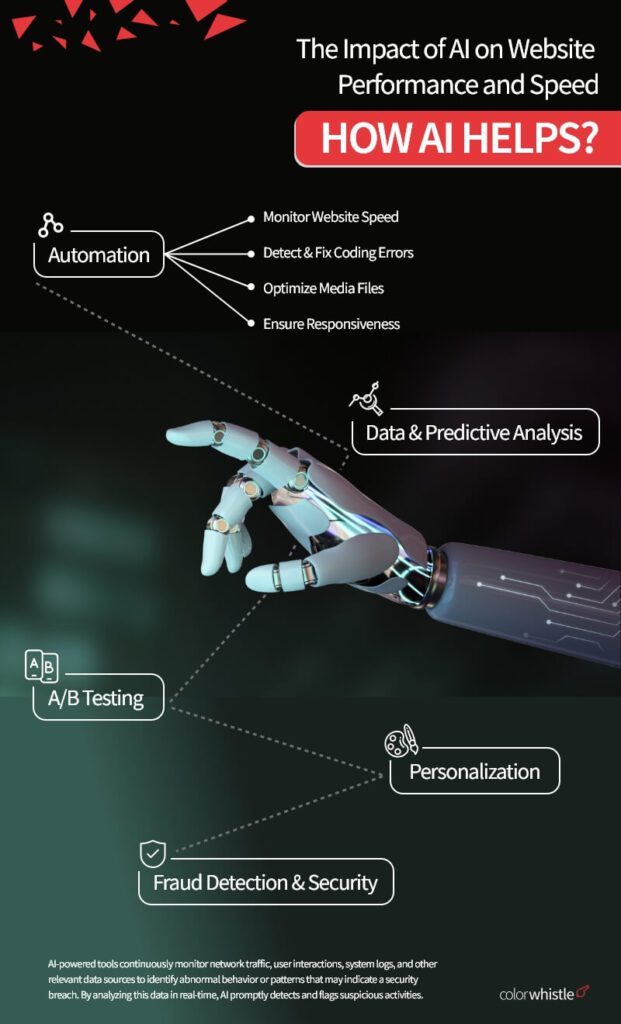
Automation
- Monitor Website Speed – AI tools detect slow pages, layout shifts, and resource-heavy elements in real time.
- Detect & Fix Coding Errors – AI scans your codebase to identify issues like unused code, inefficient patterns, broken scripts, and unoptimized queries. Some tools can also automate minor fixes.
- Optimize Media Files – AI automatically compresses images and videos, chooses the right formats, and adjusts sizes without affecting quality.
- Ensure Responsiveness – AI simulates mobile and desktop interactions to ensure your layout works across various devices and screen sizes.
Data & Predictive Analysis
AI does far more than simple reporting. It analyzes large volumes of data and helps with:
- User behavior analysis
- Predicting traffic patterns
- Identifying bottlenecks
- Spotting recurring slowdowns
- Recommending optimization steps
- Tailoring content experiences
- Enhance user experience
Powerful AI analytics can detect patterns humans may overlook.
A/B Testing
AI simplifies A/B testing by automatically creating multiple versions of:
- CTAs
- Headlines
- Product cards
- Layouts
- Colors or fonts
- Images
AI then identifies which version performs best by analyzing:
- Clicks
- Time on page
- Scroll depth
- Conversion rates
- User engagement
This helps you improve performance without hours of manual data crunching.
Personalization
AI enhances user experience by personalizing:
- Content
- UI layout
- Language
- Recommendations
- Product suggestions
- Messaging style
It does this by analyzing:
- User behavior
- Browsing history
- Past purchases
- Interaction patterns
- Device usage
This level of personalization improves engagement and reduces friction in the user journey.
Fraud Detection & Security
AI algorithms employ advanced techniques to analyze patterns, behaviors, and anomalies in real-time data to identify suspicious activities and potential security risks.
AI improves security and performance together by detecting:
- Malware
- Suspicious login attempts
- Bot spikes
- Fraudulent activity
- Abnormal traffic behavior
- Injection attempts
- Script manipulation
It monitors your site continuously and alerts you before small issues become major problems.
Also Read
Final Words on Using AI for Website Performance
In today’s digital world, website performance can make or break your online success. AI offers a powerful way to stay ahead by automating repetitive tasks, monitoring real-time performance, and detecting issues before they impact users. It takes care of the technical heavy lifting so you can focus on strategic improvements, UX, and conversions.
If you’re so skeptical about embracing AI for your/your client’s website performance-related activities, you can take professional consultation from ColorWhistle. We understand your business, audit your website, brainstorm with SMEs, carry out web searches, and suggest the best possible tools that cater to your requirements.
We’re just a message or phone call away! Let’s embark together on a long-time AI journey!
What’s Next?
Now that you’ve had the chance to explore our blog, it’s time to take the next step and see what opportunities await!
 23 Tips (+ Free Tools) to Improve Your Social...