


Our Outbound Automation Stack: Sales Navigator to Leads

Phurvishaa specializes in crafting travel tech and marketing content, leveraging deep research, SEO expertise, and AI-driven insights. Her strategic approach ensures content that educates, engages and delivers knowledge.

Our authors are proven experts in their fields, writing on topics where they have demonstrated expertise. Every piece of content undergoes peer review and validation by industry professionals.
AI Summary
Key Highlights of Outbound Automation Stack Sales Navigator Leads
This post explores building a custom outbound sales automation stack tailored for a web design agency lacking a traditional playbook. The key insight: combining Sales Navigator, Serper, Snov.io, and CRM cuts prospecting time drastically while maintaining control and understanding of the workflow. It targets sales and marketing teams needing budget-conscious, hands-on outbound solutions. The stack finds leads, verifies contacts, sequences outreach, and funnels responses for human follow-up. Despite Serper's limitations, the stack boosts efficiency, reduces burnout, and emphasizes human judgment for personalization and lead qualification. Next steps involve streamlining tools and monitoring AI personalization advancements.
We’re a web design and development agency. Outbound sales wasn’t something we had a playbook for and when we decided to build one, we did what most teams do: looked at what the “experts” recommended, got overwhelmed by the options, and ended up stitching together something that worked within our budget and constraints.
This is that story. Not a polished case study. Just an honest breakdown of the stack we built, why we built it the way we did, what it’s saved us, where it still falls short, and where we’re taking it next.
TL; DR:
- We built an outbound automation stack that connects LinkedIn Sales Navigator, lead enrichment, email verification, personalized outreach, and CRM tracking into one streamlined workflow.
- This guide explains each step of our process and how it helps generate more qualified B2B leads while reducing manual effort.
Why We Built Our Own Workflow
The off-the-shelf answer to B2B outbound in 2025 is usually some version of “just use Apollo” or “Outreach plus ZoomInfo and you’re done.” And for teams with serious sales budgets, that’s probably fine. We weren’t on that team.
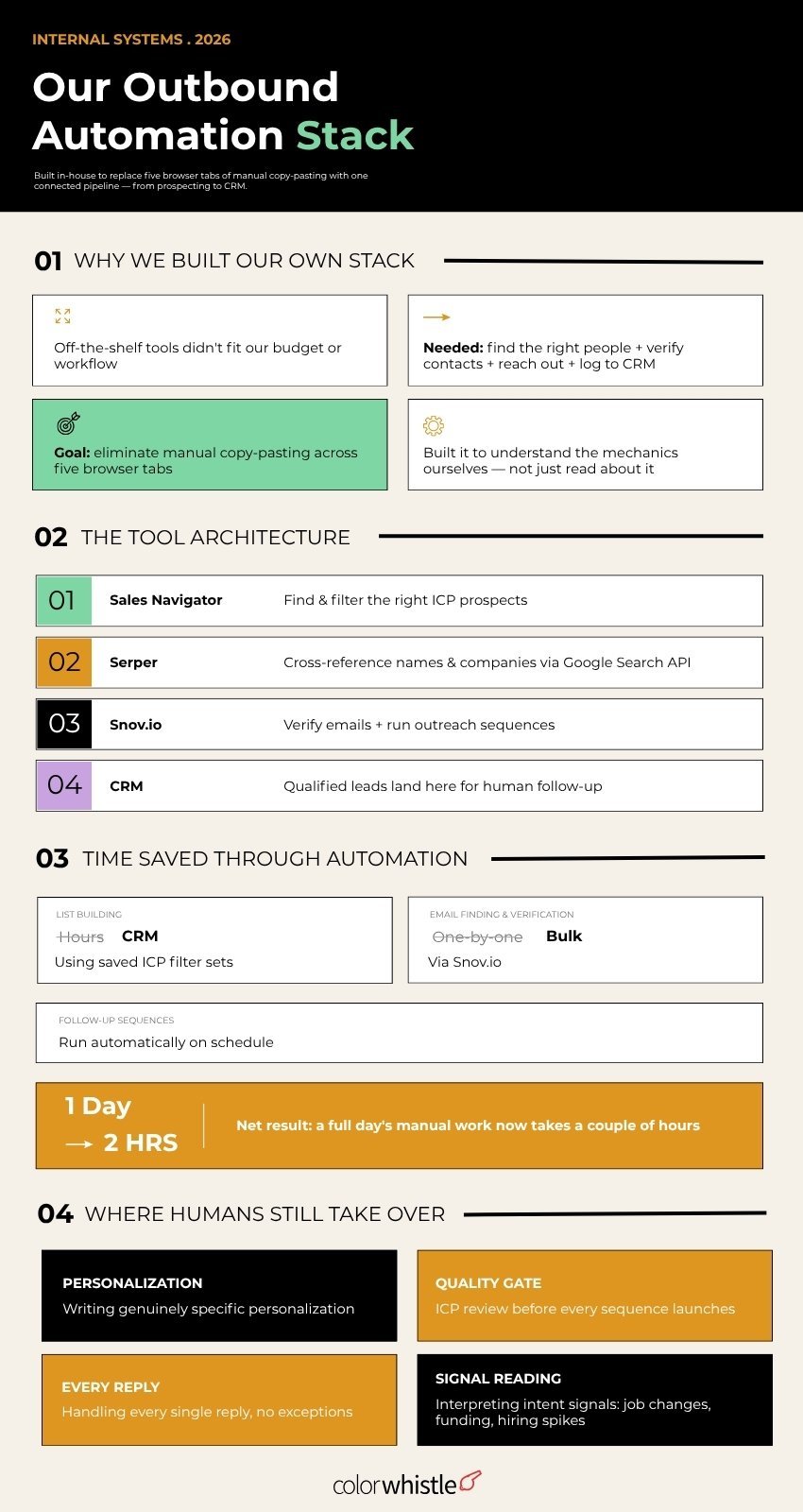
We needed something that could find the right people, verify their contact details, reach out without getting flagged, and drop everything into our CRM without someone manually copying and pasting between five browser tabs. We also needed it to not cost a fortune before we’d even validated whether outbound was going to work for us.
The other honest reason: we wanted to understand the mechanics ourselves. If you’re building outbound for clients or advising on it you need to have run the workflow personally, not just read about it. That hands-on experience is what makes the difference between generic advice and something actually useful.
So, we built our own stack. It’s not perfect. But it works, and we know exactly why every part of it is there.
The Stack: How It Actually Works
Here’s the workflow as it stands today:
Sales Navigator → Serper → Snov.io → CRM
Simple on paper. A bit messier in practice. Here’s what each piece does and why it’s in the chain.
Step 1: Sales Navigator – Finding the Right People
This is where every search starts. Sales Navigator gives us access to LinkedIn’s full professional graph with 50+ filters, company size, industry, seniority, geography, hiring activity, and crucially, whether someone has posted on LinkedIn recently.
That last filter is one most people skip. Active posters respond significantly more often than dormant profiles; the engagement gap is real and consistent. We save our ICP filter sets and run them weekly rather than rebuilding from scratch each time, which keeps the process tight.
What Sales Navigator doesn’t give us is contact information. It shows us who to talk to. Getting the actual email is a separate problem.
Step 2: Serper – Bridging the Gap
This is the part of our stack we’re most honest about: Serper is a workaround, not a solution.
Serper is a Google Search API. We use it to cross-reference names and companies from Sales Navigator against publicly available information essentially running the kind of search a human would do manually to find a contact email or verify their current role before reaching out.
It works. But it adds friction; it’s not always accurate, and it introduces a manual review step that slows things down. If we could cut one tool from the current stack, it would be this one. More on that shortly.
Step 3: Snov.io – Email Finding and Outreach
Snov.io handles two things for us: email verification and outreach sequencing.
Once we have a name and company, Snov.io finds and verifies the email address significantly reducing bounce rates compared to using unverified contact data. It also runs our outreach sequences: multi-step email campaigns with follow-ups timed and personalized per segment.
The deliverability tooling inside Snov.io has been solid. Domain warm-up, sender rotation, bounce handling these are the unglamorous things that determine whether your outreach reaches inboxes or disappears into spam folders.
Step 4: CRM Where Qualified Leads Land
Responses and qualified leads flow into our CRM. This is where the automation hands off to a human because from the moment someone replies with genuine interest, no automation should be making decisions.
The CRM gives us visibility into what’s converting, where leads are dropping off, and which outreach sequences are generating real conversations versus polite declines.
Did you know?
Combining LinkedIn outreach with email in a coordinated sequence can boost conversions by up to 287% compared to using either channel alone which is exactly why having both Snov.io and Sales Navigator in the same workflow matters.
(Source: LinkedIn Pulse)
Time Saved Through Automation
Before this stack, prospecting was entirely manual. Someone would search LinkedIn, find a name, try to find an email through a combination of guesswork and Google, add it to a spreadsheet, and then write an individual email. For a list of 50 contacts, that was easily a full day’s work and that’s before any actual outreach happened.
With the current stack running:
- Lead list building goes from hours to minutes. Saved searches in Sales Navigator mean we’re not rebuilding ICP searches from scratch we’re pulling fresh prospects that match a criteria we’ve already validated
- Email finding and verification happens in bulk through Snov.io rather than one contact at a time
- Outreach sequencing runs automatically follow-ups go out on schedule without anyone having to remember who hasn’t replied yet
- CRM updates happen without manual data entry for the initial lead capture stage
The honest number: what used to take a full day of one person’s time now takes a couple of hours and most of that time is spent on review and quality control, not execution.
That time saving isn’t just an efficiency win. It means the team members doing outreach aren’t burning out on admin they’re spending their energy on the conversations that matter.
Also Read
Where Manual Intervention Still Matters
Automation handles volume. Humans handle judgment. That line is something we’ve had to redraw a few times.
Personalization that isn’t fake Automated sequences can reference someone’s company name, industry, or job title. What they can’t do is reference something genuinely specific a recent post they wrote, a product launch they announced, a piece of content they shared that’s directly relevant to what we’re offering. That kind of personalization requires a human to write it, and it’s almost always what separates a reply from silence.
ICP review before sequences launch: We don’t let lists go straight from Sales Navigator into a sequence without a human reviewing them. Filters are powerful but imperfect a search for “Head of Marketing at SaaS companies with 50–200 employees” will still surface people who aren’t right for what we’re offering. That review step catches the obvious mismatches before they become wasted sends or awkward replies.
Responding to replies: The moment someone responds with interest, with a question, with an objection a human takes over. Always. Automated reply handling for sales conversations is where most outbound tools oversell their capabilities and where most prospects can tell something is off. The response to a reply is where the relationship either starts or dies.
Reading the signals Job change alerts, funding announcements, hiring spikes Sales Navigator surfaces these, but deciding which ones are worth acting on and how to use them in outreach requires judgment. Automation can flag the signal. Only a human can decide what to do with it.
Where This Stack Falls Short (And What’s Next)
We said we’d be honest, so here it is: Serper is the weak link.
Using a Google Search API to bridge Sales Navigator and Snov.io is a workaround. It adds a step, introduces inaccuracy, and requires more manual review than we’d like. It’s in the stack because it was the most accessible option within our budget at the time we built this. It’s not the right long-term answer.
The cleaner version of this stack the one we’re moving toward is:
Sales Navigator → Snov.io directly
Snov.io has its own LinkedIn prospecting features that, with a slightly higher plan, handle email finding directly from LinkedIn profiles without needing a search API in the middle. Simpler, more accurate, fewer moving parts.
Did you know?
LinkedIn processes over 11,000 hires per minute, and members update their own profiles in real time, making LinkedIn-sourced data significantly fresher than most third-party B2B databases.
(Source: Financial Express)
We’re also watching the AI personalization layer closely. Tools that auto-generate personalized first lines from a prospect’s LinkedIn activity are improving fast but the quality gap between AI-written personalization and genuinely human-written personalization is still wide enough that we haven’t committed to automating that step yet.
One honest caveat worth flagging: this space moves quickly. The specific tool recommendations in this post reflect what we’re using and what’s working in 2026. By 2027, some of these tools will have changed their pricing, their features, or their LinkedIn compliance posture. Treat the architecture as the durable insight the specific tools are just today’s best available options within that architecture.
The Bigger Picture
Building this stack taught us something that goes beyond the tools: outbound only works when the fundamentals are right.
The workflow finds the right people and gets a message in front of them efficiently. But if the ICP is wrong, the sequencing won’t fix it. If the messaging doesn’t connect, the automation just delivers bad messages faster. If the website a prospect lands on after clicking through your LinkedIn profile doesn’t reflect the quality and credibility of your outreach, the conversion falls apart at the last step.
That last point is one we care about for obvious reasons. Building web presences that support business development is what we do. A strong outbound motion and a weak website is a leaky bucket. The same is true in reverse. Both have to work.
If you’re building outbounds for your team or thinking through how your digital presence supports your sales motion, properly built website involves and see how ColorWhistle approaches web design and development .
FAQs
What is an outbound automation stack?
An outbound automation stack is a combination of tools that help businesses identify prospects, enrich contact data, automate outreach, and track conversations throughout the sales process.
Why is LinkedIn Sales Navigator important for outbound sales?
Sales Navigator provides advanced search filters, buying signals, and account insights that help sales teams identify highly relevant prospects instead of relying on generic lead lists.
Which tools are commonly included in an outbound sales stack?
A typical stack includes LinkedIn Sales Navigator for prospecting, lead enrichment tools, email verification software, outreach automation platforms, CRM software, and analytics tools to monitor campaign performance.
How does outbound automation improve lead quality?
Automation reduces manual work while ensuring prospects are selected using specific criteria, enriched with accurate contact information, and contacted with personalised messaging, resulting in more qualified leads.
 Packers & Movers Industry Statistics 2026...