


LinkedIn Sales Navigator Statistics Every B2B Sales Team Should Know

Phurvishaa specializes in crafting travel tech and marketing content, leveraging deep research, SEO expertise, and AI-driven insights. Her strategic approach ensures content that educates, engages and delivers knowledge.

Our authors are proven experts in their fields, writing on topics where they have demonstrated expertise. Every piece of content undergoes peer review and validation by industry professionals.
AI Summary
LinkedIn Sales Navigator Statistics Every B2B Sales Team Should Know
This post explores why LinkedIn Sales Navigator is essential for B2B sales teams, highlighting its superior prospecting power over traditional cold outreach. The key insight: Sales Navigator users achieve up to 25% response rates and 18% larger pipelines, far outperforming cold email methods. The blog details usage patterns, best filters, and common mistakes to avoid, emphasizing that Sales Navigator works best as part of an integrated outbound stack combining AI tools and multichannel outreach. Sales leaders and SDRs will learn how to leverage fresh data and intent signals to boost conversions, shorten sales cycles, and build a credible digital presence that converts LinkedIn traffic into real pipeline.
If your B2B sales team is still prospecting from a static CSV or relying on cold email blasts to a rented database, the numbers are working against you. LinkedIn Sales Navigator has become the de facto prospecting infrastructure for serious outbound teams and the benchmarks coming out of 2025 and 2026 make a compelling case for why.
This blog breaks down the key LinkedIn Sales Navigator statistics every SDR, AE, and sales manager should have in their back pocket from response rates and pipeline impact to the filters that move the needle and the mistakes that quietly kill conversion.
TL; DR
A practitioner-facing breakdown of how B2B sales teams are using LinkedIn Sales Navigator in 2025–2026 covering what the platform delivers in real pipeline terms, how response rates compare to cold outreach, which filters top reps swear by, and the mistakes quietly killing conversion for everyone else.
This blog is for: SDRs, AEs, sales managers, RevOps leads, and B2B agencies building or optimizing outbound prospecting workflows on LinkedIn.
- How companies across industries are using Sales Navigator beyond basic prospecting
- Why InMail response rates leave cold email benchmarks in the dust
- The filters that move the needle and why most reps ignore them
- The benchmarks every SDR should be holding themselves to in 2026
- The most common prospecting mistakes and what the data says to do instead
Why Sales Navigator Is Now Table Stakes for B2B Outbound
Let’s start with the platform context, because it matters:
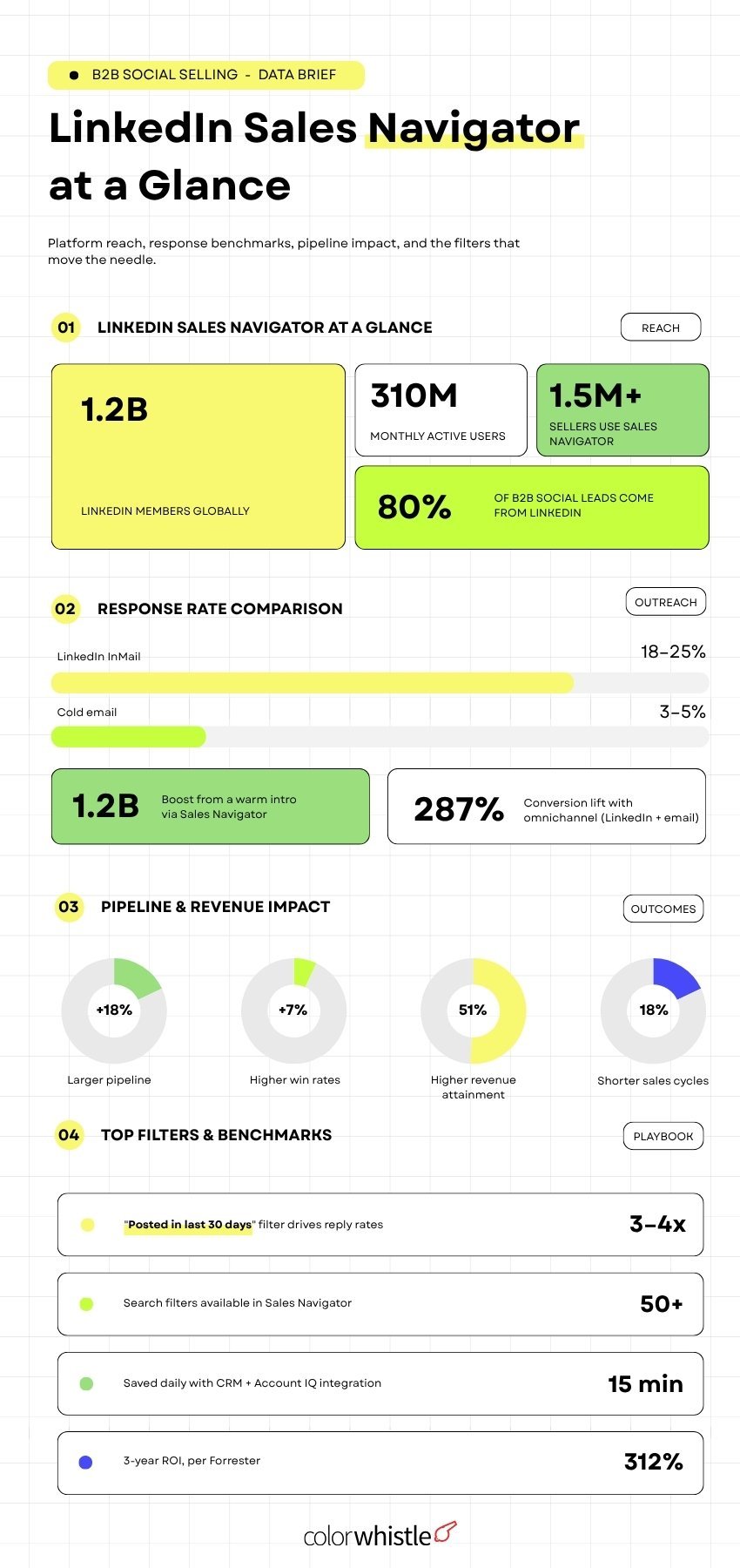
- LinkedIn has 1.2 billion members globally as of 2026, with 310 million monthly active users making it the world’s largest database of self-updating professional profiles. (Source: Grow with Ghost)
- 89% of B2B marketers use LinkedIn for lead generation, and 40% call it the single most effective channel for high-quality leads. (Source: Sprout Social via Bitscale)
- LinkedIn’s visitor-to-lead conversion rate is 2.74% compared to 0.77% on Facebook and 0.69% on X/Twitter. (Source: LigoSocial via Bitscale)
- 80% of all B2B leads generated through social media come from LinkedIn. (Source: Venuelabs)
- Sales Navigator users identify 45% more prospects than those using standard LinkedIn search. (Source: Grow with Ghost)
- Teams using Sales Navigator report +18% larger pipeline and +7% higher win rates compared to non-users. (Source: LinkedIn internal data via Martal)
Did you know?
A Forrester study found that Sales Navigator users achieved a 312% ROI over three years, with payback periods under six months driven by faster deal cycles and higher close rates. (Source: GetSales.io)
How Companies Are Using Sales Navigator Today
Sales Navigator is trusted by 1.5 million+ sellers globally, and the use cases go well beyond basic prospecting:
- 71% of sales professionals and approximately 90% of top performers use social selling tools like Sales Navigator as a core part of their workflow. (Source: Martal)
- Among millennial sales reps specifically, 78% use social selling tools and 63% say it’s crucial to their success. (Source: Martal)
- The tool is used across industries with SaaS and tech leading adoption, while manufacturing, finance, healthcare MedTech, and professional services are all growing rapidly as segments.
- Beyond prospecting, teams use Sales Navigator to track job changes, funding rounds, hiring spikes, and leadership changes all high-intent signals that indicate a buying window is open
- 2 in 3 B2B marketers now use generative AI tools as part of their LinkedIn outreach workflow up 20% year-over-year with AI handling research, draft writing, and sequence personalization while humans manage the actual conversation.
The platform has also evolved beyond search. LinkedIn’s Account IQ feature (Advanced and Advanced Plus plans) delivers AI-powered account summaries, org charts, and strategic priority mapping in minutes of work that previously took hours of manual research per account.
“The Account IQ feature is a game changer. I’m able to create a pre-sales document, org chart, and share details about the account in minutes, not hours.”
Karloff Rosario, Enterprise Account Executive, Cyera (Source: LinkedIn Sales Navigator)
Response Rates: Sales Navigator vs Cold Databases
This is where the data gets uncomfortable for teams still running cold outreach the old way:
- LinkedIn’s warm intro feature using shared connections for introductions can boost buyer responses by up to 5x compared to cold outreach. (Source: LinkedIn Sales Navigator)
- Companies with high social selling adoption achieve 51% higher revenue attainment than those with low adoption. (Source: LinkedIn State of Sales Report 2025 via Grow with Ghost)
- Social selling reduces average sales cycle length by 18%, as prospects enter conversations already familiar with the seller’s expertise. (Source: Grow with Ghost)
The cold database problem is real: stale data, low deliverability, and burned domains. LinkedIn’s advantage is that members update their own profi1les, which means the data is fresher and more reliable than almost any third-party enrichment tool that can match senior decision-makers.
Best-Performing Filters for B2B Prospecting
Sales Navigator has 50+ search filters but not all of them pull equal weight. Here’s what practitioners consistently report as highest leverage:
The filters that move the needle:
- “Posted on LinkedIn in the last 30 days” Active posters reply 3–4x more often than dormant profiles. This is the single most underused, highest-impact filter in Sales Navigator.
- Seniority + Function Combining these two filters eliminates the noise from large searches and gets directly to decision-makers. The winning combo for most B2B SaaS teams: Director/VP/C-Level + Sales or Marketing function
- Years in Role (6+ months) Too new and they’re still onboarding. Too long and they’re entrenched. The 6–24-month window is where new budget owners are most likely to be evaluating vendors
- Company headcount growth A company hiring aggressively is a company with active problems to solve and budget to spend. Sales Navigator surfaces this directly
- Job change alerts A contact moving to a new company is a warm signal. They’re building new vendor relationships, have fresh budget, and often want to replicate tools that worked at their last role
Boolean search for precision: When broad filters return 5,000+ results, Boolean strings narrow to the 50–100 perfect-fit prospects. Example: (“Head of Sales” OR “VP Sales” OR “Chief Revenue Officer”) NOT (“Freelance” OR “Consultant”) run against a saved filter set that cuts noise fast.
Pro tip: Save your ICP filter set with a clear name (e.g. ICP – US SaaS Sales Leaders) and run it weekly rather than rebuilding from scratch. Consistency compounds.
Also Read
Common Prospecting Mistakes (And What the Data Says Instead)
Most Sales Navigator underperformance isn’t a tool problem it’s a usage problem. Here are the patterns that kill results:
Mistake 1: Treating Sales Navigator as the entire workflow The tool finds and vets prospects. It doesn’t replace your sequencer, your CRM, or your enrichment layer. Teams that buy Sales Navigator and expect pipeline to appear without a proper outreach stack are always disappointed.
Mistake 2: Messaging to broad industries Generic industry messaging fails. The data is clear on this sub-niche messaging consistently outperforms broad category targeting. Sending a message about “helping software companies” to “Computer & Network Security” and “Wireless Services” contacts needs different copy.
Mistake 3: Ignoring intent signals Funding news, hiring spikes, leadership changes, and content activity are all available inside Sales Navigator. Reps who ignore these and prospect purely on firmographics are leaving the warmest signals on the table.
Mistake 4: Going straight to the pitch 84% of C-level executives use social media to support purchasing decisions, with LinkedIn as their primary research platform. They’ve likely seen your profile before they respond to your message. An optimized, buyer-facing profile isn’t optional; it’s the first impression before the conversation even starts.
Mistake 5: Over-automating outreach LinkedIn’s detection algorithms are improving. The trend is toward “augmented” selling AI drafts and research; humans hit send. Full automation of connection requests and InMails risks account restrictions and tanks deliverability.
Did you know?
With only 1% of LinkedIn users posting content weekly, consistent content from a rep’s personal profile compounds over time making every prospecting touchpoint warmer than a cold message out of nowhere.
What This Means for Your Sales Team’s Digital Stack
Sales Navigator doesn’t operate in a vacuum. It’s a prospecting layer that feeds into a broader outbound stack and the teams winning in 2026 have connected the pieces:
- Discovery → Sales Navigator (filters, saved searches, intent signals)
- Enrichment → Verified contact data and firmographics layered on top
- Outreach → Multichannel sequencer (LinkedIn + email, not either/or)
- CRM sync → Every lead, interaction, and signal feeding automatically into your pipeline
The data is consistent: omnichannel outreach combining LinkedIn with email outperforms either channel alone by up to 287%. Teams choosing between the two are leaving the majority of their potential response rate on the table.
For agencies and consultancies building outbound on behalf of clients or businesses building a website and brand presence that supports social selling the digital infrastructure behind your outbound matters as much as the tool itself. A credible, well-built web presence is what a prospect sees when they click through your LinkedIn profile before deciding whether to reply. Explore how ColorWhistle approaches B2B web design and development and what a professional website build actually costs because your website is the landing page your LinkedIn outreach sends people to.
Building a website that makes your outbound work harder? Talk to ColorWhistle we build web presences for B2B businesses that convert LinkedIn traffic into real pipeline.
FAQ’s
Is LinkedIn Sales Navigator worth it for B2B sales teams in 2026?
For teams doing outbound, yes Sales Navigator users report 18% larger pipeline, 7% higher win rates, and a 312% ROI over three years per a Forrester study, making it one of the highest-returning tools in a modern sales stack.
What response rates can you expect from LinkedIn InMail vs cold email?
LinkedIn InMail consistently delivers 18–25% response rates compared to 3–5% for cold email, a gap that reflects both the quality of LinkedIn’s data and the professional context in which messages are received.
What is the single most underused filter in Sales Navigator?
“Posted on LinkedIn in the last 30 days” active posters reply 3–4x more often than dormant profiles, yet most reps skip it entirely and prospect purely on firmographics instead.
 Telehealth & Online Consultation Statisti...