Integrating Three.js Visualizer / Configurators into Your WooCommerce Store

Powered by an expert content team, this blog blends SEO precision with compelling storytelling. Every insight is supported by data-driven research, ensuring content that ranks, engages, and drives conversions.

Our authors are proven experts in their fields, writing on topics where they have demonstrated expertise. Every piece of content undergoes peer review and validation by industry professionals.
AI Summary
Key Highlights of Three.js Visualizer Integration in WooCommerce
This post explores integrating Three.js visualizers and configurators into WooCommerce to enhance eCommerce experiences. The key insight: 3D product visualization drives higher engagement and conversion by letting customers interact with products digitally as they would in-store. It covers practical methods including plugins, custom development, third-party platforms, headless setups, and AR/VR integration. Case studies from IKEA, Lolo Chateney, and Jweel demonstrate real-world success. Readers learn how to implement immersive 3D tools, boosting purchase confidence and reducing returns. The guide serves eCommerce brands seeking to modernize shopping and elevate customer satisfaction through advanced 3D technology.
As we move into 2026, more brands are embracing the power of 3D technology in eCommerce. Virtual configurators, interactive product visualizers, and immersive 3D experiences are becoming mainstream. With customers expecting richer shopping experiences, 3D elements are no longer a “nice to have”, they are quickly becoming a conversion driver.
The shift is clear. Modern shoppers want to explore products the way they would in a physical store. They want to rotate them, zoom in, inspect materials, choose variations, and understand proportions. This is where Three.js visualizers and configurators shine. When paired with WooCommerce, they elevate product discovery and help customers make confident purchase decisions.
If you plan to enrich your store with 3D experiences, get support from an experienced website development company that provides Three.js development services. In this guide, we walk through practical implementation approaches and real-world examples to help you get started.
What is Three.js and Why?
Three.js is a powerful, open-source JavaScript library that makes it easier to create and render 3D graphics inside a browser. It eliminates the complexity of writing low-level WebGL code and gives developers intuitive tools for producing immersive 3D experiences.
You can build almost anything with Three.js, such as:
- Product visualizers
- 3D configurators
- Virtual stores
- Visual simulations
- AR and VR experiences
- Interactive animations
- Training and education tools
- Data visualizations
Major platforms like A-Frame and Sketchfab rely on Three.js under the hood. Many eCommerce brands use it to let users visualize, rotate, and customize products directly within the website.
Also Read
What are Visualizers and Configurators?
Visualizers
Visualizers focus on giving customers a closer look at the product. They allow actions like zooming, rotation, lighting changes, and exploring textures or materials. They work best for products where appearance and design matter.
Examples include:
- Furniture previews (IKEA 3D furniture explorer)
- Ring and diamond visualizers
- Sneaker color variations
- Eyewear try-on previews
These interactions reduce purchase hesitation by giving users a more realistic understanding before they buy.
Configurators
Configurators allow customers to personalize a product in real time. This could include size, color, material, engraving, accessories, or full component-level customization.
Examples include:
- Car configuration tools
- Customizable shoes on Nike
- Build-your-own laptop options
- Personalized jewelry editors
Configurators also increase average order value, help customers visualize what they are buying, and reduce returns.
Methods to Integrate Visualizers and Configurators into WooCommerce Using Three.js
Below are the four most practical approaches, along with scenarios where each method makes the most sense.
Method 1: Use a Three.js Plugin or Extension
This is the simplest way to add 3D visualization to WooCommerce. Several plugins allow you to upload 3D models in formats like glTF, OBJ, or FBX, and automatically display them on product pages.
Benefits:
- Fast installation
- Minimal development effort
- Good for small and medium stores
- Works well for basic visualization needs
Limitations:
- Limited customization
- Not ideal for complex multi-step configurators
Example Plugin: WooCommerce 3D Product Viewer
Use this method if you want a straightforward 3D preview without extensive customization.
Method 2: Custom Development With Three.js
Custom development gives you full control over interactions, UI, logic, materials, and the user journey. If your product has dynamic parts or needs real-time asset swapping, this is the ideal solution.
You can:
- Change textures on the fly
- Swap components
- Update pricing based on selections
- Build guided configuration steps
- Sync selections with WooCommerce attributes or custom fields
This approach is great for brands selling configurable or made-to-order products.
Real Example:
A furniture brand offering custom upholstery and finish options for sofas and chairs. Customers can choose fabrics, legs, materials, and color combinations, then preview the final product before ordering.
Method 3: Integrate Third-Party 3D Platforms
Platforms like Sketchfab or Vectary allow you to upload your 3D models, then embed them in WooCommerce. These platforms handle rendering, hosting, lighting, and optimization.
Benefits:
- Fast setup
- No need for custom coding
- Reliable rendering infrastructure
- Works even with large 3D models
Limitations:
- Monthly subscription costs
- Limited flexibility compared to custom Three.js builds
Example Platform: Sketchfab
Method 4: Headless WooCommerce with a Custom Three.js Front-End
This method is for businesses that want maximum control and performance. You decouple WooCommerce and build the front end using modern frameworks like React, Vue, or Next.js. Then, integrate Three.js as part of your UI.
Benefits:
- Fully customizable
- High-performance architecture
- Works well for complex or enterprise-level configurators
- Smooth interactions and animations
This is ideal for industries like jewelry, automotive, furniture, and luxury goods.
Example:
A jewelry store allowing users to configure rings by changing metal type, gemstones, and engravings while seeing real-time changes in a fully interactive 3D model.
Method 5: AR and VR Integration
AR and VR experiences take product visualization to the next level. Three.js can work with WebXR APIs to enable immersive product previews. When combined with WooCommerce, these experiences bring the in-store try-on feel to digital platforms.
Common uses:
- Eyewear and apparel virtual try-on
- Furniture placed in a customer’s room
- Interactive product showrooms
- VR product explorations
Example
Lenskart using AR previews to help customers try-on eyeglasses before buying.
Also Read
Case Studies of Visualizers and Configurators in WooCommerce Stores
IKEA: A Pioneer in 3D and AR Retail

IKEA uses Three.js-powered visualization and AR technology to help customers virtually place furniture in their homes. This improves decision-making and strengthens purchase confidence.
Lolo Chateney: Luxury Bag Customization
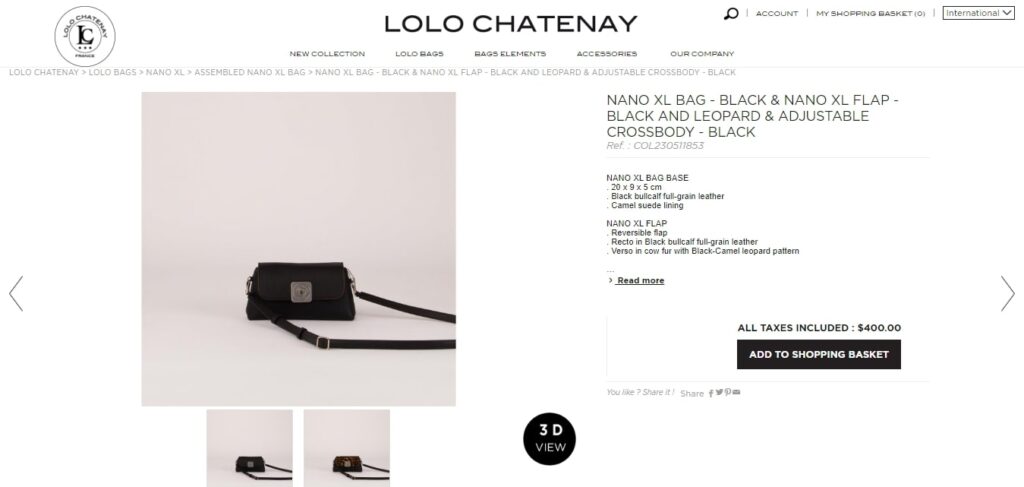
Lolo Chateney introduced a 3D bag configurator that lets customers explore texture, size, color, and accessories in real time. This increased engagement and helped them boost custom orders.
Jweel – Glorifying Personalized Jewelry to New Heights
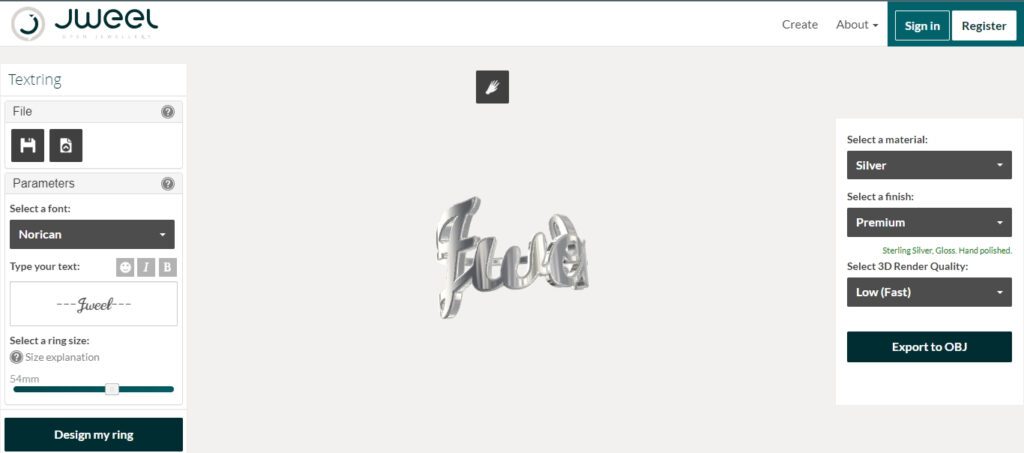
Jweel revolutionizes personalized jewelry by offering an innovative platform it allows customers design jewelry pieces with high precision. Users can modify materials, shapes, patterns, fonts, and engravings while viewing a realistic 3D preview before placing their order.
Get Your Results With Three.js Visualizer/Configurator Integration
Bringing Three.js visualizers and configurators into your WooCommerce store creates a richer, more interactive shopping experience. Customers get to see products exactly how they want them. As a result:
- Engagement increases
- Returns decrease
- Confidence in purchase decisions improves
- Conversions go up
- Customer satisfaction strengthens
3D customization is no longer futuristic. It’s becoming an important part of modern eCommerce.
To get a more detailed comparison of the two leading eCommerce platforms, I recommend exploring WooCommerce vs Shopify statistics.
If you are looking for professional Three.js development services you can contact ColorWhistle by sending us a message or call us at +1 (919) 234-5140, we’ll get back to you at the earliest. We provide services tailored to your requirements that suit your business. We are also experts at website development services, website designing and digital marketing services. You can approach us for any of these services to make a robust online presence for your business.
What’s Next?
Now that you’ve had the chance to explore our blog, it’s time to take the next step and see what opportunities await!
 Digital Marketing Trends for Switzerland