Ensuring Performance Optimization: Tips for Enterprise Website Maintenance (PDF Download Included)

Powered by an expert content team, this blog blends SEO precision with compelling storytelling. Every insight is supported by data-driven research, ensuring content that ranks, engages, and drives conversions.

Our authors are proven experts in their fields, writing on topics where they have demonstrated expertise. Every piece of content undergoes peer review and validation by industry professionals.
AI Summary
Key Highlights of Enterprise Website Performance Optimization
This post explores essential performance optimization strategies for enterprise website maintenance, aimed at site administrators and digital marketers. The key insight: regular audits and updates prevent slowdowns, security risks, and broken links that degrade user experience and conversions. It covers methods like optimizing page load times, improving Core Web Vitals, leveraging CDNs, browser caching, and continuous monitoring. Benefits include faster load speeds, improved search rankings, and stronger brand credibility. The blog provides a maintenance checklist and emphasizes proactive scalability planning to handle traffic surges, ensuring a stable, efficient website that supports growth and enhances user engagement.
Performance optimization plays a major role in helping an enterprise website stay healthy and efficient. If your WordPress website has many files, blogs, images, videos, and dynamic elements, it needs regular care to stay stable. Without routine maintenance, issues like broken links, security risks, slow loading pages, and technical errors eventually pile up.
When these issues go unchecked, you will notice an increase in bounce rate and a drop in user engagement. Over time, this directly affects conversions and overall business performance.
As a WordPress development company, we have spent a significant amount of time exploring what actually helps enterprise websites stay fast and reliable. After discussions with our development team, performance experts, and research across multiple sources, we have put together practical insights that can guide your maintenance efforts.
Let’s walk through why performance optimization matters, the metrics you should track, and the steps you can take to keep your enterprise website running smoothly.
Enjoy your reading!
Importance of Performance Optimization During Enterprise Website Maintenance
A fast and stable website is essential for delivering meaningful user experiences. Modern users expect pages to load quickly, respond instantly, and stay secure. When pages take too long to load, they leave. This affects more than just engagement. Even search engines treat page speed as a ranking factor.
Google found that when page load time rises from 1 second to 3 seconds, the bounce probability increases by 32 percent. Slow websites lose traffic, conversions, and search visibility.
Prioritizing performance optimization during routine maintenance helps:
- Improve user satisfaction
- Reduce friction in the browsing journey
- Boost search engine rankings
- Deliver faster conversion flows
- Maintain strong brand credibility
Performance is not a one-time activity. It requires consistent monitoring, testing, and improvement.
Impact of a Slow Website on User Experience, Conversions, and Rankings
A slow website affects everything from usability to revenue. Users simply do not wait. A few extra seconds of delay leads them to exit and look for a faster alternative.
A slow website impacts you in three main ways:
1. User experience
Slow pages cause frustration and reduce trust. Users spend less time exploring and interacting with the website.
2. Conversions
Users are less likely to complete actions like buying a product or filling a form when the site feels unresponsive. Even a one second delay can reduce conversions by up to 20 percent.
Source: Portent
3. SEO performance
Google ranks fast websites higher. Slower websites often fall in rankings, which reduces organic traffic and long-term visibility.
Performance optimization helps remove these friction points and keeps the user journey smooth.
Metrics for an Enterprise Website Maintenance
Your maintenance metrics should align with your business goals, audience size, and technical setup. These are the essential metrics every enterprise should track:
- Uptime
- Page load time
- Core Web Vitals
- Server response time
- Conversion rate
- Bounce rate
- Traffic sources
- Mobile responsiveness
- Error rates
- Security incidents
- Search engine rankings
- Downtime and recovery time
These metrics give you a clear picture of both your technical health and the quality of your user experience.
Tips for Enterprise Website Maintenance to Ensure Performance Optimization
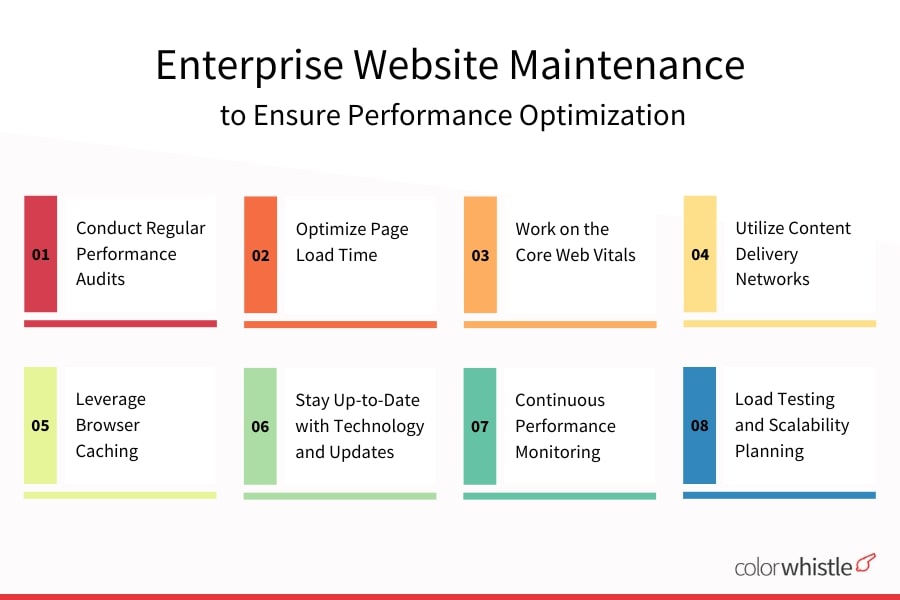
Conduct Regular Performance Audits
Regular performance audits help you pinpoint problems early. They identify issues like slow server response, oversized images, unnecessary scripts, inefficient database queries, or misconfigurations in caching.
Audits also make it easier to track improvements over time. They prevent unexpected slowdowns and help you maintain a consistently reliable experience.
Did you know?
Nearly 70 percent of websites load unused or oversized scripts that slow down performance.
Source: WebPageTest
Fixing these issues keeps your user experience smooth and predictable.
Optimize Page Load Time
Users expect pages to load quickly. Every second counts. Techniques that improve load time include:
- Reducing HTTP requests
- Compressing images and videos
- Removing unused CSS and JavaScript
- Using caching plugins
- Prioritizing visible (above-the-fold) content
- Using a CDN for global content delivery
- Optimizing database performance
A well-optimized website keeps users engaged and helps improve conversions naturally.
Work on the Core Web Vitals
Google measures real user experience using Core Web Vitals.
- Largest Contentful Paint (LCP)
- Interaction to Next Paint (INP, replacing FID)
- Cumulative Layout Shift (CLS)
Improving these metrics helps enhance usability, stability, and search visibility. This can be done by optimizing images, reducing script delays, improving server response time, and preventing layout shifts.
Did you know?
Only about 40 percent of websites currently pass all Core Web Vitals.
Source: HTTP Archive
Working on these directly improves real-world user experience.
Utilize Content Delivery Networks
CDNs help load content faster by serving it from the nearest server based on the user’s location. This reduces latency and improves overall performance.
CDNs are especially useful for enterprise websites with global visitors or heavy media usage. They also offer DDoS protection, caching, and additional security features.
Also Read
Leverage Browser Caching
Caching stores static content like images, CSS, and JavaScript in the user’s browser. This means returning visitors experience much faster load times.
By configuring proper cache headers, you reduce server load and improve overall performance.
Managed WP Hosting and Its Advantages on Enterprise CMS Websites
Managed WordPress hosting is ideal for enterprises because it takes care of all the technical aspects:
- Performance tuning
- Security protections
- Daily or real-time backups
- Server-level caching
- Automatic updates
- Staging environments
- Expert support
It removes the operational burden from your internal teams and keeps your website stable and optimized.
Stay Up-to-Date with Technology and Updates
Updates bring security patches, performance improvements, and new features. Keeping your CMS, plugins, themes, and integrations updated reduces risk and ensures compatibility.
Using a staging environment for updates prevents accidental downtime and allows safe testing before deploying changes.
Continuous Performance Monitoring
Continuous monitoring helps track key metrics like performance, uptime, error logs, and traffic anomalies. It allows you to detect issues early and fix them before they affect users.
Monitoring tools also help you understand long-term trends, peak usage periods, and areas that need improvement.
Load Testing and Scalability Planning
Load testing helps you check how the website performs under stress. This is critical for enterprise websites that face sudden traffic spikes, large campaign launches, or seasonal surges.
Scalability planning ensures you are prepared with:
- Load balancing
- Auto scaling
- Efficient caching
- Database optimization
Did you know?
Eighty two percent of websites break under sudden traffic spikes when not properly tested.
Source: Kinsta testing data
Load testing helps you avoid these failures.
Also Read
Checklist for Enterprise Website Maintenance
- Update content regularly
- Track uptime and page speed
- Perform full backups on schedule
- Update all plugins, themes, and CMS
- Scan for malware and vulnerabilities
- Test all forms, user flows, and CTAs
- Check for broken links
- Ensure mobile responsiveness
- Optimize images and database
- Review SEO settings and indexing
- Monitor error logs and warnings
- Review hosting performance and server limits

Improve Your Engagement with Regular Enterprise Website Maintenance
Consistent website maintenance keeps your platform fast, secure, and reliable. It strengthens user trust, improves engagement, and helps your business grow without interruptions.
A well-maintained website provides a strong foundation for conversions, search visibility, and long-term digital success. By continuously improving performance, updating content, monitoring security, and staying current with best practices, your enterprise website becomes a powerful asset that supports your growth.
For more interesting and professional digital marketing services, you can contact ColorWhistle by sending us a message or call us at +1 (919) 234-5140, we’ll get back to you at the earliest. We provide services tailored to your requirements that suit your business.
What’s Next?
Now that you’ve had the chance to explore our blog, it’s time to take the next step and see what opportunities await!
 Website Design Ideas, Examples and Inspiratio...