




Migrating HubSpot Website to WordPress – Developer Guide

With half a decade of experience in creating tech content for education, healthcare, hospitality, and real estate, Nandhini excels at turning complex insights into clear, credible, in-depth, research-backed, and engaging content that helps readers make informed decisions.

Our authors are proven experts in their fields, writing on topics where they have demonstrated expertise. Every piece of content undergoes peer review and validation by industry professionals.
AI Summary
Key Highlights of HubSpot to WordPress Migration Guide
This post explores migrating HubSpot websites to WordPress, aimed at developers seeking greater design control and scalability. The key insight: a structured, step-by-step migration process simplifies this complex task. It covers backing up HubSpot content, choosing migration methods (manual or plugin-based), setting up WordPress environments, replacing HubSpot features with equivalent plugins, and thorough testing before launch. Benefits include access to a vast plugin ecosystem, enhanced customization, and improved website performance. The guide offers practical workflows, real case studies, and checklists to ensure a smooth transition, empowering developers to build dynamic, customizable, and sustainable WordPress sites efficiently.
Migrating a HubSpot website to WordPress gives you more freedom over design, functionality, and customization. For developers, this move offers deeper control over the codebase, easier scalability, and access to a much wider ecosystem of tools and themes.
What is Website Migration?
Website migration refers to moving a website from one platform or environment to another. This may include:
- Changing CMS platforms (HubSpot to WordPress)
- Switching hosting providers
- Moving to a new domain
- Changing site structure or page hierarchy
- Updating frameworks or redesigning the UI
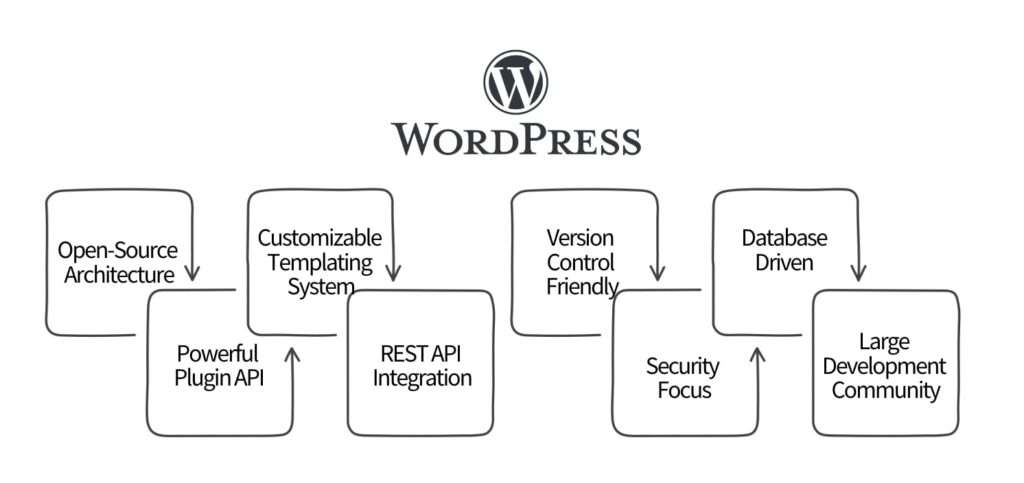
Why WordPress Migration: A Technical Deep Dive
Beyond its user-friendly interface, WordPress offers strong technical advantages that make it a popular choice among developers.
Open-Source Architecture: WordPress is built on PHP, a well-established server-side language. Because it’s open-source, developers can modify core features, extend functionality, and build custom plugins or integrations with complete freedom.
Customizable Templating System: WordPress has a powerful template hierarchy that gives developers full control over page layout and rendering. Themes are built from these templates, letting you adjust both design and functionality at a granular level.
Powerful Plugin API: WordPress’s plugin API lets developers build add-ons that hook into the system, override behavior, or integrate with external services. This flexibility makes it possible to build any feature without altering core files.
Database Driven: WordPress stores content, users, and settings in a MySQL database. This structured approach helps maintain performance, scale content, and organize data for large websites.
REST API Integration: WordPress REST API allows developers to build headless applications. You can keep WordPress as the backend for content, while using front-end frameworks like React or Vue.js for the UI.
Version Control Friendly: WordPress works smoothly with Git. Developers can track theme/plugin changes, collaborate with teams, and manage deployments with ease.
Strong Developer Community: The large global developer community provides plugins, tutorials, frameworks, and tools that accelerate development and troubleshooting.
Continuous Security Updates: The WordPress core team actively fixes vulnerabilities, and the security community constantly monitors risks. This makes WordPress reliable when properly maintained.
Also Read
Migrating HubSpot Website to WordPress Website: A Developer Guide
Website migration can feel intimidating, but with the right approach, it becomes a straightforward process. Below is a practical, step-by-step HubSpot-to-WordPress migration workflow designed specifically for developers.
Backup Your HubSpot Website
- Before doing anything, create a complete backup.
- Export all content, blogs, landing pages, images, and assets
- Document the site structure
- Identify all HubSpot functionalities being used, for example:
- Forms
- Pop-ups
- CTAs
- Blog templates
- Smart content
- Map each HubSpot feature to a WordPress equivalent plugin or custom module
Choose a Website Migration Method:
There are two main options for Hubspot to WordPress migration
Option A: Manual Migration
Gives complete control, but requires development skills.
Option B: Plugin-Based Migration
Faster and easier, suitable for simple to medium-complexity sites.
Moving a large website? See how others did it successfully with real case studies and a migration checklist—download the PDF to stay on track!
Steps Involved in Hubspot to WordPress Migration
Step 1: Exporting Your HubSpot Data
- Log in to HubSpot
- Navigate to Settings > Marketing > Files and Templates
- Export pages and blog posts
- Choose XML format for easier migration
- Export images and media
- Go to Files, select items, and download
Step 2: Setting Up Your WordPress Environment
- Choose a reliable hosting provider (with strong PHP and database support)
- Install WordPress
- Select a theme that matches your existing design, or choose a starter framework if you’re building a custom theme
Step 3: Migrating Your Content
Option 1: Manual Migration
Good for full redesigns or when you want pixel-perfect control.
- Open exported XML files in a code editor
- Extract titles, body content, image URLs, meta tags
- Recreate pages and blog posts in WordPress
- Upload media to the WordPress media library
- Set up redirects for each old HubSpot URL
Manual migration is more accurate but time-consuming.
Option 2: Using a Website Migration Plugin for Hubspot to WordPress Migration
Useful for quick transfers or content-heavy sites.
- Install a plugin (e.g., WP All Import, custom scripts, or XML import tools)
- Upload your exported HubSpot XML
- Map fields like title, content, categories, and featured images
- Run the import
- Review pages and posts for formatting issues
Step 4: Setting Up Functionality with Plugins
Replace HubSpot features with WordPress equivalents.
- Forms: WPForms, Gravity Forms, Ninja Forms
- Pop-ups: Popup Maker, Elementor, OptinMonster
- Landing pages: Elementor, Divi, Gutenberg block builders
- SEO: Yoast SEO, Rank Math
- Analytics: GA4, Matomo
- Marketing automation: HubSpot plugin or alternatives like FluentCRM
Configure each plugin based on your site requirements.
Step 5: Testing and Launch
Testing Checklist:
- Broken links
- Form submissions
- Contact flows
- CTA buttons
- Menus and navigation
- Image rendering
- Page layout and responsiveness
- Redirects
- SEO metadata
- Performance benchmarks
Pre-launch
Use a staging site to thoroughly test before going live.
Launch
Point your domain to your new WordPress hosting and monitor logs, speed, uptime, and analytics for any irregularities.
Additional Considerations
SEO
- Maintain page titles, meta descriptions, and schema
- Map and implement 301 redirects
- Submit updated sitemaps to Google Search Console
Custom Code
If HubSpot had custom modules or scripts, recreate them using:
- Custom plugins
- Theme functions
- Custom Gutenberg blocks
Analytics and Tracking
Set up your measurement tools again:
- GA4
- Meta Pixel
- Tag Manager
- Heatmaps (Hotjar, Microsoft Clarity)
Also Read
Wrap-Up
By migrating HubSpot to WordPress, developers can tap into a vast array of plugins, themes, and customization options that can elevate the website’s functionality and user experience. This transition not only opens up new avenues for creativity and innovation but also provides greater control over the website’s design and content management. Ultimately, the migration from HubSpot to WordPress website empowers developers to create a more dynamic, engaging, and sustainable online presence.
Already hired a WordPress development service company to migrate your website? If not, ColorWhistle can help you with!
Feel free to swing by our ColorWhistle page. You’ll get the lowdown on our services and find some interesting stuff there! Just head to our Contact Us page to get in touch with us.
What’s Next?
Now that you’ve had the chance to explore our blog, it’s time to take the next step and see what opportunities await!
 Sports 3D configurator for E-commerce website...







Great read! This article is so informative, especially for developers looking to migrate HubSpot websites to WordPress. Thanks for sharing this valuable guide!