Is Headless CMS Right for Your Business? Key Questions to Ask Before You Build

Phurvishaa specializes in crafting travel tech and marketing content, leveraging deep research, SEO expertise, and AI-driven insights. Her strategic approach ensures content that educates, engages and delivers knowledge.

Our authors are proven experts in their fields, writing on topics where they have demonstrated expertise. Every piece of content undergoes peer review and validation by industry professionals.
AI Summary
Is Headless CMS Right for Your Business? Key Questions to Ask Before You Build
This post explores whether a headless CMS suits your business by outlining key questions before adoption. The key insight: headless CMS excels in multi-channel content delivery and scalable, API-driven architectures, critical for businesses with complex digital needs or AI integrations. It breaks down what headless CMS is, its benefits like flexibility and performance, and challenges including developer dependency, cost, and content model strategy. Targeted at business leaders and marketers, it helps them assess team capacity, budget, content velocity, and long-term goals to avoid common pitfalls and choose the right CMS for sustainable growth and technology alignment.
You’ve heard the buzz. “Go headless.” “Decouple your frontend.” “Future-proof your content stack.”
But before you jump in and rebuild your entire content infrastructure, it’s worth pausing to ask a simple question: Is headless CMS actually the right fit for your business?
The honest answer? It depends and that “depends” is worth unpacking carefully before you commit to a web development project of this scale.
In this post, we’ll break down what a headless CMS really is, who it’s built for, and the key questions every business should ask before making the switch.
What Is a Headless CMS?
A traditional CMS (like a standard WordPress setup) bundles everything together, the backend where you manage content, and the frontend where users see it. Change one, and you’re often touching the other.
A headless CMS decouples these two layers. The backend (your content repository) is completely separate from the frontend (your website, app, kiosk, smartwatch, whatever). Content is delivered via APIs to any channel or device you choose.
Think of it like a restaurant kitchen versus the dining room. A traditional CMS is a diner where the kitchen and the counter are one and the same. A headless CMS is a full-service kitchen that can be delivered to any table or any restaurant in the city.
Popular headless CMS platforms include Contentful, Sanity, Strapi, and even headless WordPress. Each has its own pricing, flexibility, and learning curve.
Did You Know?
The Headless CMS Software Market grew from USD 84.00 billion in 2025 to USD 91.55 billion in 2026. It is projected to expand at a CAGR of 9.16%, reaching USD 155.20 billion by 2032.
The Key Questions to Ask Before You Build
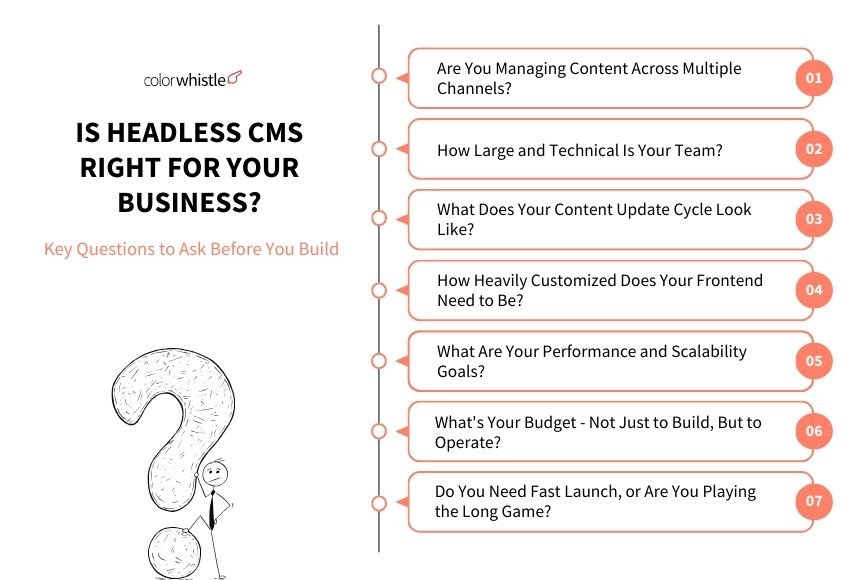
Are You Managing Content Across Multiple Channels?
This is the biggest differentiator. If your content only lives on one website, a traditional CMS might serve you just fine.
But if you’re publishing content to a website, a mobile app, a digital display, a voice assistant, or a partner platform simultaneously headless becomes a genuine superpower. Write once, publish everywhere, without copy-pasting or format gymnastics.
Ask yourself: Do you currently (or plan to) deliver content beyond a single website?
How Large and Technical Is Your Team?
Let’s be honest, headless CMS setups require developer involvement. There’s no built-in theme, no drag-and-drop editor out of the box, and no one-click deployments (at least not in the traditional sense).
If your team consists mostly of marketers and content creators without dedicated developers, the operational overhead can outweigh the technical benefits. You’d be trading editorial simplicity for developer flexibility.
Ask yourself: Do you have developers who can own and maintain a headless architecture long-term?
What Does Your Content Update Cycle Look Like?
If your marketing team needs to spin up landing pages, update product descriptions, or run A/B tests on content every week, they need a system that lets them move fast without filing a developer ticket every time.
Some headless CMS platforms (like Sanity or Contentful) have built solid visual editing experiences. But they’re rarely as intuitive as page builders your non-tech team already knows. If content velocity is critical and your team isn’t technical, factor in the training and tooling cost.
Ask yourself: Who manages content day-to-day, and how comfortable are they with new tools?
Also Read
How Heavily Customized Does Your Frontend Need to Be?
If your brand demands unique, highly interactive experiences animations, personalized content blocks, complex layouts that no off-the-shelf theme can handle headless gives your developers the freedom to build exactly what’s needed without fighting the CMS.
On the flip side, if your needs are fairly standard (blog, service pages, contact form), a traditional or hybrid CMS with good customization options can deliver without the architectural complexity.
Ask yourself: Is your front-end vision genuinely constrained by your current CMS, or do you just want more features?
What Are Your Performance and Scalability Goals?
Headless architectures pair naturally with modern frontend frameworks like Next.js or Gatsby, and they shine when combined with a CDN and static site generation. The result? Blazing-fast page loads and infrastructure that scales without sweating.
If you’re running a high-traffic e-commerce platform, a media publication, or a SaaS product with thousands of daily users, the performance and scalability argument for going headless gets very compelling.
Ask yourself: Is site performance a current pain point, or is speed optimization a priority in your roadmap?
Did You Know?
61% of teams are still using more than one CMS to manage content across platforms, regions, or departments – a direct pain point that headless architecture is built to solve.
What’s Your Budget – Not Just to Build, But to Operate?
Headless CMS projects tend to cost more upfront. You’re essentially building a custom frontend from scratch, integrating APIs, and potentially paying for premium CMS platform tiers.
The ongoing cost is real too – hosting, developer maintenance, platform subscriptions, and debugging across a more distributed system all add up. For enterprise businesses with dedicated tech resources, this is manageable. For lean startups or small businesses, it can strain budgets quickly.
Ask yourself: Can your business absorb not just the build cost, but the long-term operational cost of a headless setup?
Do You Need a Fast Launch, or Are You Playing the Long Game?
Headless done right takes time. There are architecture planning, API design, frontend development, content modeling, and testing all before a single page goes live.
If you need to launch in four weeks, a headless build is probably not the right call. If you’re planning a 12-month roadmap for a platform that will serve your business for the next five years, it could be exactly the right investment.
Ask yourself: What’s your timeline, and does it align with the complexity of a headless build?
Also Read
Headless CMS for AI Agents
AI agents don’t browse websites. They call it APIs. As businesses increasingly deploy autonomous AI systems, whether customer support, content personalization, product recommendations, or workflow automation, the way these agents consume content is fundamentally different from how humans do. They don’t need a beautifully rendered page. They need structured, clean, accessible data delivered fast. This is where headless CMS becomes not just useful, but essential.
Structured Content AI Agents Can Actually Use
A headless CMS stores content as structured data, not tangled inside HTML templates or page builders. Every content entry has defined fields, relationships, and types. For an AI agent querying your content to answer a customer question or populate a dynamic response, this structure is everything. Messy, unstructured content produces unreliable AI outputs. Clean, well-modeled headless content produces precise ones.
Real-Time API Access for Dynamic Workflows
AI agents operate in real time. A headless CMS delivers content via APIs, meaning your agent can pull out the latest product information, policy update, or knowledge base article at the moment it’s published, no caching delays, no stale data, no manual syncing.
Scalable Content Delivery Across AI Touchpoints
Whether your AI agent is embedded in a chatbot, a voice interface, a recommendation engine, or an internal automation workflow, a headless CMS serves all of them from a single content source. One update in the CMS propagates instantly across every AI-powered touchpoint in your stack.
For businesses building or integrating AI agents into their operations, a headless CMS isn’t just a content management choice; its infrastructure for intelligent, scalable, future-ready digital experiences.
Common Mistakes Businesses Make When Choosing a CMS
Choosing the wrong CMS doesn’t always happen because of bad research. More often, it happens because of the right research applied to the wrong question. Here are the mistakes that show up most often and how to avoid them.
Choosing Based on Hype, Not Need
Headless is having a moment. So is every new JavaScript framework that pairs with it. But “everyone’s talking about it” is not a business requirement. The best CMS for your business is the one that solves your actual operational problems, not the one that trends at developer conferences.
Before evaluating any platform, write down your three biggest content management pain points. If the CMS you’re considering doesn’t directly address at least two of them, keep looking.
Letting Developers Decide in Isolation
Developers love headless. It gives them creative freedom, modern tooling, and a clean separation of concerns. But they’re often not the ones updating content every Tuesday morning; your marketing team is. When CMS decisions are made purely from a technical standpoint without input from the people who’ll use it daily, you end up with a system that’s elegant to build and painful to operate.
Bring both teams to the table early. The right CMS works for both.
Underestimating the True Cost of Ownership
The platform subscription is just the beginning. Factor in developer time to build and maintain the frontend, onboarding and training for your content team, integration costs with your existing tools (CRM, analytics, e-commerce), and the ongoing cost of debugging a distributed system. Many businesses are surprised to find that a “cheaper” headless platform ends up costing significantly more in engineering hours than a traditional CMS would have.
Always calculate total cost of ownership, not just licensing fees.
Migrating Without a Content Model Strategy
One of the most overlooked steps in any CMS migration is designing your content model before your move. How your content is structured in its fields, relationships, and reusable components directly determines how flexible and scalable your system will be down the line. Businesses that skip this step and simply recreate their old site structure in a new CMS end up with the same limitations they were trying to escape.
Treat content modeling as a strategic exercise, not a technical afterthought.
Ignoring the Editor Experience
A CMS that your content team dreads using is a CMS that slows your business down. Poor editorial UX leads to workarounds, errors, and eventually pressure to switch platforms all over again, at significant cost. Always run a real-world content editing test with your actual team before committing to a platform. If they struggle in the demo, it won’t get easier in production.
Treating CMS Selection as a One-Time Decision
Your content needs today are not your content needs three years from now. Businesses that choose a CMS without considering scalability, API extensibility, and ecosystem support often find themselves locked into a platform that can’t grow with them. Ask vendors directly: how does this platform handle 10x your current content volume? What does migration look like if we need to leave?
A good CMS is a long-term infrastructure decision, treat it like one.
Is a Headless CMS the Right Choice for Your Business?
Here’s a simple way to think about it:
| Go Headless If... | Stick with Traditional/Hybrid If... |
|---|---|
| You publish to multiple digital touchpoints | You only need a single website |
| You have dedicated developers on your team | Your team is mostly non-technical |
| Performance and scalability are top priorities | You need fast deployment and easy content editing |
| You need a fully custom frontend experience | A theme or page builder meets your needs |
| You're building for a 3–5 year horizon | You're launching something in weeks |
The answer isn’t always binary. Many businesses today opt for a hybrid CMS approach, using a platform like WordPress in headless mode, to get the best of both worlds: a familiar content editing experience on the backend with a modern, decoupled frontend.
Wrap Up
Headless CMS is a powerful architectural choice, but it’s not a universal upgrade. The businesses that benefit most are those with multi-channel content needs, technical teams, and long-term product vision.
Before you commit to a headless build, work through these questions honestly. The goal isn’t to follow a trend; it’s to build a content infrastructure that serves your business, your team, and your users effectively.
Not sure which direction is right for you? At ColorWhistle, we’ve helped businesses across industries evaluate, design, and build the right CMS architecture for their specific goals whether that’s headless, hybrid, or traditional. Let’s talk.
Looking for more insights on web development strategies? Explore the ColorWhistle blog or request a free consultation with our team.
 How NABL Consultants Can Manage Client Docume...