How NABL Consultants can Manage Client Documents Digitally

With half a decade of experience in creating tech content for education, healthcare, hospitality, and real estate, Nandhini excels at turning complex insights into clear, credible, in-depth, research-backed, and engaging content that helps readers make informed decisions.

Our authors are proven experts in their fields, writing on topics where they have demonstrated expertise. Every piece of content undergoes peer review and validation by industry professionals.
AI Summary
Key Highlights of NABL Consultants Managing Client Documents Digitally
This post explores how NABL consultants can effectively manage client documents digitally across multiple clients, addressing the unique challenge of not owning but architecting document systems. The key insight: structured digital workflows must cover intake, creation, handoff, adoption tracking, and revision management to ensure compliance and operational efficiency. It serves NABL consultants seeking scalable solutions beyond simple file sharing, emphasizing audit-ready version control and client adoption visibility. The article offers practical methods and systems to prevent compliance gaps and improve workflow, preparing consultants to meet assessor expectations and streamline multi-client document management.
Managing client documents as a NABL accreditation consultant is fundamentally different from managing documents within a single laboratory. You are not the document owner; you are the architect of a system that someone else must operate, maintain, and defend in front of an assessor. That distinction matters more than most consultants realize, especially once you are managing five, ten, or twenty clients at the same time.
This article focuses on a specific and often overlooked layer of the problem: how documents flow between you and your clients, from creation through handoff, revision, client adoption, and ongoing maintenance.
It is not about whether to go digital (that case is already clear), but about how to structure that digital flow so that it works reliably across your entire client portfolio.
And if you are concerned about how digital tools might introduce new compliance risks during NABL assessments, our piece on digitizing NABL consulting without triggering assessor red flags addresses those risks specifically.
TL; DR
This guide is for NABL accreditation consultants managing documentation across multiple laboratories. It explains how to structure a scalable, audit-ready digital document workflow that tracks creation, approval, handoff, adoption, and revisions without losing control.
- Why consultant-side document management differs from lab-side control
- Structuring client workspaces aligned to ISO/IEC 17025 or ISO 15189
- Eliminating email-based drafts and informal approvals
- Creating structured approval workflows with audit trails
- Tracking client handoff and implementation acknowledgment
- Managing post-handoff revisions without version conflicts
- Preventing cross-client document contamination
- Key platform requirements: role-based approvals, version logs, review reminders
- How a proper digital system enables consultancy scalability
The NABL Consultant’s Document Problem Is Not the Same as the Lab’s
When laboratories think about NABL document management, they think about storing and controlling their own records. When a consultant thinks about it, the challenge is different: you are simultaneously maintaining your own working versions, the client-adopted versions, revision histories, pending approvals, and implementation status, across multiple clients, each at a different stage.
A document that you created, revised three times, and handed to a client eight months ago has now taken on a life of its own inside their lab. Did they implement it correctly? Have they updated it since? Is the version on the shop floor the same one their quality manager approved? You will not always know, unless your system is designed to track exactly that.
This is the gap that most digital tools do not address well: the handoff layer between consultant-managed documents and client-operated documents.
Did you know?
The global document management system market was valued at about $8.32 billion in 2025 and is projected to grow to $29.78 billion by 2034 at a 15 % CAGR, reflecting strong enterprise demand for structured digital workflows and compliance capabilities.
Structuring the Document Lifecycle Across Multiple Clients
Phase 1: Intake and Baseline Mapping
Every client engagement starts with one simple step: understand what documents already exist.
- For new labs, you build everything from scratch
- For labs seeking re-accreditation or scope extension, you review what is current, what is outdated, and what is missing
This intake stage is critical. The way you structure documents at this point will either streamline your work later or create unnecessary complexity.
Digitally, this means setting up a structured client workspace from day one. Not just a shared folder, but a properly configured environment with:
- Predefined document categories aligned to ISO/IEC 17025 or ISO 15189 clauses
- A clear NABL document numbering system
- Standard fields for document status, responsible person, and review date
Finally, intake findings, what exists, what’s missing, and what needs to be revision should automatically flow into your gap tracking system. Avoid managing this in separate spreadsheets that require manual updates.
Phase 2: Document Creation and Consultant-Side Control
During documentation, you are the main author, and the client acts as the reviewer.
This often becomes messy. Drafts are shared over email or WhatsApp. Feedback comes in different formats. There’s no clear record of what was suggested, what was updated, and which version was finally approved.
A structured digital workflow solves this.
- Drafts are created in a controlled system
- Clients are notified and review documents inside the platform
- Feedback is recorded in a structured way
- Changes are tracked with proper version updates
- Final approval is logged and timestamped
It creates a clear audit trail.
When assessors review document control records, they expect to see evidence of proper creation, review, and approval. If your workflow is structured correctly, that evidence is already there is no last-minute reconstruction required before assessment.
Phase 3: Client Handoff and Adoption Tracking
Handoff is where most document management systems fail.
You finalize the documents, send them to the lab, and move on. But real work starts after that. The lab must implement the procedures, train staff, and follow them.
Assessors don’t just check whether a document exists. They check whether it is being used in practice.
So, digital handoff should go beyond simply sending files.
It should include structured confirmation:
- The quality manager confirms receipt
- They confirm that the documents were shared with relevant staff
- They confirm the effective date
These confirmations should be logged in your system. This gives you visibility into whether the lab has truly adopted the documents or if they are just sitting in a folder.
For clients who are slow to implement, this visibility is critical. It allows you to follow up early, well before assessment day, instead of discovering gaps during a pre-assessment visit.
Companies that adopt digital document management report up to 60 % increase in operational efficiency due to faster access, structured workflows, and version control.
Phase 4: Revision Management After Handoff
Documents don’t remain static.
Labs update procedures when equipment changes, test methods evolve, or staff turnover happens. The problem? Many labs modify documents after handoff without informing the consultant.
This creates issues like:
Missing clause references
Inconsistent content
Version conflicts
Broken document numbering
A shared digital system with defined roles solves this.
- Lab staff can raise revision requests
- The document control workflow remains enforced
- You are notified when changes are proposed
- You review and advise
- The authorized person approves the final version
- Version history is automatically preserved
This keeps the NABL document numbering system intact and prevents compliance gaps.
This becomes critical during surveillance visits. Assessors often check whether documents were updated properly and whether outdated versions were withdrawn.
If your system maintains structured version control, that evidence is already available — clean, consistent, and audit-ready.
If you are thinking about how to design the broader infrastructure of a digital NABL consulting system, including gap analysis tools, CAPA tracking, and compliance monitoring, our guide on designing audit-proof digital systems for NABL consultants covers that architecture in detail.
What to Look for in a Document Management Platform
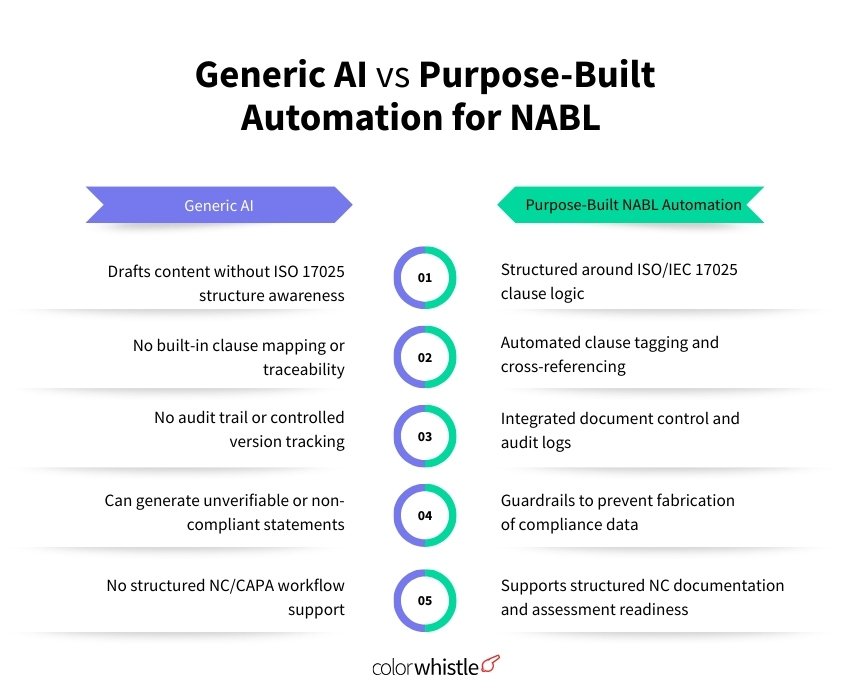
When evaluating whether a digital platform can genuinely support multi-client NABL document management, the following capabilities are non-negotiable:
Client isolation: Each client’s documents, communications, and records must be completely separate. There should be no possibility of cross-contamination between client workspaces
Role-based approvals: The system must ensure that documents are approved by the client’s own authorized personnel, not just by the consultant. This is what NABL assessors expect to see
Version control with change logs: Every revision must carry a version number, effective date, description of changes, and the identity of the person who approved it
Handoff and acknowledgment tracking: The system should record when documents were delivered to the client and when the client confirmed receipt and distribution to staff
Review reminders: ISO/IEC 17025 requires periodic document review. The system should trigger these reminders automatically, based on each document’s review interval
Template separation from client copies: Your master templates and the client-adopted versions must be architecturally distinct. Updating a template should not automatically alter a client’s controlled document
Wrap-Up
The question for most NABL consultants is not whether to manage documents digitally; it is whether their digital approach is structured for the realities of multi-client consultancy. A shared drive is not a document management system. An email thread is not an approval workflow. And a WhatsApp message is not a handoff record.
Building a proper digital document management workflow, one that tracks creation, approval, client handoff, adoption, and ongoing revision across every client is what separates a scalable consultancy practice from one that is always playing catch-up.
If you are evaluating what that infrastructure should look like for your practice, ColorWhistle builds custom digital systems designed around how NABL consultants actually work not around generic QMS templates.
FAQs
How can consultants prevent clients from modifying controlled documents improperly?
By using a role-based digital system where revision requests are logged, reviewed, and approved within the platform. This ensures version integrity and maintains NABL numbering consistency
Why is email-based document sharing risky for NABL consultants?
Email does not create structured audit trails, controlled version histories, or formal approval logs. During an assessment, reconstructing document control history from emails becomes inefficient and risky.
 Top Online Educator Trends and Statistics for...