




The Problem
If you manage SEO for multiple websites, you know that keeping track of Google Search Console (GSC) indexing can quickly become a repetitive task. Checking sitemap health, monitoring indexing status, and submitting URLs for indexing often requires going through several sections inside GSC. The process works, but it is not always efficient when you are handling many pages.
We also faced the same challenge on our own website. Our site has hundreds of pages and thousands of blog posts. While submitting a sitemap helps Google discover these pages, it does not guarantee that every URL will be processed and indexed immediately.
To speed things up, we often had to manually request indexing for individual URLs inside Google Search Console. The problem is that Google allows only a limited number of manual indexing requests per day, usually fewer than 20 URLs. For large websites or when publishing multiple pages, this limit becomes a bottleneck.
As a development agency, we started exploring whether the Google Search Console API could help streamline this process. After experimenting with it, we found that it was possible to submit URLs for indexing in bulk through the API.
Since this is a common problem for many businesses, and most existing solutions in the market are paid tools, we decided to build this GSC Dashboard tool. Our goal was to simplify indexing management and help websites get their important pages discovered by Google more efficiently.
The Solution: A Centralized GSC Indexing Dashboard
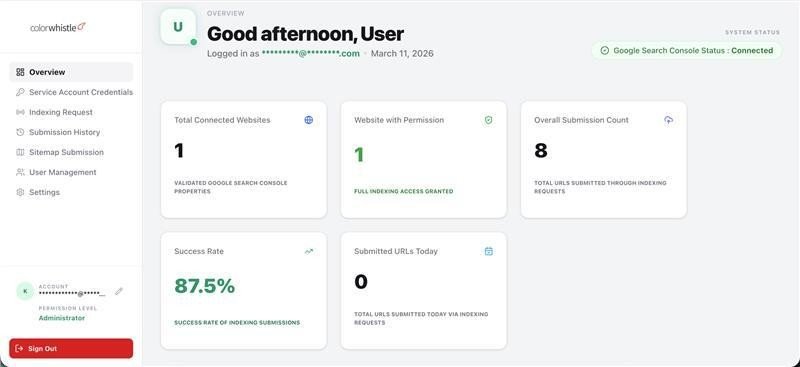
To address these challenges, we developed a custom-built platform that brings together several Search Console related tasks into one simple interface. Instead of moving between different sections inside GSC, everything can be managed from a single dashboard.
Core Platform Features
Bulk URL Indexing
One of the main features of the tool is the ability to submit URLs for indexing in bulk. Normally, Google Search Console allows you to request indexing only a small number of URLs per day, and each request must be done manually.
With this tool, users can paste a list of URLs or upload a CSV file and submit them together. The system then sends these requests to Google using batch processing. This is especially helpful when publishing new content or updating many pages at once.
Bulk URL Removal
There are situations where pages need to be removed from Google search results, such as when content is deleted or moved to a new location. Instead of submitting removal requests one by one, this dashboard allows users to send removal requests for multiple URLs at the same time.
Sitemap Submission
Sitemaps can be submitted directly from the dashboard. Whenever a sitemap is updated or a new one is created, it can be quickly sent to Google without navigating through different sections of Search Console.
Sitemap Monitoring
After a sitemap is submitted, the system monitors its status in the background. It checks whether Google has processed the sitemap and whether any errors were found.
This helps identify indexing problems early without having to manually check Search Console.
Real-Time URL Validation
Before sending indexing requests to Google, the system verifies whether the submitted URLs belong to the correct domain. This helps prevent incorrect submissions and avoid wasting API requests.
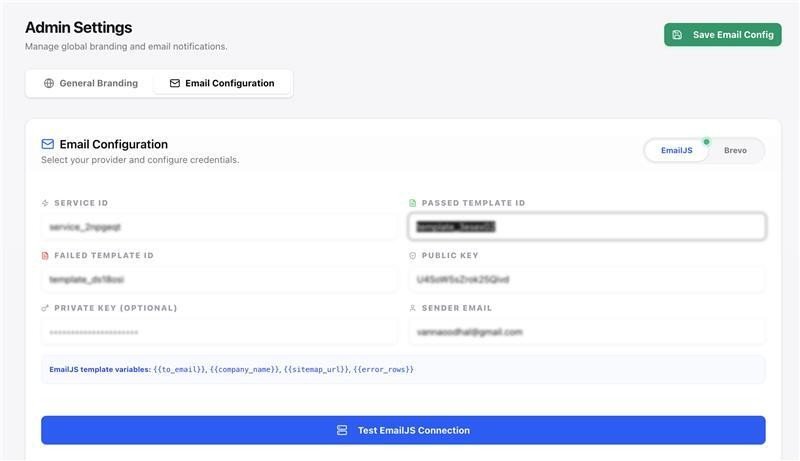
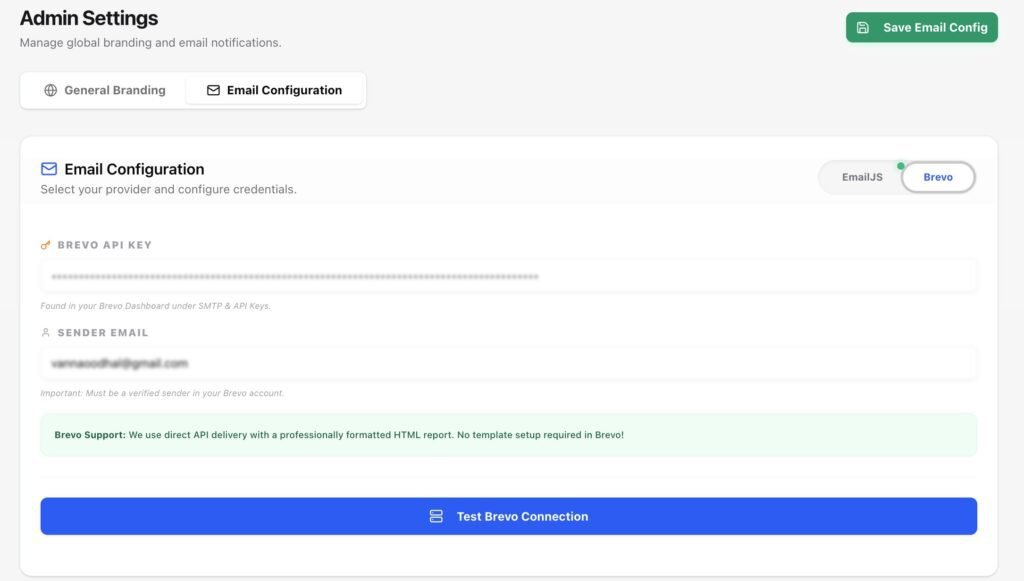
Automated Email Notifications
The dashboard can send automatic email updates about sitemap health and indexing activities. These reports provide a quick overview of what was submitted and whether any issues were detected.
Users can receive these updates through email services such as EmailJS or Brevo.
Role-Based Access (Admin and User)
Since this tool may be used by multiple team members, we added a simple role system.
Administrators have full access to system settings, service account configuration, and user management.
Regular users get a simplified interface where they can submit URLs and monitor indexing without accessing sensitive system settings.
Multiple Service Account Support
Agencies often manage several websites at the same time. The dashboard supports multiple Google Service Accounts, allowing users to manage different Search Console properties from one place.
This also helps distribute API usage across accounts when handling large indexing requests.
Smart API Quota Management
Google APIs have daily usage limits. The tool keeps track of API quotas locally in the database. When one service account reaches its limit, the system can automatically switch to another account.
This helps avoid failed requests and ensures indexing operations continue smoothly.
White Label Customization
The dashboard also includes basic white-label support. Users can update the logo, site title, and favicon from the settings page. This allows agencies to use the tool internally or present it to clients under their own branding.
Background Processing
Some operations, such as sitemap checks and email reporting, run in the background. This keeps the dashboard fast and responsive while the system handles heavier tasks behind the scenes.
Why We Chose Service Accounts Instead of Google OAuth
When integrating with Google APIs, the usual approach is to use Google OAuth so users can connect their accounts through a login flow. However, for this tool we decided to use Google Cloud Service Accounts instead.
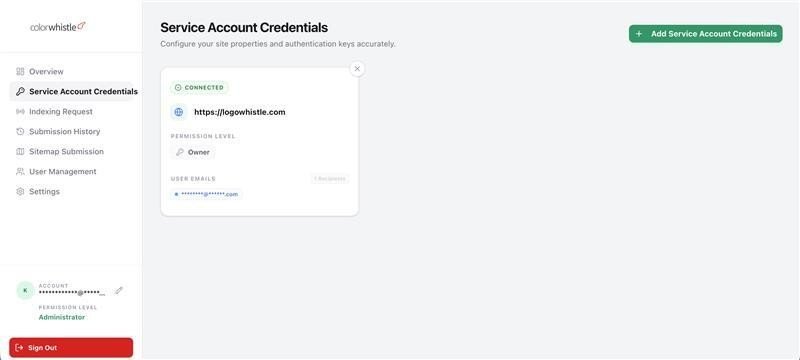
There were a few practical reasons for this decision.
First, this tool is mainly used internally or by trusted teams managing their own websites. Using OAuth would require users to go through a login and permission approval process every time a connection is created. Service accounts simplify this process because authentication happens through a secure key file.
Second, service accounts work well for automated systems. Since this tool performs background tasks such as sitemap monitoring and indexing checks, it needs stable authentication that does not depend on user sessions.
Another important reason is API quota management. By allowing multiple service accounts to be added, the system can distribute requests across accounts and handle larger indexing workloads without running into strict daily limits.
To make this work, the service account email is simply added as a user inside the Google Search Console property. Once access is granted, the dashboard can securely communicate with Google APIs.
Overall, this approach made the system easier to automate and more reliable for long-running background tasks.
Architecture and Technology
To build the GSC Indexing Dashboard, we used a modern JavaScript stack that allowed us to move quickly while keeping the system scalable and easy to maintain.
The Application Framework
The tool is built using Next.js with the App Router. One advantage of Next.js is that it allows us to manage both the frontend interface and backend API routes within the same project. This made development faster and helped keep the architecture simple.
The dashboard interface runs on the frontend, while the server-side logic handles tasks such as processing indexing requests, interacting with Google APIs, and managing background operations.
Database
We chose MongoDB as the database for this project. Since the application stores different types of data such as user accounts, API logs, submission history, and quota tracking, MongoDB’s flexible structure made it a good fit.
The database itself is hosted on MongoDB Atlas, which provides automatic backups and keeps the system running reliably without requiring much maintenance.
Authentication and Security
User authentication is handled using NextAuth.js combined with bcrypt for password hashing. This ensures that login credentials are securely stored and managed.
For Google API access, the system uses Google Cloud Service Accounts. Users upload their service account JSON key files, which are encrypted before being stored in the database. Whenever the application needs to communicate with Google APIs, it temporarily decrypts the key and generates a secure access token.
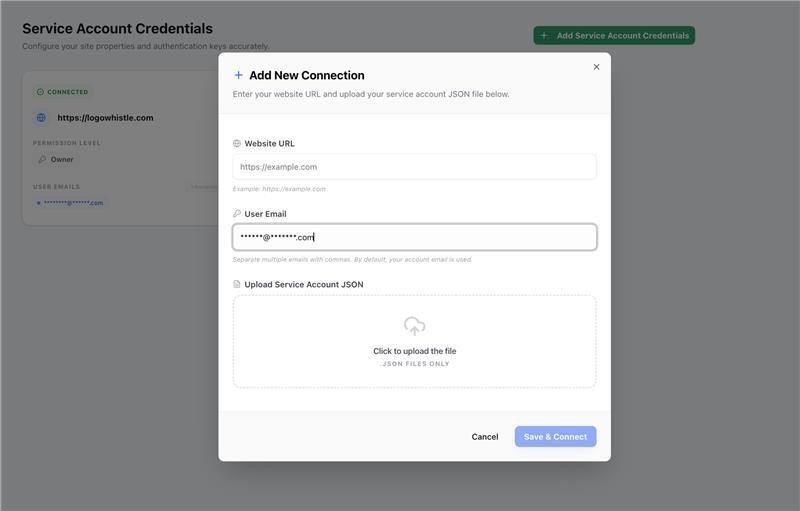
This approach allows the system to run automated tasks without requiring repeated user logins.
UI and Styling
For the user interface, we used Tailwind CSS along with Shadcn UI components. This combination helped us build a clean and responsive interface while keeping the styling consistent across the dashboard.
The UI was designed to stay lightweight so that users can quickly submit URLs, check reports, and navigate between features without delays.
Google API Integration
The application connects to Google services using the official googleapis and google-auth-library packages.
These libraries allow the system to interact with several Google services including:
- Google Search Console API
- URL Inspection API
- Sitemap submission endpoints
Through these APIs, the dashboard can submit indexing requests, remove URLs, check indexing status, and monitor sitemap processing.
Background Processing
Some operations, such as sitemap checks and email reporting, run in the background. This prevents the dashboard interface from slowing down while longer tasks are being processed.
Once these tasks are complete, the system sends updates to the user through email notifications or dashboard logs.
Deployment and CI/CD
To keep updates simple and reliable, we set up a CI/CD pipeline using GitHub Actions.
Whenever new code is pushed to the main branch, GitHub Actions automatically connects to the production server, pulls the latest code, builds the project, and restarts the application using PM2.
This automated deployment process ensures that updates can be released quickly without causing downtime.
Hosting
The application runs on a Node.js server hosted on cloud infrastructure such as DigitalOcean or AWS. Combined with MongoDB Atlas for database management, this setup keeps the system stable while allowing it to scale if usage grows.
How it Actually Works
Connecting to Google
To interact with Google Search Console, the dashboard uses Google Cloud Service Accounts. Instead of requiring users to log in through Google every time, the system uses these service accounts to securely communicate with Google’s APIs.
Users upload their service account JSON key file to the dashboard. For security, the file is encrypted before being stored in the database. When the system needs to make a request to Google, it temporarily decrypts the file, generates an access token, and uses that token to perform the required action.
For this setup to work, the service account email simply needs to be added as a user in the corresponding Google Search Console property. Once access is granted, the tool can interact with the property through the API.
This approach allows the system to run automated tasks such as indexing requests and sitemap checks without requiring manual logins.
Handling Bulk Indexing Requests
One of the main goals of the tool was to make indexing faster for large sets of URLs.
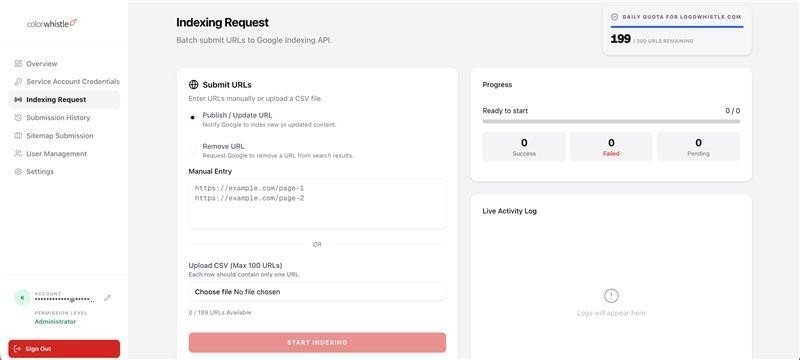
Instead of sending a separate API request for every single URL, the dashboard uses Google’s batch request capability. This allows multiple URLs to be processed in a single request.
When a user submits URLs for indexing or removal, the system groups them into batches of up to 100 URLs. Each URL is tagged with the action that should be performed, such as requesting indexing or removing the page from search results.
Once the request is sent, Google responds with the status for each URL. The system then processes the response and records whether each URL request was successful or if it failed due to issues like rate limits.
To further verify the results, the system can also check the indexing status of a URL using the URL Inspection API.
Monitoring Sitemaps
When a sitemap is submitted through the dashboard, the tool sends it directly to the Google Search Console API.
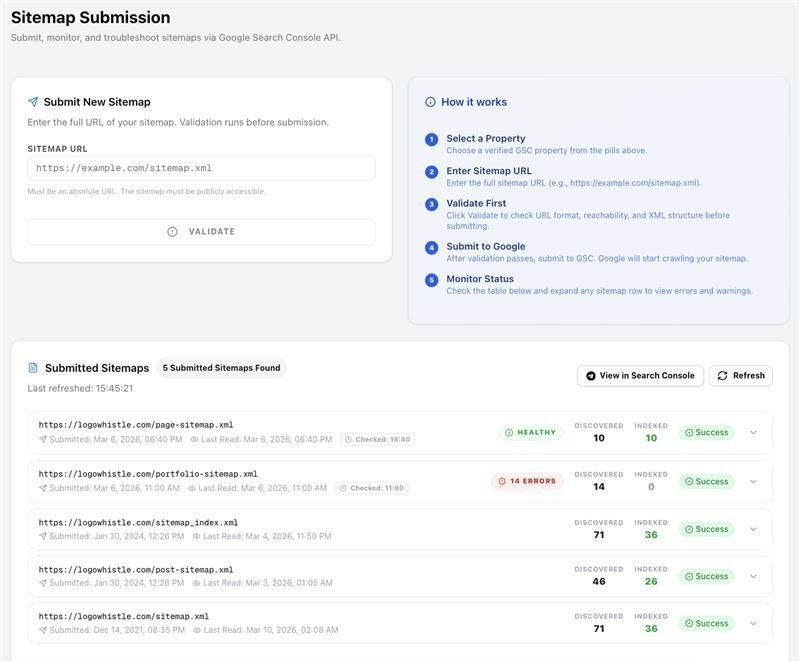
Right after submission, a background process begins monitoring the sitemap to check whether it has been processed successfully. This process runs independently from the main interface so the dashboard remains fast and responsive.
Once the check is completed, the system gathers information about the sitemap status, including whether there were any errors or warnings.
Sending Email Reports
After sitemap checks are completed, the system can send email notifications with a summary of the results. The tool supports email services such as EmailJS and Brevo for delivering these reports.
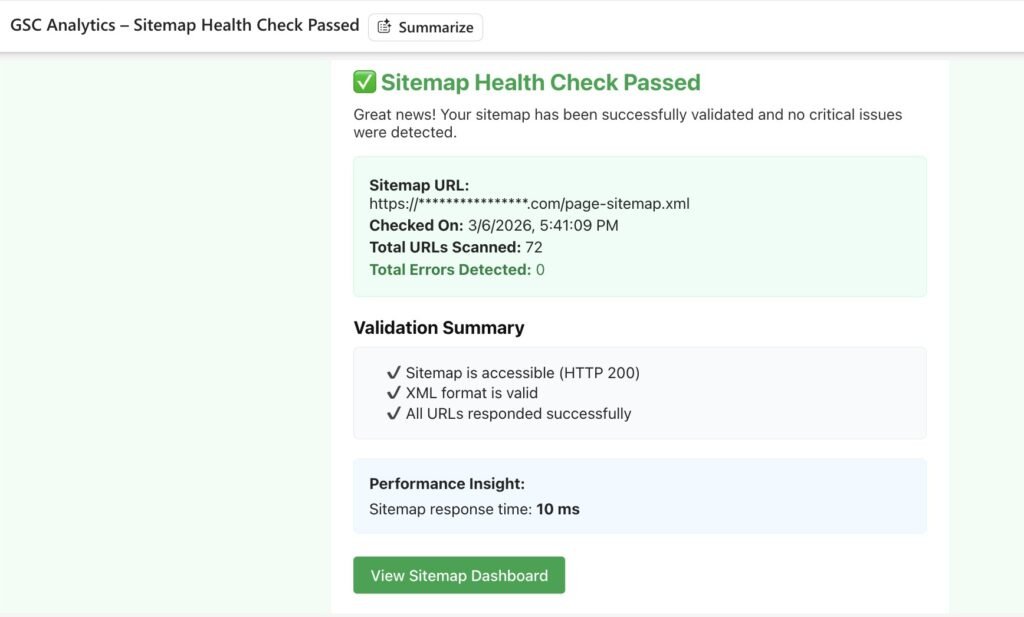
The emails include useful details about sitemap health, indexing activity, and any issues that were detected during processing.
Managing API Limits
Google APIs have strict daily limits on how many requests can be made. To handle this efficiently, the dashboard keeps track of API usage locally in the database.
If one service account reaches its daily quota, the system can automatically switch to another available service account. This helps ensure that indexing requests continue to be processed without interruptions.
By tracking these limits internally, the system also avoids sending requests that are likely to fail due to quota restrictions.
Building and Hosting
We wanted the deployment process to be simple and reliable so that new updates can be released without interrupting the system.
Deploying Updates
For deployments, we use GitHub Actions to automate the process. Whenever new code is pushed to the main branch, the deployment workflow starts automatically.
The pipeline connects to our production server, pulls the latest code from the repository, builds the application, and then restarts the service using PM2. Since PM2 manages the Node.js process, the restart happens smoothly without causing downtime for users.
This setup allows us to release fixes and new features quickly without needing to manually log into the server each time.
Where the Application Runs
The dashboard runs on a Node.js server hosted on cloud infrastructure, such as DigitalOcean or AWS. This provides a stable environment for running the application and handling API requests.
The database is hosted on MongoDB Atlas, which takes care of backups, scaling, and overall database reliability. Using a managed database service helps reduce maintenance work and ensures the data remains safe.
Together, this setup keeps the system stable while allowing it to grow as usage increases.
Technical Challenges
While building the GSC Indexing Dashboard, we ran into a few technical challenges that required some experimentation and problem solving.
Working with Google Batch Requests
One of the biggest challenges was implementing Google’s batch request system correctly. In theory, batch requests allow multiple indexing actions to be sent in a single HTTP request. However, the request format has to be extremely precise.
Even small mistakes in how the payload is structured can cause the entire request to fail. It took some careful testing and debugging to get the formatting right. Once this was working properly, it significantly improved performance because the system could process large numbers of URLs much faster than sending individual requests.
Running Background Tasks
Another challenge involved running background tasks in a Next.js environment. Features like sitemap health checks and indexing verification need to run asynchronously so the user interface stays responsive.
Since Next.js does not natively provide a built-in background job system, we implemented a workaround where the server triggers internal requests to handle these tasks separately. This allows longer processes to run in the background while users continue using the dashboard without delays.
By solving these challenges, we were able to keep the system fast, reliable, and capable of handling large indexing workloads.
Results and Impact
For teams managing large websites or multiple client projects, SEO operations can quickly become repetitive and time consuming. Tasks like submitting URLs for indexing, monitoring sitemap health, and checking indexing status often require a lot of manual work inside Google Search Console.
This tool was built to simplify those tasks.
Saving Time on Routine Work
Instead of submitting URLs one by one or switching between multiple Google accounts, teams can manage everything from a single dashboard. Bulk indexing and automated monitoring significantly reduce the time spent on routine SEO operations.
Faster Content Discovery
When new pages are published or existing content is updated, getting those pages indexed quickly can make a difference. By allowing bulk indexing requests and better tracking of indexing status, the tool helps websites push important content to Google faster.
Better Visibility Into Indexing Activity
The dashboard provides clearer visibility into sitemap processing, indexing requests, and potential errors. Automated email notifications help teams identify issues early rather than discovering them days later.
More Efficient Use of Google API Limits
Google APIs come with strict usage limits. By tracking API quotas and rotating service accounts when needed, the system helps manage large indexing workloads without running into frequent request failures.
Built from a Real Need
Most importantly, this tool was not built as a theoretical product. It came from a real challenge we faced while managing our own websites and client projects.
By building a system that solves our own workflow problems, we created a practical solution that can help other businesses manage indexing more efficiently as well.
Looking to automate your own digital workflows? At ColorWhistle, we transform complex technical challenges into custom-built solutions. If you need a bespoke dashboard or specialized API integration to scale your operations, reach out to our development team to discuss your project.
 Creditor Outreach Automation System - AI Adap...


