





Contact Form Entries Database – Engineering Case Study
Project Background
Over time, many WordPress websites end up using more than one form plugin. This usually happens gradually rather than through a planned decision.
A website might initially use Contact Form 7 for a simple contact page. Later, a marketing campaign may introduce WPForms for landing pages. At some point, a developer might install Ninja Forms to handle more complex workflows.
Individually, each of these plugins works well and solves a specific requirement. However, as the website grows, form submissions begin coming from multiple plugins across different pages.
In the early stages this is manageable. But as the number of submissions increases, reviewing and managing those entries becomes more complicated. Administrators often have to navigate through several plugin dashboards to find and review submissions.
We encountered this scenario in a few projects where administrators wanted a simple way to track submissions without switching between multiple interfaces.
This led to the idea of building a small utility plugin that captures submissions from multiple form plugins and stores them in a centralized location.
The Problem
The main challenge lies in how different form plugins store and manage submissions.
Each WordPress form plugin handles entry storage differently. Some plugins store submissions in their own database tables. Others provide entry storage only through paid add-ons. A few rely entirely on email notifications and do not store submissions inside WordPress at all.
Because of this, administrators often depend on multiple plugins or extensions just to ensure that form submissions are stored somewhere.
There is also a practical reliability issue. Many websites still rely on the default PHP mail function instead of using SMTP or dedicated email services. In such setups, email delivery is not always guaranteed. If an email fails to send, the form submission might never reach the administrator.
For this reason, storing submissions directly in the website database provides a more reliable fallback.
When multiple form plugins are used on the same site, submissions end up scattered across different systems. Each plugin has its own interface, export format, and way of managing entries. This makes it difficult to review submissions in one place or generate consistent reports from the collected data.
Why We Didn’t Use Existing Solutions
Most form plugins already provide entry storage features. However, these solutions typically work only within the plugin itself.
For example, Contact Form 7 does not store submissions by default and usually requires an additional plugin for entry storage. WPForms includes entry storage mainly in its paid version. Ninja Forms has its own internal entry management system.
These solutions work well when a site relies on a single form plugin. But they do not address situations where multiple form plugins are used on the same website.
Administrators would still need to switch between different dashboards to review submissions. Exporting entries from multiple plugins also results in inconsistent data structures.
Another limitation is that many entry storage plugins are tightly coupled with the form plugin they support. If the form plugin is replaced or removed in the future, accessing previously stored submissions can become difficult.
To avoid these limitations, we decided to build a small standalone plugin that works alongside existing form plugins instead of replacing them.
Our Approach
Instead of building a new form system, our goal was to capture submissions from existing form plugins and store them in one place.
We approached this by treating form submissions as events.
When a form is submitted, the plugin listens for the corresponding WordPress hook triggered by the form plugin. It then extracts the submitted data and saves it into a centralized database table.
This approach allows the original form plugin to continue functioning exactly as intended. Email notifications, integrations, validation logic, and workflows remain unchanged.
Our plugin simply records a copy of the submission data in the background.
From an administrator’s perspective, this creates a single dashboard inside WordPress where submissions from different form plugins can be viewed and exported.
The Solution
The final solution was implemented as a lightweight WordPress plugin called Contact Form Entries Database.
The plugin listens for submission events from supported form plugins and captures the submitted data automatically. Each submission is stored in a custom database table, allowing administrators to access all entries from a unified interface inside the WordPress admin panel.
The plugin currently supports integrations with:
- Contact Form 7
- WPForms
- Ninja Forms
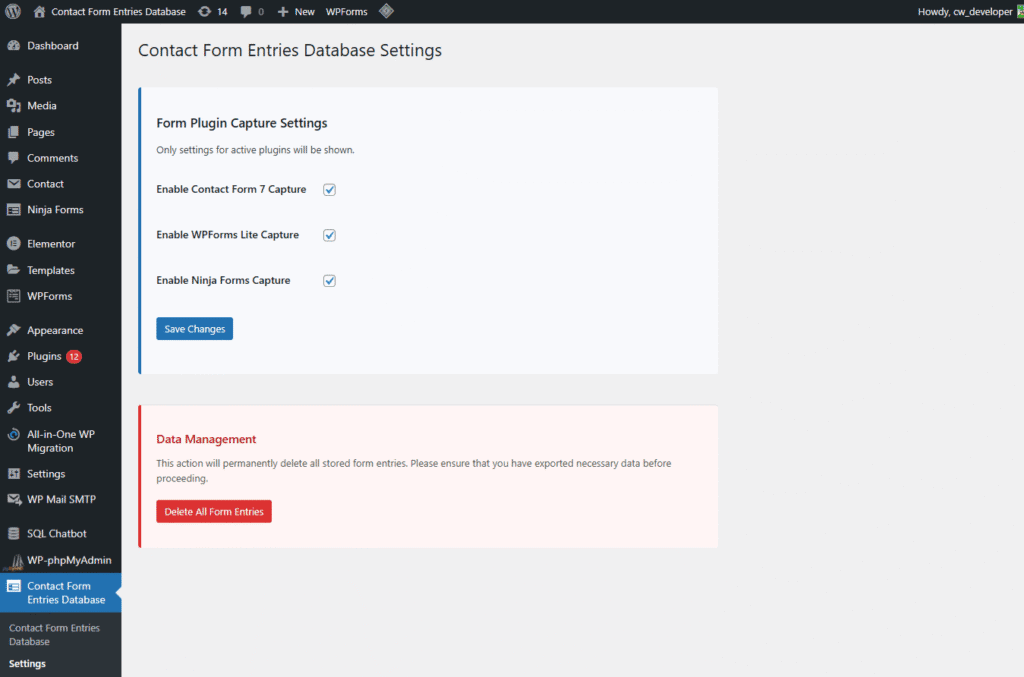
Each integration is implemented separately to ensure the plugin correctly extracts submission data from the respective plugin’s data structure.
Technical Implementation
Each supported form plugin provides hooks that are triggered when a form submission is completed.
The plugin connects to these hooks and captures the submitted data. For example:
Contact Form 7 triggers the wpcf7_mail_sent hook
WPForms triggers wpforms_process_complete
Ninja Forms triggers ninja_forms_after_submission
For each plugin, a small integration class is responsible for extracting the relevant submission data.
Once the data is captured, it is passed to a helper function responsible for storing the submission in the database.
The helper receives three key values:
- The form plugin name
- The form ID
- The submitted fields
Before saving the submission, the plugin checks whether capturing is enabled for that particular form plugin in the settings. If enabled, the data is inserted into the plugin’s custom database table.
Database Design
All captured submissions are stored in a single custom database table.
The table includes the following fields:
- plugin_name
- form_id
- submission_data
- submitted_at
Instead of creating separate columns for each form field, the submitted data is stored as JSON in the submission_data column.
This approach keeps the schema flexible because different forms can have completely different field structures. One form might contain only a name and email field, while another could include phone numbers, dropdown selections, or custom inputs.
Storing data as JSON avoids the need to modify the database structure whenever a form changes.
Indexes were also added for commonly queried fields such as plugin name, form ID, and submission date to ensure efficient database queries.
Admin Interface
To make the captured submissions easy to manage, the plugin adds a new menu item in the WordPress admin panel called Contact Form Entries Database.
The main screen displays a list of forms detected across supported plugins, including:
- Form name
- Plugin name
- Total number of stored submissions
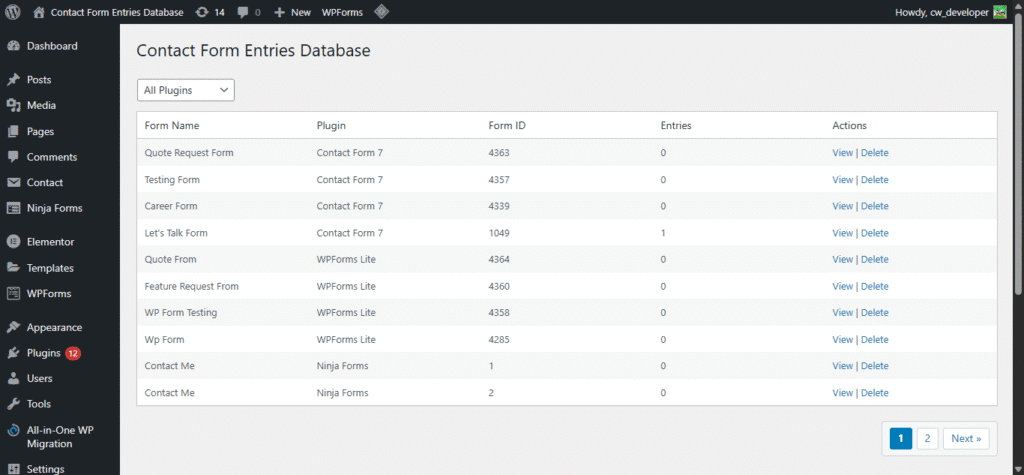
Selecting a form opens the entries page where administrators can view the collected submissions.
Entries are displayed using a paginated table that allows administrators to:
- Search submissions
- Filter by date range
- View individual entries
- Delete entries when required
- Export filtered results
The interface is built using WordPress’ WP_List_Table class so it behaves consistently with other WordPress admin tables.
Displaying Form Fields in the Entries Table
Since submissions can come from different forms with different fields, displaying them consistently in a table required some additional logic.
The plugin analyzes stored submissions and identifies commonly used field names across entries.
A few of these fields are automatically selected and displayed as columns in the entries table. This allows administrators to quickly scan key information such as name or email without opening each entry individually.
The full submission data is still available when viewing a single entry.
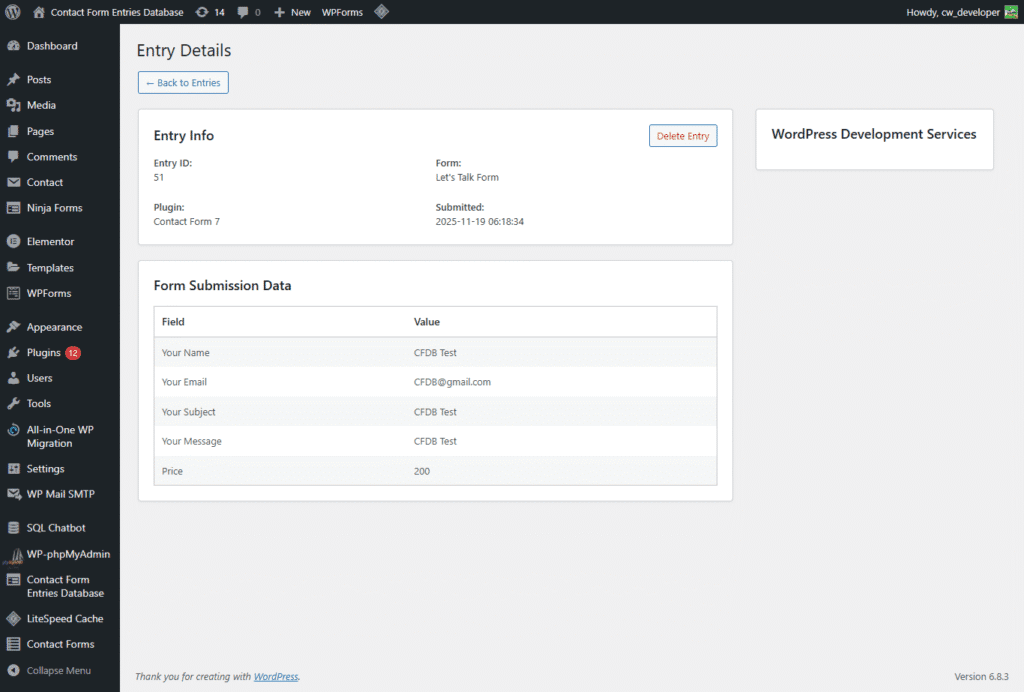
Exporting Submissions
Exporting form submissions is a common requirement for reporting or further data processing.
The plugin includes a CSV export feature that respects the same filters used in the entries table. Administrators can export submissions based on:
Form
Date range
Search filters
The exported file contains:
- Entry ID
- Plugin name
- Form ID
- Detected form fields
- Submission timestamp
To handle large datasets efficiently, the CSV file is streamed directly to the browser instead of generating the entire file in memory first.
Security Considerations
Because the plugin stores user-submitted data, security was an important consideration during development.
All administrative actions require proper capability checks. Nonces are used for operations that modify data, such as deleting entries.
All incoming data is sanitized before storage, and output displayed in the admin interface is properly escaped to prevent unsafe rendering.
The plugin operates entirely within WordPress and does not rely on any external services.
Challenges During Development
One of the primary challenges was dealing with the different data structures returned by each form plugin.
Each plugin provides submission data in a slightly different format. To ensure consistent storage, the plugin converts all submissions into a standardized associative array before saving them to the database.
Another challenge was designing the entries table so that it remains readable even when forms contain completely different fields. Automatically detecting commonly used fields helped address this issue.
Performance was also considered carefully. Websites collecting large numbers of submissions could generate heavy database queries. To address this, indexes and pagination were implemented to keep the admin interface responsive even with larger datasets.
Results
The plugin provides a simple way to manage form submissions across multiple form plugins.
Instead of navigating through separate dashboards for each plugin, administrators can now review all submissions from a single interface. This significantly reduces the time required to locate and manage entries.
Exports are also easier to manage because all submissions follow a consistent structure.
Another benefit is that submissions remain available even if the original form plugin is removed or replaced, since the data is stored independently in the plugin’s own table.
Plugin Availability
The plugin eventually evolved into a publicly available WordPress plugin called Contact Form Entries Database.
It is now available in the WordPress plugin repository:
https://wordpress.org/plugins/contact-form-entries-database/
Conclusion
Contact Form Entries Database was built to solve a common issue on WordPress sites that use multiple form plugins.
Instead of replacing existing form systems, the plugin simply captures submissions and stores them in a centralized database table. This makes it easier for administrators to review and export form data without depending on individual plugin entry systems.
 Building an AI Recipe Assistant for a High Tr...


