Website Modernization Without SEO Loss: Technical Migration Guide

With half a decade of experience in creating tech content for education, healthcare, hospitality, and real estate, Nandhini excels at turning complex insights into clear, credible, in-depth, research-backed, and engaging content that helps readers make informed decisions.

Our authors are proven experts in their fields, writing on topics where they have demonstrated expertise. Every piece of content undergoes peer review and validation by industry professionals.
AI Summary
Website Modernization Without SEO Loss: Technical Migration Guide
This post explores how to redesign, replatform, or rebuild websites in 2026 without losing SEO equity. The key insight: meticulous planning and execution preserve rankings amid AI-era search changes and stricter Core Web Vitals standards. Targeted at marketers and site owners, it outlines pre-migration audits, critical URL mapping, structured data migration, and performance testing. Emphasizing AI visibility and daily post-launch monitoring, the guide ensures risk-managed modernization. Readers will learn to maintain SEO signals, avoid common pitfalls, and leverage advanced tools for sustainable organic growth in a competitive, evolving search landscape.
The definitive 2026 playbook for redesigning, replatforming, or rebuilding your website without handing your hard-earned rankings to a competitor. Includes AI-era search considerations, Core Web Vitals 2.0 thresholds, and the post-migration monitoring stack nobody else is talking about.
53%
of sites fail core web vitals in 2026
9MO
Avg recovery time after a botched migration
301
Redirects are single most critical task
7%
Conversion drop per second of load delay
A website migration is one of the highest-risk events in a brand’s digital life. Done poorly, it can erase years of accumulated SEO equity overnight. Done right, it’s a launchpad for explosive organic growth.
Google doesn’t care that your old site looked like it was built in 2011. It cares about the signals it has accumulated on those URLs, backlinks, crawl history, user engagement data, structured signals and a migration reset all of that if you’re not careful.
In 2026, the stakes are even higher. You’re not just migrating URLs. You’re migrating your AI presence, the structured signals, schema markup, and topical authority that determine whether Google’s AI Overviews and LLMs cite your content in their answers. Lose that, and you lose visibility in a growing share of zero-click searches.
But here’s the thing: the risk is entirely manageable. Every point of failure in a migration is well understood, and there’s a systematic process for avoiding all of them. That’s what this guide is.
For a deeper breakdown of modernization vs revamp strategies, read this detailed guide.
Types of Website Migrations
Before you plan anything, understand what kind of migration you’re doing. Each type carries a different risk profile and requires different interventions.
| Migration Type | SEO Risk | Primary Concern | Example |
|---|---|---|---|
| Domain Change | High | Complete link equity reassignment | brand.com → newbrand.com |
| HTTP → HTTPS | Medium | Mixed content, redirect chains | Protocol upgrade |
| CMS Replatform | High | URL structure changes, metadata loss | WordPress → Webflow |
| Subdomain → Subfolder | Medium | Consolidating blog/shop authority | blog.domain.com → domain.com/blog |
| Redesign (same URLs) | Lower | Core Web Vitals, content changes | Visual overhaul only |
| Site Consolidation | High | Duplicate content, merged audiences | Merging two brand sites |
| Internationalization | Medium | hreflang, regional URL structures | Adding /en/ /fr/ subfolders |
Most real-world migrations combine two or more of these types – e.g., a CMS switch that also changes the URL structure. Each additional dimension compounds the risk. Plan accordingly.
Pre-Migration: Audit Your Baseline
You cannot protect what you haven’t measured. Before touching a single file on your live site, you need a complete snapshot of your current SEO state. This becomes your reference document for the entire project.
Think of it like a pre-surgery baseline; doctors need to know your vital signs before they cut. Your SEO baseline serves the same purpose: it tells you what “healthy” looks like, so you know immediately when something goes wrong post-launch.
Full Site Crawl
Run Screaming Frog or Sitebulb against your live site. Export every URL, status code, title tag, meta description, H1, canonical tag, and internal link structure. This is your master inventory.
Keyword Ranking Snapshot
Export your top 200 keyword positions from Google Search Console. Include clicks, impressions, CTR, and position. Overlay this with Ahrefs or Semrush data. These are your canary metrics post-launch.
Traffic Analysis by URL
Pull 12-month organic traffic data from Google Analytics 4 for every URL. Sort by organic sessions. The top 50-100 pages are your “money pages” where they get VIP treatment during migration.
Explore ColorWhistle’s website development services to modernize your site without risking SEO performance.
Backlink Profile Export
Export your full backlink profile from Ahrefs or Majestic. Identify which pages receive the most referring domains. These pages cannot have broken redirects, the link equity loss is permanent.
Core Web Vitals Baseline
Record your current LCP, INP, and CLS scores from Google Search Console’s CWV report and Page Speed Insights. Your new site must match or beat these. Any regression is a ranking signal regression.
Structured Data Inventory
Use Google’s Rich Results Test to document all existing schema markups. Note every schema type (Article, Product, FAQ, How To, Local Business). These must all be recreated precisely on the new site.
URL Mapping – The Most Critical Phase
If there’s one thing you take from this entire guide, let it be this: URL mapping is the single most important technical task in any website migration. Small mistakes here erase years of SEO equity in a single launch event.
Search engines treat URLs as unique entities. Each URL has its own authority score, trust history, ranking history, and backlink profile. When a URL changes without a proper redirect, that entity is effectively destroyed; its accumulated signals are reset to zero.
Best Practices
- Map every URL 1-to-1, no URL left behind
- Use 301 (permanent) for moved content, never 302
- Use 410 (Gone) for pages that are intentionally deleted
- Keep redirects to a single hop, no chains
- Prioritize pages with the most backlinks and traffic
- Verify every redirect fires in staging before go-live
Fatal Mistakes
- Using 302 redirects instead of 301
- Redirect chains (A→B→C instead of A→C)
- Orphaned pages with no redirect at all
- Redirecting everything to the homepage
- Forgetting trailing slash consistency
- Missing redirect for www vs non-www variants
Every extra hop in a redirect chain costs you link equity. If your old site had /page → /page-v2 → /final, collapse this to /page → /final directly. Google has confirmed that each redirect hop causes some degree of PageRank loss.
301 Redirects
A 301 redirect permanently sends users and search engines from an old URL to a new one while keeping SEO value intact.
- Always redirect old URL → final URL (one step only)
- Force HTTPS and one domain version (no www vs www mix)
- Map important old pages to relevant new pages
- Avoid redirect chains
Staging Environment Setup
Your staging environment is your crash test dummy. Everything that will go live must be tested exhaustively here first. The golden rule: if it’s not perfect in staging, it doesn’t go live.
Block all search engines from your staging site. Use Disallow: / in your staging robots.txt AND add a noindex meta tag to every page. Remove both immediately after launch on the production site only.
- Clone site: Create a staging site identical to production
- SEO audit: Crawl it → fix URLs, metadata, canonicals, sitemap
- Performance: Test Core Web Vitals → meet or beat current scores
- Device testing: Check real mobile + browsers (mobile = priority)
- Tracking: Ensure GA4 & tags fire correctly
- Redirects: Test all → 301, correct URLs, no chains
Metadata & Structured Data Migration
Metadata is the invisible layer of SEO that most migration guides treat as an afterthought. Don’t make that mistake. Your title tags, meta descriptions, canonical tags, hreflang attributes, and structured data are as important as the page content itself.
Metadata Checklist
- Title tags transferred exactly (or improved), never truncated or generic
- Meta descriptions preserved – these affect click-through rate
- H1 tags present on every page, matching intent
- Canonical tags pointing to correct production URLs
- Open Graph & Twitter Card tags for social sharing
- hreflang tags for multi-language/region sites
- Robots meta tags – none should have no index on live site
Schema Types to Preserve
- Organization / Local Business (homepage)
- Article / Blog Posting (content pages)
- Product + Offer (e-commerce)
- FAQ / How To (Q&A and guides)
- Breadcrumb List (navigation context)
- Website with Search Action (sitelinks search)
- Review / Aggregate Rating (social proof)
AI Search Note
In 2026, structured data is no longer just about rich snippets in Google. FAQ and HowTo schema directly feed AI Overviews. If your content appeared in AI-generated answer boxes before your migration, you need to ensure your schema is precisely preserved or you’ll vanish from those placements.
Core Web Vitals 2026: LCP, INP & CLS
In March 2026, Google strengthened the weight of Core Web Vitals in its ranking algorithm. This is not hypothetical anymore; sites that fail these thresholds are measurably losing rankings to sites that pass them.
The current three metrics (confirmed by Google’s official documentation as of December 2025):
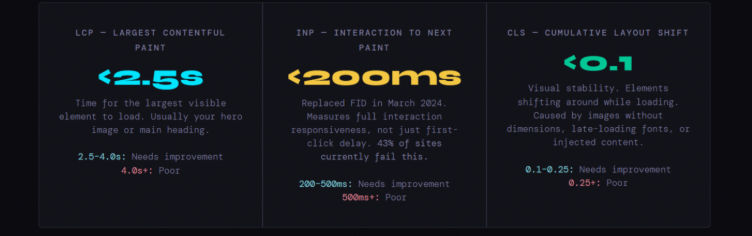
Only 47% of sites reach Google’s “good” thresholds across all three metrics. The remaining 53% show measurable drops in conversions and organic traffic. INP is the most commonly failed, it requires deep JavaScript architecture changes, not just image compression.
LCP (Largest Contentful Paint)
Optimize what loads first, usually your hero section:
- Convert hero images to WebP or AVIF (AVIF cuts ~40–50% size vs JPEG)
- Preload the LCP image using <link rel=”preload”> in the <head>
- Use a CDN to keep TTFB under ~600ms
- Inline critical CSS to avoid render delays
- Defer non-critical JavaScript (defer or dynamic import)
INP (Interaction to Next Paint)
Focus on responsiveness after the page loads:
- Audit and limit third-party scripts (biggest bottleneck)
- Break long JS tasks using set Timeout or scheduler.yield()
- Reduce DOM size (aim well below 1,500 nodes)
- Use web workers for heavy processing
- Page builders have limits, deep fixes may require structural changes
CLS (Cumulative Layout Shift)
Prevent unexpected layout movement:
- Always define width & height for images/videos
- Reserve space for ads, embeds, and dynamic elements (min-height)
- Use font-display: swap to avoid invisible text shifts
- Don’t inject elements above existing content after load
AI Search Optimization
This is the section that most migration guides from 2024 and earlier completely miss. In 2026, your visibility in search is no longer only about where you rank on a SERP. It’s about whether AI systems trust and cite your content in their generated answers.
Google’s AI Overviews, Perplexity, and Bing Copilot all synthesize content from the web to answer user queries. During a migration, you risk losing your “AI equity”, the structured signals and topical authority that these systems use to decide whether to include your content.
How to Protect AI Citations
- Preserve the exact URL of pages that appear in AI Overviews if possible or use precise 301 redirects
- Don’t consolidate or merge pages that AI systems cite, they track specific URLs
- Maintain consistent entity naming throughout the site (always “Brand Name”, never alternating abbreviations)
- Keep author bios, credentials, and E-E-A-T signals intact on every article page
- Implement FAQ schema on content pages, FAQ markup is directly parsed by AI answer engines
Content Quality for AI Systems
- Write concise, factual summaries at the top of long-form content, AI systems prefer digestible intro sections
- Use clear heading hierarchies (H2/H3) that outline the topic structure, AI models use these as navigation
- Answer the question in the first sentence under each heading, then elaborate
- Cite primary sources, AI systems trust content that references authoritative external sources
- Keep definitions consistent across your site, conflicting terminology within a domain confuses entity resolution
Launch Day Protocol
Launch day is a high-stakes, time-sensitive operation. Treat it like a military mission: every action is pre-planned, every person knows their role, and there’s a contingency plan for everything.
Final Staging Sign-off
Complete all QA, get sign-off from SEO, dev, and content teams. Freeze the staging environment, no more changes.
Notify Stakeholders
Inform your dev team, hosting provider, CDN provider. Schedule on-call developer coverage for 48 hours post-launch. Lower DNS TTL to 300 seconds for faster propagation.
Go Live During Off-Peak Hours
For most sites this means 2-4 AM local time on a Tuesday or Wednesday (lowest traffic periods globally). This gives your team time to catch issues before peak traffic hits.
Immediate Launch Checklist
Remove noindex tags from production. Remove Disallow: / from robots.txt. Activate full redirect map. Update DNS. Force HTTPS. Verify SSL certificate. Deploy production analytics tags.
Crawl the Live Site
Immediately run Screaming Frog against the live URL. Look for 404s, 5xx errors, accidental noindex tags, broken redirects. Fix any critical issues within the hour.
Submit to Google
Go to Google Search Console → Sitemaps → Submit your new XML sitemap. Use the URL Inspection tool to request indexing of your top 10 money pages individually.
First Data Review
Check GA4 for traffic anomalies. Check GSC for crawl errors. Run Page Speed Insights on key pages. Verify all redirects still firing correctly. Check server error logs for 5xx spikes.
Metrics to Track Daily (First 2 Weeks)
- Google Search Console: Crawl errors, index coverage, and page experience signals
- GA4 organic sessions vs. same period previous year – watch for sudden drops
- Top 50 keyword positions in Ahrefs/Semrush daily ranking tracker
- Server error rate (5xx) via hosting dashboard or Datadog/New Relic
- Core Web Vitals in Google Search Console (updates every 28 days, but Page Speed Insights gives immediate feedback)
- Redirect response codes – ensure no redirects have reverted to 302 or broken
- Backlink profile – watch for domains pointing to old URLs returning 404s
Built for SEO-Safe Modernization
If you’re planning a website upgrade, execution matters more than intention.
ColorWhistle approaches modernization as a performance-first, SEO-safe process, ensuring your site evolves without losing rankings, traffic, or authority. From architecture and URL strategy to content alignment and performance optimization, every layer is handled with continuity in mind.
Because a modern website should do more than look better, it should perform better where it counts.
Wrap-Up
Website modernization is not inherently risky. What makes it risky is the assumption that SEO will adapt automatically.
It won’t.
Search engines respond to consistency. When your site changes, they reassess everything, structure, content, relationships, and trust.
If your modernization preserves those elements, your SEO remains stable. If it disrupts them, your rankings decline.
The difference is not in the tools you use or the design you choose. It’s in how well you understand the system you’re changing.
Modernize the experience but maintain the meaning. That’s how you upgrade a website without breaking its search performance.
 AI Chatbot Statistics Trends Market Growth Ad...