




Project Background
One of our clients, a well-known celebrity chef, approached us with an interesting request. Their website hosts a very large collection of recipes, and visitors often struggle to find exactly what they are looking for.
Traditional website search works fine when someone types the exact recipe name. But real users rarely search that way. Instead, they ask more natural questions like:
“How do I make eggless chocolate cake?”
“Do you have a quick paneer recipe for dinner?”
“Can this recipe be made in an air fryer?”
The client wanted a smarter experience where visitors could simply ask questions and get helpful answers along with links to the relevant recipes.
In short, the idea was to build an AI powered chatbot that understands food related questions and suggests the right recipes from the website.
Initial Approach
Before building this plugin from scratch, we first explored several plugins which are available in WP plugin repository.
Our goal was simple. If a reliable solution already existed, we could configure it and adapt it for the website.
However, we ran into a few issues.
Some plugins required expensive licenses and still needed heavy customization. Others worked more like a generic AI assistant rather than something trained on the website’s content. In many cases, the responses were too general and not actually based on the recipes available on the site.
For example, when asking about a recipe, the chatbot would sometimes generate answers from general cooking knowledge rather than referencing the actual recipes published on the website.
This defeated the purpose. The goal was not to build a general cooking chatbot. It needed to use only the content from the website and guide visitors to the correct recipes.
Because of these limitations, we decided to take a different approach.
The Solution
Instead of relying on an existing plugin, we built a custom AI chatbot plugin for WordPress specifically designed for content heavy recipe websites.
The idea was to combine modern AI tools with the website’s existing content so that the chatbot could understand questions and respond using the site’s own recipes as the knowledge source.
To achieve this, we used a technique called Retrieval Augmented Generation (RAG). The concept is simple. When a visitor asks a question, the system first searches the website content to find the most relevant pieces of information. Those results are then provided to the AI model, which uses them to generate a helpful answer.
This approach prevents the AI from “making things up” and ensures that answers are always based on the website’s own content.
The result is a chatbot that behaves more like a smart guide for the website rather than a generic AI assistant.
Main Features
While building the chatbot, the goal was not just to add a chat interface to the website. The focus was on making sure the bot could understand user questions, retrieve the right content from the website, and guide visitors to the relevant recipes quickly.
Below are some of the key features we implemented.
Automatic Content Sync
The plugin automatically scans the website’s posts and extracts the relevant content from them on a single click.The plugin automatically scans the website’s posts and extracts the relevant content from them on a single click.
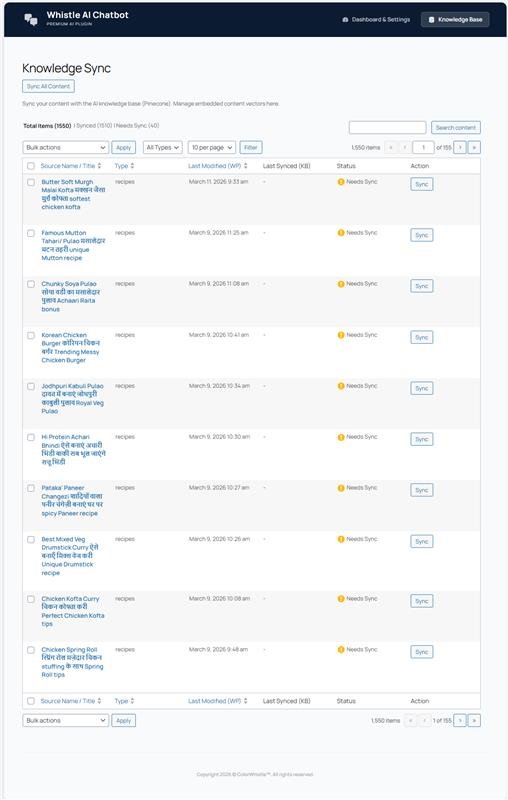
During this process, the system removes unnecessary HTML elements, formatting tags, and other noise that typically exist in WordPress content. The cleaned text is then prepared so it can be processed by the AI system.
This allows the chatbot to continuously stay updated with the latest recipes and articles published on the website.
Semantic Search Instead of Keyword Search
Traditional search systems rely on keyword matching. This means a user must type the exact words used in the article to find it.
Our system works differently. It uses semantic search, which means it tries to understand the meaning behind the user’s question rather than simply matching keywords.
For example, a query like “quick dinner with paneer” can still match recipes even if those exact words do not appear together in the post.
This significantly improves the quality of search results.
Handling Spelling Variations and Typos
Food related searches often include spelling variations or regional differences. For example:
- pakoda vs pakkoda
- paneer butter masala vs butter paneer
- eggless cake vs cake without eggs
To make the chatbot more practical for real users, we added additional logic to handle these types of variations. This helps the system return relevant results even when the query is not perfectly typed.
Direct Recipe Suggestions
Whenever the chatbot provides an answer, it also includes links to the original recipe pages on the website.
This is important because the goal is not just to answer questions but to guide visitors to the full recipe content. Users can quickly click through to read the detailed recipe, ingredients, and cooking steps.
Smooth Chat Experience
The chatbot interface was designed to feel simple and responsive.
The chat window uses a dark themed layout and includes a typewriter style response effect. Instead of waiting several seconds for a full answer to appear, users begin seeing the response almost immediately as it is generated.
This small UI detail helps make the interaction feel faster and more natural.
How the System Works
To make the chatbot respond accurately using the website’s content, we built a system that combines content processing, vector search, and AI response generation.
The overall process happens in two main stages: preparing the website content and answering user questions.
Preparing the Website Content
Before the chatbot can answer questions, the website’s content needs to be converted into a format that the AI system can understand.
The plugin scans the site’s posts and extracts the useful text from them. During this process, HTML tags, styling elements, and other unnecessary content are removed so that only meaningful text remains.
Long articles are then divided into smaller sections. This is important because sending very large pieces of content to the AI model at once can reduce accuracy and increase processing time.
Each section of text is then converted into a vector embedding using the OpenAI embedding model. A vector embedding is essentially a numerical representation of the meaning of a piece of text.
These vectors are stored in Pinecone, which acts as the system’s vector database. This allows the chatbot to quickly search through the website’s content and find the sections that are most relevant to a user’s question.
Answering User Questions
When a visitor types a question in the chat interface, the system follows a multi step process to generate a response.
First, the user’s question is converted into a vector embedding using the same embedding model.
Next, Pinecone is queried to find the most relevant content sections from the website. Typically, the system retrieves the top matching pieces of content that are semantically closest to the user’s query.
After this, an additional filtering step is applied. This step checks whether the retrieved content actually contains important keywords from the user’s question. This helps prevent cases where the vector search returns results that are similar in meaning but not truly relevant.
Once the relevant content has been confirmed, the system prepares a prompt that includes both the user’s question and the retrieved website content.
This prompt is then sent to the OpenAI chat model, which generates a natural language response based only on the provided information.
Finally, the chatbot returns the answer to the user along with links to the relevant recipes so visitors can explore the full content on the website.
Architecture and Technology Stack
The chatbot was built as a custom WordPress plugin so it could integrate directly with the website’s content and infrastructure. This allowed us to access recipe posts easily while keeping the system lightweight and manageable from the WordPress dashboard.
WordPress Plugin Architecture
The core of the system is written in PHP following standard WordPress plugin development practices. The plugin handles content processing, API communication, and backend configuration.
Because it runs inside WordPress, the chatbot can directly read posts, extract recipe content, and keep its knowledge base updated as new recipes are published.
AI and Data Services
The intelligence of the chatbot is powered by two main services.
OpenAI API
OpenAI is used for two tasks in the system:
- Creating vector embeddings from website content
- Generating natural language responses for user questions
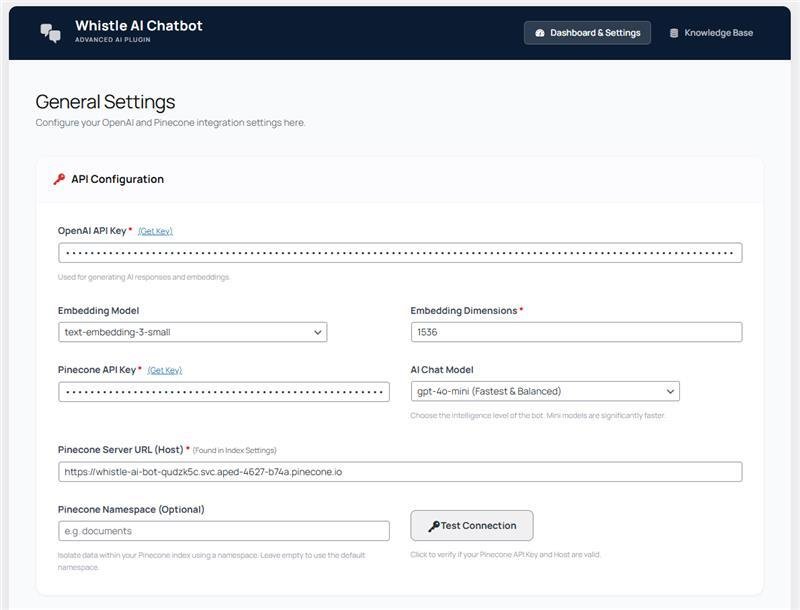
The system uses the text-embedding-3-small model for embeddings and gpt-4o-mini for generating responses, which provides a good balance of speed, cost, and accuracy.
Pinecone Vector Database
The embeddings generated from the website content are stored in Pinecone, which acts as the vector database.
When a user asks a question, Pinecone quickly searches the stored vectors and returns the most relevant sections of content based on meaning rather than simple keyword matches.
Frontend Chat Interface
The chat interface is built with JavaScript and communicates with the WordPress backend using AJAX.
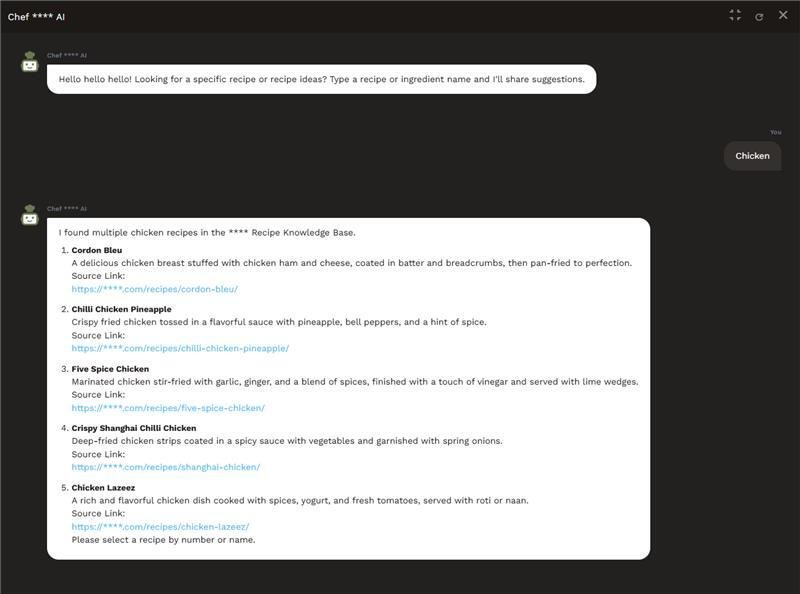
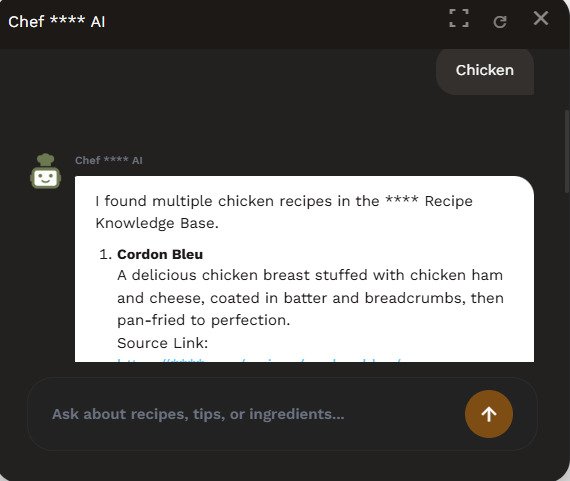
When a visitor asks a question, the backend processes the request, retrieves relevant content from Pinecone, sends the context to OpenAI, and returns the generated answer to the chat interface.
Background Processing
To handle large websites with many posts, the plugin uses Action Scheduler to process tasks like content indexing in smaller background batches. This prevents server overload and keeps the website responsive while syncing content.
Challenges and Solutions
Building an AI chatbot that works reliably with real website content came with a few practical challenges. During development, we had to address several issues to improve accuracy, performance, and compatibility.
Handling “Almost Correct” Results
Vector search is powerful, but it sometimes returns results that are similar in meaning but not exactly what the user asked for.
For example, a search for “eggless cake” might return results for a regular cake recipe because the topics are closely related.
Our Solution
We added a custom keyword filtering step after retrieving results from Pinecone. This additional check ensures that the retrieved content contains important keywords from the user’s query before it is used to generate the final response.
This extra layer significantly improved the accuracy of the chatbot’s answers.
Keeping the Chatbot Fast
AI responses can sometimes take several seconds to generate, which can feel slow for users.
Our Solution
We optimized the system by using the gpt-4o-mini model, which is faster and more cost efficient while still producing good quality responses. We also implemented a typewriter style response effect in the chat interface so users begin seeing the answer immediately instead of waiting for the entire message to load.
This made the chatbot feel much more responsive.
Avoiding Plugin Conflicts
WordPress websites often run many plugins at the same time. If class names, functions, or CSS selectors are too generic, they can conflict with other plugins.
Our Solution
To prevent conflicts, we used a strict naming convention for all functions, classes, and styles within the plugin. This ensures the chatbot can run safely alongside other plugins without breaking existing functionality.
Results and Benefits
After implementing the AI chatbot, the website gained a much more interactive way for visitors to discover recipes.
Instead of manually searching through multiple pages, users can now simply ask a question and receive relevant suggestions instantly. The chatbot understands natural language queries and responds with helpful answers along with direct links to the related recipes.
This makes it easier for visitors to find exactly what they are looking for, even if they are not sure about the exact recipe name.
For content heavy websites like recipe blogs, this approach significantly improves the browsing experience. Visitors spend less time searching and more time engaging with the content.
From the website owner’s perspective, the chatbot also helps surface older recipes that might otherwise remain buried deep in the archive. By intelligently suggesting relevant content, it encourages users to explore more pages across the site.
Overall, the solution transforms the website from a traditional content library into a more interactive and conversational experience.
Conclusion
Building this chatbot was an interesting opportunity to combine traditional WordPress development with modern AI tools.
The goal was not just to add a chatbot to the website, but to solve a real problem. Visitors needed a better way to navigate a large collection of recipes and quickly find what they were looking for.
By combining semantic search, vector databases, and AI generated responses, we were able to create a system that understands user questions and guides them to the right content.
The result is a smarter and more user friendly way for people to explore recipes on the website.
This project also shows how AI can be used in a practical way for content heavy websites. Instead of replacing the content, it helps users discover and access it more easily.
 Building the GSC Indexing Dashboard


