





Goal
As our Laravel applications grew in complexity and usage, manual deployment started becoming a bottleneck. Each release required logging into the server, pulling code, installing dependencies, clearing caches, and verifying configurations. This process was not only time-consuming but also prone to human error.
To improve reliability and speed, we decided to standardize our production hosting and introduce a proper CI/CD pipeline. The goal was simple: every approved code change should be deployed in a consistent, secure, and automated way.
Challenges
Before implementing CI/CD, we faced several issues:
- Inconsistent deployments: Different team members followed slightly different steps during deployment.
- Risk of downtime: Small mistakes in commands or permissions could break the application.
- Security concerns: Ad-hoc SSH access and manual key handling were not ideal.
- Scalability limits: As projects increased, manual deployment would not scale.
Solution
We designed a production-ready workflow combining:
- VPS hosting best practices
- Secure SSH-based authentication
- GitHub as the single source of truth
- GitHub Actions for automation
The approach ensured that code, infrastructure steps, and deployment logic were all standardized.
Implementation
1. Standardizing Hosting
Each Laravel project was required to live in a GitHub repository. This established a clear source of truth for code and enabled automation.
Domains and subdomains were mapped to the VPS via DNS A records. Only after DNS propagation did we proceed with deployment, ensuring proper routing from the start.
2. Securing Server Access
SSH key-based authentication was configured on the VPS and registered with GitHub to enable secure, password-less communication between the server and the repository. Connectivity validation confirmed that the server could securely pull code from GitHub.
2.1 Generate SSH Key on the Server
Run the following command on the VPS to generate an Ed25519 SSH key pair (public and private keys):
ssh-keygen -t ed25519 -C "project-name" This process creates a private key and a corresponding public key on the server.
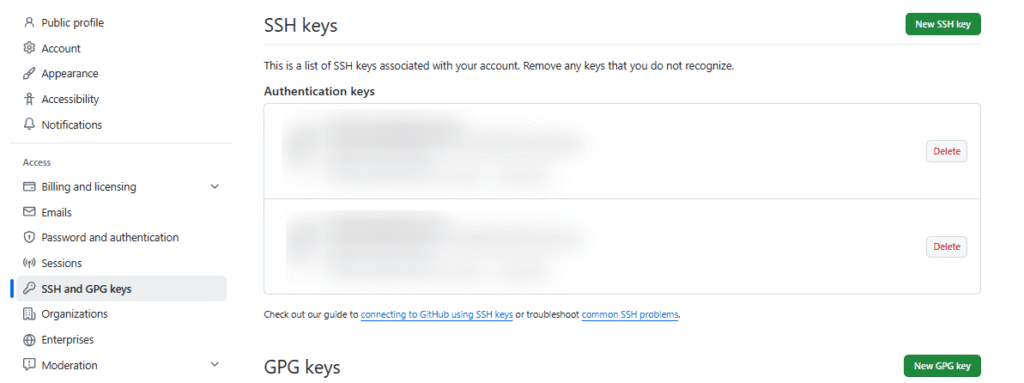
2.2 Configure SSH Key in GitHub
- In GitHub, navigate to:
Settings → SSH and GPG keys → New SSH key - Choose the Authentication key as the key type.
- Retrieve the public key from the server:
- cat ~/.ssh/id_ed25519.pub
- Copy the output and add it as a new SSH key in GitHub.
2.3 Verify GitHub Connectivity
Test the SSH connection between the server and GitHub:
ssh -T git@github.com A successful response confirms that authentication is working and the server can securely access the repository.
3. Deploying the Application
The repository was cloned into the domain’s document root. We resolved common issues like Git’s “dubious ownership” warnings by marking directories as safe.
git clone git@github.com:<<your-git-repository .

git config --global --add safe.directory <<project-root-directory (server)
We standardized on PHP 8.3 to avoid compatibility surprises. Composer was used to install optimized production dependencies, and the Laravel environment setup was completed with key generation, cache clearing, and correct directory permissions.
At this stage, the application was live and functional.
4.CI/CD Automation Implementation
To ensure consistent and low-risk deployments, we introduced a structured CI/CD automation layer tailored to the client’s technology stack. The goal was to make every release predictable, secure, and fully repeatable without manual server intervention.
4.1 Deployment Script Standardization
We first designed a centralized deployment script to handle all application-level tasks. This script acted as the single execution point for production deployments and was version-controlled alongside the project.
Depending on the technology stack, the script included:
- Laravel applications: installing Composer dependencies, clearing and rebuilding caches, and running optimization commands
- MERN applications: installing Node packages, building production assets, and managing processes with PM2
By codifying these steps, deployments became standardized and independent of individual developer practices.
4.2 Secure Credential Management
To maintain security and compliance with best practices, sensitive connection details were never stored in the codebase.
Instead, we configured encrypted repository secrets within GitHub Actions, including:
- Server host (IP address)
- SSH port
- SSH user
- SSH private key for authentication
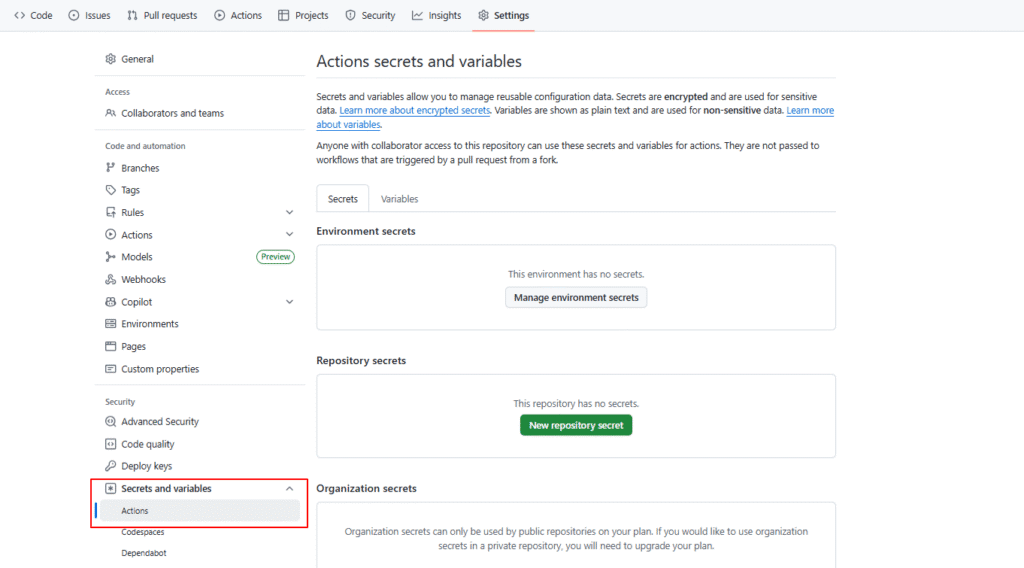
This ensured that credentials remained protected while still enabling seamless automation.
4.3 Workflow Automation Setup
We then implemented a dedicated GitHub Actions workflow to orchestrate deployments. A structured workflows directory was created within the repository, and a deployment configuration file defined:
- Trigger conditions for deployment
- Secure usage of repository secrets
- Target server directory paths
- Execution of the deployment script on the server
With this setup, any approved code change automatically triggers a secure deployment pipeline.
Secure Key Management
A dedicated SSH key pair was created for GitHub Actions.
- The public key was stored on the server
- The private key was stored in GitHub Secrets
- Server credentials (host, port, user) were also stored as secrets
This design kept sensitive data out of the codebase and limited access scope.
Final Thoughts
By combining VPS best practices with GitHub Actions, we built a reliable CI/CD pipeline for Laravel applications. What started as a need to reduce manual work evolved into a structured deployment framework that improved speed, security, and scalability.
This approach now serves as a reusable model for future Laravel projects and ensures production deployments remain stable and efficient.
 Automating Form Submissions to a Client’s D...


